
Spring Security Passkeys, WebAuthn and One-Time Token Login
Introduction
This tutorial, the last of the Spring Security module, shows two ways to log in without a password that Spring Security 7 supports out of the box: passkeys, based on the WebAuthn standard, and one-time token login, the "magic link" sent by email. We will see how a passkey works - a key pair per site, with the private key kept on the user's device - and why it resists both database leaks and phishing. We will add both methods to an application next to the usual password form, follow a complete one-time token login with real requests, and call the server side of a passkey registration and sign-in, whose other half runs in the browser and the authenticator.The trouble with passwords
The tutorials so far assumed passwords, and Users, passwords and PasswordEncoderClick to read tutorial: Spring Security Users, Passwords and PasswordEncoder showed how much care storing them takes. Even stored perfectly, passwords are reused across sites, guessed, and above all phished: a convincing copy of a login page collects them, and the real site cannot tell the difference. Passkeys remove the shared secret altogether -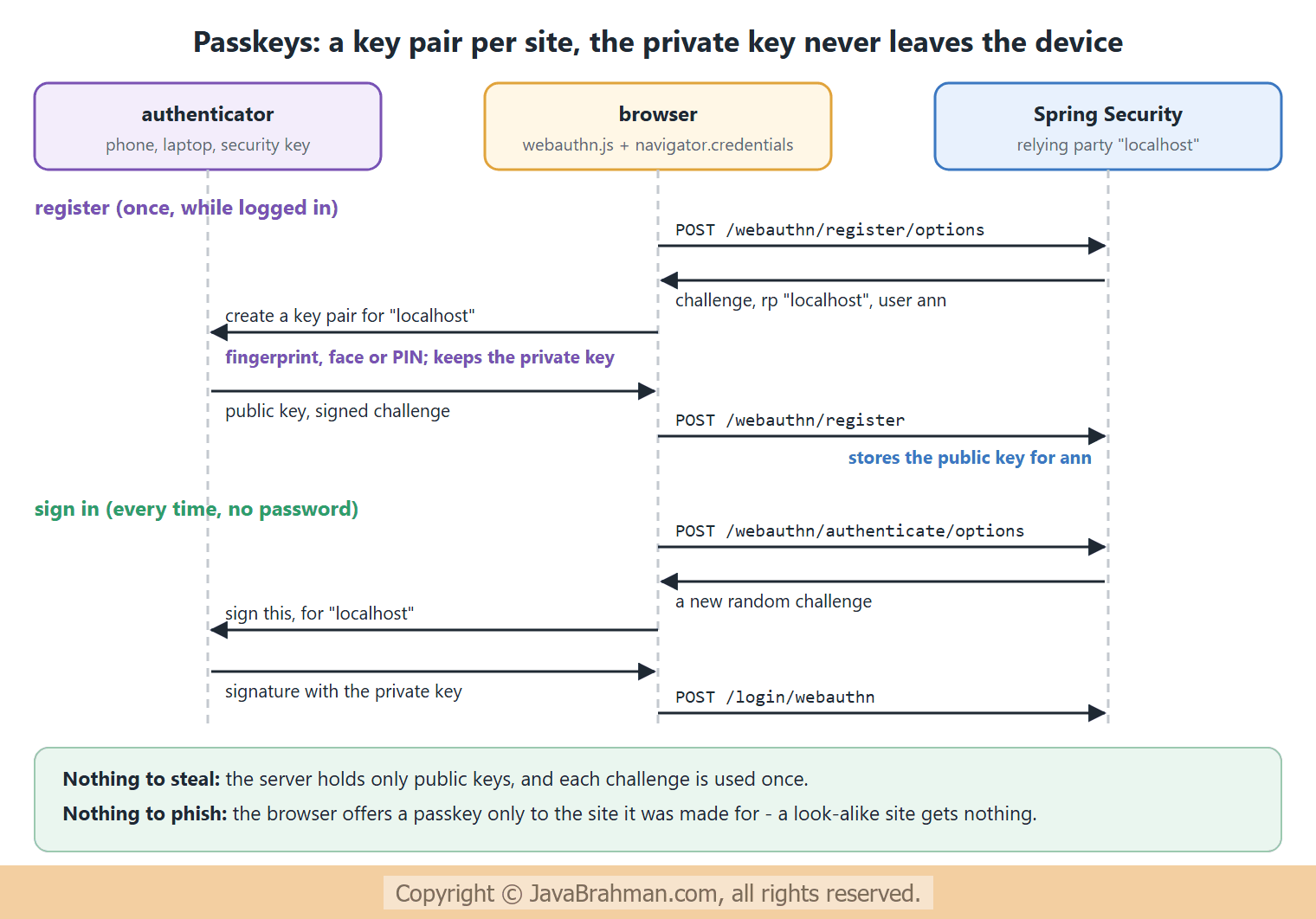
- The authenticator - the phone's or laptop's secure hardware, a password manager, or a USB security key - creates a new key pair for each site, unlocked with a fingerprint, the face or a PIN.
- The relying party, our application, stores only the public key. A stolen database of public keys is useless for logging in.
- Each sign-in signs a new random challenge, so a recorded sign-in cannot be replayed.
- The browser binds each passkey to the site's domain, the relying party id, and checks the origin. A phishing site on another domain cannot even ask for it.
The example
The application keeps form login and adds both passwordless methods. Passkey support lives in thespring-security-webauthn module, which brings the WebAuthn4J library to verify the authenticators' responses; one-time token login is part of Spring Security's core web support -
PasswordlessSecurity.java - passkeys and one-time tokens next to the password form
//PasswordlessSecurity.java
package com.javabrahman.security.passwordless;

import static org.springframework.security.config.Customizer.withDefaults;

import java.util.Set;
import org.springframework.context.annotation.Bean;
import org.springframework.context.annotation.Configuration;
import org.springframework.security.config.annotation.web.builders.HttpSecurity;
import org.springframework.security.core.userdetails.User;
import org.springframework.security.core.userdetails.UserDetailsService;
import org.springframework.security.provisioning.InMemoryUserDetailsManager;
import org.springframework.security.web.SecurityFilterChain;

@Configuration
public class PasswordlessSecurity {

  @Bean
  SecurityFilterChain chain(HttpSecurity http, MagicLinkHandler magicLinks) throws Exception {
    http
        .authorizeHttpRequests(auth -> auth
            .requestMatchers("/ott/sent", "/error").permitAll()
            .anyRequest().authenticated())
        .formLogin(withDefaults())
        .webAuthn(passkeys -> passkeys
            .rpName("JavaBrahman Shop")                      // shown to the user by the browser
            .rpId("localhost")                               // the site the passkeys belong to
            .allowedOrigins(Set.of("http://localhost:8080")))
        .oneTimeTokenLogin(ott -> ott
            .tokenGenerationSuccessHandler(magicLinks));
    return http.build();
  }

  @Bean
  UserDetailsService users() {
    return new InMemoryUserDetailsManager(
        User.withUsername("ann").password("{noop}ann-pass").roles("USER").build());
  }
}webAuthn(...)adds the passkey endpoints - registration and sign-in options, registration, and/login/webauthn- and a "Sign in with a passkey" button on the login page.rpIdis the domain the passkeys belong to;allowedOriginslists the exact origins the browser may report. WebAuthn requires HTTPS, except onlocalhost, which is why this example can use plain HTTP.- The registered passkeys are kept in memory by default. Production applications provide a
UserCredentialRepositoryand aPublicKeyCredentialUserEntityRepository; Spring Security includes JDBC implementations. oneTimeTokenLogin(...)adds/ott/generateto request a token and/login/ottto log in with one, and a form on the login page. The one thing it cannot do for you is deliver the token, so aOneTimeTokenGenerationSuccessHandleris required.
MagicLinkHandler.java - what happens to a new one-time token
//MagicLinkHandler.java
package com.javabrahman.security.passwordless;

import jakarta.servlet.http.HttpServletRequest;
import jakarta.servlet.http.HttpServletResponse;
import java.io.IOException;
import org.springframework.security.authentication.ott.OneTimeToken;
import org.springframework.security.web.authentication.ott.OneTimeTokenGenerationSuccessHandler;
import org.springframework.stereotype.Component;

@Component
public class MagicLinkHandler implements OneTimeTokenGenerationSuccessHandler {

  @Override
  public void handle(HttpServletRequest request, HttpServletResponse response, OneTimeToken token) throws IOException {
    String link = "http://localhost:8080/login/ott?token=" + token.getTokenValue();
    // A real application emails the link to the user's address, and shows "check your inbox".
    // This demo writes it into the response instead, so that the next request can follow it.
    response.setContentType("text/plain");
    response.getWriter().write("Magic link for " + token.getUsername() + ", valid until "
        + token.getExpiresAt().toString().substring(11, 19) + " UTC:\n" + link);
  }
}
AccountController.java
//AccountController.java
package com.javabrahman.security.passwordless;

import org.springframework.security.core.Authentication;
import org.springframework.web.bind.annotation.GetMapping;
import org.springframework.web.bind.annotation.RestController;

@RestController
public class AccountController {

  @GetMapping("/me")
  public String me(Authentication user) {
    return "logged in as " + user.getName() + " with " + user.getClass().getSimpleName()
        + ", authorities " + user.getAuthorities();
  }
}
PasswordlessApp.java
//PasswordlessApp.java
package com.javabrahman.security.passwordless;

import org.springframework.boot.SpringApplication;
import org.springframework.boot.autoconfigure.SpringBootApplication;

@SpringBootApplication
public class PasswordlessApp {

  public static void main(String[] args) {
    SpringApplication.run(PasswordlessApp.class, args);
  }
}
One-time token login
A one-time token login replaces the password with proof of access to the user's mailbox -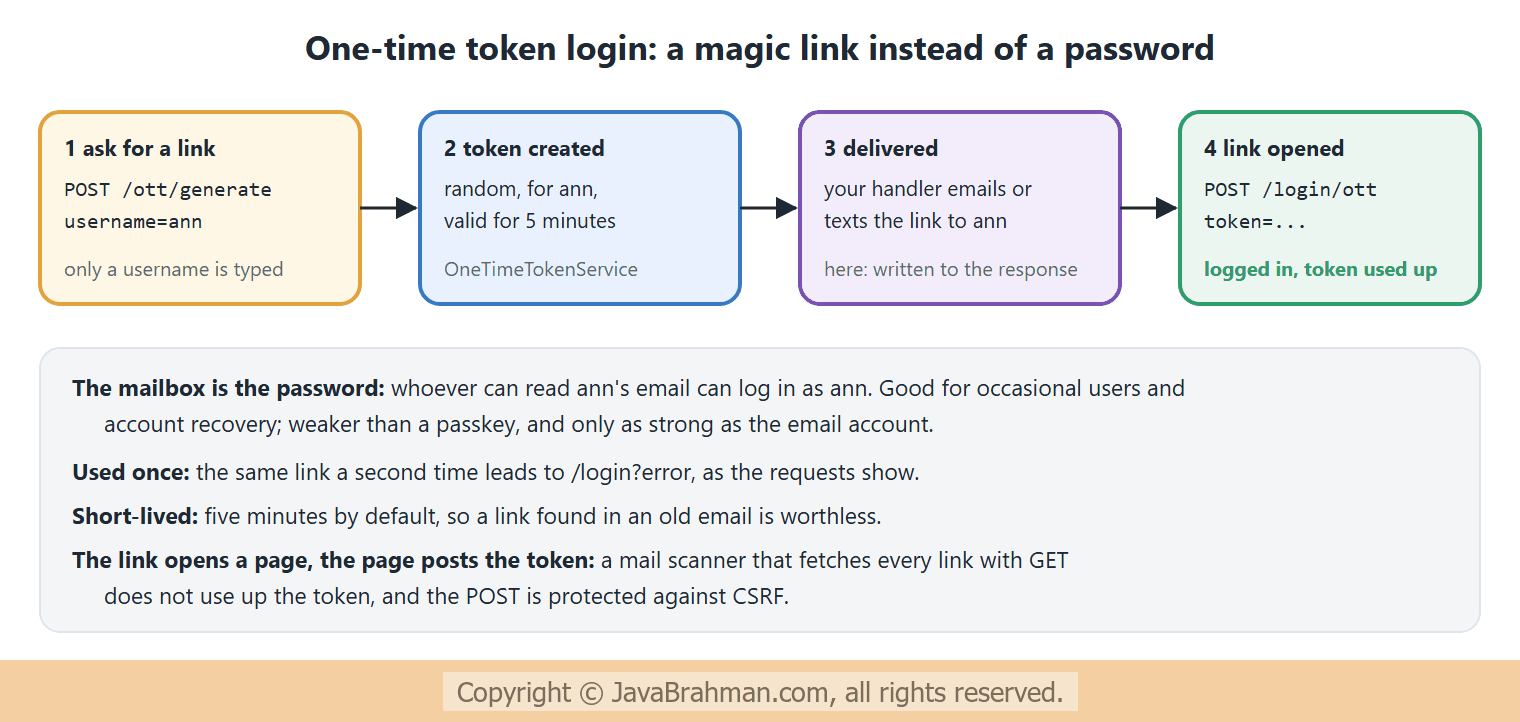
The requests
The requests carry the session cookie and the latest CSRF token, as a browser would. The login page is shown in full, and the token page and the passkey registration page only at their start - OUTPUT of the HTTP requests> curl -i http://localhost:8080/login
HTTP/1.1 200
X-Content-Type-Options: nosniff
X-XSS-Protection: 0
Pragma: no-cache
X-Frame-Options: DENY
Cache-Control: no-store, must-revalidate, no-cache, max-age=0
Set-Cookie: JSESSIONID=9E4F6A67E824AAFB755E722BADC7D9EF; Path=/; HttpOnly
Content-Length: 2210
Content-Type: text/html; charset=UTF-8
Expires: 0
<!DOCTYPE html>
<html lang="en">
<head>
<meta charset="utf-8">
<meta name="viewport" content="width=device-width, initial-scale=1, shrink-to-fit=no">
<meta name="description" content="">
<meta name="author" content="">
<title>Please sign in</title>
<link href="/default-ui.css" rel="stylesheet" /> <script type="text/javascript" src="/login/webauthn.js"></script>
<script type="text/javascript">
<!--
document.addEventListener("DOMContentLoaded",() => setupLogin({"X-CSRF-TOKEN" : "_a1ldQGgGElVZZ0pE9KiiM3pT9adQf0XELmQ_IBC6ZwTT_8qnpkDQWOXK3B4XPlKdf-WsfTZYrepcsw6KI6omLR73_kkfMpI"}, "", document.getElementById('passkey-signin')));
//-->
</script>
</head>
<body>
<div class="content">
<form class="login-form" method="post" action="/login">
<h2>Please sign in</h2>
<p>
<label for="username" class="screenreader">Username</label>
<input type="text" id="username" name="username" placeholder="Username" required autofocus>
</p>
<p>
<label for="password" class="screenreader">Password</label>
<input type="password" id="password" name="password" placeholder="Password" autocomplete="password webauthn" required>
</p>
<input name="_csrf" type="hidden" value="_a1ldQGgGElVZZ0pE9KiiM3pT9adQf0XELmQ_IBC6ZwTT_8qnpkDQWOXK3B4XPlKdf-WsfTZYrepcsw6KI6omLR73_kkfMpI" />
<button type="submit" class="primary">Sign in</button>
</form>
<form id="ott-form" class="login-form" method="post" action="/ott/generate">
<h2>Request a One-Time Token</h2>
<p>
<label for="ott-username" class="screenreader">Username</label>
<input type="text" id="ott-username" name="username" placeholder="Username" required autofocus>
</p>
<input name="_csrf" type="hidden" value="_a1ldQGgGElVZZ0pE9KiiM3pT9adQf0XELmQ_IBC6ZwTT_8qnpkDQWOXK3B4XPlKdf-WsfTZYrepcsw6KI6omLR73_kkfMpI" />
<button class="primary" type="submit" form="ott-form">Send Token</button>
</form><div class="login-form">
<h2>Login with Passkeys</h2>
<button id="passkey-signin" type="submit" class="primary">Sign in with a passkey</button>
</div>
</div>
</body>
</html>
> curl -i -X POST http://localhost:8080/ott/generate -H "Cookie: JSESSIONID=9E4F6A67E824AAFB755E722BADC7D9EF" -H "Content-Type: application/x-www-form-urlencoded" -d 'username=ann&_csrf=_a1ldQGgGElVZZ0pE9KiiM3pT9adQf0XELmQ_IBC6ZwTT_8qnpkDQWOXK3B4XPlKdf-WsfTZYrepcsw6KI6omLR73_kkfMpI'
HTTP/1.1 200
X-Content-Type-Options: nosniff
X-XSS-Protection: 0
Pragma: no-cache
X-Frame-Options: DENY
Cache-Control: no-store, must-revalidate, no-cache, max-age=0
Content-Length: 120
Content-Type: text/plain; charset=ISO-8859-1
Expires: 0
Magic link for ann, valid until 19:17:46 UTC:
http://localhost:8080/login/ott?token=7750af8e-dff4-4c8a-a7e1-eeaf6ba87bc2
> curl -i http://localhost:8080/login/ott?token=7750af8e-dff4-4c8a-a7e1-eeaf6ba87bc2 -H "Cookie: JSESSIONID=9E4F6A67E824AAFB755E722BADC7D9EF"
HTTP/1.1 200
X-Content-Type-Options: nosniff
X-XSS-Protection: 0
Pragma: no-cache
X-Frame-Options: DENY
Cache-Control: no-store, must-revalidate, no-cache, max-age=0
Content-Length: 903
Content-Type: text/html; charset=UTF-8
Expires: 0
<!DOCTYPE html>
<html lang="en">
<head>
...
> curl -i -X POST http://localhost:8080/login/ott -H "Cookie: JSESSIONID=9E4F6A67E824AAFB755E722BADC7D9EF" -H "Content-Type: application/x-www-form-urlencoded" -d 'token=7750af8e-dff4-4c8a-a7e1-eeaf6ba87bc2&_csrf=1jCytfWafuXy8WmG7Gu_cy5kx7ZiQ5MZFKaTWJ64PQyHhcMwtQTUgZetTdzfyA3likaLShdU6tdWcKI0LJGrPKqBC2mwtvZS'
HTTP/1.1 302
X-Content-Type-Options: nosniff
X-XSS-Protection: 0
Pragma: no-cache
X-Frame-Options: DENY
Cache-Control: no-store, must-revalidate, no-cache, max-age=0
Location: http://localhost:8080/
Set-Cookie: JSESSIONID=5C3C23944F7934E47E89D0F4D30CC96C; Path=/; HttpOnly
Content-Length: 0
Expires: 0
> curl -i http://localhost:8080/me -H "Cookie: JSESSIONID=5C3C23944F7934E47E89D0F4D30CC96C"
HTTP/1.1 200
X-Content-Type-Options: nosniff
X-XSS-Protection: 0
Pragma: no-cache
X-Frame-Options: DENY
Cache-Control: no-store, must-revalidate, no-cache, max-age=0
Content-Length: 161
Content-Type: text/plain; charset=UTF-8
Expires: 0
logged in as ann with OneTimeTokenAuthentication, authorities [ROLE_USER, FactorGrantedAuthority [authority=FACTOR_OTT, issuedAt=2026-11-06T19:12:47.019146600Z]]
> curl -i http://localhost:8080/webauthn/register -H "Cookie: JSESSIONID=5C3C23944F7934E47E89D0F4D30CC96C"
HTTP/1.1 200
X-Content-Type-Options: nosniff
X-XSS-Protection: 0
Pragma: no-cache
X-Frame-Options: DENY
Cache-Control: no-store, must-revalidate, no-cache, max-age=0
Content-Length: 2008
Content-Type: text/html; charset=ISO-8859-1
Expires: 0
<html>
<head>
<meta charset="utf-8">
<meta name="viewport" content="width=device-width, initial-scale=1, shrink-to-fit=no">
<meta name="description" content="">
<meta name="author" content="">
<title>WebAuthn Registration</title>
<link href="/default-ui.css" rel="stylesheet" />
<script type="text/javascript" src="/login/webauthn.js"></script>
<script type="text/javascript">
<!--
const ui = {
...
> curl -i -X POST http://localhost:8080/login/ott -H "Cookie: JSESSIONID=5C3C23944F7934E47E89D0F4D30CC96C" -H "Content-Type: application/x-www-form-urlencoded" -d 'token=7750af8e-dff4-4c8a-a7e1-eeaf6ba87bc2&_csrf=j2BC4E1uKEeBXcULqJ3omWVjv8NqZBeIuN6aegNIWe2ai4sF7lRx2StbS3esbfU6zrDcq1ZSkvpZBSSlge2uGGEqONWpv-1n'
HTTP/1.1 302
X-Content-Type-Options: nosniff
X-XSS-Protection: 0
Pragma: no-cache
X-Frame-Options: DENY
Cache-Control: no-store, must-revalidate, no-cache, max-age=0
Location: http://localhost:8080/login?error
Content-Length: 0
Expires: 0
> curl -i -X POST http://localhost:8080/webauthn/register/options -H "Cookie: JSESSIONID=5C3C23944F7934E47E89D0F4D30CC96C" -H "X-CSRF-TOKEN: j2BC4E1uKEeBXcULqJ3omWVjv8NqZBeIuN6aegNIWe2ai4sF7lRx2StbS3esbfU6zrDcq1ZSkvpZBSSlge2uGGEqONWpv-1n"
HTTP/1.1 200
X-Content-Type-Options: nosniff
X-XSS-Protection: 0
Pragma: no-cache
X-Frame-Options: DENY
Cache-Control: no-store, must-revalidate, no-cache, max-age=0
Content-Length: 495
Content-Type: application/json
Expires: 0
{"attestation":"none","authenticatorSelection":{"residentKey":"required","userVerification":"preferred"},"challenge":"goTdDckHgApAlqjdf6i1hYUA_lepUlA3f3fs2iaTm6Q","excludeCredentials":[],"extensions":{"credProps":true},"pubKeyCredParams":[{"alg":-8,"type":"public-key"},{"alg":-7,"type":"public-key"},{"alg":-257,"type":"public-key"}],"rp":{"id":"localhost","name":"JavaBrahman Shop"},"timeout":300000,"user":{"name":"ann","id":"qxiG5Jza-iV-ZFGA_DWPLbqum6EE06-QxT3XZmyVljY","displayName":"ann"}}
> curl -i -X POST http://localhost:8080/webauthn/authenticate/options -H "X-CSRF-TOKEN: j2BC4E1uKEeBXcULqJ3omWVjv8NqZBeIuN6aegNIWe2ai4sF7lRx2StbS3esbfU6zrDcq1ZSkvpZBSSlge2uGGEqONWpv-1n" -H "Cookie: JSESSIONID=5C3C23944F7934E47E89D0F4D30CC96C"
HTTP/1.1 200
X-Content-Type-Options: nosniff
X-XSS-Protection: 0
Pragma: no-cache
X-Frame-Options: DENY
Cache-Control: no-store, must-revalidate, no-cache, max-age=0
Content-Length: 164
Content-Type: application/json
Expires: 0
{"allowCredentials":[],"challenge":"UcCjCKd7SgNoaGe5maNqW23LMbx1Stc6WTItP713Lrs","extensions":{},"rpId":"localhost","timeout":300000,"userVerification":"preferred"}
Explanation of the one-time token login
- 1. The login page now offers three ways in: the username and password form, a "Request a One-Time Token" form posting to
/ott/generate, and a "Sign in with a passkey" button. The page loads/login/webauthn.js, and hands it the CSRF token as anX-CSRF-TOKENheader for its requests. The password field'sautocomplete="password webauthn"lets browsers suggest a passkey as soon as the field is focused. - 2. Requesting a token for ann: our handler answered with the link,
/login/ott?token=1f87...style, and its expiry, five minutes after the request. Note that the form needs only a username. To avoid revealing which usernames exist, a real handler should answer the same way for unknown users, and simply send nothing. - 3. Opening the link shows a small page with the token in a form, rather than logging in at once. The login happens on the POST: a mail scanner that fetches every link in an email cannot use the token up, and the POST is protected by the CSRF token.
- 4. Posting the token: 302 to
/, logged in, with a new session id as after any login. - 5.
/me: ann, authenticated with aOneTimeTokenAuthentication. BesidesROLE_USER, the authorities include aFactorGrantedAuthoritynamedFACTOR_OTTwith the time it was granted - the counterpart ofFACTOR_PASSWORDfor passwords andFACTOR_BEARERfor tokens, seen earlier in this module. Spring Security 7 uses these factor authorities for multi-factor rules, such as requiring both a password and a one-time token for an admin page. - 7. The same token again (request 6 fetched the passkey page, see below): 302 to
/login?error. The token was consumed by the first login.
Explanation of the passkey requests
- 6.
/webauthn/register: a generated page, for logged-in users, to register a passkey and list or delete existing ones. Its script carries the CSRF header for the calls below. - 8. Registration options: the JSON the browser passes to
navigator.credentials.create().rpis{"id":"localhost","name":"JavaBrahman Shop"};userhas ann's name and a random user handle asid;challengeis a fresh random value;pubKeyCredParamslists the accepted signature algorithms by their COSE numbers - -8 is EdDSA, -7 ECDSA with SHA-256, -257 RSA with SHA-256;residentKey: "required"asks for a discoverable credential, a true passkey that can sign in without typing a username;attestation: "none"means the server does not ask for proof of the authenticator's make; and the user hastimeout300000 ms, five minutes, to complete the ceremony. - 9. Sign-in options: what the browser passes to
navigator.credentials.get()- a new challenge, therpId, and an emptyallowCredentialslist, which lets the user pick any passkey they have for this site. - The next steps need an authenticator and a person: the browser asks for a fingerprint or PIN, the authenticator creates a key pair or signs the challenge, and
webauthn.jsposts the result to/webauthn/registeror/login/webauthn, where Spring Security verifies it with WebAuthn4J. They cannot be scripted with plain HTTP requests, which is exactly the point: only the device holding the private key can produce a valid signature. Try it in a browser with this application athttp://localhost:8080.
Choosing between them
- Passkeys are the strongest option: no shared secret, resistant to phishing, and fast for users. Passkeys stored in a platform's password manager sync across a user's devices. Offer them next to an existing login method, since users must register one first.
- One-time tokens suit occasional users, sign-up flows, and account recovery when a passkey device is lost. They are only as safe as the user's email account, so combine them with a second factor for sensitive accounts.
- Passwords can stay, protected as described in the passwords tutorial, while users move to passkeys over time.
Summary
In this tutorial we added two ways to log in without a password. Passkeys use a key pair created by the user's authenticator for each site: the server stores only the public key and checks a signature over a fresh challenge, so there is no secret to leak or phish.webAuthn() with a relying party id and allowed origins added the endpoints, and real requests returned the registration and sign-in options that the browser hands to the authenticator. One-time token login sent a magic link instead: oneTimeTokenLogin() with our own delivery handler created a five-minute token, posting it logged ann in with a FACTOR_OTT authority, and using it a second time failed. This completes the Spring Security module of the series; the next module covers testing Spring applications.Spring Security Tutorials
Spring Security CSRF, CORS and Security Headers ExplainedClick to read tutorial: Spring Security CSRF, CORS and Security Headers Explained Spring Security Architecture: Filter Chain ExplainedClick to read tutorial: Spring Security Architecture: Filter Chain Explained Configuring SecurityFilterChain in Spring SecurityClick to read tutorial: Configuring SecurityFilterChain in Spring Security Spring Security Users, Passwords and PasswordEncoderClick to read tutorial: Spring Security Users, Passwords and PasswordEncoder Spring Security Form Login and Session AuthenticationClick to read tutorial: Spring Security Form Login and Session Authentication Stateless REST API Security with JWT in Spring BootClick to read tutorial: Stateless REST API Security with JWT in Spring Boot Spring Security OAuth2 Login and OpenID ConnectClick to read tutorial: Spring Security OAuth2 Login and OpenID Connect
Spring Security CSRF, CORS and Security Headers ExplainedClick to read tutorial: Spring Security CSRF, CORS and Security Headers Explained Spring Security Architecture: Filter Chain ExplainedClick to read tutorial: Spring Security Architecture: Filter Chain Explained Configuring SecurityFilterChain in Spring SecurityClick to read tutorial: Configuring SecurityFilterChain in Spring Security Spring Security Users, Passwords and PasswordEncoderClick to read tutorial: Spring Security Users, Passwords and PasswordEncoder Spring Security Form Login and Session AuthenticationClick to read tutorial: Spring Security Form Login and Session Authentication Stateless REST API Security with JWT in Spring BootClick to read tutorial: Stateless REST API Security with JWT in Spring Boot Spring Security OAuth2 Login and OpenID ConnectClick to read tutorial: Spring Security OAuth2 Login and OpenID Connect