
Spring Security Architecture: Filter Chain Explained
Introduction
This tutorial, the first of the Spring Security module, explains how Spring Security works inside a Spring Boot application before we start configuring it. We will see the two questions every secured request must answer, authentication and authorization, and how Spring Security answers them with a chain of servlet filters. We will print the real filter chain of an example application and follow a request through it. We will then look at the objects that authenticate a user -AuthenticationManager, AuthenticationProvider, UserDetailsService and PasswordEncoder - and where the result is kept, the SecurityContextHolder. Lastly, we will send real requests and see when the answer is 200, 401, 403 or a redirect to a login page.Authentication and authorization
Every request to a secured application raises two separate questions -- Authentication: who is making this request? The caller proves an identity, with a password, a token, a certificate or a login session.
- Authorization: is this caller allowed to do this? Only after we know who the caller is can we decide, for example, that only administrators may read
/admin/stats.
spring-boot-starter-security is enough to switch it on: from then on, every endpoint requires a logged-in user unless the configuration says otherwise.
Security as a chain of filters
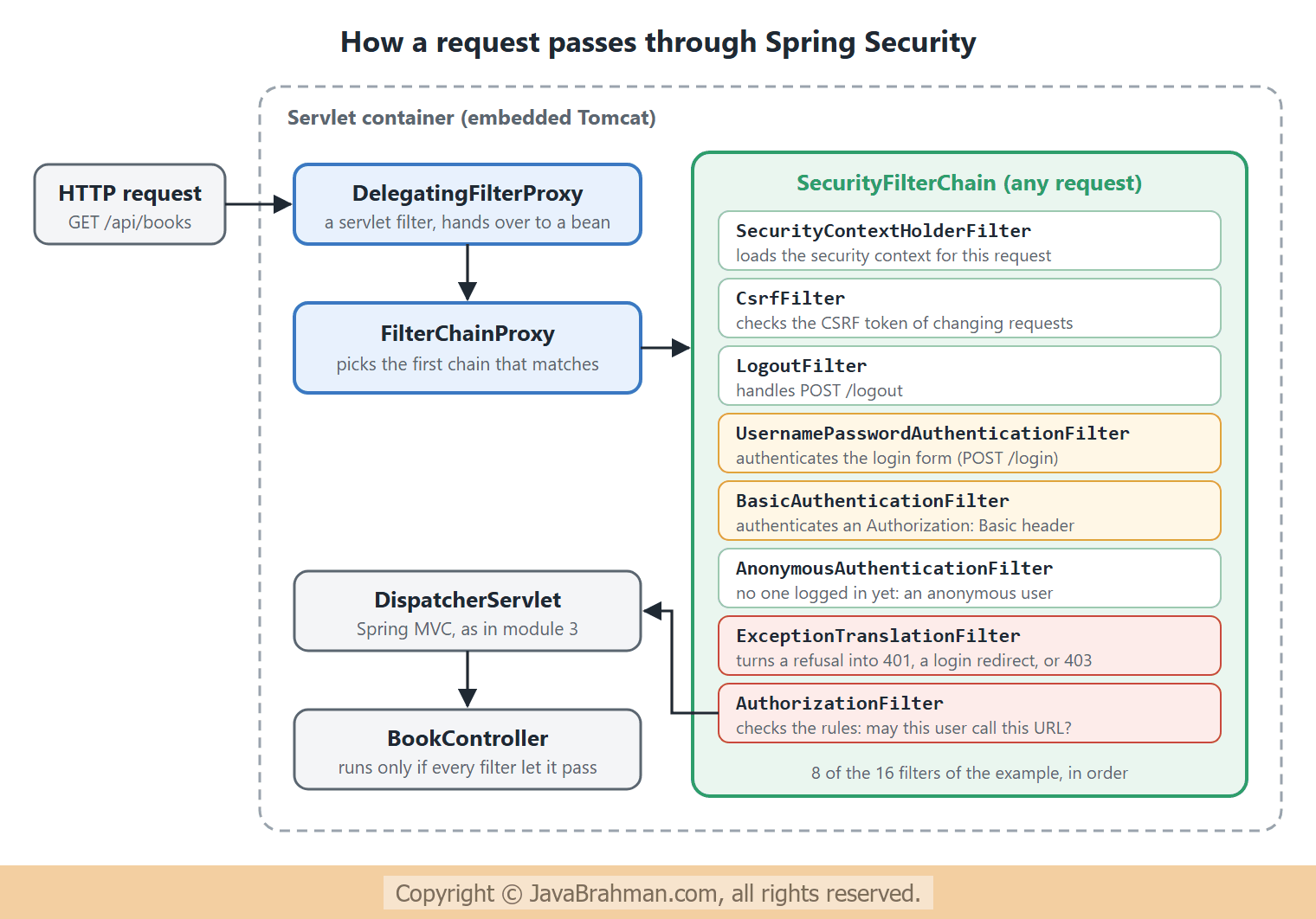
A servlet filter is code that runs before a request reaches the servlet, and can let it continue, change it, or answer it itself. Spring Security is built entirely from filters. That is why it can refuse a request before any of your controller code runs, and why it works the same for every endpoint, including static files and error pages. The request travels through three layers -DelegatingFilterProxy: a plain servlet filter registered with Tomcat. The servlet container knows nothing about Spring beans, so this filter's only job is to hand each request over to a Spring bean.FilterChainProxy: that bean, namedspringSecurityFilterChain. An application can have several security configurations, for example one for/api/**and one for the web pages.FilterChainProxypicks the first chain whose request matcher matches the request, and runs only that one.SecurityFilterChain: an ordered list of security filters, each with one job. Their order matters: the user must be authenticated before the authorization filter can check what that user may do.
The example
The example application has a controller with three kinds of endpoints: public ones, ones for any logged-in user, and one for administrators -BookController.java - three endpoints with three levels of protection
//BookController.java
package com.javabrahman.security.arch;

import java.util.List;
import java.util.Map;
import org.springframework.security.core.Authentication;
import org.springframework.security.core.GrantedAuthority;
import org.springframework.security.core.context.SecurityContextHolder;
import org.springframework.web.bind.annotation.GetMapping;
import org.springframework.web.bind.annotation.RestController;

@RestController
public class BookController {

  @GetMapping("/public/hello")
  public String hello() {
    return "Hello, anyone";
  }

  @GetMapping("/api/books")
  public List<String> books() {
    return List.of("Effective Java", "Clean Code");
  }

  @GetMapping("/api/me")
  public Map<String, Object> me() {
    Authentication auth = SecurityContextHolder.getContext().getAuthentication();
    return Map.of(
        "name", auth.getName(),
        "authorities", auth.getAuthorities().stream().map(GrantedAuthority::getAuthority).sorted().toList(),
        "authenticationType", auth.getClass().getSimpleName(),
        "thread", Thread.currentThread().getName().replaceAll("\\d+$", "N"));
  }

  @GetMapping("/admin/stats")
  public Map<String, Integer> stats() {
    return Map.of("books", 2);
  }
}SecurityFilterChain bean with three rules and two ways to log in, and two users in memory. The next tutorial, Configuring SecurityFilterChainClick to read tutorial: Configuring SecurityFilterChain in Spring Security, goes through this configuration style in detail. For now, read it as plain English: /public/** is open to everyone, /admin/** needs the role ADMIN, and anything else needs a logged-in user. The {noop} prefix stores the passwords as plain text, which is only acceptable in an example; Users, passwords and PasswordEncoderClick to read tutorial: Spring Security Users, Passwords and PasswordEncoder explains how passwords should be stored.
SecurityConfig.java - the rules, the users, and HTTP Basic
//SecurityConfig.java
package com.javabrahman.security.arch;

import static org.springframework.security.config.Customizer.withDefaults;

import org.springframework.context.annotation.Bean;
import org.springframework.context.annotation.Configuration;
import org.springframework.security.config.annotation.web.builders.HttpSecurity;
import org.springframework.security.core.userdetails.User;
import org.springframework.security.core.userdetails.UserDetailsService;
import org.springframework.security.provisioning.InMemoryUserDetailsManager;
import org.springframework.security.web.SecurityFilterChain;

@Configuration
public class SecurityConfig {

  @Bean
  SecurityFilterChain securityFilterChain(HttpSecurity http) throws Exception {
    http
        .authorizeHttpRequests(auth -> auth
            .requestMatchers("/public/**").permitAll()
            .requestMatchers("/admin/**").hasRole("ADMIN")
            .anyRequest().authenticated())
        .httpBasic(withDefaults())
        .formLogin(withDefaults());
    return http.build();
  }

  @Bean
  UserDetailsService users() {
    return new InMemoryUserDetailsManager(
        User.withUsername("ann").password("{noop}ann-pass").roles("USER").build(),
        User.withUsername("raj").password("{noop}raj-pass").roles("USER", "ADMIN").build());
  }
}list-filters, it asks the FilterChainProxy bean for its chains and prints each chain's filters, then stops -
SecurityApp.java - the application, which can also list its filter chain
//SecurityApp.java
package com.javabrahman.security.arch;

import java.util.Arrays;
import org.springframework.boot.CommandLineRunner;
import org.springframework.boot.SpringApplication;
import org.springframework.boot.autoconfigure.SpringBootApplication;
import org.springframework.context.ApplicationContext;
import org.springframework.context.annotation.Bean;
import org.springframework.security.web.FilterChainProxy;

@SpringBootApplication
public class SecurityApp {

  // Started with the argument "list-filters", prints every security filter chain and its filters, then stops
  @Bean
  CommandLineRunner listFilters(FilterChainProxy proxy, ApplicationContext context) {
    return args -> {
      if (!Arrays.asList(args).contains("list-filters")) {
        return;
      }
      proxy.getFilterChains().forEach(chain -> {
        System.out.println("Security filter chain: " + chain.getClass().getSimpleName());
        chain.getFilters().forEach(f -> System.out.println("   " + f.getClass().getSimpleName()));
      });
      System.exit(SpringApplication.exit(context));
    };
  }

  public static void main(String[] args) {
    SpringApplication.run(SecurityApp.class, args);
  }
}Security filter chain: DefaultSecurityFilterChain DisableEncodeUrlFilter WebAsyncManagerIntegrationFilter SecurityContextHolderFilter HeaderWriterFilter CsrfFilter LogoutFilter UsernamePasswordAuthenticationFilter DefaultResourcesFilter DefaultLoginPageGeneratingFilter DefaultLogoutPageGeneratingFilter BasicAuthenticationFilter RequestCacheAwareFilter SecurityContextHolderAwareRequestFilter AnonymousAuthenticationFilter ExceptionTranslationFilter AuthorizationFilter
Explanation of the filter list
The application has one chain, aDefaultSecurityFilterChain, with 16 filters in the order they run. Each one comes from a part of the configuration, and adding or removing a feature adds or removes filters -
- Housekeeping:
DisableEncodeUrlFilterstops session ids from being written into URLs,WebAsyncManagerIntegrationFiltermakes the security context available to asynchronous requests, andSecurityContextHolderFilterloads the security context of this request, for example from the HTTP session after a form login. - Protection:
HeaderWriterFilteradds security headers to every response, andCsrfFilterchecks CSRF tokens on requests that change data. - Logging in and out:
LogoutFilterhandles logout.UsernamePasswordAuthenticationFilter,DefaultResourcesFilter,DefaultLoginPageGeneratingFilterandDefaultLogoutPageGeneratingFiltercome fromformLogin(): they process the login form and generate a simple login and logout page with its styles.BasicAuthenticationFiltercomes fromhttpBasic(). - After authentication:
RequestCacheAwareFilterresumes a request that was interrupted by a login,SecurityContextHolderAwareRequestFiltermakes servlet methods such asrequest.isUserInRole()work, andAnonymousAuthenticationFiltersets an anonymous user if nobody authenticated, so that later filters always find someone. - The decision:
AuthorizationFilter, last, checks the rules.ExceptionTranslationFilter, just before it, catches its refusal and turns it into the right response.
How authentication works
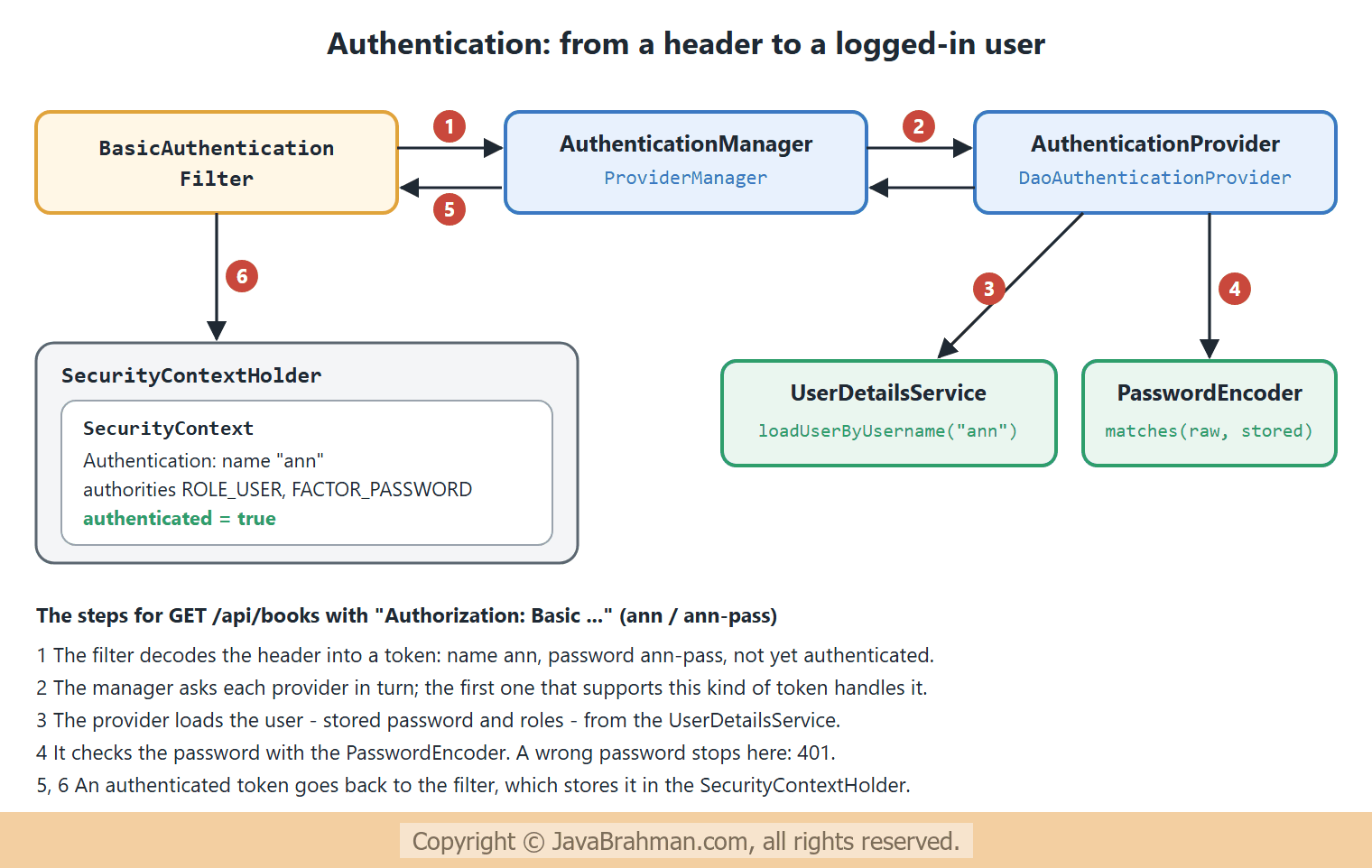
Authentication filters, such asBasicAuthenticationFilter, do not check passwords themselves. They extract the credentials from the request and hand them to a chain of objects, each with one responsibility -
Authentication: the object that represents a user, before and after login. Before, it holds the credentials the caller sent. After, it holds the user's name and authorities (roles and permissions), and is marked authenticated.AuthenticationManager: the one entry point,authenticate(Authentication). Its usual implementation,ProviderManager, holds a list ofAuthenticationProviders and passes the request to the first one that supports this kind ofAuthentication: one for passwords, another for tokens, another for LDAP.DaoAuthenticationProvider: the provider for usernames and passwords. It loads the user from aUserDetailsService, and checks the password with aPasswordEncoder.SecurityContextHolder: where the authenticated user is kept for the rest of the request. By default it is bound to the current thread, so that any code running for this request can ask who the user is.
How authorization decides
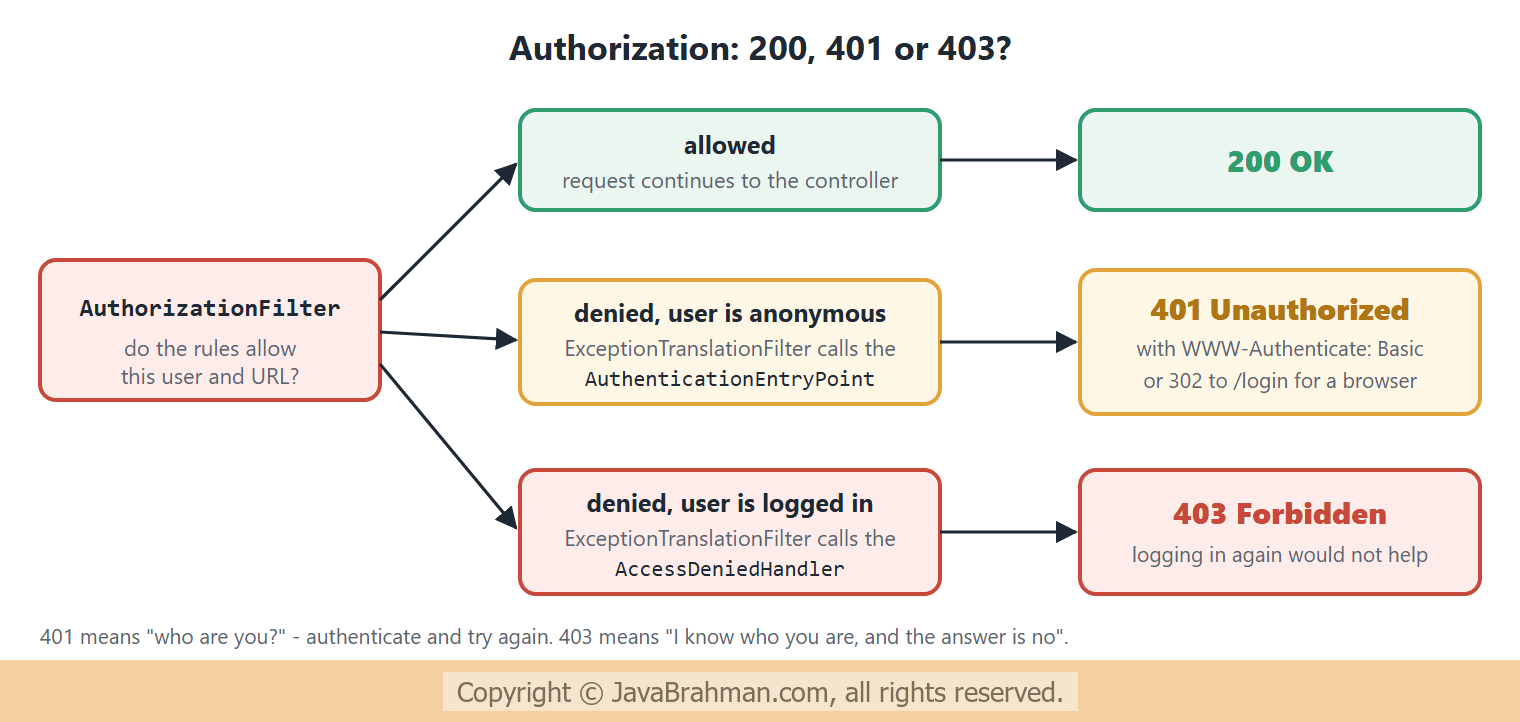
When the request reachesAuthorizationFilter, there is always an Authentication in the context: a real user, or the anonymous one. The filter checks the rules for the URL. If they allow the request, it continues to the controller. If not, the filter throws an exception, and ExceptionTranslationFilter decides what the caller sees, depending on whether the caller is anonymous or logged in -
The requests
Now we send eight real requests to the running application.Authorization: Basic carries username:password encoded in Base64: YW5uOmFubi1wYXNz is ann:ann-pass, YW5uOndyb25n is ann:wrong, and cmFqOnJhai1wYXNz is raj:raj-pass. Base64 is an encoding, not encryption, which is why HTTP Basic must only be used over HTTPS.
OUTPUT of the HTTP requests> curl -i http://localhost:8080/public/hello
HTTP/1.1 200
X-Content-Type-Options: nosniff
X-XSS-Protection: 0
Pragma: no-cache
X-Frame-Options: DENY
Cache-Control: no-store, must-revalidate, no-cache, max-age=0
Content-Length: 13
Content-Type: text/plain; charset=UTF-8
Expires: 0
Hello, anyone
> curl -i http://localhost:8080/api/books
HTTP/1.1 401
X-Content-Type-Options: nosniff
X-XSS-Protection: 0
Pragma: no-cache
X-Frame-Options: DENY
Cache-Control: no-store, must-revalidate, no-cache, max-age=0
Set-Cookie: JSESSIONID=2400A42FAD110FC728B4BE0A22E4743C; Path=/; HttpOnly
WWW-Authenticate: Basic realm="Realm", charset="UTF-8"
Content-Length: 0
Expires: 0
> curl -i http://localhost:8080/api/books -H "Authorization: Basic YW5uOmFubi1wYXNz"
HTTP/1.1 200
X-Content-Type-Options: nosniff
X-XSS-Protection: 0
Pragma: no-cache
X-Frame-Options: DENY
Cache-Control: no-store, must-revalidate, no-cache, max-age=0
Content-Length: 31
Content-Type: application/json
Expires: 0
["Effective Java","Clean Code"]
> curl -i http://localhost:8080/api/books -H "Authorization: Basic YW5uOndyb25n"
HTTP/1.1 401
X-Content-Type-Options: nosniff
X-XSS-Protection: 0
Pragma: no-cache
X-Frame-Options: DENY
Cache-Control: no-store, must-revalidate, no-cache, max-age=0
Set-Cookie: JSESSIONID=7ED1AFD935EBC362B517FDB4A2668797; Path=/; HttpOnly
WWW-Authenticate: Basic realm="Realm", charset="UTF-8"
Content-Length: 0
Expires: 0
> curl -i http://localhost:8080/api/me -H "Authorization: Basic YW5uOmFubi1wYXNz"
HTTP/1.1 200
X-Content-Type-Options: nosniff
X-XSS-Protection: 0
Pragma: no-cache
X-Frame-Options: DENY
Cache-Control: no-store, must-revalidate, no-cache, max-age=0
Content-Length: 151
Content-Type: application/json
Expires: 0
{"thread":"http-nio-8080-exec-N","authorities":["FACTOR_PASSWORD","ROLE_USER"],"authenticationType":"UsernamePasswordAuthenticationToken","name":"ann"}
> curl -i http://localhost:8080/admin/stats -H "Authorization: Basic YW5uOmFubi1wYXNz"
HTTP/1.1 403
X-Content-Type-Options: nosniff
X-XSS-Protection: 0
Pragma: no-cache
X-Frame-Options: DENY
Cache-Control: no-store, must-revalidate, no-cache, max-age=0
Content-Type: application/json
Expires: 0
{"timestamp":"2026-11-06T17:46:58.425Z","status":403,"error":"Forbidden","path":"/admin/stats"}
> curl -i http://localhost:8080/admin/stats -H "Authorization: Basic cmFqOnJhai1wYXNz"
HTTP/1.1 200
X-Content-Type-Options: nosniff
X-XSS-Protection: 0
Pragma: no-cache
X-Frame-Options: DENY
Cache-Control: no-store, must-revalidate, no-cache, max-age=0
Content-Length: 11
Content-Type: application/json
Expires: 0
{"books":2}
> curl -i http://localhost:8080/api/books -H "Accept: text/html"
HTTP/1.1 302
X-Content-Type-Options: nosniff
X-XSS-Protection: 0
Pragma: no-cache
X-Frame-Options: DENY
Cache-Control: no-store, must-revalidate, no-cache, max-age=0
Location: http://localhost:8080/login
Set-Cookie: JSESSIONID=EB8BB5A8BAD929C18836B1219EA04267; Path=/; HttpOnly
Content-Length: 0
Expires: 0
Explanation of the responses
- Security headers on every response, even the public one:
X-Content-Type-Options: nosniff,X-Frame-Options: DENYagainst clickjacking, andCache-Control: no-storewithPragmaandExpires, so that browsers and proxies do not cache possibly private responses. These come fromHeaderWriterFilter. /public/hellowithout credentials: 200. The anonymous user passed thepermitAll()rule./api/bookswithout credentials: 401, withWWW-Authenticate: Basic realm="Realm"telling the client how to authenticate. The anonymous user was refused, so the entry point of HTTP Basic answered. The response also sets aJSESSIONIDcookie: Spring Security saved the refused request in a new session, to resume it after a login.- With ann's password: 200 and the books. With a wrong password: 401 again. The
DaoAuthenticationProviderrejected it at the password check, and the controller never ran. /api/meshows what the controller can see in theSecurityContextHolder: the nameann, anAuthenticationof typeUsernamePasswordAuthenticationToken, and two authorities.ROLE_USERcomes fromroles("USER"), which adds theROLE_prefix.FACTOR_PASSWORDis added by Spring Security 7 to record how the user authenticated - with a password - for its multi-factor authentication support. The request ran on a Tomcat worker thread, which is where the thread-bound context lives./admin/statsas ann: 403. Ann is authenticated, but lacks the roleADMIN, so the access-denied handler answered; the JSON body is Spring Boot's standard error response. As raj, who has both roles: 200.- The browser-like request, with
Accept: text/htmland no credentials: 302 to/login. Two entry points are configured, form login and HTTP Basic, and Spring Security chose by the kind of client: a browser is sent to the login page, a program gets a 401.
What Spring Boot adds
Without aSecurityFilterChain bean of our own, Spring Boot's auto-configuration creates one in which every request requires authentication, with form login and HTTP Basic. Without a UserDetailsService of our own, it creates a single user named user, with a random password printed in the log at startup, or the name and password set in spring.security.user.name and spring.security.user.password. Both defaults back off as soon as you declare your own beans, as this example does. They are there so that an application is never accidentally left open.
Summary
In this tutorial we saw that Spring Security answers two questions, authentication and authorization, using servlet filters. A request passes fromDelegatingFilterProxy to FilterChainProxy, which runs the filters of the matching SecurityFilterChain; we printed the 16 filters of the example and what each one is for. Authentication filters pass credentials to the AuthenticationManager, whose DaoAuthenticationProvider checks them with a UserDetailsService and a PasswordEncoder, and the result is kept in the SecurityContextHolder. Real requests then showed 200 for allowed requests, 401 for unknown callers and wrong passwords, 403 for a logged-in user without the role, and a redirect to the login page for a browser. The next tutorial shows how to write the security rules: Configuring SecurityFilterChainClick to read tutorial: Configuring SecurityFilterChain in Spring Security.Spring Security Tutorials
Configuring SecurityFilterChain in Spring SecurityClick to read tutorial: Configuring SecurityFilterChain in Spring Security Spring Security Users, Passwords and PasswordEncoderClick to read tutorial: Spring Security Users, Passwords and PasswordEncoder Spring Security Form Login and Session AuthenticationClick to read tutorial: Spring Security Form Login and Session Authentication
Configuring SecurityFilterChain in Spring SecurityClick to read tutorial: Configuring SecurityFilterChain in Spring Security Spring Security Users, Passwords and PasswordEncoderClick to read tutorial: Spring Security Users, Passwords and PasswordEncoder Spring Security Form Login and Session AuthenticationClick to read tutorial: Spring Security Form Login and Session Authentication