
Spring Security OAuth2 Login and OpenID Connect
Introduction
This tutorial shows how to let users log in to a Spring Boot application with an account they already have elsewhere - "Sign in with Google" or "Sign in with GitHub" - using OAuth2 and OpenID Connect. We will see the roles in an OAuth2 login and how OpenID Connect adds identity to OAuth2. To run the whole flow for real, without accounts and secrets at Google, we will start our own identity provider with Spring Authorization Server, and a shop application that logs in with it usingoauth2Login(). Nine real requests then follow the authorization code flow from the first redirect to the logged-in user, and we will look at the ID token the application receives. Lastly, we will configure Google and GitHub, which only needs a few properties.OAuth2 and OpenID Connect
Asking users for a password has costs: storing it safely, resetting it, and users who reuse the same password everywhere. Delegating login to a provider the user already trusts avoids all of that, and the application never sees the password. Three parties take part -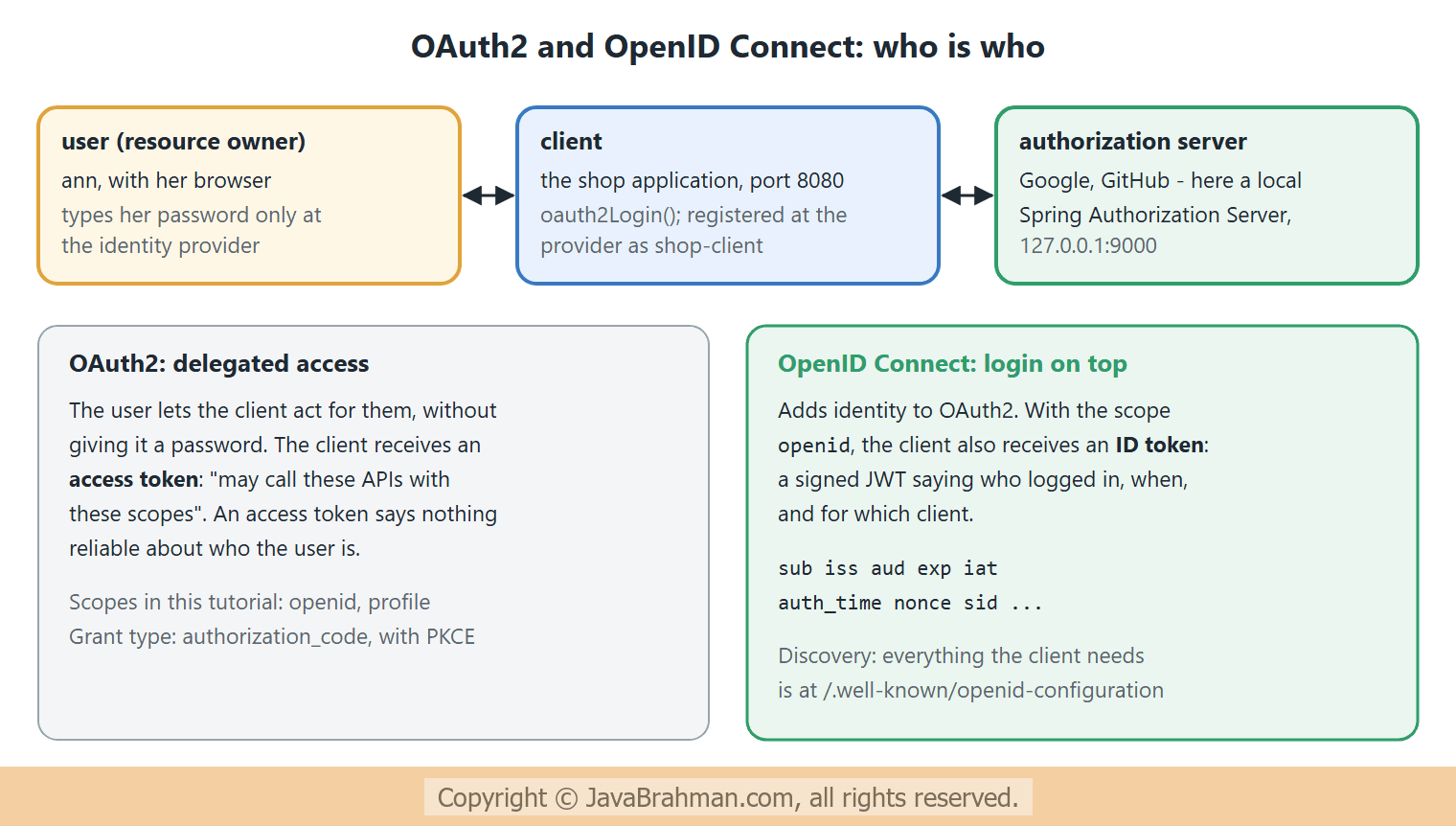 OAuth2 itself is about access: the client gets an access token to call APIs on the user's behalf. Using it for login was never part of OAuth2, and early "log in with OAuth2" implementations each did it differently. OpenID Connect (OIDC) standardises it: with the scope
openid, the provider also returns an ID token, a signed JWT about the user and the login, and offers a standard discovery document and user-info endpoint. Google, Microsoft, Okta and Keycloak are OpenID Connect providers; GitHub offers plain OAuth2, and Spring Security handles it with a user-info request instead of an ID token.
The example: a provider and a shop
Two applications run side by side. The provider is a Spring Authorization Server, part of Spring Security since version 7, added withspring-boot-starter-security-oauth2-authorization-server. Spring Boot configures it entirely from properties: the issuer address, one registered client - the shop, with its id, secret, allowed redirect address and scopes - and one user. The provider runs at 127.0.0.1:9000 and the shop at localhost:8080. Using two different host names keeps their session cookies apart, since cookies are kept per host name and not per port. Each application reads its own properties file, selected with --spring.config.name -
authserver.properties - the identity provider: one registered client, one user
server.port=9000
spring.security.oauth2.authorizationserver.issuer=http://127.0.0.1:9000
spring.security.oauth2.authorizationserver.client.shop.registration.client-id=shop-client
spring.security.oauth2.authorizationserver.client.shop.registration.client-secret={noop}shop-secret
spring.security.oauth2.authorizationserver.client.shop.registration.client-authentication-methods=client_secret_basic
spring.security.oauth2.authorizationserver.client.shop.registration.authorization-grant-types=authorization_code,refresh_token
spring.security.oauth2.authorizationserver.client.shop.registration.redirect-uris=http://localhost:8080/login/oauth2/code/local
spring.security.oauth2.authorizationserver.client.shop.registration.scopes=openid,profile
spring.security.oauth2.authorizationserver.client.shop.require-authorization-consent=false
spring.security.user.name=ann
spring.security.user.password=ann-pass
AuthServerApp.java - a local authorization server, standing in for Google or GitHub
//AuthServerApp.java
package com.javabrahman.security.authserver;

import org.springframework.boot.SpringApplication;
import org.springframework.boot.autoconfigure.SpringBootApplication;

@SpringBootApplication
public class AuthServerApp {

  public static void main(String[] args) {
    SpringApplication.run(AuthServerApp.class, args);
  }
}
require-authorization-consent=false skips the "allow this application to see your profile?" page that providers usually show on a first login, to keep the request sequence short. The provider application itself is an empty Spring Boot application.The shop uses
spring-boot-starter-security-oauth2-client. It registers the provider under the name local, with the same client id and secret. issuer-uri is all it needs to know about the provider: at startup it reads the provider's discovery document and learns every address from it -
client.properties - the application: who it is, and where its provider is
spring.security.oauth2.client.registration.local.client-id=shop-client
spring.security.oauth2.client.registration.local.client-secret=shop-secret
spring.security.oauth2.client.registration.local.scope=openid,profile
spring.security.oauth2.client.provider.local.issuer-uri=http://127.0.0.1:9000
ShopSecurity.java - log in with the provider
//ShopSecurity.java
package com.javabrahman.security.oauthlogin;

import static org.springframework.security.config.Customizer.withDefaults;

import org.springframework.context.annotation.Bean;
import org.springframework.context.annotation.Configuration;
import org.springframework.security.config.annotation.web.builders.HttpSecurity;
import org.springframework.security.web.SecurityFilterChain;

@Configuration
public class ShopSecurity {

  @Bean
  SecurityFilterChain chain(HttpSecurity http) throws Exception {
    http
        .authorizeHttpRequests(auth -> auth
            .requestMatchers("/", "/error").permitAll()
            .anyRequest().authenticated())
        .oauth2Login(withDefaults());
    return http.build();
  }
}
oauth2Login(withDefaults()) replaces the login form of the form login tutorialClick to read tutorial: Spring Security Form Login and Session Authentication: an unauthenticated user is sent to the provider, and comes back logged in. The controller receives the user as an OidcUser, which holds the ID token and its claims -
ProfileController.java - what the application learns about the user
//ProfileController.java
package com.javabrahman.security.oauthlogin;

import java.util.TreeSet;
import org.springframework.security.core.annotation.AuthenticationPrincipal;
import org.springframework.security.oauth2.core.oidc.user.OidcUser;
import org.springframework.web.bind.annotation.GetMapping;
import org.springframework.web.bind.annotation.RestController;

@RestController
public class ProfileController {

  @GetMapping("/")
  public String home() {
    return "Welcome to the shop";
  }

  @GetMapping("/me")
  public String me(@AuthenticationPrincipal OidcUser user) {
    return "name: " + user.getName()
        + "\nissuer: " + user.getIssuer()
        + "\nauthorities: " + user.getAuthorities().stream().map(Object::toString).sorted().toList()
        + "\nID token claims: " + new TreeSet<>(user.getIdToken().getClaims().keySet());
  }
}
ShopApp.java
//ShopApp.java
package com.javabrahman.security.oauthlogin;

import org.springframework.boot.SpringApplication;
import org.springframework.boot.autoconfigure.SpringBootApplication;

@SpringBootApplication
public class ShopApp {

  public static void main(String[] args) {
    SpringApplication.run(ShopApp.class, args);
  }
}
The authorization code flow
The login takes the browser back and forth between the two applications. Here is the sequence, numbered like the requests below. The essential trick is that the browser only ever carries a short-lived code; the tokens are fetched by the shop directly from the provider -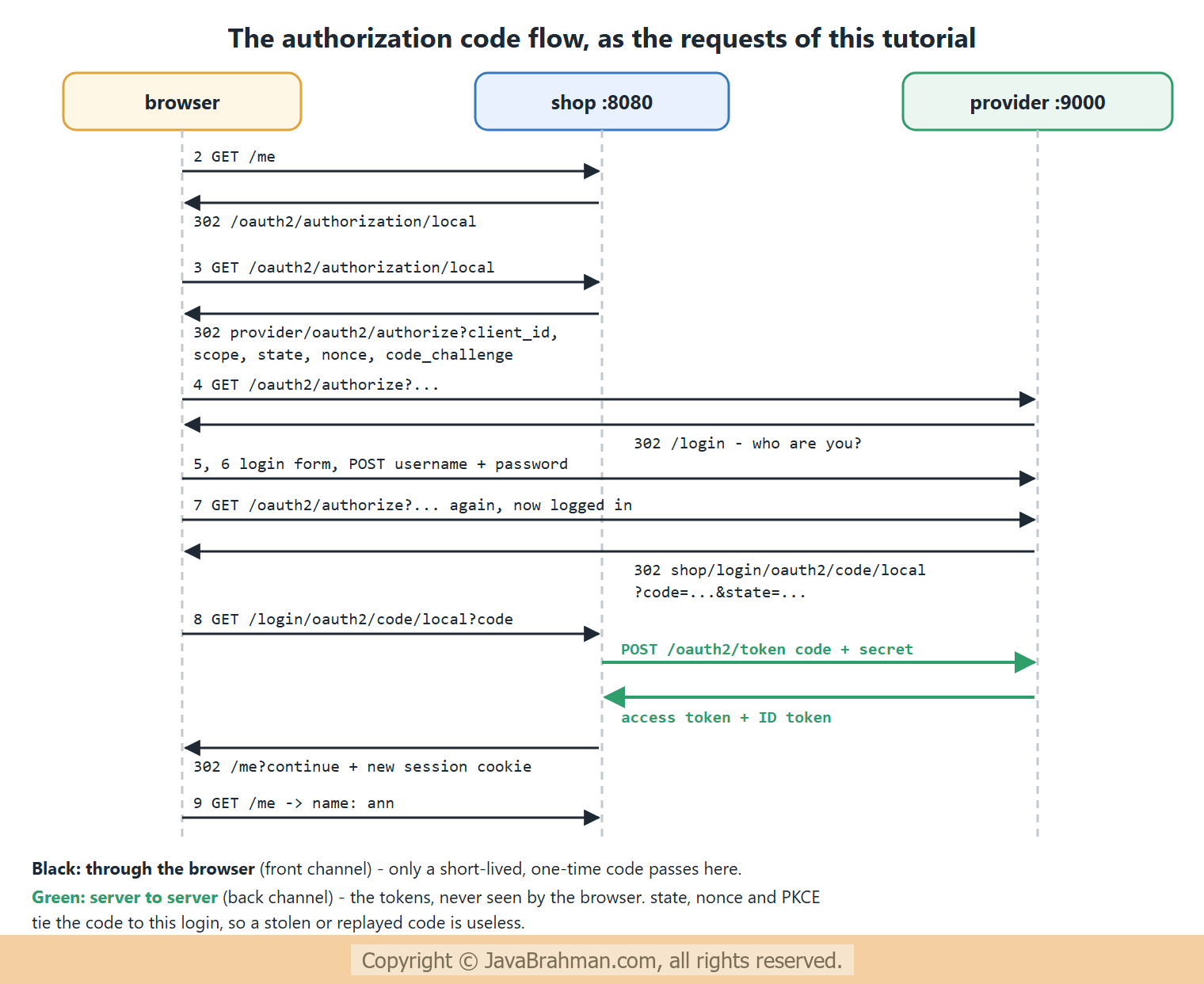
The requests
The requests are sent as a browser would send them: each one follows theLocation of the previous redirect, and carries the session cookie of the host it goes to. Request 1 reads the provider's discovery document first -
OUTPUT of the HTTP requests> curl -i http://127.0.0.1:9000/.well-known/openid-configuration
HTTP/1.1 200
X-Content-Type-Options: nosniff
X-XSS-Protection: 0
Pragma: no-cache
X-Frame-Options: DENY
Cache-Control: no-store, must-revalidate, no-cache, max-age=0
Content-Length: 1460
Content-Type: application/json
Expires: 0
{"issuer":"http://127.0.0.1:9000","authorization_endpoint":"http://127.0.0.1:9000/oauth2/authorize","token_endpoint":"http://127.0.0.1:9000/oauth2/token","token_endpoint_auth_methods_supported":["client_secret_basic","client_secret_post","client_secret_jwt","private_key_jwt","tls_client_auth","self_signed_tls_client_auth"],"jwks_uri":"http://127.0.0.1:9000/oauth2/jwks","userinfo_endpoint":"http://127.0.0.1:9000/userinfo","end_session_endpoint":"http://127.0.0.1:9000/connect/logout","response_types_supported":["code"],"grant_types_supported":["authorization_code","client_credentials","refresh_token","urn:ietf:params:oauth:grant-type:token-exchange"],"revocation_endpoint":"http://127.0.0.1:9000/oauth2/revoke","revocation_endpoint_auth_methods_supported":["client_secret_basic","client_secret_post","client_secret_jwt","private_key_jwt","tls_client_auth","self_signed_tls_client_auth"],"introspection_endpoint":"http://127.0.0.1:9000/oauth2/introspect","introspection_endpoint_auth_methods_supported":["client_secret_basic","client_secret_post","client_secret_jwt","private_key_jwt","tls_client_auth","self_signed_tls_client_auth"],"code_challenge_methods_supported":["S256"],"tls_client_certificate_bound_access_tokens":true,"dpop_signing_alg_values_supported":["RS256","RS384","RS512","PS256","PS384","PS512","ES256","ES384","ES512"],"subject_types_supported":["public"],"id_token_signing_alg_values_supported":["RS256"],"scopes_supported":["openid"]}
> curl -i http://localhost:8080/me -H "Accept: text/html"
HTTP/1.1 302
X-Content-Type-Options: nosniff
X-XSS-Protection: 0
Pragma: no-cache
X-Frame-Options: DENY
Cache-Control: no-store, must-revalidate, no-cache, max-age=0
Location: http://localhost:8080/oauth2/authorization/local
Set-Cookie: JSESSIONID=D42F3E933DFB27892A777FA9CA057447; Path=/; HttpOnly
Content-Length: 0
Expires: 0
> curl -i http://localhost:8080/oauth2/authorization/local -H "Cookie: JSESSIONID=D42F3E933DFB27892A777FA9CA057447"
HTTP/1.1 302
X-Content-Type-Options: nosniff
X-XSS-Protection: 0
Pragma: no-cache
X-Frame-Options: DENY
Cache-Control: no-store, must-revalidate, no-cache, max-age=0
Location: http://127.0.0.1:9000/oauth2/authorize?response_type=code&client_id=shop-client&scope=openid%20profile&state=NtkOTF17jtwyzZQmmbLcj-SYUMguKB5OSYVvpjaw4V4%3D&redirect_uri=http://localhost:8080/login/oauth2/code/local&nonce=hL32d8FpxzmVkB-FldCo2HNbt7L2-As7Ughix1-w7V8&code_challenge=35Jm7bPDC5Df9sv9m-CxDcLr1EzTb-X5PKVjj_4FC4Y&code_challenge_method=S256
Content-Length: 0
Expires: 0
> curl -i http://127.0.0.1:9000/oauth2/authorize?response_type=code&client_id=shop-client&scope=openid%20profile&state=NtkOTF17jtwyzZQmmbLcj-SYUMguKB5OSYVvpjaw4V4%3D&redirect_uri=http://localhost:8080/login/oauth2/code/local&nonce=hL32d8FpxzmVkB-FldCo2HNbt7L2-As7Ughix1-w7V8&code_challenge=35Jm7bPDC5Df9sv9m-CxDcLr1EzTb-X5PKVjj_4FC4Y&code_challenge_method=S256 -H "Accept: text/html"
HTTP/1.1 302
X-Content-Type-Options: nosniff
X-XSS-Protection: 0
Pragma: no-cache
X-Frame-Options: DENY
Cache-Control: no-store, must-revalidate, no-cache, max-age=0
Location: http://127.0.0.1:9000/login
Set-Cookie: JSESSIONID=4B0C26CBAA88A4DA6B1F0396A0368D3A; Path=/; HttpOnly
Content-Length: 0
Expires: 0
> curl -i http://127.0.0.1:9000/login -H "Cookie: JSESSIONID=4B0C26CBAA88A4DA6B1F0396A0368D3A"
HTTP/1.1 200
X-Content-Type-Options: nosniff
X-XSS-Protection: 0
Pragma: no-cache
X-Frame-Options: DENY
Cache-Control: no-store, must-revalidate, no-cache, max-age=0
Content-Length: 1103
Content-Type: text/html; charset=UTF-8
Expires: 0
<!DOCTYPE html>
...
> curl -i -X POST http://127.0.0.1:9000/login -H "Cookie: JSESSIONID=4B0C26CBAA88A4DA6B1F0396A0368D3A" -H "Content-Type: application/x-www-form-urlencoded" -d 'username=ann&password=ann-pass&_csrf=T4hcYG2JaCI95P8M0bh52xFDQML3N5B7kKc6loE3GrO5LHR7d-s_AwvsDBcQ0548s5VNuighbaDBUqlWpZZbpbkAL4bbFURK'
HTTP/1.1 302
X-Content-Type-Options: nosniff
X-XSS-Protection: 0
Pragma: no-cache
X-Frame-Options: DENY
Cache-Control: no-store, must-revalidate, no-cache, max-age=0
Location: http://127.0.0.1:9000/oauth2/authorize?response_type=code&client_id=shop-client&scope=openid%20profile&state=NtkOTF17jtwyzZQmmbLcj-SYUMguKB5OSYVvpjaw4V4%3D&redirect_uri=http://localhost:8080/login/oauth2/code/local&nonce=hL32d8FpxzmVkB-FldCo2HNbt7L2-As7Ughix1-w7V8&code_challenge=35Jm7bPDC5Df9sv9m-CxDcLr1EzTb-X5PKVjj_4FC4Y&code_challenge_method=S256&continue
Set-Cookie: JSESSIONID=4D2E9674C92C4F83136DCA2C6721D981; Path=/; HttpOnly
Content-Length: 0
Expires: 0
> curl -i http://127.0.0.1:9000/oauth2/authorize?response_type=code&client_id=shop-client&scope=openid%20profile&state=NtkOTF17jtwyzZQmmbLcj-SYUMguKB5OSYVvpjaw4V4%3D&redirect_uri=http://localhost:8080/login/oauth2/code/local&nonce=hL32d8FpxzmVkB-FldCo2HNbt7L2-As7Ughix1-w7V8&code_challenge=35Jm7bPDC5Df9sv9m-CxDcLr1EzTb-X5PKVjj_4FC4Y&code_challenge_method=S256&continue -H "Cookie: JSESSIONID=4D2E9674C92C4F83136DCA2C6721D981"
HTTP/1.1 302
X-Content-Type-Options: nosniff
X-XSS-Protection: 0
Pragma: no-cache
X-Frame-Options: DENY
Cache-Control: no-store, must-revalidate, no-cache, max-age=0
Location: http://localhost:8080/login/oauth2/code/local?code=6jAhcSWnMiJsKMt1A0t5emK6aobpWyAoOEG0yxnhRhp1J8p8tYro3KsgrHb320Tj14y8y9jgKPCnCbul6Ted9tt5AqPWEZsNIBgvYPwq_3SFm4RXcxyd1GkPFFnBDetO&state=NtkOTF17jtwyzZQmmbLcj-SYUMguKB5OSYVvpjaw4V4%3D
Content-Length: 0
Expires: 0
> curl -i http://localhost:8080/login/oauth2/code/local?code=6jAhcSWnMiJsKMt1A0t5emK6aobpWyAoOEG0yxnhRhp1J8p8tYro3KsgrHb320Tj14y8y9jgKPCnCbul6Ted9tt5AqPWEZsNIBgvYPwq_3SFm4RXcxyd1GkPFFnBDetO&state=NtkOTF17jtwyzZQmmbLcj-SYUMguKB5OSYVvpjaw4V4%3D -H "Cookie: JSESSIONID=D42F3E933DFB27892A777FA9CA057447"
HTTP/1.1 302
X-Content-Type-Options: nosniff
X-XSS-Protection: 0
Pragma: no-cache
X-Frame-Options: DENY
Cache-Control: no-store, must-revalidate, no-cache, max-age=0
Location: http://localhost:8080/me?continue
Set-Cookie: JSESSIONID=F5CDFE9AFCBB50BB6E6594A374D3D5CC; Path=/; HttpOnly
Content-Length: 0
Expires: 0
> curl -i http://localhost:8080/me?continue -H "Cookie: JSESSIONID=F5CDFE9AFCBB50BB6E6594A374D3D5CC"
HTTP/1.1 200
X-Content-Type-Options: nosniff
X-XSS-Protection: 0
Pragma: no-cache
X-Frame-Options: DENY
Cache-Control: no-store, must-revalidate, no-cache, max-age=0
Content-Length: 169
Content-Type: text/html; charset=UTF-8
Expires: 0
name: ann
issuer: http://127.0.0.1:9000
authorities: [OIDC_USER, SCOPE_openid, SCOPE_profile]
ID token claims: [aud, auth_time, azp, exp, iat, iss, jti, nonce, sid, sub]
Explanation of the flow
- 1. Discovery:
/.well-known/openid-configurationlists the provider's addresses -authorization_endpoint,token_endpoint,jwks_uriwith its public keys,userinfo_endpoint- and what it supports, includingcode_challenge_methods_supported: ["S256"]. The shop read this same document at startup, from itsissuer-uri. - 2. A protected page:
/mewithout a login is redirected to/oauth2/authorization/local, the shop's own start-login address for the registrationlocal. With only one registration, Spring Security goes straight to it instead of showing a page with one link per provider. - 3. To the provider: the shop redirects to the provider's
/oauth2/authorizewithresponse_type=code, itsclient_id, thescope"openid profile", theredirect_urito come back to, and three values that protect the flow:state, a random value the shop checks when the browser returns, against forged responses;nonce, which must come back inside the ID token, against replayed tokens; andcode_challengewithS256, for PKCE, which ties the code to this login so that a stolen code is useless to anyone else. - 4 to 6. Logging in at the provider: the provider does not know the browser yet, so it shows its own login form; ann's password is posted to the provider, never to the shop. After login, the provider redirects back to the saved authorize request, as in form login.
- 7. The code: now the provider redirects to
localhost:8080/login/oauth2/code/local?code=...&state=.... The code is useless on its own: it can be used once, briefly, and only with the client's secret and the PKCE verifier. - 8. The exchange: the shop receives the code, checks
state, and posts the code to the provider's token endpoint with its secret and PKCE verifier - a server-to-server request that does not appear in the browser's list. It receives an access token and an ID token, checks the ID token's signature with the provider's public keys and itsnonce, logs ann in, and, as with form login, issues a new session id and redirects to the saved page,/me?continue. - 9. Logged in:
/meshows the nameann, the issuer, and the authoritiesOIDC_USER, plus oneSCOPE_authority for each granted scope. The ID token's claims aresub(the user's id at the provider),iss,aud(the client id: the token was made for this shop),azp,exp,iat,auth_time,nonce,sid(the provider's session) andjti.
Logging in with Google or GitHub
Spring Security knows the addresses of Google, GitHub, Facebook and Okta already. After registering the application in the provider's developer console - which gives a client id and a client secret, and asks for the redirect addresshttps://your-host/login/oauth2/code/google - the configuration is two properties per provider. With several registrations, /login shows one link for each -
application.properties - Google and GitHub logins (not run here: needs real client registrations)
spring.security.oauth2.client.registration.google.client-id=${GOOGLE_CLIENT_ID}
spring.security.oauth2.client.registration.google.client-secret=${GOOGLE_CLIENT_SECRET}

spring.security.oauth2.client.registration.github.client-id=${GITHUB_CLIENT_ID}
spring.security.oauth2.client.registration.github.client-secret=${GITHUB_CLIENT_SECRET}- Keep the secrets out of the source code, in environment variables or a secrets store, as the placeholders show.
- Google is an OpenID Connect provider, so its users arrive as an
OidcUser. GitHub is plain OAuth2: Spring Security fetches the user from GitHub's user API, and the controller receives anOAuth2User.@AuthenticationPrincipal OAuth2Userworks for both, sinceOidcUserextends it. - The provider decides who the user is; your application decides what they may do. Map users to your own roles, for example by their email or provider id, in a custom
OAuth2UserServiceorOidcUserService.
Summary
In this tutorial we logged users in with an external identity provider. OAuth2 gives a client delegated access with an access token; OpenID Connect adds login, with a signed ID token about the user. We ran a local Spring Authorization Server, configured from properties with one client and one user, and a shop withoauth2Login() that knew only the provider's issuer-uri. Nine real requests followed the authorization code flow: discovery, the redirect to the provider with state, nonce and a PKCE challenge, the login at the provider, the redirect back with a one-time code, the server-to-server exchange for tokens, and a logged-in user with the ID token's claims. Logging in with Google or GitHub needs only a client id and secret for each. The next tutorial is about the other side of OAuth2, APIs that accept access tokens from an authorization server: OAuth2 resource server with JWTClick to read tutorial: Spring Security OAuth2 Resource Server with JWT.Spring Security Tutorials
Stateless REST API Security with JWT in Spring BootClick to read tutorial: Stateless REST API Security with JWT in Spring Boot Spring Security OAuth2 Resource Server with JWTClick to read tutorial: Spring Security OAuth2 Resource Server with JWT Spring Security Architecture: Filter Chain ExplainedClick to read tutorial: Spring Security Architecture: Filter Chain Explained Configuring SecurityFilterChain in Spring SecurityClick to read tutorial: Configuring SecurityFilterChain in Spring Security Spring Security Users, Passwords and PasswordEncoderClick to read tutorial: Spring Security Users, Passwords and PasswordEncoder Spring Security Form Login and Session AuthenticationClick to read tutorial: Spring Security Form Login and Session Authentication Spring Method Security: @PreAuthorize and @PostAuthorizeClick to read tutorial: Spring Method Security: @PreAuthorize and @PostAuthorize
Stateless REST API Security with JWT in Spring BootClick to read tutorial: Stateless REST API Security with JWT in Spring Boot Spring Security OAuth2 Resource Server with JWTClick to read tutorial: Spring Security OAuth2 Resource Server with JWT Spring Security Architecture: Filter Chain ExplainedClick to read tutorial: Spring Security Architecture: Filter Chain Explained Configuring SecurityFilterChain in Spring SecurityClick to read tutorial: Configuring SecurityFilterChain in Spring Security Spring Security Users, Passwords and PasswordEncoderClick to read tutorial: Spring Security Users, Passwords and PasswordEncoder Spring Security Form Login and Session AuthenticationClick to read tutorial: Spring Security Form Login and Session Authentication Spring Method Security: @PreAuthorize and @PostAuthorizeClick to read tutorial: Spring Method Security: @PreAuthorize and @PostAuthorize