
Spring Security Users, Passwords and PasswordEncoder
Introduction
This tutorial is about the users of a Spring Security application and, above all, their passwords. We will see why a password must never be stored as it is, or even with an ordinary hash, and what a slow, salted hash such as bcrypt does instead. We will hash and check passwords withBCryptPasswordEncoder, then use the DelegatingPasswordEncoder that Spring Security recommends, with its {id} prefixes. We will then move the users from memory into a database with JdbcUserDetailsManager, register a new user through a REST endpoint, and watch a password stored in an old format being upgraded automatically at login.Users in Spring Security
In the architecture tutorialClick to read tutorial: Spring Security Architecture: Filter Chain Explained we saw that theDaoAuthenticationProvider loads a user through a UserDetailsService and checks the password with a PasswordEncoder. These are the pieces you choose -
UserDetails: one user as Spring Security sees it - username, stored password, authorities, and flags for enabled, locked and expired accounts.User.withUsername(...)builds one.UserDetailsService: one method,loadUserByUsername(String). Spring Security only needs to read users.UserDetailsManager: addscreateUser,updateUser,deleteUser,changePasswordanduserExists. Spring Security ships two:InMemoryUserDetailsManager, used in the previous tutorials, andJdbcUserDetailsManager, used here. With JPA, you would write your ownUserDetailsServiceover a user entity.PasswordEncoder:encode(raw)when a password is set,matches(raw, stored)when a user logs in.
How passwords must be stored
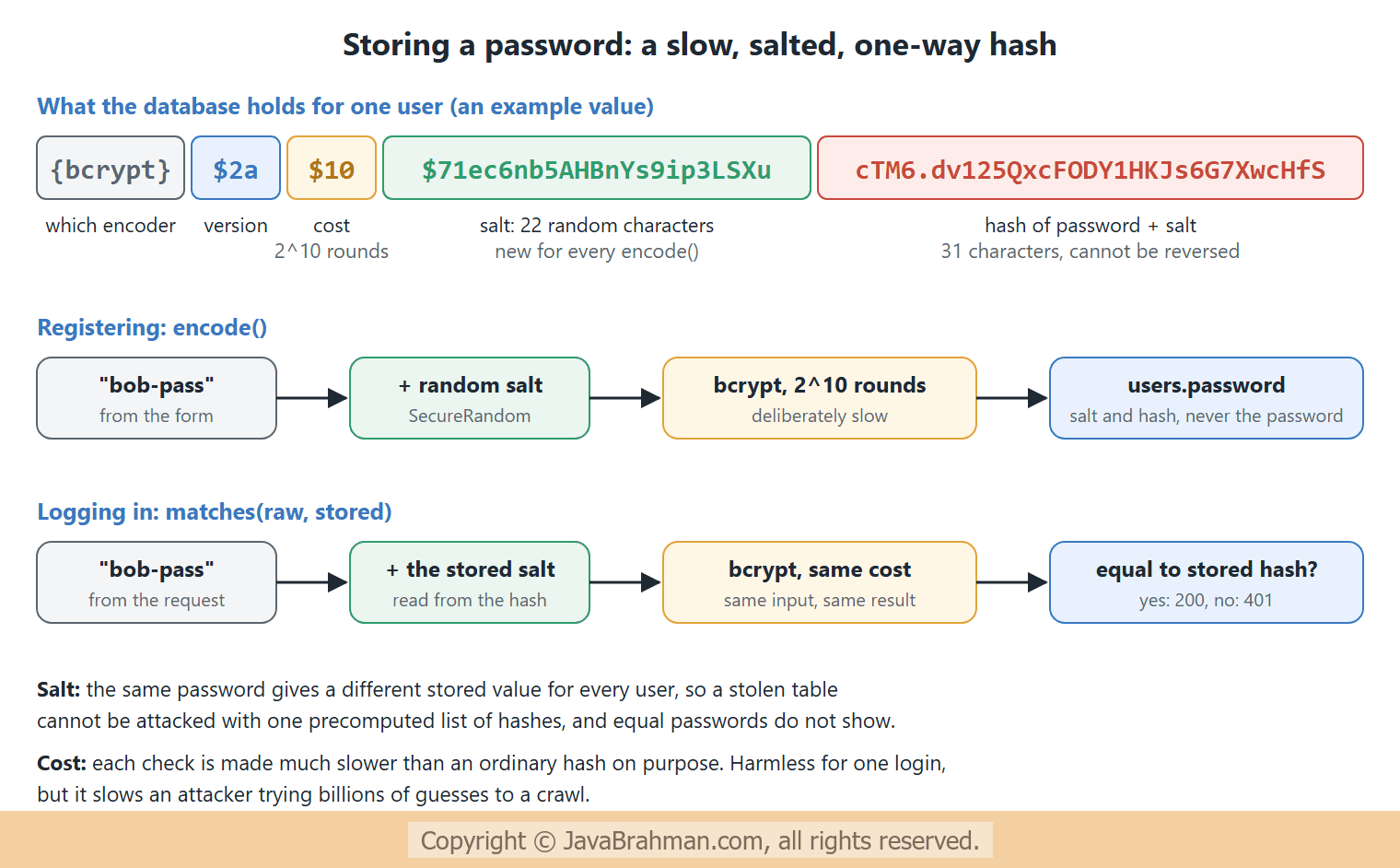
Databases leak: through backups, SQL injection, a stolen laptop, or an employee with too much access. The way passwords are stored decides what an attacker gets from a stolen table. Plain text gives away every account, and since people reuse passwords, their accounts on other sites too. A fast hash such as SHA-256 is little better: identical passwords produce identical hashes, and modern hardware can test billions of guesses per second against them.A password hashing function is built for exactly this job. It is one-way: there is no way back from the hash to the password, only checking a guess. It adds a random salt to every password before hashing, so two users with the same password get different stored values. And it is deliberately slow, with a cost factor that can be raised as computers get faster. bcrypt, the default in Spring Security, does all three -
Hashing passwords in code
The first program uses the encoders directly, without Spring Boot, to show what they produce -PasswordDemo.java - BCrypt and the DelegatingPasswordEncoder
//PasswordDemo.java
package com.javabrahman.security.passwords;

import org.springframework.security.crypto.bcrypt.BCryptPasswordEncoder;
import org.springframework.security.crypto.factory.PasswordEncoderFactories;
import org.springframework.security.crypto.password.PasswordEncoder;

public class PasswordDemo {

  public static void main(String[] args) {
    System.out.println("== BCryptPasswordEncoder");
    PasswordEncoder bcrypt = new BCryptPasswordEncoder();
    String first = bcrypt.encode("secret");
    String second = bcrypt.encode("secret");
    System.out.println("hash 1: " + first);
    System.out.println("hash 2: " + second);
    System.out.println("same hash twice?   " + first.equals(second));
    System.out.println("matches hash 1?    " + bcrypt.matches("secret", first));
    System.out.println("matches hash 2?    " + bcrypt.matches("secret", second));
    System.out.println("wrong password?    " + bcrypt.matches("Secret", first));
    System.out.println("parts of hash 1:   version " + first.substring(1, 3) + ", cost " + first.substring(4, 6)
        + ", salt " + first.substring(7, 29) + ", hash " + first.substring(29));

    System.out.println("== DelegatingPasswordEncoder");
    PasswordEncoder encoder = PasswordEncoderFactories.createDelegatingPasswordEncoder();
    String stored = encoder.encode("secret");
    System.out.println("encode:            " + stored);
    System.out.println("matches {bcrypt}:  " + encoder.matches("secret", stored));
    System.out.println("matches {noop}:    " + encoder.matches("secret", "{noop}secret"));
    System.out.println("upgrade {noop}?    " + encoder.upgradeEncoding("{noop}secret"));
    System.out.println("upgrade {bcrypt}?  " + encoder.upgradeEncoding(stored));
    try {
      encoder.matches("secret", "secret");   // stored without an {id} prefix
    } catch (IllegalArgumentException e) {
      System.out.println("no prefix:         " + e.getMessage());
    }
  }
}== BCryptPasswordEncoder
hash 1: $2a$10$LMg6DGkE2EBwNsWI3h5hxO4ioj38prLaLTC0aO12sj61AM5iCL7.2
hash 2: $2a$10$8LxtNvUc9H.folhHmM3yIOrw8Nbys4gpXF/KXbVS.R3zA345nYEtq
same hash twice? false
matches hash 1? true
matches hash 2? true
wrong password? false
parts of hash 1: version 2a, cost 10, salt LMg6DGkE2EBwNsWI3h5hxO, hash 4ioj38prLaLTC0aO12sj61AM5iCL7.2
== DelegatingPasswordEncoder
encode: {bcrypt}$2a$10$zxGJTISTAB0jOdN4lyUrvuMsTcirQ4sJQIizzNJt0Th6sCqwEf1um
matches {bcrypt}: true
matches {noop}: true
upgrade {noop}? true
upgrade {bcrypt}? false
no prefix: Given that there is no default password encoder configured, each password must have a password encoding prefix. Please either prefix this password with '{noop}' or set a default password encoder in `DelegatingPasswordEncoder`.
Explanation of the output
- Same password, two hashes: encoding "secret" twice gave two different values, and
equals()says false. Each call chose a new salt. Yetmatches("secret", ...)is true for both:matches()reads the salt and cost out of the stored value, hashes the typed password the same way, and compares. That is also why you can never compare passwords by encoding the typed one and checkingequals(). - Case matters: "Secret" did not match.
- The parts of a bcrypt hash: version
2a, cost10, which means 210 = 1,024 rounds of the algorithm's expensive setup, a 22-character salt, and the 31-character hash itself. The salt is not secret; it only has to be unique.new BCryptPasswordEncoder(12)would use cost 12, four times slower than 10. Pick the highest cost your login rate allows. - The DelegatingPasswordEncoder, from
PasswordEncoderFactories.createDelegatingPasswordEncoder(), stored the same kind of bcrypt hash with a{bcrypt}prefix in front. It matched both that value and{noop}secret, a plain-text password marked with the{noop}prefix. upgradeEncoding()is true for the{noop}value and false for the current bcrypt one: the encoder can tell which stored passwords are out of date.- A stored password without any prefix is refused with an
IllegalArgumentException: "each password must have a password encoding prefix".
Why a DelegatingPasswordEncoder
Password storage has to change over time. MD5 and SHA-1 were once common, bcrypt replaced them, and Argon2 may replace bcrypt one day. An application that has stored passwords for ten years holds several formats at once, and cannot convert them, because it does not know the passwords - only users typing them can. The{id} prefix makes every stored password say which encoder made it -
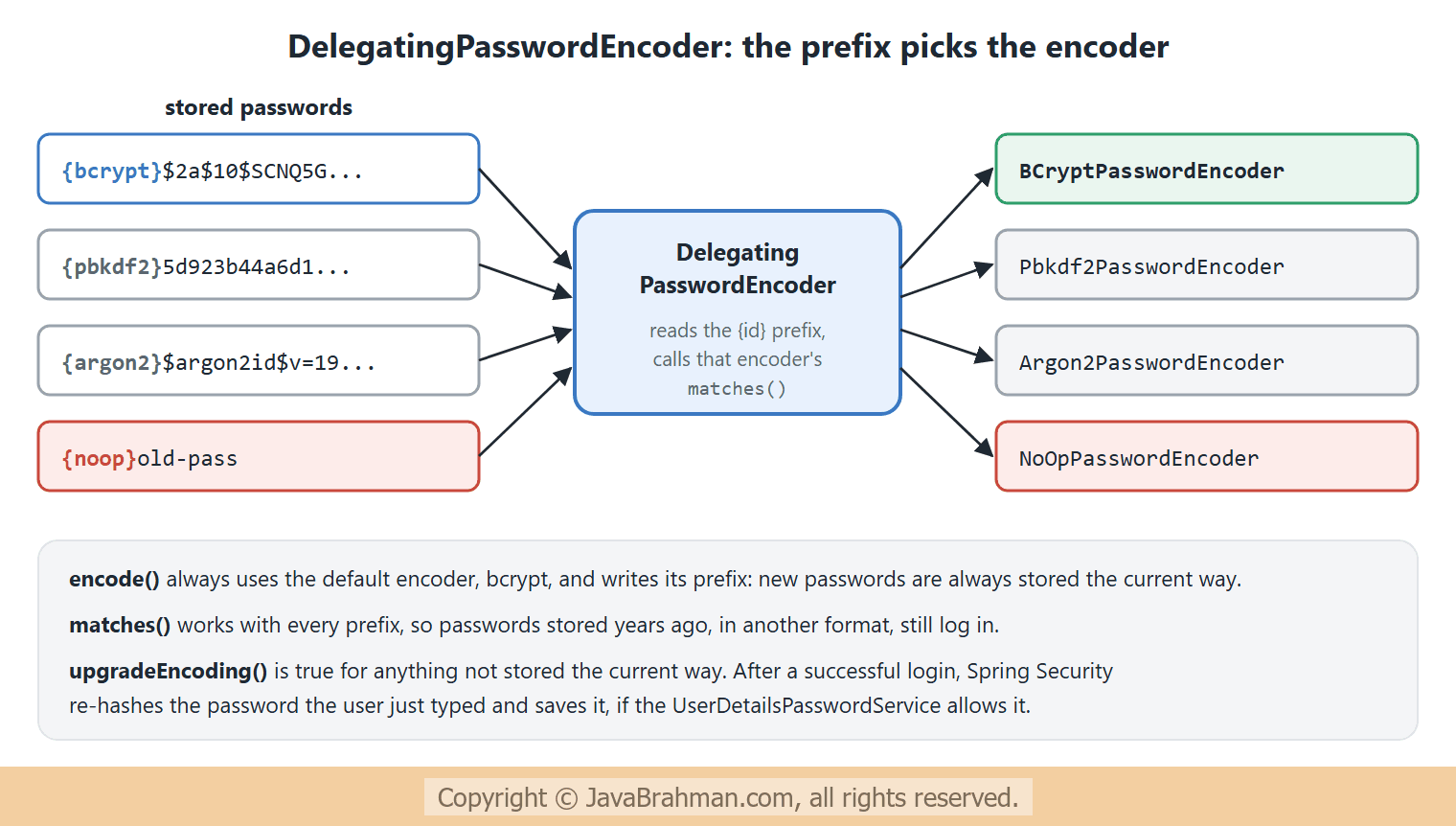 The factory knows the ids
bcrypt, pbkdf2, scrypt, argon2, noop and several older ones kept for migrations. Scrypt and Argon2 also need the Bouncy Castle library on the classpath. Declaring this encoder as a PasswordEncoder bean is the usual setup.
Users in a database
JdbcUserDetailsManager stores users in two tables, users and authorities, and reads them with the SQL queries in JdbcDaoImpl, which can be changed to fit an existing schema. Spring Security ships a script for its default tables, org/springframework/security/core/userdetails/jdbc/users.ddl. Here we create them in schema.sql, which Spring Boot runs at startup for the embedded H2 database -
schema.sql - the tables Spring Security's JDBC user store expects
create table users (
  username varchar(50) not null primary key,
  password varchar(500) not null,
  enabled boolean not null
);

create table authorities (
  username varchar(50) not null references users(username),
  authority varchar(50) not null
);
create unique index ix_auth_username on authorities (username, authority);
UserConfig.java - users in the database, and the password encoder
//UserConfig.java
package com.javabrahman.security.passwords;

import javax.sql.DataSource;
import org.springframework.context.annotation.Bean;
import org.springframework.context.annotation.Configuration;
import org.springframework.security.config.annotation.web.builders.HttpSecurity;
import org.springframework.security.config.http.SessionCreationPolicy;
import org.springframework.security.crypto.factory.PasswordEncoderFactories;
import org.springframework.security.crypto.password.PasswordEncoder;
import org.springframework.security.provisioning.JdbcUserDetailsManager;
import org.springframework.security.web.SecurityFilterChain;

import static org.springframework.security.config.Customizer.withDefaults;

@Configuration
public class UserConfig {

  @Bean
  PasswordEncoder passwordEncoder() {
    return PasswordEncoderFactories.createDelegatingPasswordEncoder();
  }

  @Bean
  JdbcUserDetailsManager users(DataSource dataSource) {
    JdbcUserDetailsManager users = new JdbcUserDetailsManager(dataSource);
    users.setEnableUpdatePassword(true);   // let Spring Security re-hash outdated passwords at login
    return users;
  }

  @Bean
  SecurityFilterChain chain(HttpSecurity http) throws Exception {
    http
        .authorizeHttpRequests(auth -> auth
            .requestMatchers("/register", "/debug/passwords").permitAll()
            .anyRequest().authenticated())
        .httpBasic(withDefaults())
        .csrf(csrf -> csrf.disable())
        .sessionManagement(s -> s.sessionCreationPolicy(SessionCreationPolicy.STATELESS));
    return http.build();
  }
}UserDetailsService bean and a PasswordEncoder bean in the context, Spring Security builds the DaoAuthenticationProvider from them by itself. JdbcUserDetailsManager also implements UserDetailsPasswordService, the interface used to save an upgraded password. But it only saves upgrades when setEnableUpdatePassword(true) is called. Without that line, an earlier run of this application logged the legacy user in successfully and left the plain-text password in the table.The controller registers users, shows the logged-in user, and - for this demonstration only - shows the stored passwords -
AccountController.java - registering users, and a look at what is stored
//AccountController.java
package com.javabrahman.security.passwords;

import java.security.Principal;
import java.util.List;
import org.springframework.http.ResponseEntity;
import org.springframework.jdbc.core.simple.JdbcClient;
import org.springframework.security.core.userdetails.User;
import org.springframework.security.crypto.password.PasswordEncoder;
import org.springframework.security.provisioning.UserDetailsManager;
import org.springframework.web.bind.annotation.GetMapping;
import org.springframework.web.bind.annotation.PostMapping;
import org.springframework.web.bind.annotation.RequestParam;
import org.springframework.web.bind.annotation.RestController;

@RestController
public class AccountController {
  private final UserDetailsManager users;
  private final PasswordEncoder encoder;
  private final JdbcClient jdbc;

  public AccountController(UserDetailsManager users, PasswordEncoder encoder, JdbcClient jdbc) {
    this.users = users;
    this.encoder = encoder;
    this.jdbc = jdbc;
  }

  @PostMapping("/register")
  public ResponseEntity<String> register(@RequestParam String username, @RequestParam String password) {
    if (users.userExists(username)) {
      return ResponseEntity.status(409).body("username taken");
    }
    users.createUser(User.withUsername(username).password(encoder.encode(password)).roles("USER").build());
    return ResponseEntity.status(201).body("registered " + username);
  }

  @GetMapping("/api/me")
  public String me(Principal principal) {
    return "logged in as " + principal.getName();
  }

  // For this demo only: shows what the database holds. Never expose password hashes in a real application.
  @GetMapping("/debug/passwords")
  public List<String> passwords() {
    return jdbc.sql("select username, password from users order by username")
        .query((rs, n) -> rs.getString(1) + " = " + rs.getString(2))
        .list();
  }
}{noop} -
UsersApp.java - starting with one current user and one legacy user
//UsersApp.java
package com.javabrahman.security.passwords;

import org.springframework.boot.CommandLineRunner;
import org.springframework.boot.SpringApplication;
import org.springframework.boot.autoconfigure.SpringBootApplication;
import org.springframework.context.annotation.Bean;
import org.springframework.security.core.userdetails.User;
import org.springframework.security.crypto.password.PasswordEncoder;
import org.springframework.security.provisioning.UserDetailsManager;

@SpringBootApplication
public class UsersApp {

  @Bean
  CommandLineRunner seed(UserDetailsManager users, PasswordEncoder encoder) {
    return args -> {
      users.createUser(User.withUsername("ann").password(encoder.encode("ann-pass")).roles("USER").build());
      // a user from an old system, whose password was stored in plain text
      users.createUser(User.withUsername("old").password("{noop}old-pass").roles("USER").build());
    };
  }

  public static void main(String[] args) {
    SpringApplication.run(UsersApp.class, args);
  }
}> curl -i http://localhost:8080/debug/passwords
HTTP/1.1 200
X-Content-Type-Options: nosniff
X-XSS-Protection: 0
Pragma: no-cache
X-Frame-Options: DENY
Cache-Control: no-store, must-revalidate, no-cache, max-age=0
Content-Length: 101
Content-Type: application/json
Expires: 0
["ann = {bcrypt}$2a$10$Hjvbgoq2PH/RmWsRwvDZout/JYdVz.cfK1I47bfm15WybVkZIRoKW","old = {noop}old-pass"]
> curl -i -X POST http://localhost:8080/register -H "Content-Type: application/x-www-form-urlencoded" -d 'username=bob&password=bob-pass'
HTTP/1.1 201
X-Content-Type-Options: nosniff
X-XSS-Protection: 0
Pragma: no-cache
X-Frame-Options: DENY
Cache-Control: no-store, must-revalidate, no-cache, max-age=0
Content-Length: 14
Content-Type: text/plain; charset=UTF-8
Expires: 0
registered bob
> curl -i -X POST http://localhost:8080/register -H "Content-Type: application/x-www-form-urlencoded" -d 'username=bob&password=other'
HTTP/1.1 409
X-Content-Type-Options: nosniff
X-XSS-Protection: 0
Pragma: no-cache
X-Frame-Options: DENY
Cache-Control: no-store, must-revalidate, no-cache, max-age=0
Content-Length: 14
Content-Type: text/plain; charset=UTF-8
Expires: 0
username taken
> curl -i http://localhost:8080/api/me -H "Authorization: Basic Ym9iOmJvYi1wYXNz"
HTTP/1.1 200
X-Content-Type-Options: nosniff
X-XSS-Protection: 0
Pragma: no-cache
X-Frame-Options: DENY
Cache-Control: no-store, must-revalidate, no-cache, max-age=0
Content-Length: 16
Content-Type: text/plain; charset=UTF-8
Expires: 0
logged in as bob
> curl -i http://localhost:8080/api/me -H "Authorization: Basic Ym9iOndyb25n"
HTTP/1.1 401
X-Content-Type-Options: nosniff
X-XSS-Protection: 0
Pragma: no-cache
X-Frame-Options: DENY
Cache-Control: no-store, must-revalidate, no-cache, max-age=0
WWW-Authenticate: Basic realm="Realm", charset="UTF-8"
Content-Length: 0
Expires: 0
> curl -i http://localhost:8080/api/me -H "Authorization: Basic b2xkOm9sZC1wYXNz"
HTTP/1.1 200
X-Content-Type-Options: nosniff
X-XSS-Protection: 0
Pragma: no-cache
X-Frame-Options: DENY
Cache-Control: no-store, must-revalidate, no-cache, max-age=0
Content-Length: 16
Content-Type: text/plain; charset=UTF-8
Expires: 0
logged in as old
> curl -i http://localhost:8080/debug/passwords
HTTP/1.1 200
X-Content-Type-Options: nosniff
X-XSS-Protection: 0
Pragma: no-cache
X-Frame-Options: DENY
Cache-Control: no-store, must-revalidate, no-cache, max-age=0
Content-Length: 232
Content-Type: application/json
Expires: 0
["ann = {bcrypt}$2a$10$Hjvbgoq2PH/RmWsRwvDZout/JYdVz.cfK1I47bfm15WybVkZIRoKW","bob = {bcrypt}$2a$10$/H4hodzVr8nJvN2xopsYzuKsfPIIbmsl0i2GSnkhx9gSx/dUTvSDi","old = {bcrypt}$2a$10$jVEa0Ty08Hl13m5RYJkpeuMit4BdMc.UkQA3wZWJtLJ4BdsfGT/ky"]
Explanation of the responses
- The stored passwords at startup: ann's is a
{bcrypt}hash, old's is{noop}old-pass, readable by anyone with access to the table. - Registering bob: 201. The controller encoded "bob-pass" before handing the user to
createUser(); the manager stores whatever it is given, so encoding is the application's job. Registering bob again: 409, "username taken". - Logging in as bob with the right password: 200; with a wrong one: 401. The user now comes from the database, through the same
DaoAuthenticationProvideras before. - Logging in as old: 200. The
{noop}password still works, because theDelegatingPasswordEncodermatched it with the no-op encoder. - The stored passwords at the end: bob has a
{bcrypt}hash, and so does old. After old's successful login, the provider saw thatupgradeEncoding()was true, encoded the password old had just typed with bcrypt, and saved it throughupdatePassword(). The plain-text password is gone, without any action by the user. This is how an application moves all its users to a stronger format over time: each one is upgraded at their next login.
Password rules worth following
- Never log, return or email a password, not even a hash. The
/debug/passwordsendpoint exists only to make this tutorial's point visible. - Use the
DelegatingPasswordEncoder, and never{noop}outside examples and tests. - Prefer long passphrases over complexity rules: current guidance (NIST SP 800-63B) favours a minimum length and a check against known breached passwords over rules such as "one digit and one symbol". Spring Security can check new passwords against the "Have I Been Pwned" range API with
HaveIBeenPwnedRestApiPasswordChecker, aCompromisedPasswordChecker. - Answer the same way for unknown users and wrong passwords, as Spring Security does with its 401, so that attackers cannot find out which usernames exist.
- Limit login attempts, for example by locking an account for a while after repeated failures, since even bcrypt only slows guessing down.
Summary
In this tutorial we saw how Spring Security models users withUserDetails, UserDetailsService and UserDetailsManager, and why passwords must be stored as slow, salted, one-way hashes. BCryptPasswordEncoder produced a different hash for the same password on every call, each one still matching, and we took a bcrypt hash apart into version, cost, salt and hash. The DelegatingPasswordEncoder added an {id} prefix, matched old formats as well as new ones, and reported which ones need an upgrade. With JdbcUserDetailsManager, users moved into database tables, a REST endpoint registered new users with encoded passwords, and, once setEnableUpdatePassword(true) was set, a plain-text legacy password was replaced by a bcrypt hash at the user's next login. The next tutorial logs users in with a form, and keeps them logged in with a session: Form login and session authenticationClick to read tutorial: Spring Security Form Login and Session Authentication.Spring Security Tutorials
Configuring SecurityFilterChain in Spring SecurityClick to read tutorial: Configuring SecurityFilterChain in Spring Security Spring Security Form Login and Session AuthenticationClick to read tutorial: Spring Security Form Login and Session Authentication Spring Security Architecture: Filter Chain ExplainedClick to read tutorial: Spring Security Architecture: Filter Chain Explained
Configuring SecurityFilterChain in Spring SecurityClick to read tutorial: Configuring SecurityFilterChain in Spring Security Spring Security Form Login and Session AuthenticationClick to read tutorial: Spring Security Form Login and Session Authentication Spring Security Architecture: Filter Chain ExplainedClick to read tutorial: Spring Security Architecture: Filter Chain Explained