
Spring Security Form Login and Session Authentication
Introduction
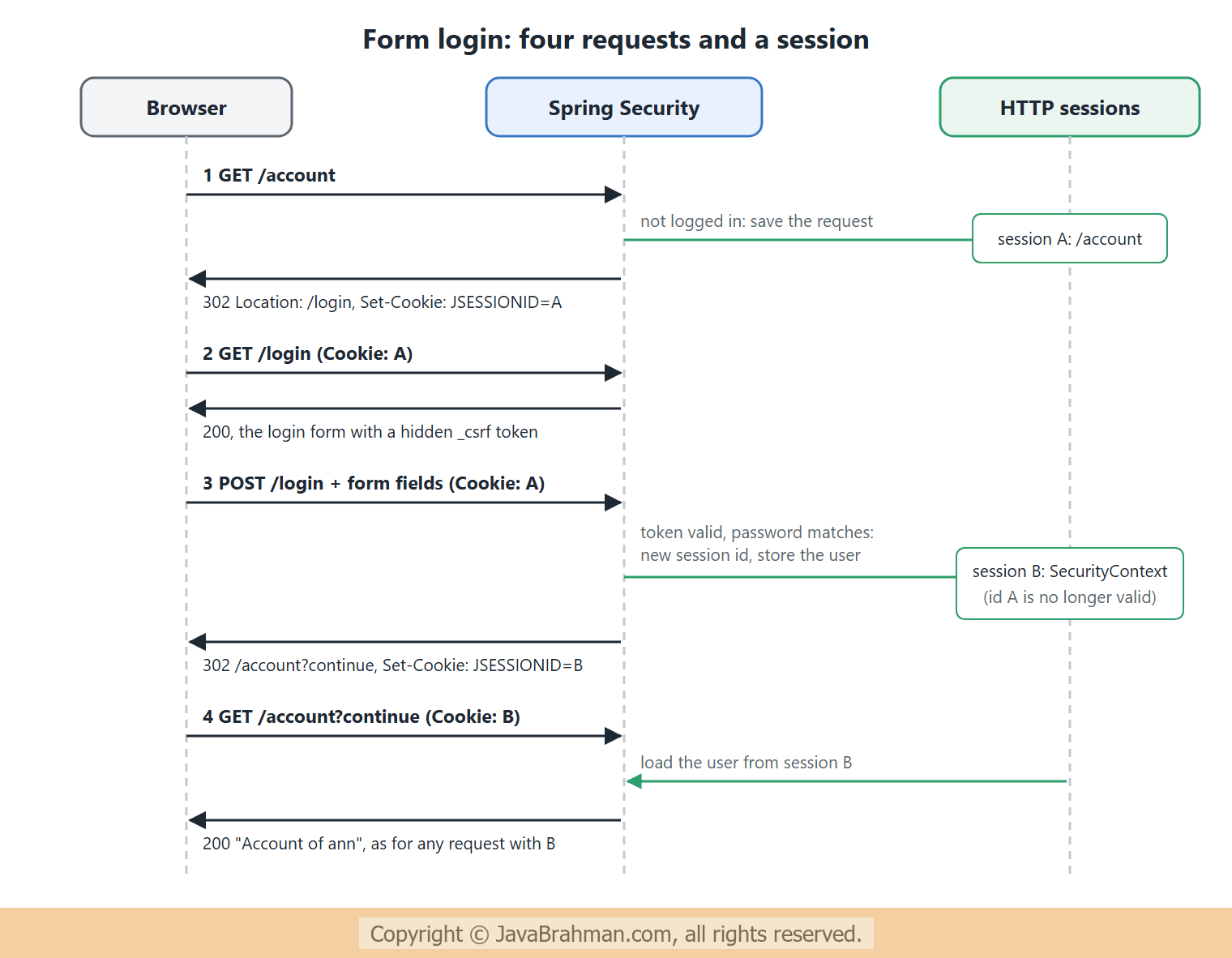
This tutorial explains how a browser user logs in to a Spring Security application with a login form, and stays logged in through an HTTP session. We will see how a session cookie stands in for the password after login, and follow the four requests of a form login step by step. We will look at the CSRF attack that sessions make possible and the token that defends against it, and at session fixation protection, which changes the session id at login. Thirteen real requests, carrying cookies and tokens from one response to the next as a browser would, then show the login, a refused forged login, a wrong password, a one-session-per-user rule ending an old session, and logout.Sessions: logging in once
HTTP Basic, used in the previous tutorialsClick to read tutorial: Configuring SecurityFilterChain in Spring Security, sends the password with every request. That suits programs, but a person in a browser should type the password once. Form login does this with an HTTP session -- The user posts the username and password once, to
/login. - If they are right, Spring Security stores the
SecurityContext, which holds the authenticated user, in the user's HTTP session on the server. - The browser receives a cookie,
JSESSIONID, naming that session, and sends it automatically with every later request. - On each request,
SecurityContextHolderFilterfinds the session from the cookie and loads the user from it. No password is needed until the session ends, by logout or timeout.
HttpOnly, so that page scripts cannot read it, and why the session id changes at login, as we will see. Over HTTPS, the cookie should also be marked Secure, so that it is never sent unencrypted.
CSRF: the danger of automatic cookies
The convenience of sessions has a price. The browser sends the session cookie with every request to the site, including requests that another site makes it send. That is cross-site request forgery: a page on an attacker's site submits a hidden form to your application, and your application sees a valid session and obeys. Spring Security's defence is a secret token that the attacker's page cannot know -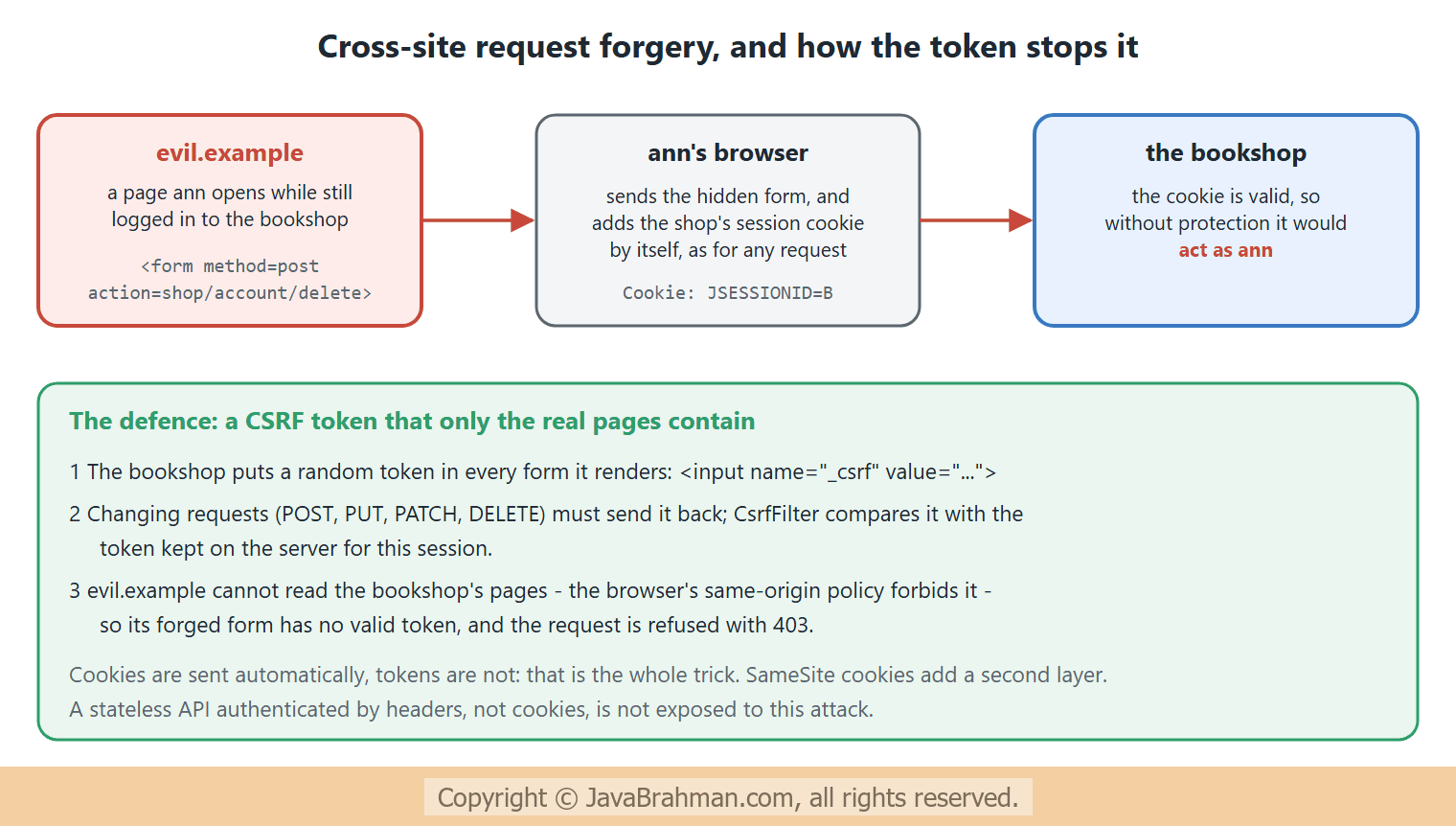 CSRF protection is on by default in Spring Security. GET, HEAD, OPTIONS and TRACE requests need no token, so they must never change data; every other method must send the token, as a form field named
_csrf or an X-CSRF-TOKEN header. Template engines such as Thymeleaf add the hidden field to forms automatically.
The example
The application has a public home page and an account page, which also says whether its session was created by this request -PageController.java - a public page and a private one
//PageController.java
package com.javabrahman.security.session;

import jakarta.servlet.http.HttpSession;
import java.security.Principal;
import org.springframework.web.bind.annotation.GetMapping;
import org.springframework.web.bind.annotation.RestController;

@RestController
public class PageController {

  @GetMapping("/")
  public String home() {
    return "Welcome";
  }

  @GetMapping("/account")
  public String account(Principal user, HttpSession session) {
    return "Account of " + user.getName() + ", session created " + (session.isNew() ? "now" : "earlier");
  }
}
SecurityConfig.java - form login, logout and session rules
//SecurityConfig.java
package com.javabrahman.security.session;

import org.springframework.context.annotation.Bean;
import org.springframework.context.annotation.Configuration;
import org.springframework.security.config.annotation.web.builders.HttpSecurity;
import org.springframework.security.core.userdetails.User;
import org.springframework.security.core.userdetails.UserDetailsService;
import org.springframework.security.crypto.factory.PasswordEncoderFactories;
import org.springframework.security.crypto.password.PasswordEncoder;
import org.springframework.security.provisioning.InMemoryUserDetailsManager;
import org.springframework.security.web.SecurityFilterChain;
import org.springframework.security.web.session.HttpSessionEventPublisher;

@Configuration
public class SecurityConfig {

  @Bean
  SecurityFilterChain chain(HttpSecurity http) throws Exception {
    http
        .authorizeHttpRequests(auth -> auth
            .requestMatchers("/", "/error").permitAll()
            .anyRequest().authenticated())
        .formLogin(form -> form
            .defaultSuccessUrl("/account"))               // where to go when no page was requested before
        .logout(logout -> logout
            .logoutSuccessUrl("/login?logout"))
        .sessionManagement(session -> session
            .maximumSessions(1));                         // one session per user: a new login ends the old one
    return http.build();
  }

  @Bean
  HttpSessionEventPublisher sessionEvents() {             // tells Spring Security when sessions end
    return new HttpSessionEventPublisher();
  }

  @Bean
  PasswordEncoder passwordEncoder() {
    return PasswordEncoderFactories.createDelegatingPasswordEncoder();
  }

  @Bean
  UserDetailsService users(PasswordEncoder encoder) {
    return new InMemoryUserDetailsManager(
        User.withUsername("ann").password(encoder.encode("ann-pass")).roles("USER").build());
  }
}
Explanation of the configuration
formLogin(...)adds the login filters and, since we name no page of our own, generates a login page at/login.defaultSuccessUrl("/account")is where a user goes after logging in when no protected page was requested first.loginPage("/my-login")would use your own page instead, which must postusername,passwordand_csrfto/login.logout(...)configuresPOST /logout, which ends the session, clears the security context, and redirects to/login?logout.maximumSessions(1)allows each user one session at a time: a new login ends the previous session. TheHttpSessionEventPublisherbean tells Spring Security when sessions end, so that it can keep its record of sessions per user correct./erroris public. That is not decoration: in a first version of this example it was not, and a refused request was sent to the error page, which needed a login. The user was then redirected to/logininstead of seeing a 403, and after logging in was taken to/error, the last page "requested".- The password is stored with the
DelegatingPasswordEncoder, as explained in Users, passwords and PasswordEncoderClick to read tutorial: Spring Security Users, Passwords and PasswordEncoder.
SessionApp.java
//SessionApp.java
package com.javabrahman.security.session;

import org.springframework.boot.SpringApplication;
import org.springframework.boot.autoconfigure.SpringBootApplication;

@SpringBootApplication
public class SessionApp {

  public static void main(String[] args) {
    SpringApplication.run(SessionApp.class, args);
  }
}
The requests
The requests below are sent the way a browser would send them: eachCookie header carries a session id from an earlier response, and each _csrf field the token from the last page received. The login page is shown up to its CSRF field, and the bodies of two later pages are cut after their first line. Security headers are present in every response, as before -
OUTPUT of the HTTP requests> curl -i http://localhost:8080/account -H "Accept: text/html"
HTTP/1.1 302
X-Content-Type-Options: nosniff
X-XSS-Protection: 0
Pragma: no-cache
X-Frame-Options: DENY
Cache-Control: no-store, must-revalidate, no-cache, max-age=0
Location: http://localhost:8080/login
Set-Cookie: JSESSIONID=50D5BF16F47A833168A68CA52793908A; Path=/; HttpOnly
Content-Length: 0
Expires: 0
> curl -i http://localhost:8080/login -H "Cookie: JSESSIONID=50D5BF16F47A833168A68CA52793908A"
HTTP/1.1 200
X-Content-Type-Options: nosniff
X-XSS-Protection: 0
Pragma: no-cache
X-Frame-Options: DENY
Cache-Control: no-store, must-revalidate, no-cache, max-age=0
Content-Length: 1103
Content-Type: text/html; charset=UTF-8
Expires: 0
<!DOCTYPE html>
<html lang="en">
<head>
<meta charset="utf-8">
<meta name="viewport" content="width=device-width, initial-scale=1, shrink-to-fit=no">
<meta name="description" content="">
<meta name="author" content="">
<title>Please sign in</title>
<link href="/default-ui.css" rel="stylesheet" />
</head>
<body>
<div class="content">
<form class="login-form" method="post" action="/login">
<h2>Please sign in</h2>
<p>
<label for="username" class="screenreader">Username</label>
<input type="text" id="username" name="username" placeholder="Username" required autofocus>
</p>
<p>
<label for="password" class="screenreader">Password</label>
<input type="password" id="password" name="password" placeholder="Password" required>
</p>
<input name="_csrf" type="hidden" value="fE9BVFATOHe5smZmfNrWHjbgxksf377cfoudW3eNDuFqg--yTywnbGIrAEeUigVeT_fielDY6yomvI3xHOqpY0-0NtRZsN6K" />
<button type="submit" class="primary">Sign in</button>
</form>
...
> curl -i -X POST http://localhost:8080/login -H "Cookie: JSESSIONID=50D5BF16F47A833168A68CA52793908A" -H "Content-Type: application/x-www-form-urlencoded" -d 'username=ann&password=ann-pass'
HTTP/1.1 403
X-Content-Type-Options: nosniff
X-XSS-Protection: 0
Pragma: no-cache
X-Frame-Options: DENY
Cache-Control: no-store, must-revalidate, no-cache, max-age=0
Content-Type: application/json
Expires: 0
{"timestamp":"2026-11-06T19:11:40.145Z","status":403,"error":"Forbidden","path":"/login"}
> curl -i -X POST http://localhost:8080/login -H "Cookie: JSESSIONID=50D5BF16F47A833168A68CA52793908A" -H "Content-Type: application/x-www-form-urlencoded" -d 'username=ann&password=wrong&_csrf=fE9BVFATOHe5smZmfNrWHjbgxksf377cfoudW3eNDuFqg--yTywnbGIrAEeUigVeT_fielDY6yomvI3xHOqpY0-0NtRZsN6K'
HTTP/1.1 302
X-Content-Type-Options: nosniff
X-XSS-Protection: 0
Pragma: no-cache
X-Frame-Options: DENY
Cache-Control: no-store, must-revalidate, no-cache, max-age=0
Location: http://localhost:8080/login?error
Content-Length: 0
Expires: 0
> curl -i -X POST http://localhost:8080/login -H "Cookie: JSESSIONID=50D5BF16F47A833168A68CA52793908A" -H "Content-Type: application/x-www-form-urlencoded" -d 'username=ann&password=ann-pass&_csrf=fE9BVFATOHe5smZmfNrWHjbgxksf377cfoudW3eNDuFqg--yTywnbGIrAEeUigVeT_fielDY6yomvI3xHOqpY0-0NtRZsN6K'
HTTP/1.1 302
X-Content-Type-Options: nosniff
X-XSS-Protection: 0
Pragma: no-cache
X-Frame-Options: DENY
Cache-Control: no-store, must-revalidate, no-cache, max-age=0
Location: http://localhost:8080/account?continue
Set-Cookie: JSESSIONID=81DC06105D4ECF4897602DEF36E3DCCF; Path=/; HttpOnly
Content-Length: 0
Expires: 0
> curl -i http://localhost:8080/account?continue -H "Cookie: JSESSIONID=81DC06105D4ECF4897602DEF36E3DCCF"
HTTP/1.1 200
X-Content-Type-Options: nosniff
X-XSS-Protection: 0
Pragma: no-cache
X-Frame-Options: DENY
Cache-Control: no-store, must-revalidate, no-cache, max-age=0
Content-Length: 39
Content-Type: text/html; charset=UTF-8
Expires: 0
Account of ann, session created earlier
> curl -i http://localhost:8080/account -H "Cookie: JSESSIONID=50D5BF16F47A833168A68CA52793908A" -H "Accept: text/html"
HTTP/1.1 302
X-Content-Type-Options: nosniff
X-XSS-Protection: 0
Pragma: no-cache
X-Frame-Options: DENY
Cache-Control: no-store, must-revalidate, no-cache, max-age=0
Location: http://localhost:8080/login
Set-Cookie: JSESSIONID=7C39DE961A89BC9684BAA6ADD0A4A9B7; Path=/; HttpOnly
Content-Length: 0
Expires: 0
> curl -i http://localhost:8080/login
HTTP/1.1 200
X-Content-Type-Options: nosniff
X-XSS-Protection: 0
Pragma: no-cache
X-Frame-Options: DENY
Cache-Control: no-store, must-revalidate, no-cache, max-age=0
Set-Cookie: JSESSIONID=BA8D64FBACB3D7981AECC1589CF9B420; Path=/; HttpOnly
Content-Length: 1103
Content-Type: text/html; charset=UTF-8
Expires: 0
<!DOCTYPE html>
...
> curl -i -X POST http://localhost:8080/login -H "Cookie: JSESSIONID=BA8D64FBACB3D7981AECC1589CF9B420" -H "Content-Type: application/x-www-form-urlencoded" -d 'username=ann&password=ann-pass&_csrf=yNkpr2AzU8EDPDdjHSzXBT8_rq-Q4ftj_ZQ-lM6SxnCX4YxOq-AQnAJQZPAuBQQGKwHjMlxdg86n1MhOxKYG8Kyjo0mk0LV6'
HTTP/1.1 302
X-Content-Type-Options: nosniff
X-XSS-Protection: 0
Pragma: no-cache
X-Frame-Options: DENY
Cache-Control: no-store, must-revalidate, no-cache, max-age=0
Location: http://localhost:8080/account
Set-Cookie: JSESSIONID=BAF37E2A5B4CA7BF8A05FE79245DBB13; Path=/; HttpOnly
Content-Length: 0
Expires: 0
> curl -i http://localhost:8080/account -H "Cookie: JSESSIONID=81DC06105D4ECF4897602DEF36E3DCCF"
HTTP/1.1 200
X-Content-Type-Options: nosniff
X-XSS-Protection: 0
Pragma: no-cache
X-Frame-Options: DENY
Cache-Control: no-store, must-revalidate, no-cache, max-age=0
Expires: 0
This session has been expired (possibly due to multiple concurrent logins being attempted as the same user).
> curl -i http://localhost:8080/logout -H "Cookie: JSESSIONID=BAF37E2A5B4CA7BF8A05FE79245DBB13"
HTTP/1.1 200
X-Content-Type-Options: nosniff
X-XSS-Protection: 0
Pragma: no-cache
X-Frame-Options: DENY
Cache-Control: no-store, must-revalidate, no-cache, max-age=0
Content-Length: 741
Content-Type: text/html; charset=UTF-8
Expires: 0
<!DOCTYPE html>
...
> curl -i -X POST http://localhost:8080/logout -H "Cookie: JSESSIONID=BAF37E2A5B4CA7BF8A05FE79245DBB13" -H "Content-Type: application/x-www-form-urlencoded" -d '_csrf=H29vbQSb27DeotvQZYkFMbZd2HLCrCFP-XsKYyMd5c709ZzEK1xWDzSj74bzmuq1VaQxVY5k9UrymkdizEI_UUckgKvFkaz2'
HTTP/1.1 302
X-Content-Type-Options: nosniff
X-XSS-Protection: 0
Pragma: no-cache
X-Frame-Options: DENY
Cache-Control: no-store, must-revalidate, no-cache, max-age=0
Location: http://localhost:8080/login?logout
Content-Length: 0
Expires: 0
> curl -i http://localhost:8080/account -H "Cookie: JSESSIONID=BAF37E2A5B4CA7BF8A05FE79245DBB13" -H "Accept: text/html"
HTTP/1.1 302
X-Content-Type-Options: nosniff
X-XSS-Protection: 0
Pragma: no-cache
X-Frame-Options: DENY
Cache-Control: no-store, must-revalidate, no-cache, max-age=0
Location: http://localhost:8080/login
Set-Cookie: JSESSIONID=BC1EFD599980FA4537AE8696C4517929; Path=/; HttpOnly
Content-Length: 0
Expires: 0
Explanation of the login
- 1.
GET /account, not logged in: 302 to/login, and a new session cookie. Spring Security saved the requested URL in that session, to return to it after login. - 2.
GET /loginwith that cookie: the generated login form, postingusernameandpasswordto/login, with a hidden_csrffield holding a long random token tied to this session. - 3. A login without the token, correct password and all: 403.
CsrfFilterrefused it before the password was even checked. A forged login from another site would look exactly like this. Forging a login sounds harmless, but it can log a victim into the attacker's account, where the victim then enters data the attacker can later read. - 4. A wrong password, with the token: 302 to
/login?error, where the login page can show an error. The response does not say whether the user or the password was wrong. - 5. The correct password: 302 to
/account?continue, the saved request; thecontinueparameter tells Spring Security to look for the saved request. The response sets a newJSESSIONID. This is session fixation protection: the session keeps its contents but gets a new id at login. Without it, an attacker who managed to plant a known session id in the victim's browser before login would share the session after it. - 6.
/account?continuewith the new cookie: 200, "Account of ann, session created earlier". The user was loaded from the session, with no password in the request. - 7. The pre-login session id no longer works: 302 to
/login, with yet another new session.
Explanation of the second login and logout
- 8 and 9. Ann logs in again, as if from a second browser: a fresh login page with a new token, then a successful login. This time no protected page was requested first, so the redirect goes to the
defaultSuccessUrl,/account. - 10. The first browser's session is now finished: the response is the text "This session has been expired (possibly due to multiple concurrent logins being attempted as the same user)".
maximumSessions(1)ended the older session when the new one was created.maxSessionsPreventsLogin(true)would do the opposite, and refuse the second login while the first session is active. AnexpiredUrl("/login?expired")would redirect to a page of your own instead of this plain message. - 11 and 12. Logout:
GET /logoutshows a generated confirmation page with a CSRF token, andPOST /logoutwith that token logs out: 302 to/login?logout. Logout is a POST, and needs the token, so that another site cannot log users out with a simple link or image. - 13. After logout, the second session's cookie leads to the login page again: the session was invalidated on the server, so the cookie the browser still holds is worthless.
More session settings
- Timeout:
server.servlet.session.timeout=30minapplication.propertiesends sessions after 30 minutes without requests; the servlet container's default is also 30 minutes. - Cookie flags:
server.servlet.session.cookie.secure=trueandserver.servlet.session.cookie.same-site=lax(orstrict).SameSitestops browsers from sending the cookie with most cross-site requests, a second line of defence against CSRF. - Remember me:
rememberMe(...)keeps users logged in across browser restarts with a long-lived cookie. Use the persistent-token variant, and require a fresh login for sensitive actions. - Several servers: sessions live in one server's memory by default. Behind a load balancer, either route each user to the same server, or store sessions in a shared store such as Redis or a database with Spring Session.
- APIs: for REST clients and single-page applications that send tokens in headers, sessions are often not used at all. That is the subject of the next tutorial, stateless REST API security with JWTClick to read tutorial: Stateless REST API Security with JWT in Spring Boot.
Summary
In this tutorial we saw how form login authenticates a user once and keeps the result in an HTTP session, named by theJSESSIONID cookie that the browser sends with every request. We followed the four requests of a login: the redirect to the login page with the original request saved, the form with its CSRF token, the login post, and the return to the requested page. Real requests showed a login without the CSRF token refused with 403, a wrong password redirected to /login?error, and a successful login issuing a new session id, which made the old id useless. With maximumSessions(1), a second login expired the first session, and a POST to /logout with its token ended the second. We also saw why /error must be public, and the settings for timeouts, cookies, remember-me and clustered servers. The next tutorial secures a REST API without sessions at all: Stateless REST API security with JWTClick to read tutorial: Stateless REST API Security with JWT in Spring Boot.Spring Security Tutorials
Spring Security Users, Passwords and PasswordEncoderClick to read tutorial: Spring Security Users, Passwords and PasswordEncoder Stateless REST API Security with JWT in Spring BootClick to read tutorial: Stateless REST API Security with JWT in Spring Boot Spring Security Architecture: Filter Chain ExplainedClick to read tutorial: Spring Security Architecture: Filter Chain Explained Configuring SecurityFilterChain in Spring SecurityClick to read tutorial: Configuring SecurityFilterChain in Spring Security Spring Security OAuth2 Login and OpenID ConnectClick to read tutorial: Spring Security OAuth2 Login and OpenID Connect Spring Security OAuth2 Resource Server with JWTClick to read tutorial: Spring Security OAuth2 Resource Server with JWT Spring Method Security: @PreAuthorize and @PostAuthorizeClick to read tutorial: Spring Method Security: @PreAuthorize and @PostAuthorize
Spring Security Users, Passwords and PasswordEncoderClick to read tutorial: Spring Security Users, Passwords and PasswordEncoder Stateless REST API Security with JWT in Spring BootClick to read tutorial: Stateless REST API Security with JWT in Spring Boot Spring Security Architecture: Filter Chain ExplainedClick to read tutorial: Spring Security Architecture: Filter Chain Explained Configuring SecurityFilterChain in Spring SecurityClick to read tutorial: Configuring SecurityFilterChain in Spring Security Spring Security OAuth2 Login and OpenID ConnectClick to read tutorial: Spring Security OAuth2 Login and OpenID Connect Spring Security OAuth2 Resource Server with JWTClick to read tutorial: Spring Security OAuth2 Resource Server with JWT Spring Method Security: @PreAuthorize and @PostAuthorizeClick to read tutorial: Spring Method Security: @PreAuthorize and @PostAuthorize