
Spring Security CSRF, CORS and Security Headers Explained
Introduction
This tutorial explains three protections that Spring Security provides for applications used in a browser, and that are often confused with each other: CSRF protection, CORS, and the security headers. We will see which question each one answers. We will then configure all three for a single-page application with Spring Security 7'scsrf.spa(), a CorsConfigurationSource bean and custom headers, and send eight real requests: POSTs with and without a CSRF token, preflight requests from an allowed and a foreign origin, and the headers of a page over plain HTTP and over HTTPS behind a proxy.Three protections, three questions
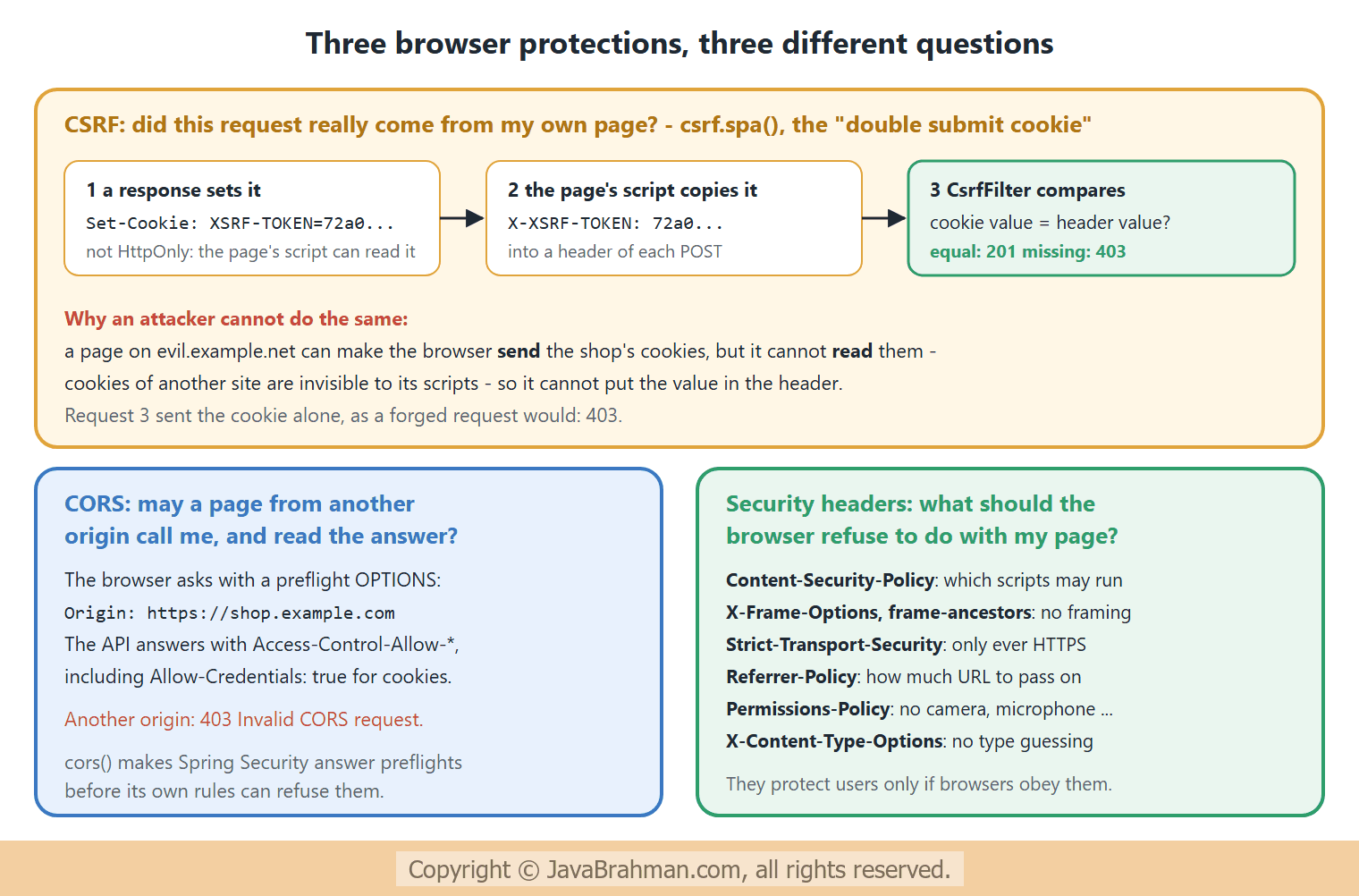
All three exist because a browser runs code from many sites side by side and attaches cookies automatically -- CSRF protection is done by your server: it refuses state-changing requests that do not prove they come from your own pages. The form login tutorialClick to read tutorial: Spring Security Form Login and Session Authentication showed it with a hidden form field.
- CORS is enforced by the browser, on your server's instructions: may JavaScript from another origin call your API and read the answer? The CORS tutorialClick to read tutorial: CORS, Content Negotiation and File Uploads in Spring Boot configured it in Spring MVC; with Spring Security, preflight requests must also get through the security filters.
- Security headers are instructions to the browser about your pages: do not run foreign scripts, do not show this page in a frame, never use plain HTTP again.
The example
A notes API is meant for a single-page application athttps://shop.example.com, which logs in with a session cookie. For such applications a hidden form field does not fit: the page is built by JavaScript, not by the server. The usual solution is the double submit cookie: the server sends the CSRF token in a cookie that scripts may read, XSRF-TOKEN, and the page sends it back in a header, X-XSRF-TOKEN. Angular's HTTP client does this automatically; with fetch or Axios it is a few lines. In Spring Security 7, csrf.spa() configures the server side of it in one call.All URLs are open, so that the requests show the protections and nothing else; CSRF protection applies to POST requests whether or not a user is logged in. The application also runs as if behind a reverse proxy that terminates HTTPS, which is how most applications are deployed:
server.forward-headers-strategy=native makes Tomcat trust the proxy's X-Forwarded-Proto header. Only enable it when a proxy really sits in front and sets these headers, since otherwise clients could send them themselves -
application.properties - trust X-Forwarded-* headers from a proxy
server.forward-headers-strategy=nativeBrowserSecurity.java - CSRF for a single-page app, CORS and security headers
//BrowserSecurity.java
package com.javabrahman.security.browser;

import java.util.List;
import org.springframework.context.annotation.Bean;
import org.springframework.context.annotation.Configuration;
import org.springframework.security.config.Customizer;
import org.springframework.security.config.annotation.web.builders.HttpSecurity;
import org.springframework.security.web.SecurityFilterChain;
import org.springframework.security.web.header.writers.ReferrerPolicyHeaderWriter.ReferrerPolicy;
import org.springframework.web.cors.CorsConfiguration;
import org.springframework.web.cors.CorsConfigurationSource;
import org.springframework.web.cors.UrlBasedCorsConfigurationSource;

@Configuration
public class BrowserSecurity {

  @Bean
  SecurityFilterChain chain(HttpSecurity http) throws Exception {
    http
        .authorizeHttpRequests(auth -> auth.anyRequest().permitAll())   // this tutorial is about the protections
        .csrf(csrf -> csrf.spa())                                        // XSRF-TOKEN cookie, X-XSRF-TOKEN header
        .cors(Customizer.withDefaults())                                 // uses the CorsConfigurationSource bean
        .headers(headers -> headers
            .contentSecurityPolicy(csp -> csp.policyDirectives("default-src 'self'; frame-ancestors 'none'"))
            .referrerPolicy(referrer -> referrer.policy(ReferrerPolicy.STRICT_ORIGIN_WHEN_CROSS_ORIGIN))
            .permissionsPolicyHeader(permissions -> permissions.policy("camera=(), microphone=(), geolocation=()")));
    return http.build();
  }

  @Bean
  CorsConfigurationSource corsConfigurationSource() {
    CorsConfiguration config = new CorsConfiguration();
    config.setAllowedOrigins(List.of("https://shop.example.com"));
    config.setAllowedMethods(List.of("GET", "POST"));
    config.setAllowedHeaders(List.of("Content-Type", "X-XSRF-TOKEN"));
    config.setAllowCredentials(true);                                    // the page may send its cookies
    config.setMaxAge(3600L);
    UrlBasedCorsConfigurationSource source = new UrlBasedCorsConfigurationSource();
    source.registerCorsConfiguration("/api/**", config);
    return source;
  }
}csrf.spa()stores the token in anXSRF-TOKENcookie withoutHttpOnly, and accepts it in anX-XSRF-TOKENheader. Form posts with a_csrffield keep working too.cors(withDefaults())adds aCorsFilterearly in the chain, using theCorsConfigurationSourcebean. Without it, a preflightOPTIONSrequest, which never carries cookies or credentials, could be refused by the security rules before Spring MVC's CORS support ever saw it.setAllowCredentials(true)lets the page send its cookies with cross-origin requests. Browsers then require an exact origin, never*.- The
headers()block adds three headers to Spring Security's defaults; the requests show the full set.
NotesController.java
//NotesController.java
package com.javabrahman.security.browser;

import java.util.List;
import org.springframework.http.ResponseEntity;
import org.springframework.web.bind.annotation.GetMapping;
import org.springframework.web.bind.annotation.PostMapping;
import org.springframework.web.bind.annotation.RequestBody;
import org.springframework.web.bind.annotation.RestController;

@RestController
public class NotesController {

  @GetMapping("/")
  public String home() {
    return "home page";
  }

  @GetMapping("/api/notes")
  public List<String> notes() {
    return List.of("buy milk");
  }

  @PostMapping("/api/notes")
  public ResponseEntity<String> add(@RequestBody String note) {
    return ResponseEntity.status(201).body("saved: " + note);
  }
}
BrowserApp.java
//BrowserApp.java
package com.javabrahman.security.browser;

import org.springframework.boot.SpringApplication;
import org.springframework.boot.autoconfigure.SpringBootApplication;

@SpringBootApplication
public class BrowserApp {

  public static void main(String[] args) {
    SpringApplication.run(BrowserApp.class, args);
  }
}
The requests
TheXSRF-TOKEN value in the requests is the one from the latest Set-Cookie, as a browser would keep it -
OUTPUT of the HTTP requests> curl -i http://localhost:8080/api/notes
HTTP/1.1 200
Vary: Origin, Access-Control-Request-Method, Access-Control-Request-Headers
X-Content-Type-Options: nosniff
X-XSS-Protection: 0
Pragma: no-cache
X-Frame-Options: DENY
Content-Security-Policy: default-src 'self'; frame-ancestors 'none'
Referrer-Policy: strict-origin-when-cross-origin
Permissions-Policy: camera=(), microphone=(), geolocation=()
Cache-Control: no-store, must-revalidate, no-cache, max-age=0
Set-Cookie: XSRF-TOKEN=845aafbb-b2d4-4509-9871-0da8b9a3e0bc; Path=/
Content-Length: 12
Content-Type: application/json
Expires: 0
["buy milk"]
> curl -i -X POST http://localhost:8080/api/notes -H "Content-Type: text/plain" -d 'call the bank'
HTTP/1.1 403
Vary: Origin, Access-Control-Request-Method, Access-Control-Request-Headers
X-Content-Type-Options: nosniff
X-XSS-Protection: 0
Pragma: no-cache
X-Frame-Options: DENY
Content-Security-Policy: default-src 'self'; frame-ancestors 'none'
Referrer-Policy: strict-origin-when-cross-origin
Permissions-Policy: camera=(), microphone=(), geolocation=()
Cache-Control: no-store, must-revalidate, no-cache, max-age=0
Set-Cookie: XSRF-TOKEN=4d103df4-87a0-4f64-822d-51a814d1695e; Path=/
Content-Type: application/json
Expires: 0
{"timestamp":"2026-11-06T19:12:38.300Z","status":403,"error":"Forbidden","path":"/api/notes"}
> curl -i -X POST http://localhost:8080/api/notes -H "Cookie: XSRF-TOKEN=4d103df4-87a0-4f64-822d-51a814d1695e" -H "Content-Type: text/plain" -d 'call the bank'
HTTP/1.1 403
Vary: Origin, Access-Control-Request-Method, Access-Control-Request-Headers
X-Content-Type-Options: nosniff
X-XSS-Protection: 0
Pragma: no-cache
X-Frame-Options: DENY
Content-Security-Policy: default-src 'self'; frame-ancestors 'none'
Referrer-Policy: strict-origin-when-cross-origin
Permissions-Policy: camera=(), microphone=(), geolocation=()
Cache-Control: no-store, must-revalidate, no-cache, max-age=0
Content-Type: application/json
Expires: 0
{"timestamp":"2026-11-06T19:12:38.332Z","status":403,"error":"Forbidden","path":"/api/notes"}
> curl -i -X POST http://localhost:8080/api/notes -H "Cookie: XSRF-TOKEN=4d103df4-87a0-4f64-822d-51a814d1695e" -H "X-XSRF-TOKEN: 4d103df4-87a0-4f64-822d-51a814d1695e" -H "Content-Type: text/plain" -d 'call the bank'
HTTP/1.1 201
Vary: Origin, Access-Control-Request-Method, Access-Control-Request-Headers
X-Content-Type-Options: nosniff
X-XSS-Protection: 0
Pragma: no-cache
X-Frame-Options: DENY
Content-Security-Policy: default-src 'self'; frame-ancestors 'none'
Referrer-Policy: strict-origin-when-cross-origin
Permissions-Policy: camera=(), microphone=(), geolocation=()
Cache-Control: no-store, must-revalidate, no-cache, max-age=0
Content-Length: 20
Content-Type: text/plain; charset=UTF-8
Expires: 0
saved: call the bank
> curl -i -X OPTIONS http://localhost:8080/api/notes -H "Origin: https://shop.example.com" -H "Access-Control-Request-Method: POST" -H "Access-Control-Request-Headers: content-type,x-xsrf-token"
HTTP/1.1 200
Vary: Origin, Access-Control-Request-Method, Access-Control-Request-Headers
Access-Control-Allow-Origin: https://shop.example.com
Access-Control-Allow-Methods: GET,POST
Access-Control-Allow-Headers: content-type, x-xsrf-token
Access-Control-Allow-Credentials: true
Access-Control-Max-Age: 3600
X-Content-Type-Options: nosniff
X-XSS-Protection: 0
Pragma: no-cache
X-Frame-Options: DENY
Content-Security-Policy: default-src 'self'; frame-ancestors 'none'
Referrer-Policy: strict-origin-when-cross-origin
Permissions-Policy: camera=(), microphone=(), geolocation=()
Cache-Control: no-store, must-revalidate, no-cache, max-age=0
Content-Length: 0
Expires: 0
> curl -i -X OPTIONS http://localhost:8080/api/notes -H "Origin: https://evil.example.net" -H "Access-Control-Request-Method: POST"
HTTP/1.1 403
Vary: Origin, Access-Control-Request-Method, Access-Control-Request-Headers
X-Content-Type-Options: nosniff
X-XSS-Protection: 0
Pragma: no-cache
X-Frame-Options: DENY
Content-Security-Policy: default-src 'self'; frame-ancestors 'none'
Referrer-Policy: strict-origin-when-cross-origin
Permissions-Policy: camera=(), microphone=(), geolocation=()
Cache-Control: no-store, must-revalidate, no-cache, max-age=0
Expires: 0
Invalid CORS request
> curl -i http://localhost:8080/
HTTP/1.1 200
X-Content-Type-Options: nosniff
X-XSS-Protection: 0
Pragma: no-cache
X-Frame-Options: DENY
Content-Security-Policy: default-src 'self'; frame-ancestors 'none'
Referrer-Policy: strict-origin-when-cross-origin
Permissions-Policy: camera=(), microphone=(), geolocation=()
Cache-Control: no-store, must-revalidate, no-cache, max-age=0
Set-Cookie: XSRF-TOKEN=98d1b459-412b-4d60-8b56-5a67f74a71f1; Path=/
Content-Length: 9
Content-Type: text/plain; charset=UTF-8
Expires: 0
home page
> curl -i http://localhost:8080/ -H "X-Forwarded-Proto: https"
HTTP/1.1 200
X-Content-Type-Options: nosniff
X-XSS-Protection: 0
Pragma: no-cache
Strict-Transport-Security: max-age=31536000 ; includeSubDomains
X-Frame-Options: DENY
Content-Security-Policy: default-src 'self'; frame-ancestors 'none'
Referrer-Policy: strict-origin-when-cross-origin
Permissions-Policy: camera=(), microphone=(), geolocation=()
Cache-Control: no-store, must-revalidate, no-cache, max-age=0
Set-Cookie: XSRF-TOKEN=6e402262-68dc-4c4b-ade8-63e245a8ddeb; Path=/; Secure
Content-Length: 9
Content-Type: text/plain; charset=UTF-8
Expires: 0
home page
Explanation of the CSRF requests
- 1. A GET succeeded, and set the cookie
XSRF-TOKEN, a random value, without theHttpOnlyflag, so that the page's JavaScript can read it. GET requests need no token: they must not change anything. - 2. A POST with no token at all: 403. The response set a new token cookie, since the request had brought none.
- 3. A POST with only the cookie: 403 again. This is exactly what a forged request from another site looks like - the browser attaches the shop's cookies to it, but the attacker's page cannot read them to fill in the header.
- 4. Cookie and header with the same value: 201, "saved: call the bank". Only script running on the shop's own origin can read the cookie and copy it.
Explanation of the CORS requests
- 5. Preflight from the shop: 200 with
Access-Control-Allow-Origin: https://shop.example.com, the allowed methodsGET,POST, the allowed headerscontent-type, x-xsrf-token,Access-Control-Allow-Credentials: true, andMax-Age: 3600. The browser may now send the real POST with its cookies and the CSRF header. Note that the CSRF filter did not refuse this preflight: it is anOPTIONSrequest, which needs no token. - 6. Preflight from another origin: 403, "Invalid CORS request", with no
Access-Control-*headers. The browser would not send the real request. - The
Vary: Origin, ...header on API responses tells caches that the answer depends on these request headers, so that a cached answer for one origin is not served to another.
Explanation of the security headers
Content-Security-Policy: default-src 'self'; frame-ancestors 'none': scripts, styles, images and connections may only come from this origin, so an injected<script src="https://evil...">or inline script will not run; and no other page may show this one in a frame. CSP is the strongest defence against XSS, but must be designed for each application: a policy that blocks your own scripts breaks the page. Start with theContent-Security-Policy-Report-Onlyvariant to find out.X-Frame-Options: DENY: the older anti-framing header, against clickjacking;frame-ancestorsis its modern replacement, and both are sent for older browsers.Referrer-Policy: strict-origin-when-cross-origin: other sites see only the origin of the page a user came from, not its full URL, which may contain ids or tokens.Permissions-Policy: camera=(), microphone=(), geolocation=(): the page, and any frames in it, may not use these browser features at all.X-Content-Type-Options: nosniff: the browser must believe theContent-Typeand not guess, for example run an uploaded "image" as a script.X-XSS-Protection: 0switches off an old browser filter that caused more problems than it solved.Cache-Control: no-store,PragmaandExpireskeep possibly private responses out of caches; responses that may be cached, such as static files, can set their ownCache-Control.- 7. Plain HTTP: no
Strict-Transport-Securityheader. 8. HTTPS, as reported by the proxy:Strict-Transport-Security: max-age=31536000 ; includeSubDomains, telling the browser to use only HTTPS for this host and its subdomains for a year, even if a user typeshttp://. Spring Security sends HSTS only over HTTPS, as the standard requires. TheXSRF-TOKENcookie also gained theSecureflag, so it will never travel unencrypted. This is why the forwarded-headers setting matters behind a proxy: without it, the application would believe every request is plain HTTP.
Summary
In this tutorial we separated three protections that work in the browser. CSRF protection, on the server, refuses state-changing requests that do not prove they come from your own pages; withcsrf.spa() the token travels in a readable XSRF-TOKEN cookie and comes back in an X-XSRF-TOKEN header, and a POST with the cookie alone, like a forged one, was refused with 403. CORS, enforced by the browser, let the shop's origin pass a preflight with credentials and refused a foreign origin, with cors() making Spring Security answer preflights itself. The security headers told the browser which scripts may run, that the page must not be framed, what to send as referrer, which features are off, and, over HTTPS only, to never use plain HTTP again. The next tutorial covers logging in without passwords: passkeys, WebAuthn and one-time token loginClick to read tutorial: Spring Security Passkeys, WebAuthn and One-Time Token Login.Spring Security Tutorials
Spring Method Security: @PreAuthorize and @PostAuthorizeClick to read tutorial: Spring Method Security: @PreAuthorize and @PostAuthorize Spring Security Passkeys, WebAuthn and One-Time Token LoginClick to read tutorial: Spring Security Passkeys, WebAuthn and One-Time Token Login Spring Security Architecture: Filter Chain ExplainedClick to read tutorial: Spring Security Architecture: Filter Chain Explained Configuring SecurityFilterChain in Spring SecurityClick to read tutorial: Configuring SecurityFilterChain in Spring Security Spring Security Users, Passwords and PasswordEncoderClick to read tutorial: Spring Security Users, Passwords and PasswordEncoder Spring Security Form Login and Session AuthenticationClick to read tutorial: Spring Security Form Login and Session Authentication Stateless REST API Security with JWT in Spring BootClick to read tutorial: Stateless REST API Security with JWT in Spring Boot
Spring Method Security: @PreAuthorize and @PostAuthorizeClick to read tutorial: Spring Method Security: @PreAuthorize and @PostAuthorize Spring Security Passkeys, WebAuthn and One-Time Token LoginClick to read tutorial: Spring Security Passkeys, WebAuthn and One-Time Token Login Spring Security Architecture: Filter Chain ExplainedClick to read tutorial: Spring Security Architecture: Filter Chain Explained Configuring SecurityFilterChain in Spring SecurityClick to read tutorial: Configuring SecurityFilterChain in Spring Security Spring Security Users, Passwords and PasswordEncoderClick to read tutorial: Spring Security Users, Passwords and PasswordEncoder Spring Security Form Login and Session AuthenticationClick to read tutorial: Spring Security Form Login and Session Authentication Stateless REST API Security with JWT in Spring BootClick to read tutorial: Stateless REST API Security with JWT in Spring Boot