
Configuring SecurityFilterChain in Spring Security
Introduction
This tutorial shows how to configure Spring Security by declaringSecurityFilterChain beans with the lambda DSL, the only configuration style left in Spring Security 7. We will write URL rules with authorizeHttpRequests() - by path, by HTTP method, by role and by authority - and see why their order matters. We will split an application into two filter chains, a stateless one for a REST API and a form-login one for web pages, choose between them with securityMatcher() and @Order, and return a JSON 401 from the API. Nine real requests show each rule at work, and a deliberately broken configuration shows the error Spring Security gives for rules in the wrong order.The lambda DSL
In the previous tutorialClick to read tutorial: Spring Security Architecture: Filter Chain Explained we saw that aSecurityFilterChain is a list of filters. We do not create those filters ourselves. We declare a @Bean method that receives an HttpSecurity builder, switch features on and configure them, and call build(). Each feature is a method that takes a lambda, the customizer, which receives that feature's own configurer -
authorizeHttpRequests(auth -> auth ...): the URL rules, which become theAuthorizationFilter.httpBasic(...),formLogin(...): the ways to log in, each adding its filters.csrf(...),sessionManagement(...),headers(...),cors(...): protections and behaviour.Customizer.withDefaults(): "switch this on with its default settings", for exampleformLogin(withDefaults()).
http.authorizeRequests().antMatchers(...).and().formLogin(), often inside a class extending WebSecurityConfigurerAdapter. That adapter was removed in Spring Security 6, and in Spring Security 7 the and() method, authorizeRequests() and the argument-less csrf() are gone too: such code no longer compiles. The lambda style keeps each feature's settings together in one block, which is easier to read.
The example
The application has a small REST API under/api and two web pages. The API is meant for programs that send HTTP Basic credentials with each request; the pages for people with a browser -
BookApiController.java - the REST API
//BookApiController.java
package com.javabrahman.security.chain;

import java.util.List;
import org.springframework.http.ResponseEntity;
import org.springframework.web.bind.annotation.DeleteMapping;
import org.springframework.web.bind.annotation.GetMapping;
import org.springframework.web.bind.annotation.PathVariable;
import org.springframework.web.bind.annotation.PostMapping;
import org.springframework.web.bind.annotation.RequestBody;
import org.springframework.web.bind.annotation.RequestMapping;
import org.springframework.web.bind.annotation.RestController;

@RestController
@RequestMapping("/api")
public class BookApiController {

  @GetMapping("/books")
  public List<String> list() {
    return List.of("Effective Java", "Clean Code");
  }

  @PostMapping("/books")
  public ResponseEntity<String> add(@RequestBody String title) {
    return ResponseEntity.status(201).body("added: " + title);
  }

  @DeleteMapping("/books/{id}")
  public ResponseEntity<Void> delete(@PathVariable long id) {
    return ResponseEntity.noContent().build();
  }

  @GetMapping("/admin/report")
  public String report() {
    return "2 books, 0 loans";
  }
}
PageController.java - two web pages
//PageController.java
package com.javabrahman.security.chain;

import java.security.Principal;
import org.springframework.web.bind.annotation.GetMapping;
import org.springframework.web.bind.annotation.RestController;

@RestController
public class PageController {

  @GetMapping("/")
  public String home() {
    return "Welcome";
  }

  @GetMapping("/account")
  public String account(Principal user) {
    return "Account of " + user.getName();
  }
}SecurityFilterChain beans and three users -
SecurityConfig.java - two filter chains, each with its own rules
//SecurityConfig.java
package com.javabrahman.security.chain;

import static org.springframework.security.config.Customizer.withDefaults;

import org.springframework.context.annotation.Bean;
import org.springframework.context.annotation.Configuration;
import org.springframework.core.annotation.Order;
import org.springframework.http.HttpMethod;
import org.springframework.http.MediaType;
import org.springframework.security.config.annotation.web.builders.HttpSecurity;
import org.springframework.security.config.http.SessionCreationPolicy;
import org.springframework.security.core.userdetails.User;
import org.springframework.security.core.userdetails.UserDetailsService;
import org.springframework.security.provisioning.InMemoryUserDetailsManager;
import org.springframework.security.web.AuthenticationEntryPoint;
import org.springframework.security.web.SecurityFilterChain;

@Configuration
public class SecurityConfig {

  @Bean
  @Order(1)
  SecurityFilterChain apiChain(HttpSecurity http) throws Exception {
    http
        .securityMatcher("/api/**")                       // this chain handles only /api/... requests
        .authorizeHttpRequests(auth -> auth
            .requestMatchers(HttpMethod.GET, "/api/books/**").permitAll()
            .requestMatchers(HttpMethod.POST, "/api/books").hasRole("EDITOR")
            .requestMatchers(HttpMethod.DELETE, "/api/books/*").hasAuthority("books:delete")
            .requestMatchers("/api/admin/**").hasRole("ADMIN")
            .anyRequest().authenticated())
        .httpBasic(basic -> basic.authenticationEntryPoint(jsonEntryPoint()))
        .csrf(csrf -> csrf.disable())                     // no browser sessions here, see below
        .sessionManagement(session -> session.sessionCreationPolicy(SessionCreationPolicy.STATELESS));
    return http.build();
  }

  @Bean
  @Order(2)
  SecurityFilterChain webChain(HttpSecurity http) throws Exception {
    http
        .authorizeHttpRequests(auth -> auth
            .requestMatchers("/", "/error").permitAll()
            .anyRequest().authenticated())
        .formLogin(withDefaults());
    return http.build();
  }

  // A JSON 401 for API clients, instead of the default empty body
  private AuthenticationEntryPoint jsonEntryPoint() {
    return (request, response, exception) -> {
      response.setStatus(401);
      response.setContentType(MediaType.APPLICATION_JSON_VALUE);
      response.setCharacterEncoding("UTF-8");
      response.getWriter().write("{\"error\":\"authentication required\",\"path\":\"" + request.getRequestURI() + "\"}");
    };
  }

  @Bean
  UserDetailsService users() {
    return new InMemoryUserDetailsManager(
        User.withUsername("ann").password("{noop}ann-pass").roles("USER").build(),
        User.withUsername("eve").password("{noop}eve-pass").roles("USER", "EDITOR").build(),
        User.withUsername("raj").password("{noop}raj-pass").authorities("ROLE_ADMIN", "books:delete").build());
  }
}
Explanation of the configuration
- Two chains:
apiChainstarts withsecurityMatcher("/api/**"), so it handles only requests under/api.webChainhas no security matcher and handles any request.@Order(1)and@Order(2)fix the order in whichFilterChainProxytries them. The catch-all chain must come last, or it would take every request. - Rules by method and path:
requestMatchers(HttpMethod.GET, "/api/books/**")matches only GET requests to that path. In path patterns,*matches one path segment and**any number of segments. - Roles and authorities: an authority is any permission string the user has, such as
books:delete. A role is an authority with the prefixROLE_:hasRole("EDITOR")checks for the authorityROLE_EDITOR, androles("USER", "EDITOR")grantsROLE_USERandROLE_EDITOR. That is why raj, created withauthorities("ROLE_ADMIN", "books:delete"), has the roleADMINand the permission to delete. Roles suit coarse groups of users; fine-grained authorities suit individual operations. - Other rule types:
permitAll(),authenticated(),denyAll(),hasAnyRole(...),hasAnyAuthority(...), andaccess(...)for a customAuthorizationManager. - API settings: HTTP Basic with a custom
AuthenticationEntryPoint, which writes a JSON 401 instead of an empty body.SessionCreationPolicy.STATELESSmeans no HTTP session is created or used, so every request must carry its credentials. CSRF protection is switched off for the API, because CSRF attacks abuse a browser's session cookie, and this chain has no sessions; it stays on in the web chain. Form login and session authenticationClick to read tutorial: Spring Security Form Login and Session Authentication explains CSRF with sessions. - Web settings:
/and/errorare public, everything else needs a login, through the generated login form./erroris public so that error pages can be shown to anonymous users.
ChainApp.java - the application, listing its chains on request
//ChainApp.java
package com.javabrahman.security.chain;

import java.util.Arrays;
import org.springframework.boot.CommandLineRunner;
import org.springframework.boot.SpringApplication;
import org.springframework.boot.autoconfigure.SpringBootApplication;
import org.springframework.context.ApplicationContext;
import org.springframework.context.annotation.Bean;
import org.springframework.security.web.DefaultSecurityFilterChain;
import org.springframework.security.web.FilterChainProxy;

@SpringBootApplication
public class ChainApp {

  @Bean
  CommandLineRunner listChains(FilterChainProxy proxy, ApplicationContext context) {
    return args -> {
      if (!Arrays.asList(args).contains("list-chains")) {
        return;
      }
      proxy.getFilterChains().forEach(chain -> System.out.println(
          "chain for " + ((DefaultSecurityFilterChain) chain).getRequestMatcher() + ": " + chain.getFilters().size() + " filters"));
      System.exit(SpringApplication.exit(context));
    };
  }

  public static void main(String[] args) {
    SpringApplication.run(ChainApp.class, args);
  }
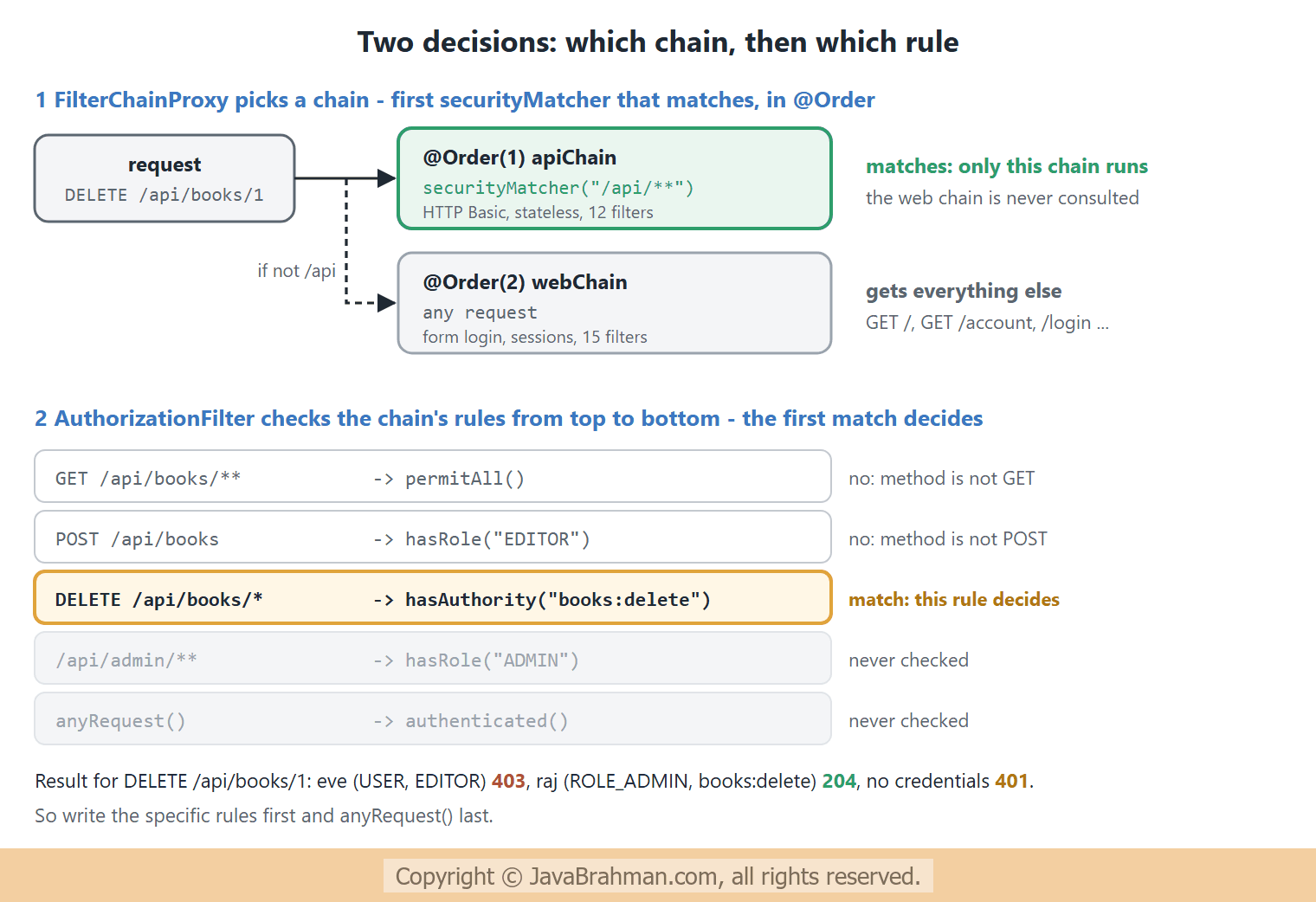
}chain for Or [PathPattern [/api/**]]: 12 filters chain for any request: 15 filters
/api/**, with 12 filters, and one for any request, with 15. The API chain has fewer, because it has no form login, no generated login pages, and no CSRF filter. Each request is handled in two steps: first a chain is chosen, then that chain's rules are checked in order -
The requests
The Basic credentials areann:ann-pass (YW5u...), eve:eve-pass (ZXZl...) and raj:raj-pass (cmFq...). The security headers seen in the previous tutorial are in every response too -
OUTPUT of the HTTP requests> curl -i http://localhost:8080/api/books
HTTP/1.1 200
X-Content-Type-Options: nosniff
X-XSS-Protection: 0
Pragma: no-cache
X-Frame-Options: DENY
Cache-Control: no-store, must-revalidate, no-cache, max-age=0
Content-Length: 31
Content-Type: application/json
Expires: 0
["Effective Java","Clean Code"]
> curl -i -X POST http://localhost:8080/api/books -H "Content-Type: text/plain" -d 'Refactoring'
HTTP/1.1 401
X-Content-Type-Options: nosniff
X-XSS-Protection: 0
Pragma: no-cache
X-Frame-Options: DENY
Cache-Control: no-store, must-revalidate, no-cache, max-age=0
Content-Length: 55
Content-Type: application/json; charset=UTF-8
Expires: 0
{"error":"authentication required","path":"/api/books"}
> curl -i -X POST http://localhost:8080/api/books -H "Authorization: Basic YW5uOmFubi1wYXNz" -H "Content-Type: text/plain" -d 'Refactoring'
HTTP/1.1 403
X-Content-Type-Options: nosniff
X-XSS-Protection: 0
Pragma: no-cache
X-Frame-Options: DENY
Cache-Control: no-store, must-revalidate, no-cache, max-age=0
Content-Type: application/json
Expires: 0
{"timestamp":"2026-11-06T17:47:13.935Z","status":403,"error":"Forbidden","path":"/api/books"}
> curl -i -X POST http://localhost:8080/api/books -H "Authorization: Basic ZXZlOmV2ZS1wYXNz" -H "Content-Type: text/plain" -d 'Refactoring'
HTTP/1.1 201
X-Content-Type-Options: nosniff
X-XSS-Protection: 0
Pragma: no-cache
X-Frame-Options: DENY
Cache-Control: no-store, must-revalidate, no-cache, max-age=0
Content-Length: 18
Content-Type: text/plain; charset=UTF-8
Expires: 0
added: Refactoring
> curl -i -X DELETE http://localhost:8080/api/books/1 -H "Authorization: Basic ZXZlOmV2ZS1wYXNz"
HTTP/1.1 403
X-Content-Type-Options: nosniff
X-XSS-Protection: 0
Pragma: no-cache
X-Frame-Options: DENY
Cache-Control: no-store, must-revalidate, no-cache, max-age=0
Content-Type: application/json
Expires: 0
{"timestamp":"2026-11-06T17:47:14.186Z","status":403,"error":"Forbidden","path":"/api/books/1"}
> curl -i -X DELETE http://localhost:8080/api/books/1 -H "Authorization: Basic cmFqOnJhai1wYXNz"
HTTP/1.1 204
X-Content-Type-Options: nosniff
X-XSS-Protection: 0
Pragma: no-cache
X-Frame-Options: DENY
Cache-Control: no-store, must-revalidate, no-cache, max-age=0
Expires: 0
> curl -i http://localhost:8080/api/admin/report -H "Accept: text/html"
HTTP/1.1 401
X-Content-Type-Options: nosniff
X-XSS-Protection: 0
Pragma: no-cache
X-Frame-Options: DENY
Cache-Control: no-store, must-revalidate, no-cache, max-age=0
Content-Length: 62
Content-Type: application/json; charset=UTF-8
Expires: 0
{"error":"authentication required","path":"/api/admin/report"}
> curl -i http://localhost:8080/
HTTP/1.1 200
X-Content-Type-Options: nosniff
X-XSS-Protection: 0
Pragma: no-cache
X-Frame-Options: DENY
Cache-Control: no-store, must-revalidate, no-cache, max-age=0
Content-Length: 7
Content-Type: text/plain; charset=UTF-8
Expires: 0
Welcome
> curl -i http://localhost:8080/account -H "Accept: text/html"
HTTP/1.1 302
X-Content-Type-Options: nosniff
X-XSS-Protection: 0
Pragma: no-cache
X-Frame-Options: DENY
Cache-Control: no-store, must-revalidate, no-cache, max-age=0
Location: http://localhost:8080/login
Set-Cookie: JSESSIONID=2224007863DE364C2A20F6501C15A6EB; Path=/; HttpOnly
Content-Length: 0
Expires: 0
Explanation of the responses
- GET
/api/bookswithout credentials: 200, from the first rule,permitAll()for GET. - POST without credentials: 401 with our JSON body, from the custom entry point. Unlike the default in the previous tutorial, there is no
Set-Cookie: the stateless API chain created no session. - POST as ann: 403, because ann lacks
ROLE_EDITOR. As eve: 201, "added: Refactoring". The POST worked without a CSRF token, since CSRF is off in this chain. - DELETE as eve: 403; she is an editor, but lacks the
books:deleteauthority. As raj: 204. The diagram above follows this request through the rules. /api/admin/reportfrom a "browser", withAccept: text/html: still 401 JSON, and no redirect to a login page. The request went to the API chain, which has no form login at all./: 200 "Welcome", from the web chain'spermitAll()./account: 302 to/login, with a session cookie to resume the request after login. The two halves of the application behave differently, as intended.
Rule order mistakes
Rules are checked from top to bottom, and the first matching rule decides. A broad rule above a specific one therefore hides it:requestMatchers("/api/**").authenticated() above requestMatchers("/api/books").permitAll() would make the second rule useless, silently. Spring Security does catch the worst case, a rule after anyRequest(), at startup -
BrokenOrderApp.java - anyRequest() written before a more specific rule
//BrokenOrderApp.java
package com.javabrahman.security.brokenorder;

import org.springframework.boot.SpringApplication;
import org.springframework.boot.autoconfigure.SpringBootApplication;
import org.springframework.context.annotation.Bean;
import org.springframework.security.config.annotation.web.builders.HttpSecurity;
import org.springframework.security.web.SecurityFilterChain;

@SpringBootApplication
public class BrokenOrderApp {

  @Bean
  SecurityFilterChain chain(HttpSecurity http) throws Exception {
    http.authorizeHttpRequests(auth -> auth
        .anyRequest().authenticated()
        .requestMatchers("/public/**").permitAll());   // can never be reached
    return http.build();
  }

  public static void main(String[] args) {
    SpringApplication.run(BrokenOrderApp.class, args);
  }
}Caused by: java.lang.IllegalStateException: Can't configure requestMatchers after anyRequest
anyRequest(), usually authenticated() or denyAll(). Then a URL nobody thought of is protected, rather than open.
Configuration tips
- Deny by default: open specific URLs with
permitAll(), and close the rest withanyRequest().authenticated(), not the other way round. - One chain per kind of client: a stateless API and browser pages need different authentication, session and CSRF settings. Separate chains keep each one simple.
- Static resources: allow them in the web chain with
permitAll(), for examplerequestMatchers("/css/**", "/images/**"), rather than taking them out of Spring Security, so that they still get the security headers. - URL rules and method rules: URL rules protect whole areas of the application. For decisions that depend on the data, such as "only the owner may edit this order", use method security with
@PreAuthorize, covered later in this module.
Summary
In this tutorial we configured Spring Security withSecurityFilterChain beans and the lambda DSL, which in Spring Security 7 has replaced the old and() chains completely. We wrote rules by HTTP method and path, with roles and with authorities, and saw that a role is an authority with the ROLE_ prefix. We split the application into a stateless API chain, selected with securityMatcher("/api/**") and @Order(1), and a form-login chain for everything else, and gave the API a JSON 401. Nine requests showed each rule deciding, the API never redirecting to a login page, and the web pages doing so. Finally, a rule after anyRequest() stopped the application at startup. The next tutorial is about the users themselves and how their passwords must be stored: Users, passwords and PasswordEncoderClick to read tutorial: Spring Security Users, Passwords and PasswordEncoder.Spring Security Tutorials
Spring Security Architecture: Filter Chain ExplainedClick to read tutorial: Spring Security Architecture: Filter Chain Explained Spring Security Users, Passwords and PasswordEncoderClick to read tutorial: Spring Security Users, Passwords and PasswordEncoder Spring Security Form Login and Session AuthenticationClick to read tutorial: Spring Security Form Login and Session Authentication
Spring Security Architecture: Filter Chain ExplainedClick to read tutorial: Spring Security Architecture: Filter Chain Explained Spring Security Users, Passwords and PasswordEncoderClick to read tutorial: Spring Security Users, Passwords and PasswordEncoder Spring Security Form Login and Session AuthenticationClick to read tutorial: Spring Security Form Login and Session Authentication