
Command Design Pattern in Java
This article explains Command design pattern in java with UML class diagram. It then takes an example scenario in java and explains it with class diagram and code.
Introduction Command Design Pattern is a behavioral design pattern among the Gang Of Four(GOF) Design PatternsClick to read: Gang Of Four(GOF) Design Patterns. Being a behavioral design pattern, the Command pattern deals with how objects interact - here, by turning a request into an object of its own. What is Command Design Pattern The Command design pattern encapsulates a request as an object. Instead of one object calling a method on another directly, the call - which object to act on, which action, and with which parameters - is wrapped in a command object with a common
Class Diagram for Command Design Pattern
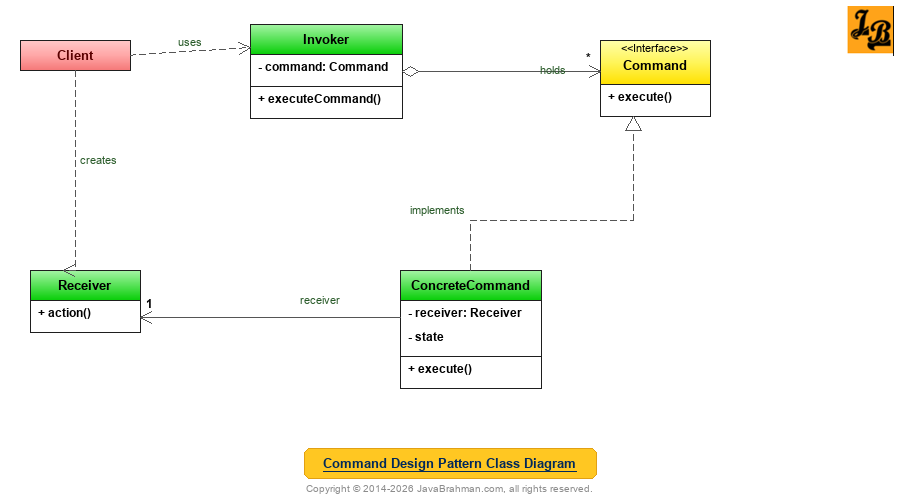 Explanation of Command Design Pattern's Class Diagram
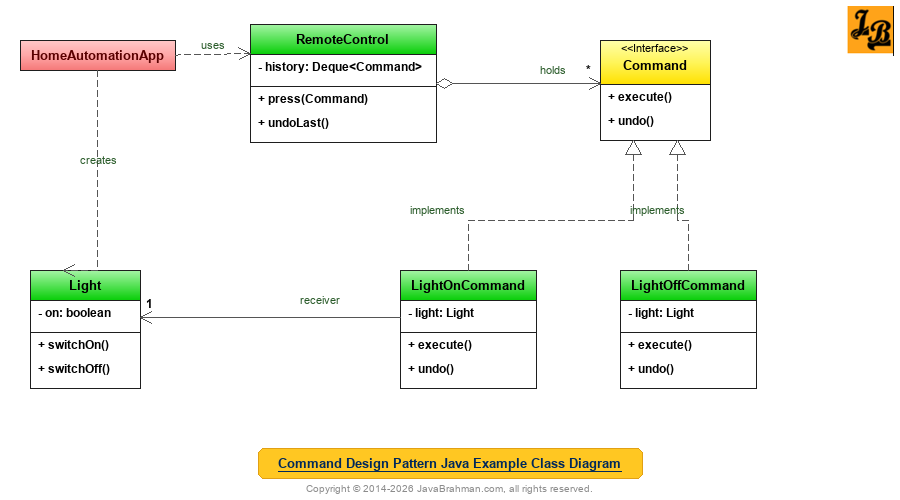 The example is a smart home remote control. Pressing a button executes a command; the remote keeps a history of the commands it has executed, so the last action can be undone.
Code for the classes shown in Java Example's Class Diagram
OUTPUT on running HomeAutomationApp.java
The example is a smart home remote control. Pressing a button executes a command; the remote keeps a history of the commands it has executed, so the last action can be undone.
Code for the classes shown in Java Example's Class Diagram
OUTPUT on running HomeAutomationApp.java
Explanation of Java Example's Class Diagram & Code
Summary
In the above tutorial we understood what is Command design pattern and the main scenarios in which it is applicable. We then looked at the UML class diagram for Command Design Pattern & its explanation, a Java use case implementing a smart home remote control with undo, with its class diagram, code and output, followed by an explanation of both the class diagram & code. This concludes the tutorial on Command design pattern.
Introduction Command Design Pattern is a behavioral design pattern among the Gang Of Four(GOF) Design PatternsClick to read: Gang Of Four(GOF) Design Patterns. Being a behavioral design pattern, the Command pattern deals with how objects interact - here, by turning a request into an object of its own. What is Command Design Pattern The Command design pattern encapsulates a request as an object. Instead of one object calling a method on another directly, the call - which object to act on, which action, and with which parameters - is wrapped in a command object with a common
execute() method. The object which triggers the request, the invoker, then only needs to know about the command interface, not about the object which does the work, the receiver. Because requests are now objects, they can be stored, passed around, queued, logged, and undone.
Scenarios in which Command Design Pattern can be used
- Decoupling the sender of a request from its receiver: When objects such as buttons, menu items or remote control slots should trigger actions without knowing which object performs them - so the same invoker can be configured with any action.
- Undo and redo: When operations must be reversible. Each command stores what it needs to reverse itself, and a history of executed commands supports undo.
- Queuing, scheduling and logging requests: When requests should run later, on another thread, or be recorded so they can be replayed after a crash - as in job queues and transaction logs.
Commandis the interface for executing an operation, with a singleexecute()method.ConcreteCommandbinds aReceiverto an action. Itsexecute()calls the corresponding method on the receiver, and it can store state needed to undo the action.Receiverknows how to actually perform the work.Invokerholds commands and asks them to execute, without knowing anything about receivers.Clientcreates the receiver and the concrete commands, and gives the commands to the invoker.
Command.java - the command interface
//Command.java
public interface Command {
 void execute();
 void undo();
}
Light.java - the receiver
//Light.java
public class Light {
 private final String room;
 private boolean on;

 public Light(String room) { this.room = room; }

 public void switchOn() { on = true; System.out.println("  " + room + " light is ON"); }
 public void switchOff() { on = false; System.out.println("  " + room + " light is OFF"); }
 public boolean isOn() { return on; }
}
LightOnCommand.java and LightOffCommand.java - the concrete commands
//LightOnCommand.java
class LightOnCommand implements Command {
 private final Light light;
 LightOnCommand(Light light) { this.light = light; }
 public void execute() { light.switchOn(); }
 public void undo() { light.switchOff(); }
}
//LightOffCommand.java
class LightOffCommand implements Command {
 private final Light light;
 LightOffCommand(Light light) { this.light = light; }
 public void execute() { light.switchOff(); }
 public void undo() { light.switchOn(); }
}
RemoteControl.java - the invoker
//RemoteControl.java
import java.util.ArrayDeque;
import java.util.Deque;

public class RemoteControl {
 private final Deque<Command> history = new ArrayDeque<>();

 public void press(Command command) {
  command.execute();
  history.push(command);                  // remember it for undo
 }

 public void undoLast() {
  if (history.isEmpty()) {
   System.out.println("  Nothing to undo");
   return;
  }
  history.pop().undo();
 }
}
HomeAutomationApp.java (with the main() method)
//HomeAutomationApp.java
public class HomeAutomationApp {
 public static void main(String[] args) {
  Light kitchen = new Light("Kitchen");
  Light bedroom = new Light("Bedroom");
  RemoteControl remote = new RemoteControl();

  System.out.println("Pressing buttons:");
  remote.press(new LightOnCommand(kitchen));
  remote.press(new LightOnCommand(bedroom));
  remote.press(new LightOffCommand(kitchen));

  System.out.println("Undoing the last two actions:");
  remote.undoLast();                      // kitchen back ON
  remote.undoLast();                      // bedroom back OFF

  System.out.println("An ad-hoc command, then three undos:");
  remote.press(new Command() {            // ad-hoc command without a named class
   public void execute() { System.out.println("  Playing music"); }
   public void undo() { System.out.println("  Music stopped"); }
  });
  remote.undoLast();
  remote.undoLast();
  remote.undoLast();
  System.out.println("Kitchen on? " + kitchen.isOn() + ", bedroom on? " + bedroom.isOn());
 }
}Pressing buttons: Kitchen light is ON Bedroom light is ON Kitchen light is OFF Undoing the last two actions: Kitchen light is ON Bedroom light is OFF An ad-hoc command, then three undos: Playing music Music stopped Kitchen light is OFF Nothing to undo Kitchen on? false, bedroom on? false
Commandis the command interface, extended withundo()so that commands can reverse themselves.LightOnCommandandLightOffCommandare concrete commands. Each holds theLightit acts on - the receiver - and knows which method to call to execute and to undo.RemoteControlis the invoker. It executes anyCommandit is given and pushes it onto a history stack;undoLast()pops the most recent command and undoes it. It knows nothing about lights - the same remote could control a fan or a music player.HomeAutomationAppis the client. It creates the receivers and commands and hands the commands to the remote. The undo calls reverse the actions in the opposite order they were done, and a further undo on an empty history is handled safely.- The anonymous class shows that commands do not always need a named class. A command with only
execute()is just aRunnable, so it can be written as a lambdaClick to read: lambda:Runnable command = () -> light.switchOn();.
Runnable and Callable objects submitted to an ExecutorService are commands, the executor is the invoker, and Swing's Action objects attach the same command to a menu item, a toolbar button and a keyboard shortcut.
Gang of Four (GOF) Design Patterns on JavaBrahman
Creational Patterns: Abstract Factory PatternAbstract Factory Design Pattern in Java Builder PatternBuilder Design Pattern in Java Factory Method PatternFactory Method Design Pattern in Java Prototype PatternPrototype Design Pattern in Java Singleton PatternSingleton Design Pattern in Java
Structural Patterns: Adapter PatternAdapter Design Pattern in Java Bridge PatternBridge Design Pattern in Java Composite PatternComposite Design Pattern in Java Decorator PatternDecorator Design Pattern in Java Facade PatternFacade Design Pattern in Java Flyweight PatternFlyweight Design Pattern in Java Proxy PatternProxy Design Pattern in Java
Behavioral Patterns: Chain of Responsibility PatternChain of Responsibility Design Pattern in Java Command PatternCommand Design Pattern in Java Interpreter PatternInterpreter Design Pattern in Java Iterator PatternIterator Design Pattern in Java Mediator PatternMediator Design Pattern in Java Memento PatternMemento Design Pattern in Java Observer PatternObserver Design Pattern in Java State PatternState Design Pattern in Java Strategy PatternStrategy Design Pattern in Java Template Method PatternTemplate Method Design Pattern in Java Visitor PatternVisitor Design Pattern in Java
Analysis of Patterns: Strategy vs State PatternStrategy Design Pattern versus State Design Pattern GOF Patterns OverviewGOF / Gang of Four Design Patterns in Java
Creational Patterns: Abstract Factory PatternAbstract Factory Design Pattern in Java Builder PatternBuilder Design Pattern in Java Factory Method PatternFactory Method Design Pattern in Java Prototype PatternPrototype Design Pattern in Java Singleton PatternSingleton Design Pattern in Java
Structural Patterns: Adapter PatternAdapter Design Pattern in Java Bridge PatternBridge Design Pattern in Java Composite PatternComposite Design Pattern in Java Decorator PatternDecorator Design Pattern in Java Facade PatternFacade Design Pattern in Java Flyweight PatternFlyweight Design Pattern in Java Proxy PatternProxy Design Pattern in Java
Behavioral Patterns: Chain of Responsibility PatternChain of Responsibility Design Pattern in Java Command PatternCommand Design Pattern in Java Interpreter PatternInterpreter Design Pattern in Java Iterator PatternIterator Design Pattern in Java Mediator PatternMediator Design Pattern in Java Memento PatternMemento Design Pattern in Java Observer PatternObserver Design Pattern in Java State PatternState Design Pattern in Java Strategy PatternStrategy Design Pattern in Java Template Method PatternTemplate Method Design Pattern in Java Visitor PatternVisitor Design Pattern in Java
Analysis of Patterns: Strategy vs State PatternStrategy Design Pattern versus State Design Pattern GOF Patterns OverviewGOF / Gang of Four Design Patterns in Java