
Bridge Design Pattern in Java
This article explains Bridge design pattern in java with UML class diagram. It then takes an example scenario in java and explains it with class diagram and code.
Introduction Bridge Design Pattern is a structural design pattern among the Gang Of Four(GOF) Design PatternsClick to read: Gang Of Four(GOF) Design Patterns. Being a structural design pattern, the Bridge pattern deals with how classes are composed together - here, by splitting one class hierarchy into two which are connected by composition. What is Bridge Design Pattern The Bridge design pattern decouples an abstraction from its implementation so that the two can vary independently. Suppose a class has two independent dimensions of variation - for example, the type of a notification (alert, reminder) and the channel it is sent over (email, SMS). Modelling both with inheritance leads to a subclass for every combination:
Class Diagram for Bridge Design Pattern
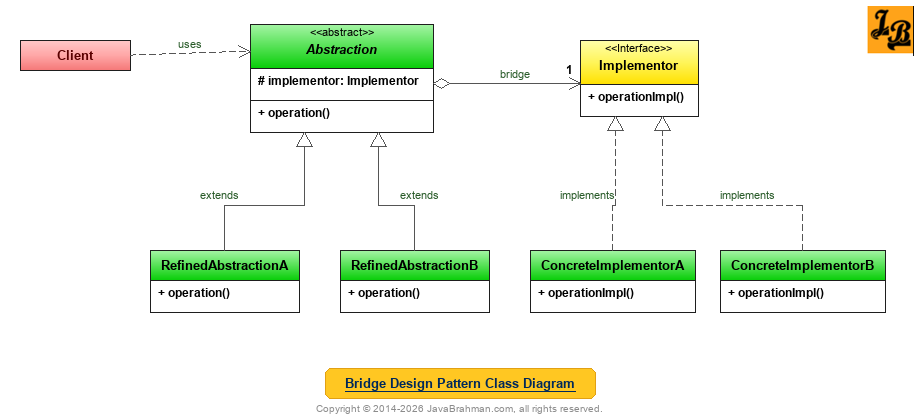 Explanation of Bridge Design Pattern's Class Diagram
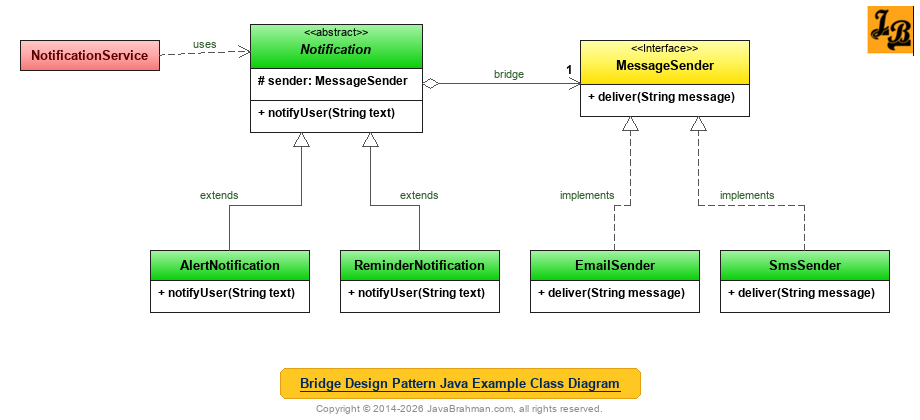 The example sends notifications. The abstraction side defines what a notification is - an alert or a reminder - and the implementation side defines how a message is delivered - by email or SMS.
Code for the classes shown in Java Example's Class Diagram
OUTPUT on running NotificationService.java
The example sends notifications. The abstraction side defines what a notification is - an alert or a reminder - and the implementation side defines how a message is delivered - by email or SMS.
Code for the classes shown in Java Example's Class Diagram
OUTPUT on running NotificationService.java
Explanation of Java Example's Class Diagram & Code
Summary
In the above tutorial we understood what is Bridge design pattern and the main scenarios in which it is applicable. We then looked at the UML class diagram for Bridge Design Pattern & its explanation, a Java use case implementing the Bridge pattern for notifications and delivery channels with its class diagram, code and output, followed by an explanation of both the class diagram & code. This concludes the tutorial on Bridge design pattern.
Introduction Bridge Design Pattern is a structural design pattern among the Gang Of Four(GOF) Design PatternsClick to read: Gang Of Four(GOF) Design Patterns. Being a structural design pattern, the Bridge pattern deals with how classes are composed together - here, by splitting one class hierarchy into two which are connected by composition. What is Bridge Design Pattern The Bridge design pattern decouples an abstraction from its implementation so that the two can vary independently. Suppose a class has two independent dimensions of variation - for example, the type of a notification (alert, reminder) and the channel it is sent over (email, SMS). Modelling both with inheritance leads to a subclass for every combination:
EmailAlert, SmsAlert, EmailReminder, SmsReminder... and adding one channel means adding a class for every type. The Bridge pattern puts each dimension in its own hierarchy, and gives the abstraction a reference to an implementation object - the "bridge" - so that any abstraction can be combined with any implementation at runtime.
Scenarios in which Bridge Design Pattern can be used
- Two independent dimensions of variation: When both the abstraction and its implementation should be extensible by subclassing, and combining them through inheritance would multiply the number of classes.
- Implementation chosen or switched at runtime: When the implementation should be selected by configuration, or changed while the program runs, rather than fixed at compile time.
- Implementation details hidden from clients: When changes to the implementation - a new email provider, a different SMS gateway - should not require recompiling or changing the client code.
Abstractiondefines the high-level interface used by the client, and holds a reference to anImplementor- this reference is the bridge.RefinedAbstractionAandRefinedAbstractionBextend the abstraction with variations of the high-level behaviour.Implementordefines the low-level, primitive operations the abstraction is built on. It need not match the abstraction's interface.ConcreteImplementorAandConcreteImplementorBimplement those operations in different ways, for example for different platforms.Clientworks with the abstraction, which forwards the low-level work to its implementor. Either side can gain new subclasses without affecting the other.
MessageSender.java - the implementor and its two implementations
//MessageSender.java
public interface MessageSender {
 void deliver(String message);
}
//EmailSender.java
class EmailSender implements MessageSender {
 public void deliver(String message) { System.out.println("  [email] " + message); }
}
//SmsSender.java
class SmsSender implements MessageSender {
 public void deliver(String message) {
  String sms = message.length() > 40 ? message.substring(0, 37) + "..." : message;   // SMS is short
  System.out.println("  [sms]   " + sms);
 }
}
Notification.java - the abstraction and its refinements
//Notification.java
public abstract class Notification {
 protected final MessageSender sender;          // the bridge to the implementation

 protected Notification(MessageSender sender) {
  this.sender = sender;
 }

 public abstract void notifyUser(String text);
}
//AlertNotification.java
class AlertNotification extends Notification {
 AlertNotification(MessageSender sender) { super(sender); }
 public void notifyUser(String text) {
  sender.deliver("ALERT! " + text.toUpperCase());
 }
}
//ReminderNotification.java
class ReminderNotification extends Notification {
 ReminderNotification(MessageSender sender) { super(sender); }
 public void notifyUser(String text) {
  sender.deliver("Friendly reminder: " + text);
 }
}
NotificationService.java (with the main() method)
//NotificationService.java
import java.util.List;

public class NotificationService {
 public static void main(String[] args) {
  MessageSender email = new EmailSender();
  MessageSender sms = new SmsSender();

  // Any abstraction combines with any implementation: 2 + 2 classes give 4 combinations
  List<Notification> notifications = List.of(
    new AlertNotification(email),
    new AlertNotification(sms),
    new ReminderNotification(email),
    new ReminderNotification(sms));

  for (Notification n : notifications) {
   System.out.println(n.getClass().getSimpleName() + " via " + n.sender.getClass().getSimpleName() + ":");
   n.notifyUser("your invoice for October is due on 31st October 2026");
  }
 }
}AlertNotification via EmailSender: [email] ALERT! YOUR INVOICE FOR OCTOBER IS DUE ON 31ST OCTOBER 2026 AlertNotification via SmsSender: [sms] ALERT! YOUR INVOICE FOR OCTOBER IS DU... ReminderNotification via EmailSender: [email] Friendly reminder: your invoice for October is due on 31st October 2026 ReminderNotification via SmsSender: [sms] Friendly reminder: your invoice for O...
Notificationis the abstraction. It holds aMessageSender- the bridge - which it receives in its constructor.AlertNotificationandReminderNotificationare the refined abstractions. They decide what the message says, and callsender.deliver()without knowing how it is delivered.MessageSenderis the implementor, andEmailSenderandSmsSenderare the concrete implementors. They decide how a message is delivered - the SMS sender, for instance, shortens long messages.NotificationService, the client, combines both kinds of alert with both channels - four combinations from four classes. With inheritance alone, it would take four classes for the combinations, and every new channel would add two more; with Bridge, a new channel - say, a push notification sender - is one new class which works with every type of notification.
Gang of Four (GOF) Design Patterns on JavaBrahman
Creational Patterns: Abstract Factory PatternAbstract Factory Design Pattern in Java Builder PatternBuilder Design Pattern in Java Factory Method PatternFactory Method Design Pattern in Java Prototype PatternPrototype Design Pattern in Java Singleton PatternSingleton Design Pattern in Java
Structural Patterns: Adapter PatternAdapter Design Pattern in Java Bridge PatternBridge Design Pattern in Java Composite PatternComposite Design Pattern in Java Decorator PatternDecorator Design Pattern in Java Facade PatternFacade Design Pattern in Java Flyweight PatternFlyweight Design Pattern in Java Proxy PatternProxy Design Pattern in Java
Behavioral Patterns: Chain of Responsibility PatternChain of Responsibility Design Pattern in Java Command PatternCommand Design Pattern in Java Interpreter PatternInterpreter Design Pattern in Java Iterator PatternIterator Design Pattern in Java Mediator PatternMediator Design Pattern in Java Memento PatternMemento Design Pattern in Java Observer PatternObserver Design Pattern in Java State PatternState Design Pattern in Java Strategy PatternStrategy Design Pattern in Java Template Method PatternTemplate Method Design Pattern in Java Visitor PatternVisitor Design Pattern in Java
Analysis of Patterns: Strategy vs State PatternStrategy Design Pattern versus State Design Pattern GOF Patterns OverviewGOF / Gang of Four Design Patterns in Java
Creational Patterns: Abstract Factory PatternAbstract Factory Design Pattern in Java Builder PatternBuilder Design Pattern in Java Factory Method PatternFactory Method Design Pattern in Java Prototype PatternPrototype Design Pattern in Java Singleton PatternSingleton Design Pattern in Java
Structural Patterns: Adapter PatternAdapter Design Pattern in Java Bridge PatternBridge Design Pattern in Java Composite PatternComposite Design Pattern in Java Decorator PatternDecorator Design Pattern in Java Facade PatternFacade Design Pattern in Java Flyweight PatternFlyweight Design Pattern in Java Proxy PatternProxy Design Pattern in Java
Behavioral Patterns: Chain of Responsibility PatternChain of Responsibility Design Pattern in Java Command PatternCommand Design Pattern in Java Interpreter PatternInterpreter Design Pattern in Java Iterator PatternIterator Design Pattern in Java Mediator PatternMediator Design Pattern in Java Memento PatternMemento Design Pattern in Java Observer PatternObserver Design Pattern in Java State PatternState Design Pattern in Java Strategy PatternStrategy Design Pattern in Java Template Method PatternTemplate Method Design Pattern in Java Visitor PatternVisitor Design Pattern in Java
Analysis of Patterns: Strategy vs State PatternStrategy Design Pattern versus State Design Pattern GOF Patterns OverviewGOF / Gang of Four Design Patterns in Java