
Abstract Factory Design Pattern in Java
This article explains Abstract Factory design pattern in java with UML class diagram. It then takes an example scenario in java and explains it with class diagram and code.
Introduction Abstract Factory Design Pattern is a creational design pattern among the Gang Of Four(GOF) Design PatternsClick to read: Gang Of Four(GOF) Design Patterns. Being a creational design pattern, the Abstract Factory pattern deals with how objects are created - specifically, how a whole family of related objects is created consistently. What is Abstract Factory Design Pattern The Abstract Factory design pattern provides an interface for creating families of related or dependent objects without specifying their concrete classes. A factory object has one creation method for each kind of product in the family. Each concrete factory creates products which belong together, so client code which works only with the factory and product interfaces automatically gets a consistent set of objects, and the whole family can be switched by switching the factory.
It is closely related to the Factory Method patternClick to read: Factory Method pattern: an abstract factory is typically implemented as a set of factory methods, one per product. The difference is in scope - a factory method creates one product, while an abstract factory creates a family of products which must be used together. Scenarios in which Abstract Factory Design Pattern can be used
Class Diagram for Abstract Factory Design Pattern
 Explanation of Abstract Factory Design Pattern's Class Diagram
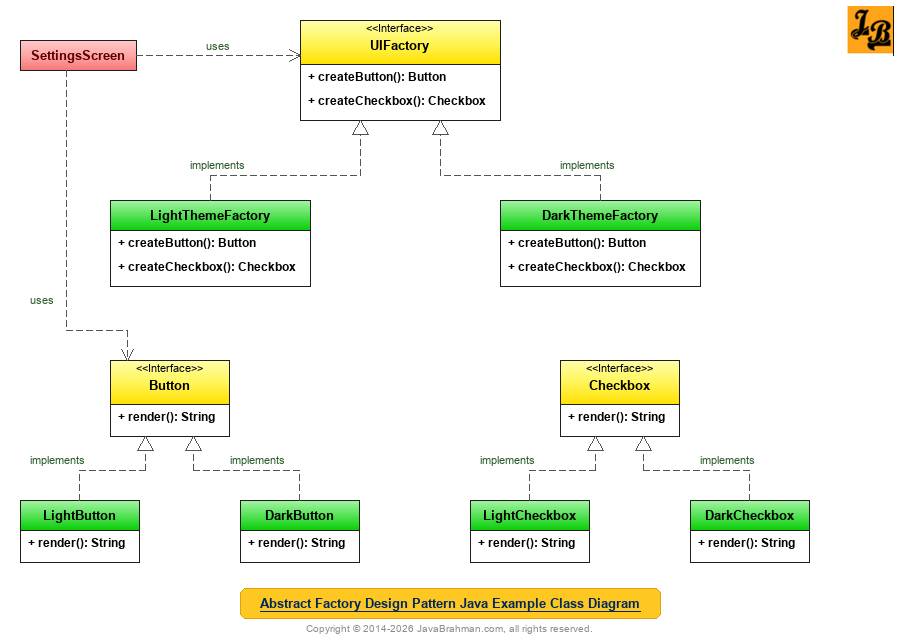 The example builds a settings screen which supports a light and a dark theme. A button and a checkbox from different themes would look wrong together, so each theme is a family of UI components, created by its own factory.
Code for the classes shown in Java Example's Class Diagram
OUTPUT on running SettingsScreen.java
The example builds a settings screen which supports a light and a dark theme. A button and a checkbox from different themes would look wrong together, so each theme is a family of UI components, created by its own factory.
Code for the classes shown in Java Example's Class Diagram
OUTPUT on running SettingsScreen.java
Explanation of Java Example's Class Diagram & Code
Summary
In the above tutorial we understood what is Abstract Factory design pattern and the main scenarios in which it is applicable. We then looked at the UML class diagram for Abstract Factory Design Pattern & its explanation, a Java use case implementing the Abstract Factory pattern for light and dark UI themes with its class diagram, code and output, followed by an explanation of both the class diagram & code. This concludes the tutorial on Abstract Factory design pattern.
Introduction Abstract Factory Design Pattern is a creational design pattern among the Gang Of Four(GOF) Design PatternsClick to read: Gang Of Four(GOF) Design Patterns. Being a creational design pattern, the Abstract Factory pattern deals with how objects are created - specifically, how a whole family of related objects is created consistently. What is Abstract Factory Design Pattern The Abstract Factory design pattern provides an interface for creating families of related or dependent objects without specifying their concrete classes. A factory object has one creation method for each kind of product in the family. Each concrete factory creates products which belong together, so client code which works only with the factory and product interfaces automatically gets a consistent set of objects, and the whole family can be switched by switching the factory.
It is closely related to the Factory Method patternClick to read: Factory Method pattern: an abstract factory is typically implemented as a set of factory methods, one per product. The difference is in scope - a factory method creates one product, while an abstract factory creates a family of products which must be used together. Scenarios in which Abstract Factory Design Pattern can be used
- Families of related products: The system works with several kinds of products - buttons, checkboxes and menus, or connections, commands and readers - which come in several variants, and the products of one variant must be used together.
- Independence from concrete classes: The client code should not depend on how its products are created or which concrete classes they are, so that variants can be added without changing it.
- Configuring the system with one family: The choice of family is made once - from configuration, the platform, or a user setting - and the rest of the application must consistently use that family.
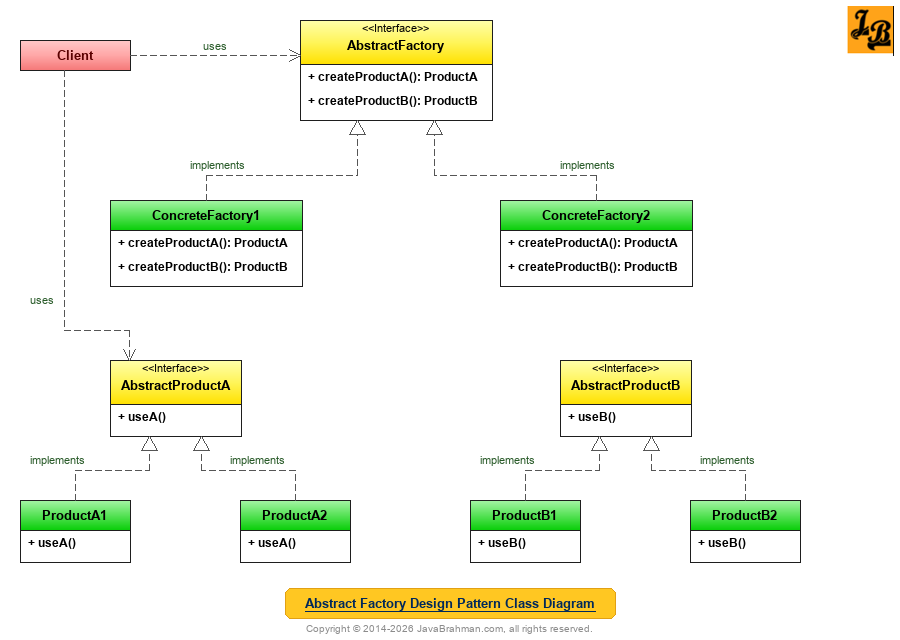
AbstractFactorydeclares one creation method per product type -createProductA()andcreateProductB()- each returning an abstract product.ConcreteFactory1andConcreteFactory2implement it. Each creates the products of one family:ConcreteFactory1createsProductA1andProductB1,ConcreteFactory2createsProductA2andProductB2.AbstractProductAandAbstractProductBare the interfaces for each kind of product, implemented by one class per family.Clientuses only the abstract interfaces. It is given a concrete factory once, and every product it creates through it belongs to the same family.
Button.java - an abstract product
//Button.java
public interface Button {
 String render();
}
Checkbox.java - an abstract product
//Checkbox.java
public interface Checkbox {
 String render();
}
LightButton.java and LightCheckbox.java - the light family
//LightButton.java
class LightButton implements Button {
 public String render() { return "[ Save ]  (white background, dark text)"; }
}
//LightCheckbox.java
class LightCheckbox implements Checkbox {
 public String render() { return "[x] Notifications  (grey border)"; }
}
DarkButton.java and DarkCheckbox.java - the dark family
//DarkButton.java
class DarkButton implements Button {
 public String render() { return "[ Save ]  (charcoal background, light text)"; }
}
//DarkCheckbox.java
class DarkCheckbox implements Checkbox {
 public String render() { return "[x] Notifications  (glowing blue border)"; }
}
UIFactory.java - the abstract factory and its two implementations
//UIFactory.java
public interface UIFactory {
 Button createButton();
 Checkbox createCheckbox();
}
//LightThemeFactory.java
class LightThemeFactory implements UIFactory {
 public Button createButton() { return new LightButton(); }
 public Checkbox createCheckbox() { return new LightCheckbox(); }
}
//DarkThemeFactory.java
class DarkThemeFactory implements UIFactory {
 public Button createButton() { return new DarkButton(); }
 public Checkbox createCheckbox() { return new DarkCheckbox(); }
}
SettingsScreen.java (with the main() method)
//SettingsScreen.java
public class SettingsScreen {
 private final Button saveButton;
 private final Checkbox notifications;

 // The screen depends only on the abstract factory and abstract products
 SettingsScreen(UIFactory factory) {
  this.saveButton = factory.createButton();
  this.notifications = factory.createCheckbox();
 }

 void draw() {
  System.out.println("  " + notifications.render());
  System.out.println("  " + saveButton.render());
 }

 static UIFactory factoryFor(String theme) {          // the family is chosen in one place
  return theme.equals("dark") ? new DarkThemeFactory() : new LightThemeFactory();
 }

 public static void main(String[] args) {
  for (String theme : new String[] {"light", "dark"}) {
   System.out.println("Theme: " + theme);
   new SettingsScreen(factoryFor(theme)).draw();
  }
 }
}Theme: light [x] Notifications (grey border) [ Save ] (white background, dark text) Theme: dark [x] Notifications (glowing blue border) [ Save ] (charcoal background, light text)
UIFactoryis the abstract factory, with one method per kind of component.LightThemeFactoryandDarkThemeFactoryare the concrete factories, one per family.ButtonandCheckboxare the abstract products;LightButton,DarkButton,LightCheckboxandDarkCheckboxare the concrete products.SettingsScreenis the client. It receives a factory in its constructor and never names a concrete class, so it cannot mix a light button with a dark checkbox - each screen's components always come from one family.- The theme is chosen in one place,
factoryFor(). Adding a third theme - say, a high-contrast one - means adding one factory and its products, with no change toSettingsScreen. - The flip side: adding a new kind of product, such as a slider, requires a new method in
UIFactoryand in every concrete factory. Abstract Factory makes new families easy, and new product types harder.
javax.xml.parsers.DocumentBuilderFactory creates XML parsers from whichever implementation is configured, and JDBC's Connection acts as a factory for the Statements and other objects of one database driver.
Gang of Four (GOF) Design Patterns on JavaBrahman
Creational Patterns: Abstract Factory PatternAbstract Factory Design Pattern in Java Builder PatternBuilder Design Pattern in Java Factory Method PatternFactory Method Design Pattern in Java Prototype PatternPrototype Design Pattern in Java Singleton PatternSingleton Design Pattern in Java
Structural Patterns: Adapter PatternAdapter Design Pattern in Java Bridge PatternBridge Design Pattern in Java Composite PatternComposite Design Pattern in Java Decorator PatternDecorator Design Pattern in Java Facade PatternFacade Design Pattern in Java Flyweight PatternFlyweight Design Pattern in Java Proxy PatternProxy Design Pattern in Java
Behavioral Patterns: Chain of Responsibility PatternChain of Responsibility Design Pattern in Java Command PatternCommand Design Pattern in Java Interpreter PatternInterpreter Design Pattern in Java Iterator PatternIterator Design Pattern in Java Mediator PatternMediator Design Pattern in Java Memento PatternMemento Design Pattern in Java Observer PatternObserver Design Pattern in Java State PatternState Design Pattern in Java Strategy PatternStrategy Design Pattern in Java Template Method PatternTemplate Method Design Pattern in Java Visitor PatternVisitor Design Pattern in Java
Analysis of Patterns: Strategy vs State PatternStrategy Design Pattern versus State Design Pattern GOF Patterns OverviewGOF / Gang of Four Design Patterns in Java
Creational Patterns: Abstract Factory PatternAbstract Factory Design Pattern in Java Builder PatternBuilder Design Pattern in Java Factory Method PatternFactory Method Design Pattern in Java Prototype PatternPrototype Design Pattern in Java Singleton PatternSingleton Design Pattern in Java
Structural Patterns: Adapter PatternAdapter Design Pattern in Java Bridge PatternBridge Design Pattern in Java Composite PatternComposite Design Pattern in Java Decorator PatternDecorator Design Pattern in Java Facade PatternFacade Design Pattern in Java Flyweight PatternFlyweight Design Pattern in Java Proxy PatternProxy Design Pattern in Java
Behavioral Patterns: Chain of Responsibility PatternChain of Responsibility Design Pattern in Java Command PatternCommand Design Pattern in Java Interpreter PatternInterpreter Design Pattern in Java Iterator PatternIterator Design Pattern in Java Mediator PatternMediator Design Pattern in Java Memento PatternMemento Design Pattern in Java Observer PatternObserver Design Pattern in Java State PatternState Design Pattern in Java Strategy PatternStrategy Design Pattern in Java Template Method PatternTemplate Method Design Pattern in Java Visitor PatternVisitor Design Pattern in Java
Analysis of Patterns: Strategy vs State PatternStrategy Design Pattern versus State Design Pattern GOF Patterns OverviewGOF / Gang of Four Design Patterns in Java