
Spring Security OAuth2 Resource Server with JWT
Introduction
This tutorial builds an OAuth2 resource server: an API that accepts access tokens issued by a separate authorization server, and checks them without ever contacting that server per request. We will see how the three parties trust each other through the issuer's published keys, and run an authorization server that gives tokens to two programs using the client credentials grant. The API, configured with nothing more than the issuer's address, then accepts and refuses requests by scope. Eight real requests show token requests, a granted and a refused scope, a scope the authorization server will not give, and the public keys themselves. Lastly, we will look at audiences, custom claims and opaque tokens.What a resource server is
In the JWT tutorialClick to read tutorial: Stateless REST API Security with JWT in Spring Boot, one application issued tokens and accepted them. In larger systems these are separate jobs. An authorization server - Spring Authorization Server, Keycloak, Okta, Microsoft Entra ID, Auth0 - knows the users and the client applications, and issues tokens. Any number of resource servers, the APIs, accept those tokens. They do not know passwords or client secrets, and they do not call the authorization server for each request: they verify the token's signature with the authorization server's public key, which they fetch once and keep -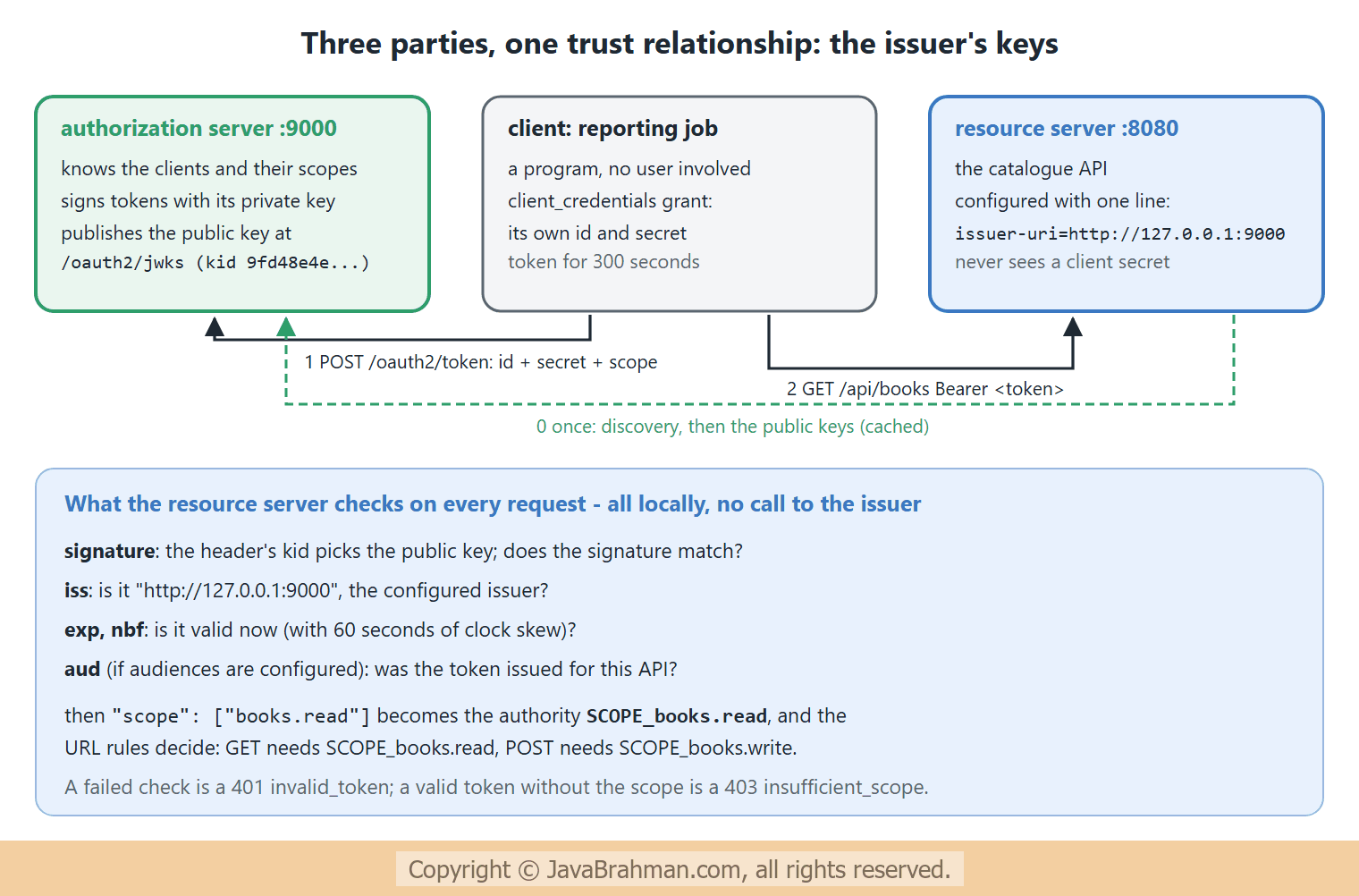
The example
The token is requested by programs, not people: a reporting job that may only read, and an admin tool that may also write. Programs use the client credentials grant: they authenticate with their own id and secret, and receive a token for themselves, with no user and no browser involved. The authorization server, at127.0.0.1:9000, registers both clients and the scopes each may ask for -
authserver.properties - an authorization server with two machine clients
server.port=9000
spring.security.oauth2.authorizationserver.issuer=http://127.0.0.1:9000
spring.security.oauth2.authorizationserver.client.reporting.registration.client-id=reporting
spring.security.oauth2.authorizationserver.client.reporting.registration.client-secret={noop}reporting-secret
spring.security.oauth2.authorizationserver.client.reporting.registration.client-authentication-methods=client_secret_basic
spring.security.oauth2.authorizationserver.client.reporting.registration.authorization-grant-types=client_credentials
spring.security.oauth2.authorizationserver.client.reporting.registration.scopes=books.read
spring.security.oauth2.authorizationserver.client.admin.registration.client-id=admin-tool
spring.security.oauth2.authorizationserver.client.admin.registration.client-secret={noop}admin-secret
spring.security.oauth2.authorizationserver.client.admin.registration.client-authentication-methods=client_secret_basic
spring.security.oauth2.authorizationserver.client.admin.registration.authorization-grant-types=client_credentials
spring.security.oauth2.authorizationserver.client.admin.registration.scopes=books.read,books.write
TokenServerApp.java - the authorization server
//TokenServerApp.java
package com.javabrahman.security.tokenserver;

import org.springframework.boot.SpringApplication;
import org.springframework.boot.autoconfigure.SpringBootApplication;

@SpringBootApplication
public class TokenServerApp {

  public static void main(String[] args) {
    SpringApplication.run(TokenServerApp.class, args);
  }
}spring-boot-starter-security-oauth2-resource-server. Its whole token configuration is the issuer's address. From it, Spring Boot builds a JwtDecoder that reads the issuer's discovery document, finds the jwks_uri with the public keys, and checks that every token's iss claim names this issuer -
resource.properties - the API trusts tokens from one issuer
spring.security.oauth2.resourceserver.jwt.issuer-uri=http://127.0.0.1:9000ApiSecurity.java - scope rules for the API
//ApiSecurity.java
package com.javabrahman.security.resourceserver;

import static org.springframework.security.config.Customizer.withDefaults;

import org.springframework.context.annotation.Bean;
import org.springframework.context.annotation.Configuration;
import org.springframework.http.HttpMethod;
import org.springframework.security.config.annotation.web.builders.HttpSecurity;
import org.springframework.security.config.http.SessionCreationPolicy;
import org.springframework.security.web.SecurityFilterChain;

@Configuration
public class ApiSecurity {

  @Bean
  SecurityFilterChain chain(HttpSecurity http) throws Exception {
    http
        .authorizeHttpRequests(auth -> auth
            .requestMatchers(HttpMethod.GET, "/api/**").hasAuthority("SCOPE_books.read")
            .requestMatchers(HttpMethod.POST, "/api/**").hasAuthority("SCOPE_books.write")
            .anyRequest().authenticated())
        .oauth2ResourceServer(oauth2 -> oauth2.jwt(withDefaults()))
        .sessionManagement(s -> s.sessionCreationPolicy(SessionCreationPolicy.STATELESS))
        .csrf(csrf -> csrf.disable());
    return http.build();
  }
}httpBasic() and no JwtDecoder bean of our own: the API only accepts bearer tokens, and the decoder comes from the properties. The /whoami endpoint shows what the API learned from a token -
CatalogController.java - the API, and who called it
//CatalogController.java
package com.javabrahman.security.resourceserver;

import java.util.List;
import java.util.Map;
import java.util.TreeMap;
import org.springframework.http.ResponseEntity;
import org.springframework.security.core.Authentication;
import org.springframework.security.core.GrantedAuthority;
import org.springframework.security.core.annotation.AuthenticationPrincipal;
import org.springframework.security.oauth2.jwt.Jwt;
import org.springframework.web.bind.annotation.GetMapping;
import org.springframework.web.bind.annotation.PostMapping;
import org.springframework.web.bind.annotation.RequestBody;
import org.springframework.web.bind.annotation.RequestMapping;
import org.springframework.web.bind.annotation.RestController;

@RestController
@RequestMapping("/api")
public class CatalogController {

  @GetMapping("/books")
  public List<String> books() {
    return List.of("Effective Java", "Clean Code");
  }

  @PostMapping("/books")
  public ResponseEntity<String> add(@RequestBody String title) {
    return ResponseEntity.status(201).body("added: " + title);
  }

  @GetMapping("/whoami")
  public Map<String, Object> whoami(@AuthenticationPrincipal Jwt jwt, Authentication authentication) {
    Map<String, Object> result = new TreeMap<>();
    result.put("tokenHeader", new TreeMap<>(jwt.getHeaders()).keySet());
    result.put("claims", new TreeMap<>(jwt.getClaims()));
    result.put("authorities", authentication.getAuthorities().stream().map(GrantedAuthority::getAuthority).sorted().toList());
    return result;
  }
}
CatalogApp.java
//CatalogApp.java
package com.javabrahman.security.resourceserver;

import org.springframework.boot.SpringApplication;
import org.springframework.boot.autoconfigure.SpringBootApplication;

@SpringBootApplication
public class CatalogApp {

  public static void main(String[] args) {
    SpringApplication.run(CatalogApp.class, args);
  }
}
The requests
The authorization server is started first, then the API. Requests to127.0.0.1:9000 go to the authorization server, the others to the API. cmVwb3J0aW5n... is reporting:reporting-secret, and YWRtaW4tdG9vbDph... is admin-tool:admin-secret; bearer tokens are shortened in the request lines -
OUTPUT of the HTTP requests> curl -i -X POST http://127.0.0.1:9000/oauth2/token -H "Authorization: Basic cmVwb3J0aW5nOnJlcG9ydGluZy1zZWNyZXQ=" -H "Content-Type: application/x-www-form-urlencoded" -d 'grant_type=client_credentials&scope=books.read'
HTTP/1.1 200
X-Content-Type-Options: nosniff
X-XSS-Protection: 0
Pragma: no-cache
X-Frame-Options: DENY
Cache-Control: no-store, must-revalidate, no-cache, max-age=0
Content-Length: 751
Content-Type: application/json; charset=UTF-8
Expires: 0
{"access_token":"eyJraWQiOiI4N2ExNmViZC05ZDk4LTRiM2MtODA3Yi1iOGYyYTYyZGIzZjYiLCJhbGciOiJSUzI1NiJ9.eyJzdWIiOiJyZXBvcnRpbmciLCJhdWQiOiJyZXBvcnRpbmciLCJuYmYiOjE3OTM5OTIzNDEsInNjb3BlIjpbImJvb2tzLnJlYWQiXSwiaXNzIjoiaHR0cDovLzEyNy4wLjAuMTo5MDAwIiwiZXhwIjoxNzkzOTkyNjQxLCJpYXQiOjE3OTM5OTIzNDEsImp0aSI6Ijg2ZTYzMmEyLTk3YWQtNDQ3OS1iYjM0LThjZWQyYjE2NWU0MCJ9.aFyl_bMLrraEzXhcb6UbzjivdFVNQbKFAj__b2KjY2FIbE23n5UIxtP8dVI5RgY4CnkwB4_1EkznDDir_CRYn-eU-kXuLJAH3BROjxV2xIrbYU-vdrabJBKZcTYGLduQ4nN47z8sBKjtd9Asg8Y_rnI1zGaw2RnWCyuwJoRbdjttvRRJxYnXX0A2RM1YCtwoJ2asiK3uZPHWwaEMMW46wQWomc_G92j4AtW5csdV5r8pRtiQtmU4woJoY8KBWCN1UTC8Rlz2ff1p5Wg0X50JL3AYSdQtgCv5tBNmHD7fo2or4oDbIeeaq9q8OQMou1KMYKELVEKex1Lvvqtk2rQL1w","scope":"books.read","token_type":"Bearer","expires_in":299}
> curl -i http://localhost:8080/api/books -H "Authorization: Bearer eyJraWQiOiI4N2ExNmVi...tk2rQL1w"
HTTP/1.1 200
X-Content-Type-Options: nosniff
X-XSS-Protection: 0
Pragma: no-cache
X-Frame-Options: DENY
Cache-Control: no-store, must-revalidate, no-cache, max-age=0
Content-Length: 31
Content-Type: application/json
Expires: 0
["Effective Java","Clean Code"]
> curl -i http://localhost:8080/api/whoami -H "Authorization: Bearer eyJraWQiOiI4N2ExNmVi...tk2rQL1w"
HTTP/1.1 200
X-Content-Type-Options: nosniff
X-XSS-Protection: 0
Pragma: no-cache
X-Frame-Options: DENY
Cache-Control: no-store, must-revalidate, no-cache, max-age=0
Content-Length: 314
Content-Type: application/json
Expires: 0
{"authorities":["FACTOR_BEARER","SCOPE_books.read"],"claims":{"aud":["reporting"],"exp":"2026-11-06T19:17:21Z","iat":"2026-11-06T19:12:21Z","iss":"http://127.0.0.1:9000","jti":"86e632a2-97ad-4479-bb34-8ced2b165e40","nbf":"2026-11-06T19:12:21Z","scope":["books.read"],"sub":"reporting"},"tokenHeader":["alg","kid"]}
> curl -i -X POST http://localhost:8080/api/books -H "Authorization: Bearer eyJraWQiOiI4N2ExNmVi...tk2rQL1w" -H "Content-Type: text/plain" -d 'Refactoring'
HTTP/1.1 403
X-Content-Type-Options: nosniff
X-XSS-Protection: 0
Pragma: no-cache
X-Frame-Options: DENY
Cache-Control: no-store, must-revalidate, no-cache, max-age=0
WWW-Authenticate: Bearer error="insufficient_scope", error_description="The request requires higher privileges than provided by the access token.", error_uri="https://tools.ietf.org/html/rfc6750#section-3.1"
Content-Length: 0
Expires: 0
> curl -i -X POST http://127.0.0.1:9000/oauth2/token -H "Authorization: Basic cmVwb3J0aW5nOnJlcG9ydGluZy1zZWNyZXQ=" -H "Content-Type: application/x-www-form-urlencoded" -d 'grant_type=client_credentials&scope=books.write'
HTTP/1.1 400
X-Content-Type-Options: nosniff
X-XSS-Protection: 0
Pragma: no-cache
X-Frame-Options: DENY
Cache-Control: no-store, must-revalidate, no-cache, max-age=0
Content-Length: 25
Content-Type: application/json; charset=UTF-8
Expires: 0
{"error":"invalid_scope"}
> curl -i -X POST http://127.0.0.1:9000/oauth2/token -H "Authorization: Basic YWRtaW4tdG9vbDphZG1pbi1zZWNyZXQ=" -H "Content-Type: application/x-www-form-urlencoded" -d 'grant_type=client_credentials&scope=books.read books.write'
HTTP/1.1 200
X-Content-Type-Options: nosniff
X-XSS-Protection: 0
Pragma: no-cache
X-Frame-Options: DENY
Cache-Control: no-store, must-revalidate, no-cache, max-age=0
Content-Length: 785
Content-Type: application/json; charset=UTF-8
Expires: 0
{"access_token":"eyJraWQiOiI4N2ExNmViZC05ZDk4LTRiM2MtODA3Yi1iOGYyYTYyZGIzZjYiLCJhbGciOiJSUzI1NiJ9.eyJzdWIiOiJhZG1pbi10b29sIiwiYXVkIjoiYWRtaW4tdG9vbCIsIm5iZiI6MTc5Mzk5MjM0Miwic2NvcGUiOlsiYm9va3Mud3JpdGUiLCJib29rcy5yZWFkIl0sImlzcyI6Imh0dHA6Ly8xMjcuMC4wLjE6OTAwMCIsImV4cCI6MTc5Mzk5MjY0MiwiaWF0IjoxNzkzOTkyMzQyLCJqdGkiOiJlMzVhNjc0Yi0wMDY3LTQ0MzctYTY3Ny02NmNjOTdmZmIzZTMifQ.GqL_xRLHyhQAXI9N3-8yw6qrFPolTp-GIiFIXo-s_O45WXQdZWq-Dn88HHIrPq72MRHs7T-WUwak99hFx7HhMskC-dXAvdz2SVW8EIH8aKTcB-RuX5AUhkuAqZ8xT06u9Aq62C2agkbPxTpzbW5aTtv230BSOKReVhW1GWFR7KPS4-dnhmMD-f3ddGnApgO0w9-6pwBMnQcc4-iNxfMSBslUwXSOcivaoW4xVqy8s2Url821T1KAYZ5xJeTMk_c7mObtFeDRVACz7OQP_bu86AfNAg4AhTqS68svKlu-uMIGOeVT4sKt71DvnstyjjgKO2G_nj87xa46IFeCdXUlNg","scope":"books.write books.read","token_type":"Bearer","expires_in":300}
> curl -i -X POST http://localhost:8080/api/books -H "Authorization: Bearer eyJraWQiOiI4N2ExNmVi...eCdXUlNg" -H "Content-Type: text/plain" -d 'Refactoring'
HTTP/1.1 201
X-Content-Type-Options: nosniff
X-XSS-Protection: 0
Pragma: no-cache
X-Frame-Options: DENY
Cache-Control: no-store, must-revalidate, no-cache, max-age=0
Content-Length: 18
Content-Type: text/plain; charset=UTF-8
Expires: 0
added: Refactoring
> curl -i http://127.0.0.1:9000/oauth2/jwks
HTTP/1.1 200
X-Content-Type-Options: nosniff
X-XSS-Protection: 0
Pragma: no-cache
X-Frame-Options: DENY
Cache-Control: no-store, must-revalidate, no-cache, max-age=0
Content-Length: 429
Content-Type: application/json; charset=ISO-8859-1
Expires: 0
{"keys":[{"kty":"RSA","e":"AQAB","kid":"87a16ebd-9d98-4b3c-807b-b8f2a62db3f6","n":"2CiZ8ojG84TO56cGJz5ko8LaLyfG2k1PyuA2zc9zSa5OUp5fyxX0jZUAZ0NoVZBs0aWJOg8pZqj49iBKf0eJi9NTfXXdOKt3zPlAPxZ_-kKqrVgC6TdTDXpdxtNUEAkeeZzn1HB4jr3ehHj8t9Gs3XbtDjpMU_R0zBUx7b38Imgb4wFCTQy9iBcLGxGOVVeiwB7C6Oehk-2ehtDWflfqYdFqr05Z93H9jJmz-AAye6JAI5CzFmF_XVljuf9XqkCDTYPpWfeA96e1MRattHUN1-leP7qx2FHGCHQNGd9HrCph7yZERob-Fq28ouk2SRPKG2mBhNf-2OOf8jlleVHEiw"}]}
Explanation of the responses
- The token request: the reporting job posted
grant_type=client_credentials&scope=books.readwith its id and secret, and received anaccess_tokenwith"scope":"books.read"and"expires_in":299- a five-minute token. Its header starts witheyJraWQiOi...: this time the header holds akid, the id of the signing key, besidesalg. - Reading:
GET /api/bookswith the token: 200. The API had never seen this token or this client before; the signature and claims were enough. /whoamishows the claims:subandaudare both "reporting" - for a client credentials token the subject is the client itself - plusiss, the issue, start and expiry times, a unique idjti, andscopeas a list. The authorities areSCOPE_books.readandFACTOR_BEARER, the bearer-token counterpart of theFACTOR_PASSWORDauthority seen in the architecture tutorialClick to read tutorial: Spring Security Architecture: Filter Chain Explained.- Writing with a read token: 403,
insufficient_scope. - Asking for more: the reporting job asked the authorization server for
books.write, which it is not registered for: 400{"error":"invalid_scope"}. The authorization server, not the API, decides which client may get which scope. - The admin tool asked for both scopes, received a token with
"scope":"books.write books.read", and its POST got 201. - The public keys:
/oauth2/jwksreturns a JSON Web Key Set with one RSA key - its type, exponente, modulusn, and thekidthat the tokens' headers referred to. This is everything the API needs, and nothing in it is secret. When the authorization server rotates its keys, it publishes the new key here, and resource servers pick it up when they see a token with an unknownkid.
Audiences: is this token meant for me?
A valid token from the right issuer may still be meant for a different API. If an authorization server serves both an orders API and a catalogue API, a token for one should not be accepted by the other. Theaud (audience) claim says who a token is for, and the resource server can require it -
application.properties - accept only tokens whose aud claim includes this API
spring.security.oauth2.resourceserver.jwt.issuer-uri=http://127.0.0.1:9000
spring.security.oauth2.resourceserver.jwt.audiences=catalog-apiaud depends on the authorization server: Keycloak, Okta and Entra ID have settings for it, and Spring Authorization Server can add claims with an OAuth2TokenCustomizer bean.
Roles from custom claims
Scopes describe what a client may do. User roles often come in a claim of their own, such asroles or Keycloak's realm_access.roles. A JwtAuthenticationConverter bean decides how claims become authorities -
Mapping a "roles" claim to ROLE_ authorities
@Bean
JwtAuthenticationConverter jwtAuthenticationConverter() {
  JwtGrantedAuthoritiesConverter roles = new JwtGrantedAuthoritiesConverter();
  roles.setAuthoritiesClaimName("roles");     // read this claim instead of "scope"
  roles.setAuthorityPrefix("ROLE_");          // so that hasRole("ADMIN") works
  JwtAuthenticationConverter converter = new JwtAuthenticationConverter();
  converter.setJwtGrantedAuthoritiesConverter(roles);
  return converter;
}spring.security.oauth2.resourceserver.jwt.authorities-claim-name and authority-prefix.
JWTs or opaque tokens?
- JWT access tokens, as here, are checked locally: fast, and the API keeps working if the authorization server is briefly unavailable. But a token stays valid until it expires, so keep lifetimes short, as the five minutes here.
- Opaque tokens are random strings with no meaning to the API. The API asks the authorization server's introspection endpoint -
introspection_endpointin the discovery document - about each token. That allows immediate revocation, at the cost of a network call per request, usually cached. Spring Security supports it withoauth2ResourceServer(o -> o.opaqueToken(...)).
Summary
In this tutorial we built an OAuth2 resource server, an API that trusts tokens from a separate authorization server. A Spring Authorization Server issued tokens to two programs through the client credentials grant, and the API, configured only withissuer-uri, verified each token's signature with the issuer's published keys and checked its issuer and expiry, all without calling the issuer per request. The scope claim became SCOPE_ authorities: a read token was accepted for GET and refused for POST with 403, the authorization server refused to grant a scope the client was not registered for, and the admin tool's token could write. We also saw the key set at /oauth2/jwks, audience checks, roles from custom claims, and opaque tokens. The next tutorial moves security from URLs to methods: method security with @PreAuthorize and @PostAuthorizeClick to read tutorial: Spring Method Security: @PreAuthorize and @PostAuthorize.Spring Security Tutorials
Spring Security OAuth2 Login and OpenID ConnectClick to read tutorial: Spring Security OAuth2 Login and OpenID Connect Spring Method Security: @PreAuthorize and @PostAuthorizeClick to read tutorial: Spring Method Security: @PreAuthorize and @PostAuthorize Spring Security Architecture: Filter Chain ExplainedClick to read tutorial: Spring Security Architecture: Filter Chain Explained Configuring SecurityFilterChain in Spring SecurityClick to read tutorial: Configuring SecurityFilterChain in Spring Security Spring Security Users, Passwords and PasswordEncoderClick to read tutorial: Spring Security Users, Passwords and PasswordEncoder Spring Security Form Login and Session AuthenticationClick to read tutorial: Spring Security Form Login and Session Authentication Stateless REST API Security with JWT in Spring BootClick to read tutorial: Stateless REST API Security with JWT in Spring Boot
Spring Security OAuth2 Login and OpenID ConnectClick to read tutorial: Spring Security OAuth2 Login and OpenID Connect Spring Method Security: @PreAuthorize and @PostAuthorizeClick to read tutorial: Spring Method Security: @PreAuthorize and @PostAuthorize Spring Security Architecture: Filter Chain ExplainedClick to read tutorial: Spring Security Architecture: Filter Chain Explained Configuring SecurityFilterChain in Spring SecurityClick to read tutorial: Configuring SecurityFilterChain in Spring Security Spring Security Users, Passwords and PasswordEncoderClick to read tutorial: Spring Security Users, Passwords and PasswordEncoder Spring Security Form Login and Session AuthenticationClick to read tutorial: Spring Security Form Login and Session Authentication Stateless REST API Security with JWT in Spring BootClick to read tutorial: Stateless REST API Security with JWT in Spring Boot