
Virtual Threads vs WebFlux: Which to Choose in 2026
Introduction
Since Java 21, Spring Boot applications can serve each request on a virtual thread, with one property. Virtual threads are cheap enough to block, so the main reason for reactive programming - not tying up an expensive thread while it waits for I/O - seems to disappear. This tutorial compares the two approaches with a small load test: the same slow endpoint in Spring MVC with platform threads, in Spring MVC with virtual threads, and in Spring WebFlux, each hit by 1000 requests at once. We will look at how long each takes and how many threads it uses, see what happens to WebFlux when a handler blocks after all, and end with when to choose which in 2026. Every number below comes from running the code with Spring Boot 4.1.2 on Java 25.Three ways to wait
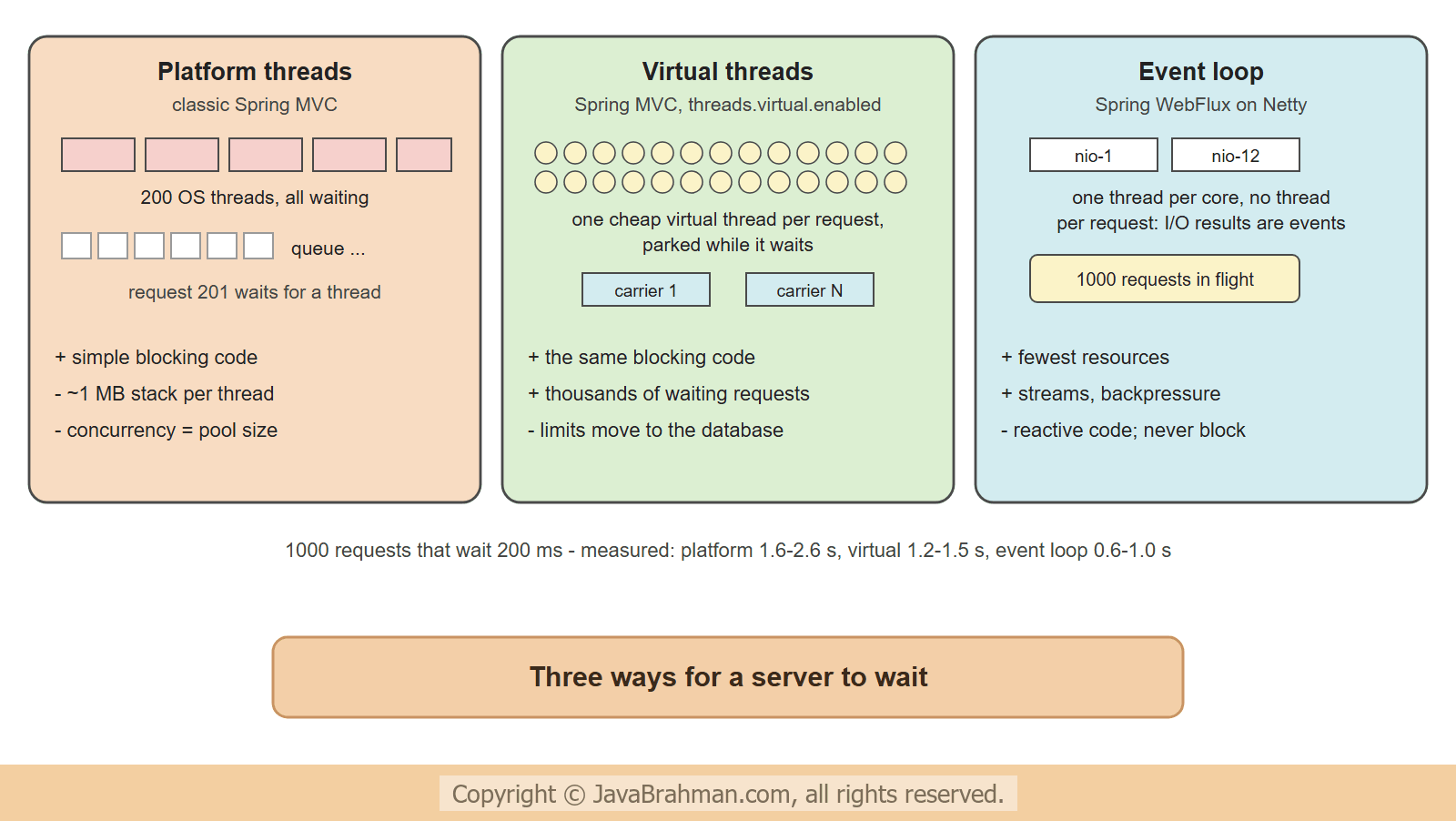
Most web requests spend most of their time waiting - for a database, for another service. The three models differ in what happens to the thread meanwhile -- Platform threads (classic Spring MVC): one operating-system thread per request, blocked while the request waits. Tomcat's pool has 200 by default; request 201 waits in a queue until a thread is free. Each thread costs about a megabyte of stack and a context switch in the operating system.
- Virtual threads (Spring MVC with
spring.threads.virtual.enabled=true): one virtual thread per request, as cheap as an object. When it blocks on I/O, the JVM parks it and frees its carrier - one of a few platform threads - for other virtual threads. The code stays ordinary blocking code. - Event loop (Spring WebFlux): no thread per request at all. A few event-loop threads start the I/O and handle its result as an event later; the code is a pipeline of Mono and FluxClick to read tutorial: Reactive Programming with Project Reactor: Mono and Flux operators.
The test
Each application has one endpoint that waits 200 ms - standing for a call to a slow service - and returns the name of the thread that handled the request. The MVC version waits withThread.sleep(), which is what a blocking database or HTTP call amounts to -
src/main/java/.../vt/mvc/MvcApp.java - Spring MVC
//MvcApp.java
package com.javabrahman.reactive.vt.mvc;

import org.springframework.boot.autoconfigure.SpringBootApplication;
import org.springframework.web.bind.annotation.GetMapping;
import org.springframework.web.bind.annotation.RestController;

@SpringBootApplication
@RestController
public class MvcApp {

  @GetMapping("/quote")
  public String quote() throws InterruptedException {
    String thread = Thread.currentThread().toString();
    Thread.sleep(200);   // a blocking call to a slow service
    return thread;
  }
}delayElement(), which is what a WebClient or R2DBC call amounts to. A second endpoint blocks instead, to see what that does -
src/main/java/.../vt/flux/FluxApp.java - Spring WebFlux
//FluxApp.java
package com.javabrahman.reactive.vt.flux;

import io.netty.channel.ChannelOption;
import java.time.Duration;
import org.springframework.boot.autoconfigure.SpringBootApplication;
import org.springframework.boot.reactor.netty.NettyServerCustomizer;
import org.springframework.context.annotation.Bean;
import org.springframework.web.bind.annotation.GetMapping;
import org.springframework.web.bind.annotation.RestController;
import reactor.core.publisher.Mono;

@SpringBootApplication
@RestController
public class FluxApp {

  @GetMapping("/quote")
  public Mono<String> quote() {
    String thread = Thread.currentThread().toString();
    return Mono.just(thread).delayElement(Duration.ofMillis(200));   // a non-blocking call to a slow service
  }

  @GetMapping("/blocking")
  public Mono<String> blocking() throws InterruptedException {
    String thread = Thread.currentThread().toString();
    Thread.sleep(200);   // WRONG in WebFlux: blocks an event-loop thread
    return Mono.just(thread);
  }

  // for the load test only: a longer queue of incoming connections than the operating system's default
  @Bean
  NettyServerCustomizer longerAcceptQueue() {
    return server -> server.option(ChannelOption.SO_BACKLOG, 4096);
  }
}HttpClient. The warm-up round sends as many requests as the measured one, so that the client's connections are already open - keep-alive then reuses them - and the measurement is not dominated by setting up 1000 TCP connections at once. It reports the time until all answers were in, and how many different server threads handled them -
src/main/java/.../vt/LoadTest.java
//LoadTest.java
package com.javabrahman.reactive.vt;

import java.net.URI;
import java.net.http.HttpClient;
import java.net.http.HttpRequest;
import java.net.http.HttpResponse;
import java.util.ArrayList;
import java.util.Arrays;
import java.util.List;
import java.util.Set;
import java.util.concurrent.ConcurrentHashMap;
import java.util.concurrent.CountDownLatch;
import java.util.concurrent.ExecutorService;
import java.util.concurrent.Executors;
import java.util.concurrent.Future;
import org.springframework.boot.SpringApplication;
import org.springframework.context.ConfigurableApplicationContext;

public class LoadTest {

  // args: application class, path, number of requests, then extra Spring Boot arguments
  public static void main(String[] args) throws Exception {
    Class<?> app = Class.forName(args[0]);
    String path = args[1];
    int requests = Integer.parseInt(args[2]);
    List<String> bootArgs = new ArrayList<>(Arrays.asList(args).subList(3, args.length));
    bootArgs.add("--server.port=0");
    try (ConfigurableApplicationContext context = SpringApplication.run(app, bootArgs.toArray(String[]::new));
         HttpClient http = HttpClient.newBuilder().executor(Executors.newVirtualThreadPerTaskExecutor()).build()) {
      URI uri = URI.create("http://localhost:" + context.getEnvironment().getProperty("local.server.port") + path);
      fire(http, uri, requests);   // warm-up: opens the connections, which the measured round reuses
      Set<String> threads = ConcurrentHashMap.newKeySet();
      long start = System.nanoTime();
      List<String> answers = fire(http, uri, requests);
      double seconds = Math.round((System.nanoTime() - start) / 100_000_000.0) / 10.0;
      answers.forEach(threads::add);
      System.out.println(requests + " requests at once: all answered after " + seconds + " s");
      System.out.println("server threads used: " + threads.size()
          + ", for example " + answers.get(0).replaceAll("#\\d+", "#N").replaceAll("-\\d+", "-N"));
    }
  }

  static List<String> fire(HttpClient http, URI uri, int count) throws Exception {
    CountDownLatch go = new CountDownLatch(1);
    List<Future<String>> futures = new ArrayList<>();
    try (ExecutorService clients = Executors.newVirtualThreadPerTaskExecutor()) {
      for (int i = 0; i < count; i++) {
        futures.add(clients.submit(() -> {
          go.await();
          for (int attempt = 1; ; attempt++) {
            try {
              return http.send(HttpRequest.newBuilder(uri).build(), HttpResponse.BodyHandlers.ofString()).body();
            } catch (java.net.ConnectException e) {   // the server's accept queue overflowed: try again shortly
              if (attempt == 50) {
                throw e;
              }
              Thread.sleep(java.util.concurrent.ThreadLocalRandom.current().nextInt(20, 200));   // spread the retries
            }
          }
        }));
      }
      go.countDown();   // all requests leave together
    }
    List<String> answers = new ArrayList<>();
    for (Future<String> f : futures) {
      answers.add(f.get());
    }
    return answers;
  }
}src/main/java/.../vt/Cores.java
//Cores.java
package com.javabrahman.reactive.vt;

public class Cores {

  public static void main(String[] args) {
    System.out.println("CPU cores: " + Runtime.getRuntime().availableProcessors());
  }
}CPU cores: 12
The results
1000 requests that each wait 200 ms. If every request could wait at the same time, all would be answered after about 0.2 s plus overhead. Spring MVC, platform threads (Tomcat's default pool of 200)1000 requests at once: all answered after 1.7 s server threads used: 200, for example Thread[#N,http-nio-auto-N-exec-N,5,main]
1000 requests at once: all answered after 1.5 s
server threads used: 1000, for example VirtualThread[#N,tomcat-handler-N]/runnable@ForkJoinPool-N-worker-N
1000 requests at once: all answered after 0.6 s
server threads used: 12, for example Thread[#N,reactor-http-nio-N,5,main]
100 requests at once: all answered after 2.1 s
server threads used: 12, for example Thread[#N,reactor-http-nio-N,5,main]
What the numbers say
The exact numbers vary from run to run - the boxes above show one run, and the ranges below come from several runs of the same test on this machine - and the client and the server compete for the same 12 cores, so even the best case is far from the ideal 0.2 s: sending, receiving and parsing 2000 HTTP messages costs time too. The pattern, though, was the same in every run -- Platform threads could only wait for 200 requests at a time: Tomcat's 200 threads were all asleep in
Thread.sleep(), and the other 800 requests queued. Five rounds of 200 ms is at least 1.0 s; the runs took between 1.6 and 2.6 s. - Virtual threads let all 1000 requests wait at once, each on its own virtual thread - 1000 different threads, created on demand and gone afterwards - with exactly the same blocking code. The time dropped to between 1.2 and 1.5 s; what remained was mostly the cost of the requests themselves.
- WebFlux served all 1000 with its 12 event-loop threads, one per core, and was the fastest, between 0.6 and 1.0 s: no thread per request means less work per request. Its advantage over virtual threads in this test is real but modest, and it pays for it with reactive code.
- Blocking in WebFlux is a disaster: 100 requests took about 2 s, because each
Thread.sleep()held one of only 12 event-loop threads - about 9 rounds of 200 ms. With 200 Tomcat platform threads the same blocking code would have answered all 100 in 0.2 s. A WebFlux application that blocks is worse than a classic one.
Which to choose in 2026
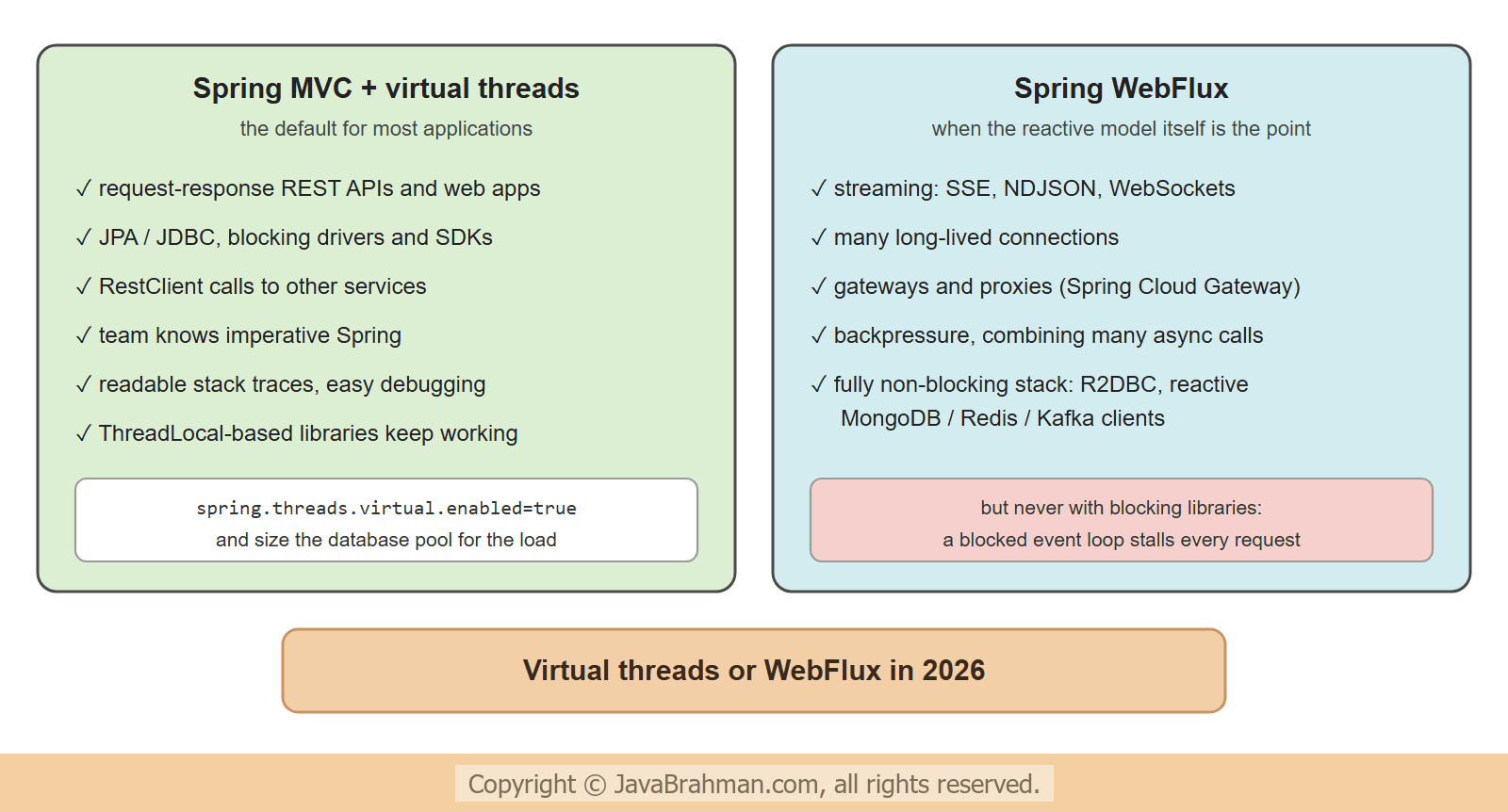
Since virtual threads, the question is no longer "can my application handle many concurrent requests" - both can - but which programming model fits the application -- Spring MVC with virtual threads is the default choice for typical request-response applications: REST APIs and web applications over a relational database with JPA or JDBC, calls to other services with RestClient, Spring Security, and existing code and libraries that block. The code stays sequential, easy to read, to debug and to profile, stack traces make sense, and
ThreadLocal-based features keep working. Setspring.threads.virtual.enabled=trueand keep connection pools sized to what the database can take: virtual threads remove the thread limit, not the database's limit. - Spring WebFlux pays off where its model is the point, not just its thread count: streaming responses and Server-Sent Events or WebSocketsClick to read tutorial: Server-Sent Events and WebSockets in Spring WebFlux with many long-lived connections; gateways and proxies that mostly pass data through (Spring Cloud Gateway is built on WebFlux); pipelines that need backpressure, timeouts, retries and combination of many concurrent calls as first-class operators; and applications whose whole stack is non-blocking - R2DBC, reactive MongoDB, Redis or Kafka clients.
- Do not mix the wrong way round: blocking libraries inside WebFlux undo its benefits, as the last run showed. WebClient inside Spring MVC, on the other hand, works well when an endpoint must combine several remote calls concurrently.
- Pinning, the old caveat of virtual threads - a virtual thread blocked inside a
synchronizedblock could not release its carrier - was fixed in Java 24 for most cases, so on Java 25 it rarely matters.
Summary
In this tutorial we compared three ways for a server to wait. With 1000 simultaneous requests that each waited 200 ms, Spring MVC on Tomcat's 200 platform threads needed 1.6 to 2.6 s, Spring MVC with virtual threads 1.2 to 1.5 s with one virtual thread per request, and Spring WebFlux 0.6 to 1.0 s with 12 event-loop threads; a WebFlux handler that blocked needed about 2 s for only 100 requests. Virtual threads give blocking code the scalability that once required reactive programming, which makes Spring MVC with virtual threads the default for most applications in 2026, while WebFlux remains the better fit for streaming, long-lived connections, backpressure and fully non-blocking stacks. The last tutorial of this module tests reactive code: StepVerifierClick to read tutorial: Testing Reactive Code with StepVerifier.Reactive Spring Tutorials
Server-Sent Events and WebSockets in Spring WebFluxClick to read tutorial: Server-Sent Events and WebSockets in Spring WebFlux Testing Reactive Code with StepVerifierClick to read tutorial: Testing Reactive Code with StepVerifier Reactive Programming with Project Reactor: Mono and FluxClick to read tutorial: Reactive Programming with Project Reactor: Mono and Flux Building REST APIs with Spring WebFluxClick to read tutorial: Building REST APIs with Spring WebFlux Calling HTTP APIs with Spring WebClientClick to read tutorial: Calling HTTP APIs with Spring WebClient Reactive Database Access with Spring Data R2DBCClick to read tutorial: Reactive Database Access with Spring Data R2DBC
Server-Sent Events and WebSockets in Spring WebFluxClick to read tutorial: Server-Sent Events and WebSockets in Spring WebFlux Testing Reactive Code with StepVerifierClick to read tutorial: Testing Reactive Code with StepVerifier Reactive Programming with Project Reactor: Mono and FluxClick to read tutorial: Reactive Programming with Project Reactor: Mono and Flux Building REST APIs with Spring WebFluxClick to read tutorial: Building REST APIs with Spring WebFlux Calling HTTP APIs with Spring WebClientClick to read tutorial: Calling HTTP APIs with Spring WebClient Reactive Database Access with Spring Data R2DBCClick to read tutorial: Reactive Database Access with Spring Data R2DBC