
Building REST APIs with Spring WebFlux
Introduction
This tutorial builds a REST API with Spring WebFlux, Spring's reactive web framework. We will see how WebFlux handles a request on a few event-loop threads of the Netty server, write a controller whose methods returnMono and Flux, answer a missing book with 404 and an invalid one with 400 - both as ProblemDetail - and stream a list as newline-delimited JSON, element by element. Then we will write the same endpoints in WebFlux's second style, functional endpoints with a router and handler functions. Every HTTP exchange below comes from running the application with Spring Boot 4.1.2.WebFlux in a nutshell
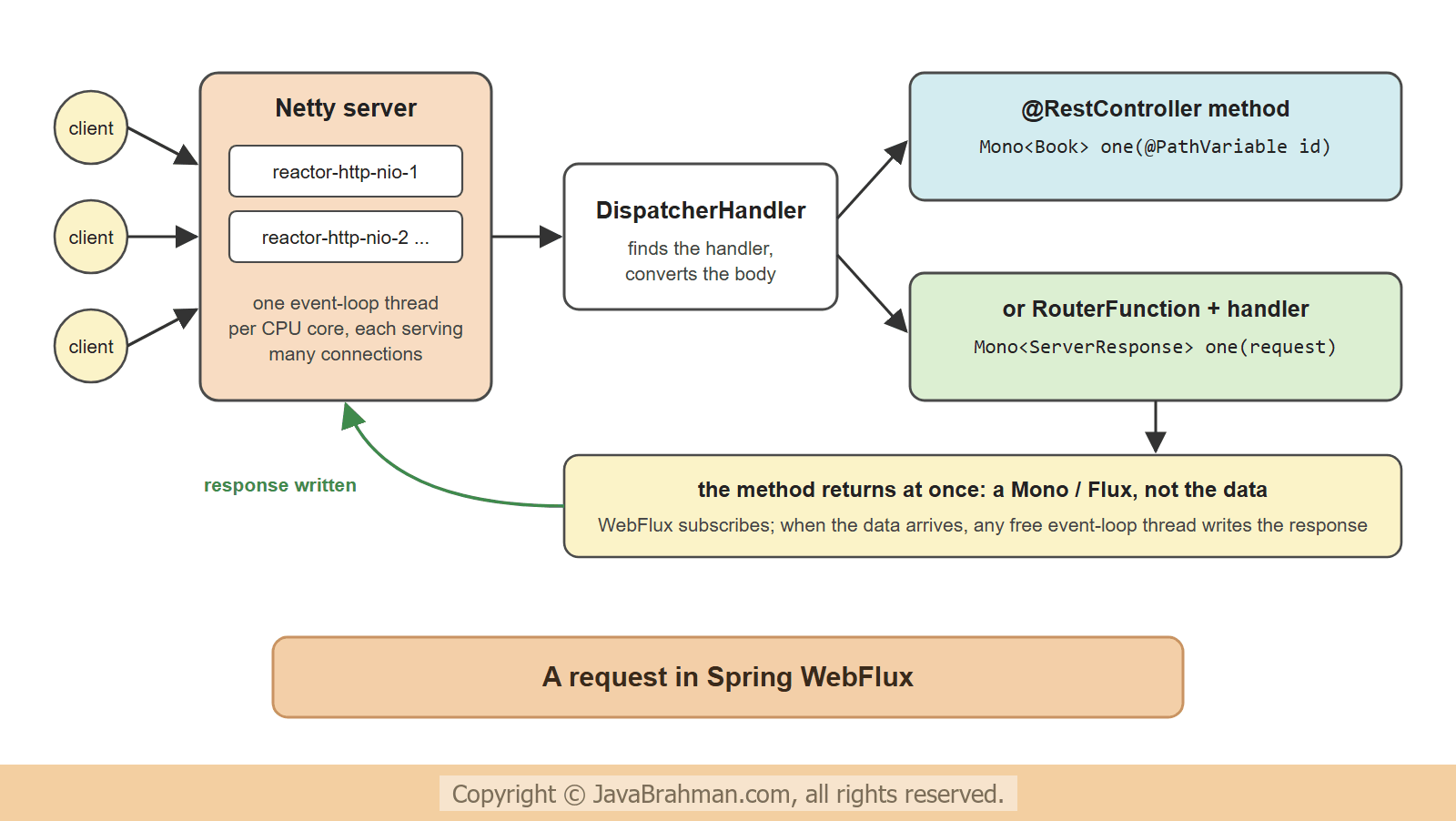
Spring WebFlux is the reactive counterpart of Spring MVC. On the surface the two look alike -@RestController, @GetMapping, @RequestBody all work the same - but underneath -
- the server is Netty (by default), whose few event-loop threads, named
reactor-http-nio-N, handle all connections. There is no thread per request. - a handler method returns a
MonoorFlux- the Reactor typesClick to read tutorial: Reactive Programming with Project Reactor: Mono and Flux - describing the response. WebFlux subscribes to it and writes the result when it arrives, without a thread waiting in between. - the whole chain has to be non-blocking: data access with R2DBC or a reactive driver, HTTP calls with WebClient. One blocking call holds up an event-loop thread, and with it every other request that thread serves.
spring-boot-starter-webflux. With it, and without the MVC starter, Spring Boot starts a reactive application on Netty.
The data
The API serves books. ABookStore keeps them in memory, but answers like a reactive data source - with a Mono or a Flux, so that the controller code is the same as with the R2DBC repository of a later tutorialClick to read tutorial: Reactive Database Access with Spring Data R2DBC -
src/main/java/.../webflux/Book.java
//Book.java
package com.javabrahman.reactive.webflux;

import jakarta.validation.constraints.Min;
import jakarta.validation.constraints.NotBlank;

public record Book(Long id, @NotBlank String title, @NotBlank String author, @Min(1) int price) {

  Book withId(long newId) {
    return new Book(newId, title, author, price);
  }
}
src/main/java/.../webflux/BookStore.java
//BookStore.java
package com.javabrahman.reactive.webflux;

import java.time.Duration;
import java.util.Map;
import java.util.concurrent.ConcurrentSkipListMap;
import java.util.concurrent.atomic.AtomicLong;
import org.springframework.stereotype.Component;
import reactor.core.publisher.Flux;
import reactor.core.publisher.Mono;

@Component
public final class BookStore {   // final: not proxied, and the constructor may call its own methods
  private final Map<Long, Book> books = new ConcurrentSkipListMap<>();
  private final AtomicLong lastId = new AtomicLong();

  public BookStore() {
    save(new Book(null, "Effective Java", "Joshua Bloch", 450)).subscribe();
    save(new Book(null, "Clean Code", "Robert C. Martin", 380)).subscribe();
    save(new Book(null, "Refactoring", "Martin Fowler", 520)).subscribe();
  }

  public Flux<Book> findAll() {
    return Flux.fromIterable(books.values());
  }

  // a slow source: one book every 300 ms, as rows arriving from a large query
  public Flux<Book> findAllSlowly() {
    return findAll().delayElements(Duration.ofMillis(300));
  }

  public Mono<Book> findById(long id) {
    return Mono.justOrEmpty(books.get(id));   // empty if there is no such book
  }

  public Mono<Book> save(Book book) {
    return Mono.fromSupplier(() -> {
      Book saved = book.withId(lastId.incrementAndGet());
      books.put(saved.id(), saved);
      return saved;
    });
  }

  public Mono<Boolean> delete(long id) {
    return Mono.fromSupplier(() -> books.remove(id) != null);
  }
}
An annotated controller
The controller looks like a Spring MVC controller, except for its return types -src/main/java/.../webflux/BookController.java
//BookController.java
package com.javabrahman.reactive.webflux;

import jakarta.validation.Valid;
import java.net.URI;
import org.springframework.http.HttpStatus;
import org.springframework.http.MediaType;
import org.springframework.http.ResponseEntity;
import org.springframework.web.bind.annotation.DeleteMapping;
import org.springframework.web.bind.annotation.GetMapping;
import org.springframework.web.bind.annotation.PathVariable;
import org.springframework.web.bind.annotation.PostMapping;
import org.springframework.web.bind.annotation.RequestBody;
import org.springframework.web.bind.annotation.RequestMapping;
import org.springframework.web.bind.annotation.RestController;
import org.springframework.web.server.ResponseStatusException;
import reactor.core.publisher.Flux;
import reactor.core.publisher.Mono;

@RestController
@RequestMapping("/books")
public class BookController {
  private final BookStore store;

  public BookController(BookStore store) {
    this.store = store;
  }

  @GetMapping
  public Flux<Book> all() {
    return store.findAll();
  }

  @GetMapping("/{id}")
  public Mono<Book> one(@PathVariable long id) {
    return store.findById(id)
        .switchIfEmpty(Mono.error(new ResponseStatusException(HttpStatus.NOT_FOUND, "No book with id " + id)));
  }

  @PostMapping
  public Mono<ResponseEntity<Book>> add(@Valid @RequestBody Book book) {
    return store.save(book)
        .map(saved -> ResponseEntity.created(URI.create("/books/" + saved.id())).body(saved));
  }

  @DeleteMapping("/{id}")
  public Mono<ResponseEntity<Void>> remove(@PathVariable long id) {
    return store.delete(id)
        .map(deleted -> deleted ? ResponseEntity.noContent().build() : ResponseEntity.notFound().build());
  }

  // streams the books one by one, as they come
  @GetMapping(value = "/stream", produces = {MediaType.APPLICATION_NDJSON_VALUE, MediaType.APPLICATION_JSON_VALUE})
  public Flux<Book> stream() {
    return store.findAllSlowly();
  }

  // shows which thread handles a request
  @GetMapping("/thread")
  public Mono<String> thread() {
    return Mono.fromSupplier(() -> Thread.currentThread().getName().replaceAll("-\\d+$", "-N"));
  }
}all()returns aFlux; with the defaultapplication/json, WebFlux collects it and writes one JSON array.one()turns an emptyMono- no such book - into an error signal withswitchIfEmpty(). Without it, an emptyMonobecomes a 200 response with no body, which is rarely what a client expects.add()returnsMono<ResponseEntity<Book>>, to set the status and theLocationheader once the save has completed.@Validworks as in Spring MVC.
@Valid - a WebExchangeBindException - does not say which fields are wrong. A small advice adds them to the problem detail -
src/main/java/.../webflux/ValidationErrors.java
//ValidationErrors.java
package com.javabrahman.reactive.webflux;

import java.util.Map;
import java.util.TreeMap;
import org.springframework.core.Ordered;
import org.springframework.core.annotation.Order;
import org.springframework.http.HttpStatus;
import org.springframework.http.ProblemDetail;
import org.springframework.web.bind.annotation.ExceptionHandler;
import org.springframework.web.bind.annotation.RestControllerAdvice;
import org.springframework.web.bind.support.WebExchangeBindException;

@RestControllerAdvice
@Order(Ordered.HIGHEST_PRECEDENCE)   // before Spring Boot's own problem-details advice
public class ValidationErrors {

  @ExceptionHandler
  public ProblemDetail invalid(WebExchangeBindException e) {
    ProblemDetail problem = ProblemDetail.forStatusAndDetail(HttpStatus.BAD_REQUEST, "The book is not valid");
    Map<String, String> errors = new TreeMap<>();
    e.getFieldErrors().forEach(error -> errors.put(error.getField(), error.getDefaultMessage()));
    problem.setProperty("errors", errors);
    return problem;
  }
}@Order matters: the property below makes Spring Boot register its own advice for WebFlux's exceptions, including this one, and without the order that advice answered first - the first run of this example returned the generic body. The property switches on RFC 9457 problem details for WebFlux's other error responses, such as the 404 -
src/main/resources/application.properties
spring.webflux.problemdetails.enabled=truesrc/main/java/.../webflux/WebFluxApp.java
//WebFluxApp.java
package com.javabrahman.reactive.webflux;

import org.springframework.boot.SpringApplication;
import org.springframework.boot.autoconfigure.SpringBootApplication;

@SpringBootApplication
public class WebFluxApp {

  public static void main(String[] args) {
    SpringApplication.run(WebFluxApp.class, args);
  }
}> curl -i http://localhost:8080/books
HTTP/1.1 200
Content-Type: application/json
[{"id":1,"title":"Effective Java","author":"Joshua Bloch","price":450},{"id":2,"title":"Clean Code","author":"Robert C. Martin","price":380},{"id":3,"title":"Refactoring","author":"Martin Fowler","price":520}]
> curl -i http://localhost:8080/books/2
HTTP/1.1 200
Content-Length: 69
Content-Type: application/json
{"id":2,"title":"Clean Code","author":"Robert C. Martin","price":380}
> curl -i http://localhost:8080/books/99
HTTP/1.1 404
Content-Length: 87
Content-Type: application/problem+json
{"detail":"No book with id 99","instance":"/books/99","status":404,"title":"Not Found"}
> curl -i -X POST http://localhost:8080/books -H "Content-Type: application/json" -d '{"title": "Domain-Driven Design", "author": "Eric Evans", "price": 610}'
HTTP/1.1 201
Location: /books/4
Content-Length: 73
Content-Type: application/json
{"id":4,"title":"Domain-Driven Design","author":"Eric Evans","price":610}
> curl -i -X POST http://localhost:8080/books -H "Content-Type: application/json" -d '{"title": "", "author": "Unknown", "price": 0}'
HTTP/1.1 400
Content-Length: 173
Content-Type: application/problem+json
{"detail":"The book is not valid","instance":"/books","status":400,"title":"Bad Request","errors":{"price":"must be greater than or equal to 1","title":"must not be blank"}}
> curl -i -X DELETE http://localhost:8080/books/1
HTTP/1.1 204
> curl -i http://localhost:8080/books/thread
HTTP/1.1 200
Content-Length: 18
Content-Type: text/plain; charset=UTF-8
reactor-http-nio-N
- The missing book became a
404with anapplication/problem+jsonbody. The invalid book became a400with field errors in anerrorsproperty - added by theValidationErrorsadvice above; by default the problem detail only says "Invalid request content." - The new book got id 4 and a
Locationheader; the delete answered204. - The last request shows that the controller ran on a
reactor-http-niothread: one of Netty's event-loop threads, of which there is one per CPU core.
Streaming a Flux
A JSON array can only be written once it is complete, so forapplication/json WebFlux waits for the whole Flux. With application/x-ndjson - newline-delimited JSON, one JSON document per line - it writes and flushes each element as soon as it arrives. The /books/stream endpoint emits a book every 300 ms. The program below reads it with Java's own HttpClient, line by line, and prints when each line arrived -
src/main/java/.../webflux/StreamReader.java
//StreamReader.java
package com.javabrahman.reactive.webflux;

import java.net.URI;
import java.net.http.HttpClient;
import java.net.http.HttpRequest;
import java.net.http.HttpResponse;
import java.util.stream.Stream;
import org.springframework.boot.SpringApplication;
import org.springframework.boot.web.server.reactive.context.ReactiveWebServerApplicationContext;

public class StreamReader {

  public static void main(String[] args) throws Exception {
    // the application on a random free port
    try (var context = (ReactiveWebServerApplicationContext) SpringApplication.run(WebFluxApp.class, "--server.port=0")) {
      int port = context.getWebServer().getPort();
      try (HttpClient http = HttpClient.newHttpClient()) {
        for (String accept : new String[] {"application/x-ndjson", "application/json"}) {
          System.out.println("Accept: " + accept);
          long start = System.nanoTime();
          HttpRequest request = HttpRequest.newBuilder(URI.create("http://localhost:" + port + "/books/stream"))
              .header("Accept", accept).build();
          HttpResponse<Stream<String>> response = http.send(request, HttpResponse.BodyHandlers.ofLines());
          response.body().forEach(line -> System.out.printf("   %.1f s  %s%n",
              Math.round((System.nanoTime() - start) / 100_000_000.0) / 10.0, line));
        }
      }
    }
  }
}Accept: application/x-ndjson
0.7 s {"id":1,"title":"Effective Java","author":"Joshua Bloch","price":450}
1.0 s {"id":2,"title":"Clean Code","author":"Robert C. Martin","price":380}
1.3 s {"id":3,"title":"Refactoring","author":"Martin Fowler","price":520}
Accept: application/json
1.0 s [{"id":1,"title":"Effective Java","author":"Joshua Bloch","price":450},{"id":2,"title":"Clean Code","author":"Robert C. Martin","price":380},{"id":3,"title":"Refactoring","author":"Martin Fowler","price":520}]
application/json, the same endpoint answered with one array after all three books were ready. Streams like this suit large result sets, exports and feeds; for streams that browsers consume, Server-Sent EventsClick to read tutorial: Server-Sent Events and WebSockets in Spring WebFlux are the usual format.
Functional endpoints
WebFlux has a second programming model, without annotations: aRouterFunction maps requests to handler functions - functions from a ServerRequest to a Mono<ServerResponse>. The routes are plain code, which makes them easy to read in one place and to compose. (Spring MVC has the same model, with blocking types.) The same API, under /v2/books -
src/main/java/.../webflux/BookHandler.java
//BookHandler.java
package com.javabrahman.reactive.webflux;

import org.springframework.http.HttpStatus;
import org.springframework.stereotype.Component;
import org.springframework.web.reactive.function.server.ServerRequest;
import org.springframework.web.reactive.function.server.ServerResponse;
import reactor.core.publisher.Mono;

@Component
public class BookHandler {
  private final BookStore store;

  public BookHandler(BookStore store) {
    this.store = store;
  }

  public Mono<ServerResponse> all(ServerRequest request) {
    return ServerResponse.ok().body(store.findAll(), Book.class);
  }

  public Mono<ServerResponse> one(ServerRequest request) {
    long id = Long.parseLong(request.pathVariable("id"));
    return store.findById(id)
        .flatMap(book -> ServerResponse.ok().bodyValue(book))
        .switchIfEmpty(ServerResponse.status(HttpStatus.NOT_FOUND).build());
  }

  public Mono<ServerResponse> add(ServerRequest request) {
    return request.bodyToMono(Book.class)
        .flatMap(store::save)
        .flatMap(saved -> ServerResponse.created(request.uriBuilder().path("/{id}").build(saved.id())).bodyValue(saved));
  }
}
src/main/java/.../webflux/BookRoutes.java
//BookRoutes.java
package com.javabrahman.reactive.webflux;

import static org.springframework.web.reactive.function.server.RequestPredicates.accept;
import static org.springframework.web.reactive.function.server.RouterFunctions.route;

import org.springframework.context.annotation.Bean;
import org.springframework.context.annotation.Configuration;
import org.springframework.http.MediaType;
import org.springframework.web.reactive.function.server.RouterFunction;
import org.springframework.web.reactive.function.server.ServerResponse;

@Configuration
public class BookRoutes {

  @Bean
  RouterFunction<ServerResponse> bookRouter(BookHandler books) {
    return route()
        .path("/v2/books", builder -> builder
            .GET("", accept(MediaType.APPLICATION_JSON), books::all)
            .GET("/{id}", books::one)
            .POST("", books::add))
        .build();
  }
}> curl -i http://localhost:8080/v2/books/3
HTTP/1.1 200
Content-Length: 67
Content-Type: application/json
{"id":3,"title":"Refactoring","author":"Martin Fowler","price":520}
> curl -i http://localhost:8080/v2/books/42
HTTP/1.1 404
Content-Length: 0
> curl -i -X POST http://localhost:8080/v2/books -H "Content-Type: application/json" -d '{"title": "Release It!", "author": "Michael Nygard", "price": 540}'
HTTP/1.1 201
Location: http://localhost:8080/v2/books/4
Content-Length: 68
Content-Type: application/json
{"id":4,"title":"Release It!","author":"Michael Nygard","price":540}
Validator itself), and the 404 had to be built by hand - here without a body. Both models can live in one application, as here, and many teams use annotations for ordinary CRUD and router functions where the routing itself is the interesting part.
Do not block the event loop
The event-loop threads are few, and each serves many connections. A handler that blocks one of them -Thread.sleep(), a JDBC query, RestTemplate, block() - stops every request on that thread for as long as it blocks. Spring does not stop you; the symptom is a server that is fast in tests and stalls under load. The rules -
- use non-blocking clients all the way: WebClientClick to read tutorial: Calling HTTP APIs with Spring WebClient for HTTP, R2DBCClick to read tutorial: Reactive Database Access with Spring Data R2DBC or reactive drivers (MongoDB, Redis, Cassandra) for data;
- wrap unavoidable blocking code in
Mono.fromCallable(...).subscribeOn(Schedulers.boundedElastic()); - in tests, the BlockHound agent can detect blocking calls on non-blocking threads.
Summary
In this tutorial we built a REST API with Spring WebFlux on Netty. An annotated controller returnedFlux and Mono, used switchIfEmpty() to turn a missing book into a 404, created books with a Location header, and validated them with @Valid; with spring.webflux.problemdetails.enabled, errors came as ProblemDetail. The requests ran on reactor-http-nio event-loop threads. An NDJSON endpoint streamed books one by one, while the same Flux as application/json arrived as one array at the end. Functional endpoints offered the same API with a RouterFunction and handler functions. The next tutorial is about the client side: WebClientClick to read tutorial: Calling HTTP APIs with Spring WebClient.Reactive Spring Tutorials
Reactive Programming with Project Reactor: Mono and FluxClick to read tutorial: Reactive Programming with Project Reactor: Mono and Flux Calling HTTP APIs with Spring WebClientClick to read tutorial: Calling HTTP APIs with Spring WebClient Reactive Database Access with Spring Data R2DBCClick to read tutorial: Reactive Database Access with Spring Data R2DBC Server-Sent Events and WebSockets in Spring WebFluxClick to read tutorial: Server-Sent Events and WebSockets in Spring WebFlux Virtual Threads vs WebFlux: Which to Choose in 2026Click to read tutorial: Virtual Threads vs WebFlux: Which to Choose in 2026 Testing Reactive Code with StepVerifierClick to read tutorial: Testing Reactive Code with StepVerifier
Reactive Programming with Project Reactor: Mono and FluxClick to read tutorial: Reactive Programming with Project Reactor: Mono and Flux Calling HTTP APIs with Spring WebClientClick to read tutorial: Calling HTTP APIs with Spring WebClient Reactive Database Access with Spring Data R2DBCClick to read tutorial: Reactive Database Access with Spring Data R2DBC Server-Sent Events and WebSockets in Spring WebFluxClick to read tutorial: Server-Sent Events and WebSockets in Spring WebFlux Virtual Threads vs WebFlux: Which to Choose in 2026Click to read tutorial: Virtual Threads vs WebFlux: Which to Choose in 2026 Testing Reactive Code with StepVerifierClick to read tutorial: Testing Reactive Code with StepVerifier