
Reactive Database Access with Spring Data R2DBC
Introduction
This tutorial makes database access non-blocking with Spring Data R2DBC. We will see why JDBC does not fit a reactive application and what R2DBC changes, map a table to a record, and use aReactiveCrudRepository with derived queries, @Query and an update statement. Then we will go below the repositories to R2dbcEntityTemplate and DatabaseClient, watch the SQL that Spring Data sends, and run a reactive transaction that rolls back when the stock runs out - with @Transactional and with TransactionalOperator. The examples use an in-memory H2 database through its R2DBC driver, with Spring Boot 4.1.2, and every output below comes from running them.Why not JDBC
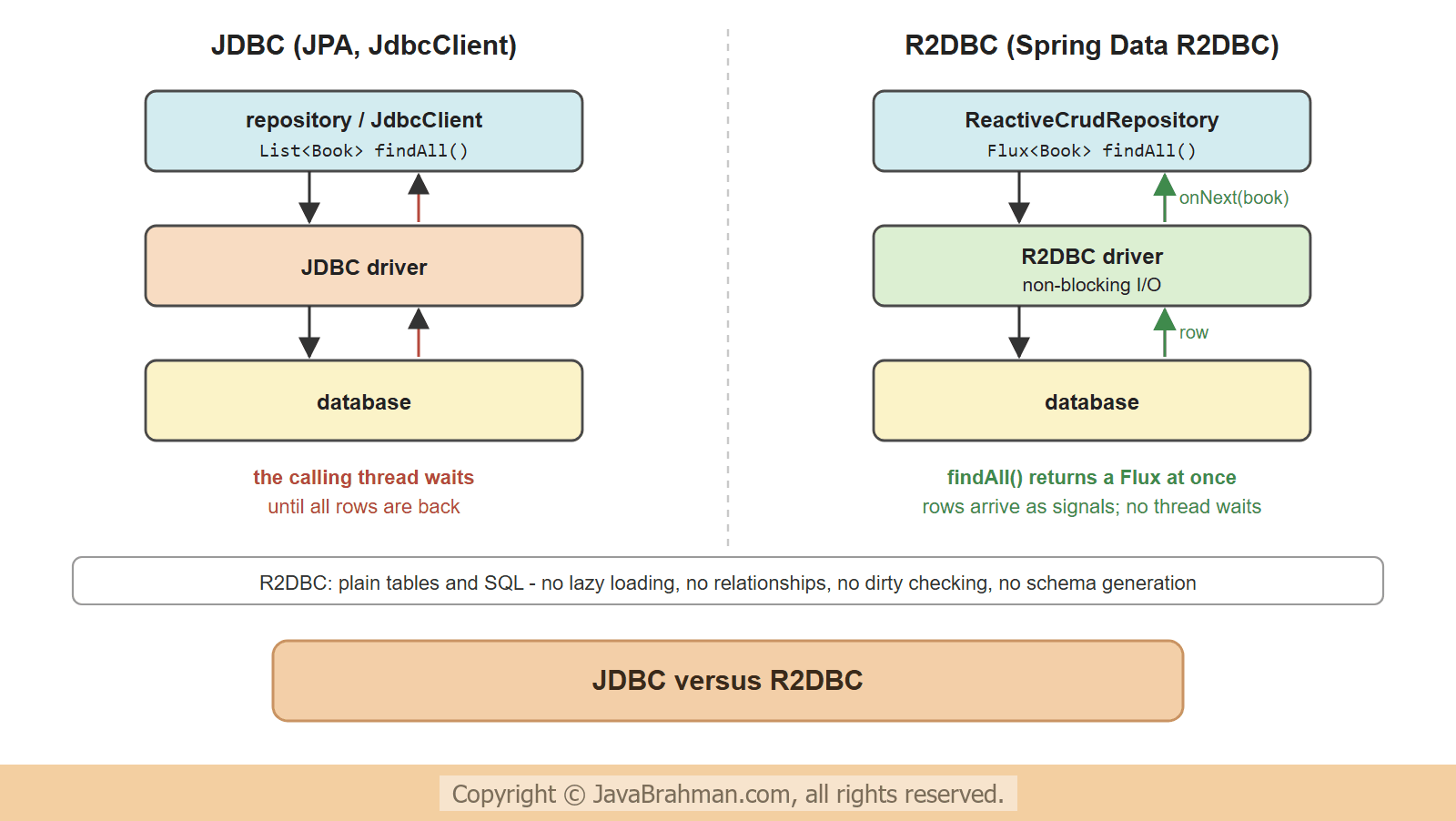
JDBC, the API under JPA, Hibernate, Spring Data JPA andJdbcClient, is blocking by design: executeQuery() returns only when the database has answered, and the calling thread waits for it. In a WebFluxClick to read tutorial: Building REST APIs with Spring WebFlux application, that thread is one of the few event-loop threads. R2DBC (Reactive Relational Database Connectivity) is a separate specification for SQL databases with non-blocking drivers: a query returns a Publisher, and rows arrive as onNext signals when the database sends them. Drivers exist for PostgreSQL, MySQL, MariaDB, SQL Server, Oracle and H2.
Spring Data R2DBC builds repositories and a template on top of R2DBC. It is deliberately simple - closer to Spring Data JDBC than to JPA -
- an entity maps to one table; there is no lazy loading, no relationship mapping, no caching and no dirty checking;
save()writes immediately; nothing happens behind the scenes;- the schema is not generated from the entities; it comes from SQL scripts or a migration tool.
Setting up
The starterspring-boot-starter-data-r2dbc and a driver are all it takes. With the H2 driver io.r2dbc:r2dbc-h2 on the classpath and no URL configured, Spring Boot creates an in-memory database and runs schema.sql and data.sql from the classpath. For a real database, set spring.r2dbc.url, such as r2dbc:postgresql://localhost/shop, with spring.r2dbc.username and password. Flyway and Liquibase still need a JDBC URL and driver for their migrations, as they are JDBC tools.
src/main/resources/schema.sql
create table book (id bigint auto_increment primary key, title varchar(100) not null, author varchar(60) not null,
                   price int not null, stock int not null);
create table book_order (id bigint auto_increment primary key, book_id bigint not null, quantity int not null);
src/main/resources/data.sql
insert into book (title, author, price, stock) values
  ('Effective Java', 'Joshua Bloch', 450, 5),
  ('Clean Code', 'Robert C. Martin', 380, 2),
  ('Refactoring', 'Martin Fowler', 520, 0),
  ('Clean Architecture', 'Robert C. Martin', 410, 7);
The entity and the repository
An entity can be a record.@Id marks the key: a null id means "new", and save() inserts the row and returns a copy with the generated id; otherwise it updates -
src/main/java/.../r2dbc/Book.java
//Book.java
package com.javabrahman.reactive.r2dbc;

import org.springframework.data.annotation.Id;

public record Book(@Id Long id, String title, String author, int price, int stock) {
}
src/main/java/.../r2dbc/BookOrder.java
//BookOrder.java
package com.javabrahman.reactive.r2dbc;

import org.springframework.data.annotation.Id;

public record BookOrder(@Id Long id, long bookId, int quantity) {   // table book_order, columns book_id and quantity
}ReactiveCrudRepository, whose methods return Mono and Flux. Derived query methods work as in the other Spring Data modules; @Query takes SQL with named parameters -
src/main/java/.../r2dbc/BookRepository.java
//BookRepository.java
package com.javabrahman.reactive.r2dbc;

import org.springframework.data.r2dbc.repository.Modifying;
import org.springframework.data.r2dbc.repository.Query;
import org.springframework.data.repository.reactive.ReactiveCrudRepository;
import reactor.core.publisher.Flux;
import reactor.core.publisher.Mono;

public interface BookRepository extends ReactiveCrudRepository<Book, Long> {

  Flux<Book> findByAuthorOrderByTitle(String author);

  Flux<Book> findByStockGreaterThan(int stock);

  @Query("select * from book where price between :low and :high order by price")
  Flux<Book> inPriceRange(int low, int high);

  @Modifying
  @Query("update book set price = price * (100 - :percent) / 100 where author = :author")
  Mono<Integer> discount(String author, int percent);
}
src/main/java/.../r2dbc/BookOrderRepository.java
//BookOrderRepository.java
package com.javabrahman.reactive.r2dbc;

import org.springframework.data.repository.reactive.ReactiveCrudRepository;

public interface BookOrderRepository extends ReactiveCrudRepository<BookOrder, Long> {
}src/main/java/.../r2dbc/R2dbcApp.java
//R2dbcApp.java
package com.javabrahman.reactive.r2dbc;

import static org.springframework.data.relational.core.query.Criteria.where;
import static org.springframework.data.relational.core.query.Query.query;

import org.springframework.boot.SpringApplication;
import org.springframework.boot.autoconfigure.SpringBootApplication;
import org.springframework.context.ConfigurableApplicationContext;
import org.springframework.data.domain.Sort;
import org.springframework.data.r2dbc.core.R2dbcEntityTemplate;
import org.springframework.r2dbc.core.DatabaseClient;

@SpringBootApplication
public class R2dbcApp {

  public static void main(String[] args) {
    try (ConfigurableApplicationContext context = SpringApplication.run(R2dbcApp.class, args)) {
      BookRepository books = context.getBean(BookRepository.class);

      System.out.println("1. findAll, then findById:");
      books.findAll().doOnNext(b -> System.out.println("   " + b)).blockLast();
      System.out.println("   " + books.findById(2L).block());

      System.out.println("2. save a new book:");
      Book saved = books.save(new Book(null, "Release It!", "Michael Nygard", 540, 3)).block();
      System.out.println("   saved with id " + saved.id());

      System.out.println("3. derived queries and @Query:");
      System.out.println("   by Martin: " + books.findByAuthorOrderByTitle("Robert C. Martin").map(Book::title).collectList().block());
      System.out.println("   in stock: " + books.findByStockGreaterThan(0).count().block());
      System.out.println("   400-500: " + books.inPriceRange(400, 500).map(Book::title).collectList().block());
      System.out.println("   discounted: " + books.discount("Robert C. Martin", 10).block() + " rows");

      System.out.println("4. R2dbcEntityTemplate with criteria:");
      R2dbcEntityTemplate template = context.getBean(R2dbcEntityTemplate.class);
      template.select(Book.class)
          .matching(query(where("price").lessThan(450)).sort(Sort.by("price")))
          .all()
          .doOnNext(b -> System.out.println("   " + b.title() + " " + b.price()))
          .blockLast();

      System.out.println("5. DatabaseClient with plain SQL and row mapping:");
      DatabaseClient db = context.getBean(DatabaseClient.class);
      db.sql("select author, count(*) as books, sum(stock) as copies from book group by author order by author")
          .map(row -> row.get("author", String.class) + ": " + row.get("books", Long.class)
              + " books, " + row.get("copies", Long.class) + " copies")
          .all()
          .doOnNext(line -> System.out.println("   " + line))
          .blockLast();
    }
  }
}1. findAll, then findById:
Executing SQL statement [SELECT "BOOK".* FROM "BOOK"]
Book[id=1, title=Effective Java, author=Joshua Bloch, price=450, stock=5]
Book[id=2, title=Clean Code, author=Robert C. Martin, price=380, stock=2]
Book[id=3, title=Refactoring, author=Martin Fowler, price=520, stock=0]
Book[id=4, title=Clean Architecture, author=Robert C. Martin, price=410, stock=7]
Executing SQL statement [SELECT "BOOK".* FROM "BOOK" WHERE "BOOK"."ID" = $1 LIMIT 2]
Book[id=2, title=Clean Code, author=Robert C. Martin, price=380, stock=2]
2. save a new book:
Executing SQL statement [INSERT INTO "BOOK" ("TITLE", "AUTHOR", "PRICE", "STOCK") VALUES ($1, $2, $3, $4)]
saved with id 5
3. derived queries and @Query:
Executing SQL statement [SELECT "BOOK"."ID", "BOOK"."TITLE", "BOOK"."AUTHOR", "BOOK"."PRICE", "BOOK"."STOCK" FROM "BOOK" WHERE "BOOK"."AUTHOR" = $1 ORDER BY "BOOK"."TITLE" ASC]
by Martin: [Clean Architecture, Clean Code]
Executing SQL statement [SELECT "BOOK"."ID", "BOOK"."TITLE", "BOOK"."AUTHOR", "BOOK"."PRICE", "BOOK"."STOCK" FROM "BOOK" WHERE "BOOK"."STOCK" > $1]
in stock: 4
Executing SQL statement [select * from book where price between $1 and $2 order by price]
400-500: [Clean Architecture, Effective Java]
Executing SQL statement [update book set price = price * (100 - $1) / 100 where author = $2]
discounted: 2 rows
4. R2dbcEntityTemplate with criteria:
Executing SQL statement [SELECT "BOOK".* FROM "BOOK" WHERE "BOOK"."PRICE" < $1 ORDER BY "BOOK"."PRICE" ASC]
Clean Code 342
Clean Architecture 369
5. DatabaseClient with plain SQL and row mapping:
Executing SQL statement [select author, count(*) as books, sum(stock) as copies from book group by author order by author]
Joshua Bloch: 1 books, 5 copies
Martin Fowler: 1 books, 0 copies
Michael Nygard: 1 books, 3 copies
Robert C. Martin: 2 books, 9 copies
- The DEBUG lines show the SQL each method sent. The derived queries became
WHEREclauses with bind markers, andsave()of a book with anullid became anINSERT; the generated id 5 came back in the returned copy. discount(), an@Modifyingquery, returned the number of changed rows.R2dbcEntityTemplatebuilds queries from criteria in code, and maps rows to entities: the tool for dynamic queries.DatabaseClientis the lowest level of Spring's R2DBC support: any SQL, with each row mapped by a function - here aGROUP BYthat maps to no entity. Both are auto-configured beans.- Each step was blocked in the main method to print it in order; in a WebFlux controller the
FluxandMonowould be returned instead.
Reactive transactions
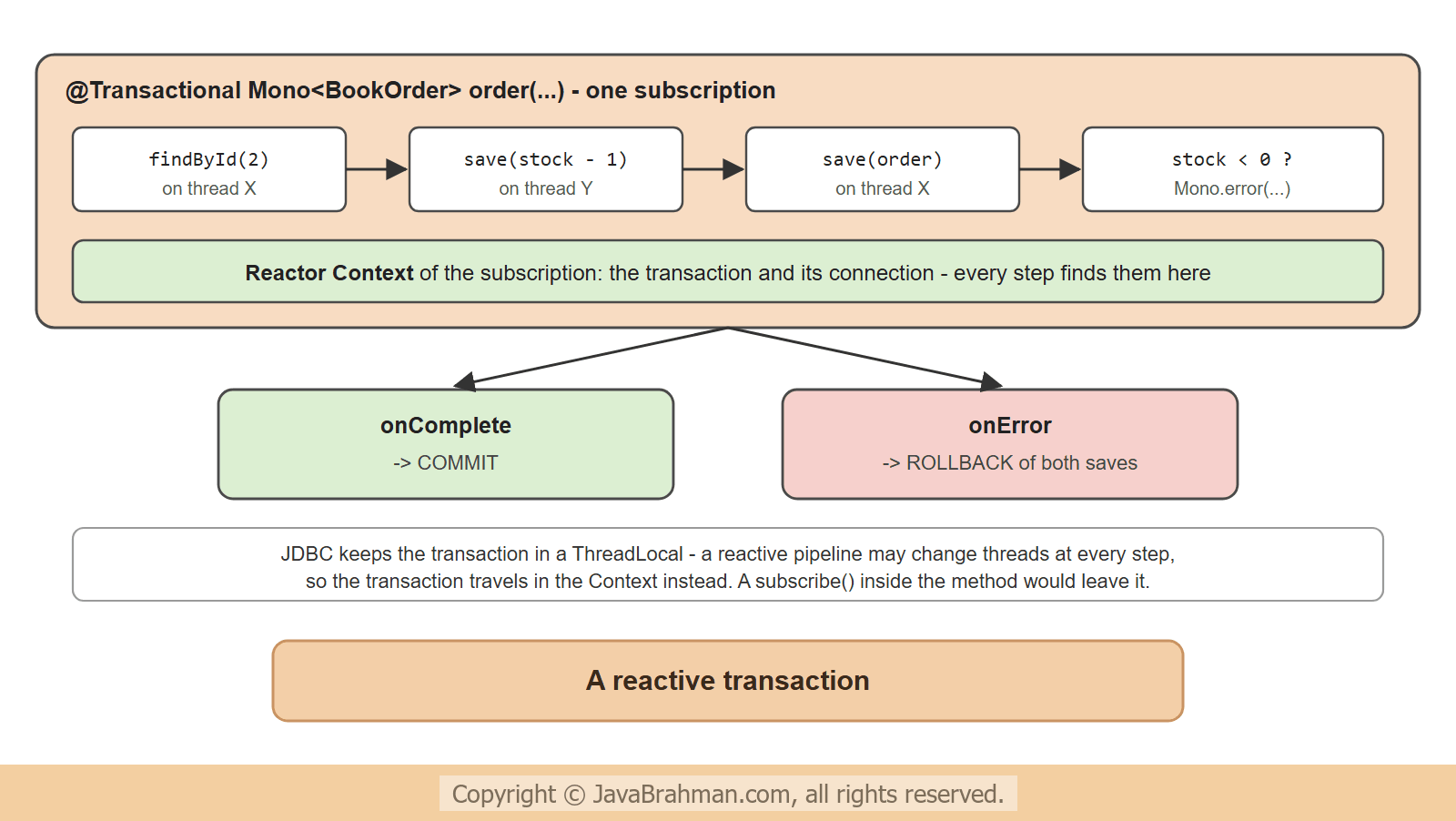
Placing an order changes two tables: the stock of the book goes down, and an order row is inserted. If the stock runs out, neither change may stay. Spring Boot configures anR2dbcTransactionManager, and @Transactional works on methods that return a Mono or Flux: the transaction begins when the publisher is subscribed, and commits when it completes - or rolls back when it ends with an error -
src/main/java/.../r2dbc/OrderService.java
//OrderService.java
package com.javabrahman.reactive.r2dbc;

import org.springframework.stereotype.Service;
import org.springframework.transaction.annotation.Transactional;
import org.springframework.transaction.reactive.TransactionalOperator;
import reactor.core.publisher.Mono;

@Service
public class OrderService {
  private final BookRepository books;
  private final BookOrderRepository orders;
  private final TransactionalOperator transactional;

  public OrderService(BookRepository books, BookOrderRepository orders, TransactionalOperator transactional) {
    this.books = books;
    this.orders = orders;
    this.transactional = transactional;
  }

  @Transactional
  public Mono<BookOrder> order(long bookId, int quantity) {
    return placeOrder(bookId, quantity);
  }

  // the same unit of work, with the transaction applied in code instead of by a proxy
  public Mono<BookOrder> orderWithOperator(long bookId, int quantity) {
    return placeOrder(bookId, quantity).as(transactional::transactional);
  }

  private Mono<BookOrder> placeOrder(long bookId, int quantity) {
    return books.findById(bookId)
        .switchIfEmpty(Mono.error(new IllegalArgumentException("no book " + bookId)))
        .flatMap(book -> books.save(new Book(book.id(), book.title(), book.author(), book.price(), book.stock() - quantity)))
        .flatMap(book -> orders.save(new BookOrder(null, bookId, quantity)).thenReturn(book))
        .flatMap(book -> book.stock() < 0
            ? Mono.error(new IllegalStateException("only " + (book.stock() + quantity) + " of " + book.title() + " in stock"))
            : orders.findAll().last());
  }
}src/main/java/.../r2dbc/TransactionApp.java
//TransactionApp.java
package com.javabrahman.reactive.r2dbc;

import org.springframework.boot.SpringApplication;
import org.springframework.context.ConfigurableApplicationContext;
import reactor.core.publisher.Mono;

public class TransactionApp {

  public static void main(String[] args) {
    try (ConfigurableApplicationContext context = SpringApplication.run(R2dbcApp.class, args)) {
      OrderService service = context.getBean(OrderService.class);
      BookRepository books = context.getBean(BookRepository.class);
      BookOrderRepository orders = context.getBean(BookOrderRepository.class);

      attempt("order 2 of Clean Code (2 in stock), @Transactional", service.order(2, 2), books, orders);
      attempt("order 1 more of Clean Code, @Transactional", service.order(2, 1), books, orders);
      attempt("order 9 of Effective Java (5 in stock), TransactionalOperator", service.orderWithOperator(1, 9), books, orders);
    }
  }

  static void attempt(String title, Mono<BookOrder> order, BookRepository books, BookOrderRepository orders) {
    System.out.println(title + ":");
    order.doOnNext(o -> System.out.println("   placed " + o))
        .onErrorResume(e -> {
          System.out.println("   failed: " + e.getMessage());
          return Mono.empty();
        })
        .block();
    System.out.println("   stock now: " + books.findAll().map(b -> b.title() + "=" + b.stock()).collectList().block()
        + ", orders: " + orders.count().block());
  }
}order 2 of Clean Code (2 in stock), @Transactional: placed BookOrder[id=1, bookId=2, quantity=2] stock now: [Effective Java=5, Clean Code=0, Refactoring=0, Clean Architecture=7], orders: 1 order 1 more of Clean Code, @Transactional: failed: only 0 of Clean Code in stock stock now: [Effective Java=5, Clean Code=0, Refactoring=0, Clean Architecture=7], orders: 1 order 9 of Effective Java (5 in stock), TransactionalOperator: failed: only 5 of Effective Java in stock stock now: [Effective Java=5, Clean Code=0, Refactoring=0, Clean Architecture=7], orders: 1
TransactionalOperator version did the same for Effective Java. A reactive transaction cannot live in a ThreadLocal as a JDBC transaction does, because the operators of one pipeline may run on several threads; Spring keeps it in the Reactor Context of the subscription instead, which travels with the pipeline. Two consequences: the transactional code must be part of the returned pipeline - a subscribe() inside it starts work outside the transaction - and, as always, the proxy rules of the proxy tutorialClick to read tutorial: How Spring Proxies Work and the Self-Invocation Trap apply to @Transactional.
Living without relationships
R2DBC entities have no@OneToMany or lazy collections. An order with its book is loaded in one of three ways -
- a join in SQL, with
DatabaseClientmapping each row to a result record - one round trip, the usual choice; - two queries combined with operators:
orders.findAll().flatMap(o -> books.findById(o.bookId()).map(b -> new OrderLine(o, b)))- simple, but one query per order; - an aggregate design in which each entity is loaded and saved on its own, referring to others by id, as Spring Data JDBC encourages.
Summary
In this tutorial we accessed a database without blocking, through Spring Data R2DBC and H2's R2DBC driver. Spring Boot created the database and ranschema.sql and data.sql; a record was the entity, and a ReactiveCrudRepository provided Flux and Mono methods, derived queries, SQL in @Query and an @Modifying update, while the DEBUG log showed the statements they sent. R2dbcEntityTemplate ran a criteria query and DatabaseClient plain SQL. @Transactional and TransactionalOperator rolled back a stock update and an order insert when the stock ran out. The next tutorial pushes data to clients: Server-Sent Events and WebSocketsClick to read tutorial: Server-Sent Events and WebSockets in Spring WebFlux.Reactive Spring Tutorials
Calling HTTP APIs with Spring WebClientClick to read tutorial: Calling HTTP APIs with Spring WebClient Server-Sent Events and WebSockets in Spring WebFluxClick to read tutorial: Server-Sent Events and WebSockets in Spring WebFlux Reactive Programming with Project Reactor: Mono and FluxClick to read tutorial: Reactive Programming with Project Reactor: Mono and Flux Building REST APIs with Spring WebFluxClick to read tutorial: Building REST APIs with Spring WebFlux Virtual Threads vs WebFlux: Which to Choose in 2026Click to read tutorial: Virtual Threads vs WebFlux: Which to Choose in 2026 Testing Reactive Code with StepVerifierClick to read tutorial: Testing Reactive Code with StepVerifier
Calling HTTP APIs with Spring WebClientClick to read tutorial: Calling HTTP APIs with Spring WebClient Server-Sent Events and WebSockets in Spring WebFluxClick to read tutorial: Server-Sent Events and WebSockets in Spring WebFlux Reactive Programming with Project Reactor: Mono and FluxClick to read tutorial: Reactive Programming with Project Reactor: Mono and Flux Building REST APIs with Spring WebFluxClick to read tutorial: Building REST APIs with Spring WebFlux Virtual Threads vs WebFlux: Which to Choose in 2026Click to read tutorial: Virtual Threads vs WebFlux: Which to Choose in 2026 Testing Reactive Code with StepVerifierClick to read tutorial: Testing Reactive Code with StepVerifier