
Calling HTTP APIs with Spring WebClient
Introduction
This tutorial explains WebClient, Spring's non-blocking HTTP client and the client half of Spring WebFlux. We will create aWebClient from Spring Boot's builder, read single objects and lists with retrieve(), and see what non-blocking calls are good for: three calls to slow price services take the time of one when they run together. Then we will handle 4xx and 5xx responses, set a timeout, retry a flaky service with exponential backoff, and look at exchangeToMono() for full control of the response. To have something real to call, the program starts a small price server on a random port first. Every output below comes from running it with Spring Boot 4.1.2.WebClient, RestClient and RestTemplate
Spring has three HTTP clients today -- WebClient (Spring 5+): non-blocking, returns
MonoandFlux, streams bodies. The client for WebFlux applications, and for any code that runs many calls concurrently. - RestClient (Spring 6.1+): the same fluent API style, but blocking - each call returns the result. The default choice for Spring MVC applications, especially with virtual threads.
- RestTemplate: the original blocking client, in maintenance; new code should use one of the two above.
spring-webflux, but in Spring Boot 4 the auto-configuration around it has a starter of its own, spring-boot-starter-webclient. With it, Spring Boot provides a preconfigured WebClient.Builder bean - with Boot's JSON codecs, metrics and connection settings - from which an application builds its clients. (The first run of this example, with only the WebFlux starter, failed with "No qualifying bean of type WebClient$Builder".)
pom.xml - dependencies
<dependency>
  <groupId>org.springframework.boot</groupId>
  <artifactId>spring-boot-starter-webflux</artifactId>
</dependency>
<dependency>
  <groupId>org.springframework.boot</groupId>
  <artifactId>spring-boot-starter-webclient</artifactId>
</dependency>
A price server to call
The server stands for remote services: a price lookup that answers after 300 ms, a list of shops, a service that is down twice before it answers, and one that is far too slow -src/main/java/.../client/Price.java
//Price.java
package com.javabrahman.reactive.client;

public record Price(String shop, String isbn, int amount) {
}
src/main/java/.../client/Shop.java
//Shop.java
package com.javabrahman.reactive.client;

public record Shop(String name) {
}
src/main/java/.../client/PriceServer.java - the remote side
//PriceServer.java
package com.javabrahman.reactive.client;

import java.time.Duration;
import java.util.Map;
import java.util.concurrent.atomic.AtomicInteger;
import org.springframework.boot.autoconfigure.SpringBootApplication;
import org.springframework.http.HttpStatus;
import org.springframework.http.ResponseEntity;
import org.springframework.web.bind.annotation.GetMapping;
import org.springframework.web.bind.annotation.PathVariable;
import org.springframework.web.bind.annotation.RestController;
import org.springframework.web.server.ResponseStatusException;
import reactor.core.publisher.Flux;
import reactor.core.publisher.Mono;

@SpringBootApplication
@RestController
public class PriceServer {
  private static final Map<String, Integer> PRICES = Map.of("shopA", 450, "shopB", 399, "shopC", 420);
  private final AtomicInteger flakyCalls = new AtomicInteger();

  @GetMapping("/shops")
  public Flux<Shop> shops() {
    return Flux.fromIterable(PRICES.keySet()).sort().map(Shop::new);
  }

  @GetMapping("/prices/{shop}/{isbn}")
  public Mono<Price> price(@PathVariable String shop, @PathVariable String isbn) {
    Integer amount = PRICES.get(shop);
    if (amount == null) {
      return Mono.error(new ResponseStatusException(HttpStatus.NOT_FOUND, "unknown shop " + shop));
    }
    return Mono.just(new Price(shop, isbn, amount)).delayElement(Duration.ofMillis(300));
  }

  @GetMapping("/flaky")
  public Mono<ResponseEntity<String>> flaky() {
    int call = flakyCalls.incrementAndGet();
    return Mono.just(call <= 2
        ? ResponseEntity.status(HttpStatus.SERVICE_UNAVAILABLE).body("busy, call " + call)
        : ResponseEntity.ok("answer on call " + call));
  }

  @GetMapping("/slow")
  public Mono<String> slow() {
    return Mono.just("finally").delayElement(Duration.ofSeconds(3));
  }
}
The client
The client class receives Spring Boot'sWebClient.Builder, sets the base URL, and declares one method per call. Each method returns a Mono or Flux: nothing is sent until someone subscribes -
src/main/java/.../client/PriceClient.java
//PriceClient.java
package com.javabrahman.reactive.client;

import java.time.Duration;
import org.springframework.http.HttpStatus;
import org.springframework.web.reactive.function.client.WebClient;
import org.springframework.web.reactive.function.client.WebClientResponseException;
import reactor.core.publisher.Flux;
import reactor.core.publisher.Mono;
import reactor.util.retry.Retry;

public class PriceClient {
  private final WebClient web;

  public PriceClient(WebClient.Builder builder, String baseUrl) {
    this.web = builder.baseUrl(baseUrl).defaultHeader("X-Client", "javabrahman-demo").build();
  }

  public Flux<Shop> shops() {
    return web.get().uri("/shops").retrieve().bodyToFlux(Shop.class);
  }

  public Mono<Price> price(String shop, String isbn) {
    return web.get().uri("/prices/{shop}/{isbn}", shop, isbn)
        .retrieve()
        .onStatus(status -> status == HttpStatus.NOT_FOUND,
            response -> response.bodyToMono(String.class).map(body -> new UnknownShopException(shop)))
        .bodyToMono(Price.class);
  }

  public Mono<String> flaky() {
    return web.get().uri("/flaky")
        .retrieve()
        .bodyToMono(String.class)
        .retryWhen(Retry.backoff(3, Duration.ofMillis(100))
            .filter(e -> e instanceof WebClientResponseException.ServiceUnavailable)
            .doBeforeRetry(signal -> System.out.println("   retry " + (signal.totalRetries() + 1)
                + " after a " + ((WebClientResponseException) signal.failure()).getStatusCode())));
  }

  public Mono<String> slow() {
    return web.get().uri("/slow").retrieve().bodyToMono(String.class)
        .timeout(Duration.ofMillis(500));
  }

  // full control: look at the status and headers, then decide how to read the body
  public Mono<String> describe(String path) {
    return web.get().uri(path).exchangeToMono(response ->
        response.bodyToMono(String.class).defaultIfEmpty("")
            .map(body -> response.statusCode().value() + " " + response.headers().contentType().orElse(null)
                + " (" + body.length() + " chars)"));
  }

  public static class UnknownShopException extends RuntimeException {
    UnknownShopException(String shop) {
      super("no such shop: " + shop);
    }
  }
}retrieve()is the usual way: it turns the body into objects withbodyToMono()orbodyToFlux(), and turns any 4xx or 5xx response into aWebClientResponseException- with a subclass per status, such asWebClientResponseException.NotFound.onStatus()replaces that exception with one of your own for selected statuses; here a 404 becomes anUnknownShopException, which the rest of the application can understand without knowing about HTTP.retryWhen()andtimeout()are plain Reactor operators of the previous tutorialsClick to read tutorial: Reactive Programming with Project Reactor: Mono and Flux: WebClient adds nothing special for them, because a call is just aMono.
src/main/java/.../client/WebClientDemo.java
//WebClientDemo.java
package com.javabrahman.reactive.client;

import java.util.concurrent.TimeoutException;
import org.springframework.boot.SpringApplication;
import org.springframework.boot.web.server.reactive.context.ReactiveWebServerApplicationContext;
import org.springframework.web.reactive.function.client.WebClient;
import reactor.core.publisher.Mono;

public class WebClientDemo {

  static long start;

  static String elapsed() {
    return Math.round((System.nanoTime() - start) / 100_000_000.0) / 10.0 + " s";
  }

  public static void main(String[] args) {
    try (var server = (ReactiveWebServerApplicationContext) SpringApplication.run(PriceServer.class, "--server.port=0")) {
      PriceClient client = new PriceClient(server.getBean(WebClient.Builder.class),
          "http://localhost:" + server.getWebServer().getPort());
      client.shops().blockLast();   // warms up the connection, so that the timings below compare fairly

      System.out.println("1. bodyToFlux and bodyToMono:");
      System.out.println("   shops: " + client.shops().map(Shop::name).collectList().block());
      System.out.println("   " + client.price("shopB", "111").block());

      System.out.println("2. three prices, one after the other:");
      start = System.nanoTime();
      int a = client.price("shopA", "111").block().amount();
      int b = client.price("shopB", "111").block().amount();
      int c = client.price("shopC", "111").block().amount();
      System.out.println("   best " + Math.min(a, Math.min(b, c)) + " after " + elapsed());

      System.out.println("3. the same three prices, at the same time with zip:");
      start = System.nanoTime();
      Integer best = Mono.zip(client.price("shopA", "111"), client.price("shopB", "111"), client.price("shopC", "111"))
          .map(t -> Math.min(t.getT1().amount(), Math.min(t.getT2().amount(), t.getT3().amount())))
          .block();
      System.out.println("   best " + best + " after " + elapsed());

      System.out.println("4. a 404, turned into an exception of our own by onStatus:");
      try {
        client.price("shopX", "111").block();
      } catch (PriceClient.UnknownShopException e) {
        System.out.println("   " + e);
      }

      System.out.println("5. a 503 twice, retried with backoff:");
      System.out.println("   " + client.flaky().block());

      System.out.println("6. a call that takes 3 s, with a 500 ms timeout:");
      start = System.nanoTime();
      try {
        client.slow().block();
      } catch (RuntimeException e) {
        System.out.println("   " + (e.getCause() instanceof TimeoutException ? "TimeoutException" : e) + " after " + elapsed());
      }

      System.out.println("7. exchangeToMono - the status and headers first:");
      System.out.println("   /shops          -> " + client.describe("/shops").block());
      System.out.println("   /prices/shopX/1 -> " + client.describe("/prices/shopX/1").block());
    }
  }
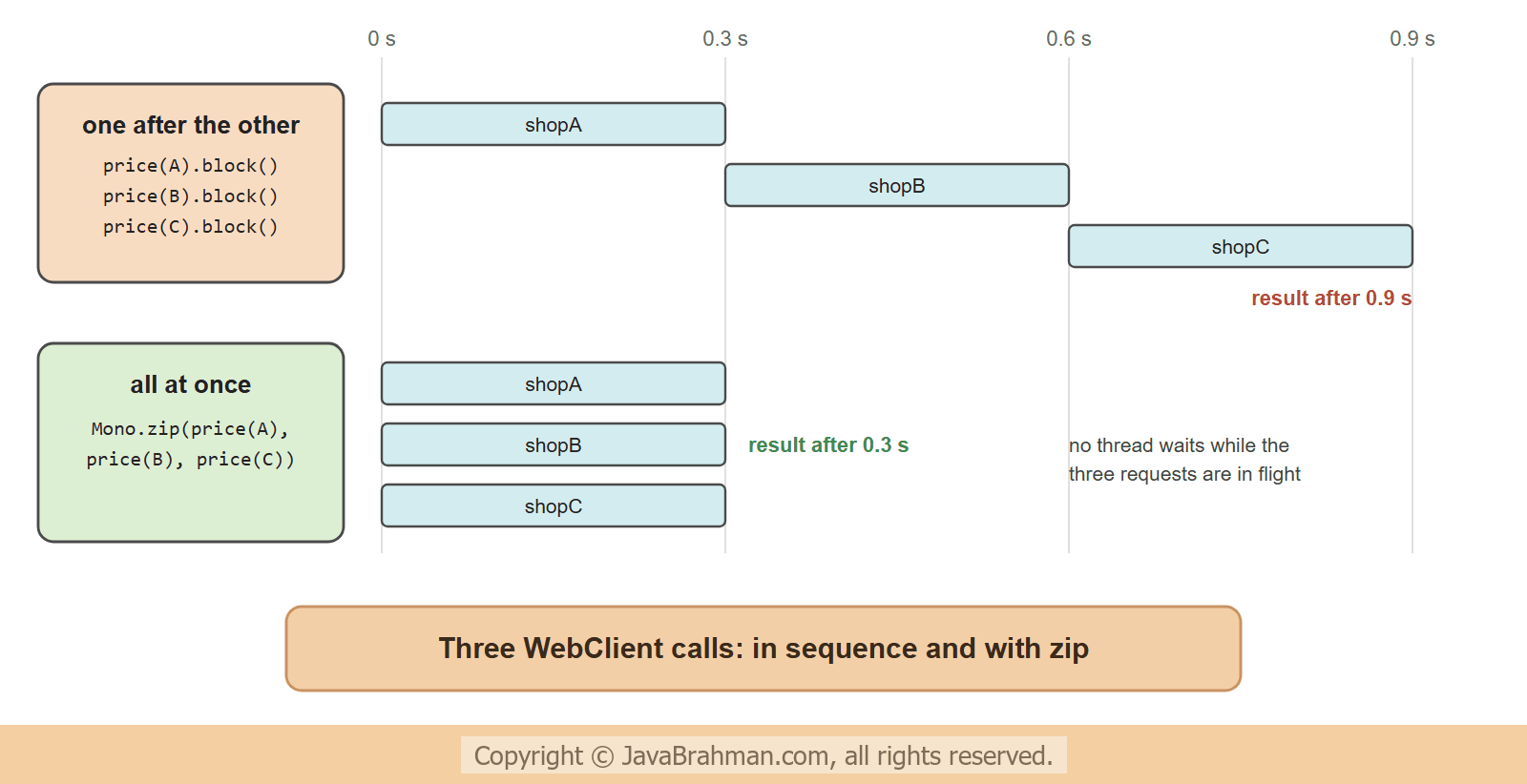
}1. bodyToFlux and bodyToMono: shops: [shopA, shopB, shopC] Price[shop=shopB, isbn=111, amount=399] 2. three prices, one after the other: best 399 after 0.9 s 3. the same three prices, at the same time with zip: best 399 after 0.3 s 4. a 404, turned into an exception of our own by onStatus: com.javabrahman.reactive.client.PriceClient$UnknownShopException: no such shop: shopX 5. a 503 twice, retried with backoff: retry 1 after a 503 SERVICE_UNAVAILABLE retry 2 after a 503 SERVICE_UNAVAILABLE answer on call 3 6. a call that takes 3 s, with a 500 ms timeout: TimeoutException after 0.5 s 7. exchangeToMono - the status and headers first: /shops -> 200 application/json (52 chars) /prices/shopX/1 -> 404 application/json (124 chars)
block() to print each result; inside a WebFlux application, the Monos would be returned and combined instead, never blocked.
What the run shows
- Concurrency for free: three calls of 300 ms took about 1 s one after the other, and about 0.3 s with
Mono.zip(). No thread pool orCompletableFuturewas needed: zip subscribed to the threeMonos at once, and the three requests were in flight together, without a thread waiting for any of them. For a list of calls,Flux.fromIterable(shops).flatMap(shop -> client.price(shop, isbn))does the same, andflatMap(..., 4)limits how many run at once. - Errors: the 404 became the application's own exception. Without
onStatus(), it would have been aWebClientResponseException.NotFound, which carries the status, headers and body of the response. - Retries: the 503 answers were retried after about 100 and 200 ms of backoff (Reactor adds jitter by default), and the third call succeeded. The
filter()matters: a 404 or 400 will fail on every attempt, so only "try again" statuses such as 503, 502, 429 and connection errors should be retried. - Timeouts: the slow call was cancelled after 0.5 s. A
timeout()on theMonolimits the whole call; for connection and response timeouts at the network level, configure the underlying Reactor NettyHttpClientand pass it withclientConnector(new ReactorClientHttpConnector(httpClient)). exchangeToMono()treats every status as a normal response; the code inspects it and decides. It must read or release the body inside the function, whichbodyToMono()does.
HTTP interface clients
For an API with many endpoints, writing each call by hand gets repetitive. An HTTP interface declares the calls as annotated methods of a Java interface, and Spring generates the implementation on top of a WebClient (or a RestClient) -An HTTP interface backed by WebClient
public interface PriceApi {

  @GetExchange("/prices/{shop}/{isbn}")
  Mono<Price> price(@PathVariable String shop, @PathVariable String isbn);

  @GetExchange("/shops")
  Flux<String> shops();
}

// creating the client
WebClient web = builder.baseUrl("http://prices.example.com").build();
PriceApi api = HttpServiceProxyFactory.builderFor(WebClientAdapter.create(web)).build()
.createClient(PriceApi.class);@ImportHttpServices, which registers such interfaces as beans in groups that share a configured client, and Spring Boot 4 configures those groups from properties.
Good practice
- Build from Spring Boot's
WebClient.Builder, so that codecs, metrics and tracing are configured. Build one client per remote service and reuse it: aWebClientis thread-safe, and its connection pool is shared. - Always set timeouts: a remote service that never answers otherwise keeps the request open indefinitely.
- Retry only idempotent calls, only on transient failures, and with backoff.
- Never
block()in a WebFlux application; on an event-loop thread it throws anIllegalStateException. In a Spring MVC application that only makes a few calls,RestClientis simpler than a blockedWebClient. - Large or endless bodies:
bodyToFlux()streams elements as they arrive, for example from an NDJSON or Server-Sent Events endpoint, without holding the whole body in memory.bodyToMono()is limited to 256 KB by default (spring.codec.max-in-memory-size).
Summary
In this tutorial we called a price server with WebClient, built from Spring Boot'sWebClient.Builder with a base URL. retrieve() with bodyToMono() and bodyToFlux() read objects and lists; three slow calls took about 1 s in sequence and 0.3 s with Mono.zip(). onStatus() mapped a 404 to an application exception, retryWhen(Retry.backoff()) got past two 503 answers, timeout() stopped a call after 0.5 s, and exchangeToMono() gave access to the status and headers. HTTP interfaces declare such calls as annotated Java methods. The next tutorial makes the database non-blocking too: Spring Data R2DBCClick to read tutorial: Reactive Database Access with Spring Data R2DBC.Reactive Spring Tutorials
Building REST APIs with Spring WebFluxClick to read tutorial: Building REST APIs with Spring WebFlux Reactive Database Access with Spring Data R2DBCClick to read tutorial: Reactive Database Access with Spring Data R2DBC Reactive Programming with Project Reactor: Mono and FluxClick to read tutorial: Reactive Programming with Project Reactor: Mono and Flux Server-Sent Events and WebSockets in Spring WebFluxClick to read tutorial: Server-Sent Events and WebSockets in Spring WebFlux Virtual Threads vs WebFlux: Which to Choose in 2026Click to read tutorial: Virtual Threads vs WebFlux: Which to Choose in 2026 Testing Reactive Code with StepVerifierClick to read tutorial: Testing Reactive Code with StepVerifier
Building REST APIs with Spring WebFluxClick to read tutorial: Building REST APIs with Spring WebFlux Reactive Database Access with Spring Data R2DBCClick to read tutorial: Reactive Database Access with Spring Data R2DBC Reactive Programming with Project Reactor: Mono and FluxClick to read tutorial: Reactive Programming with Project Reactor: Mono and Flux Server-Sent Events and WebSockets in Spring WebFluxClick to read tutorial: Server-Sent Events and WebSockets in Spring WebFlux Virtual Threads vs WebFlux: Which to Choose in 2026Click to read tutorial: Virtual Threads vs WebFlux: Which to Choose in 2026 Testing Reactive Code with StepVerifierClick to read tutorial: Testing Reactive Code with StepVerifier