
Server-Sent Events and WebSockets in Spring WebFlux
Introduction
This tutorial pushes data from a Spring WebFlux server to its clients as it happens, in the two standard ways: Server-Sent Events (SSE), a one-way stream of events over an ordinary HTTP response, and WebSockets, a two-way channel. We will look at the SSE format on the wire, send typed events with ids and names usingServerSentEvent, read them with WebClient, and broadcast news to several subscribers through a Sinks - a hot publisher. Then we will write a WebSocket handler that answers each message of a client, and a client that talks to it. Every exchange below comes from running the code with Spring Boot 4.1.2.SSE or WebSockets
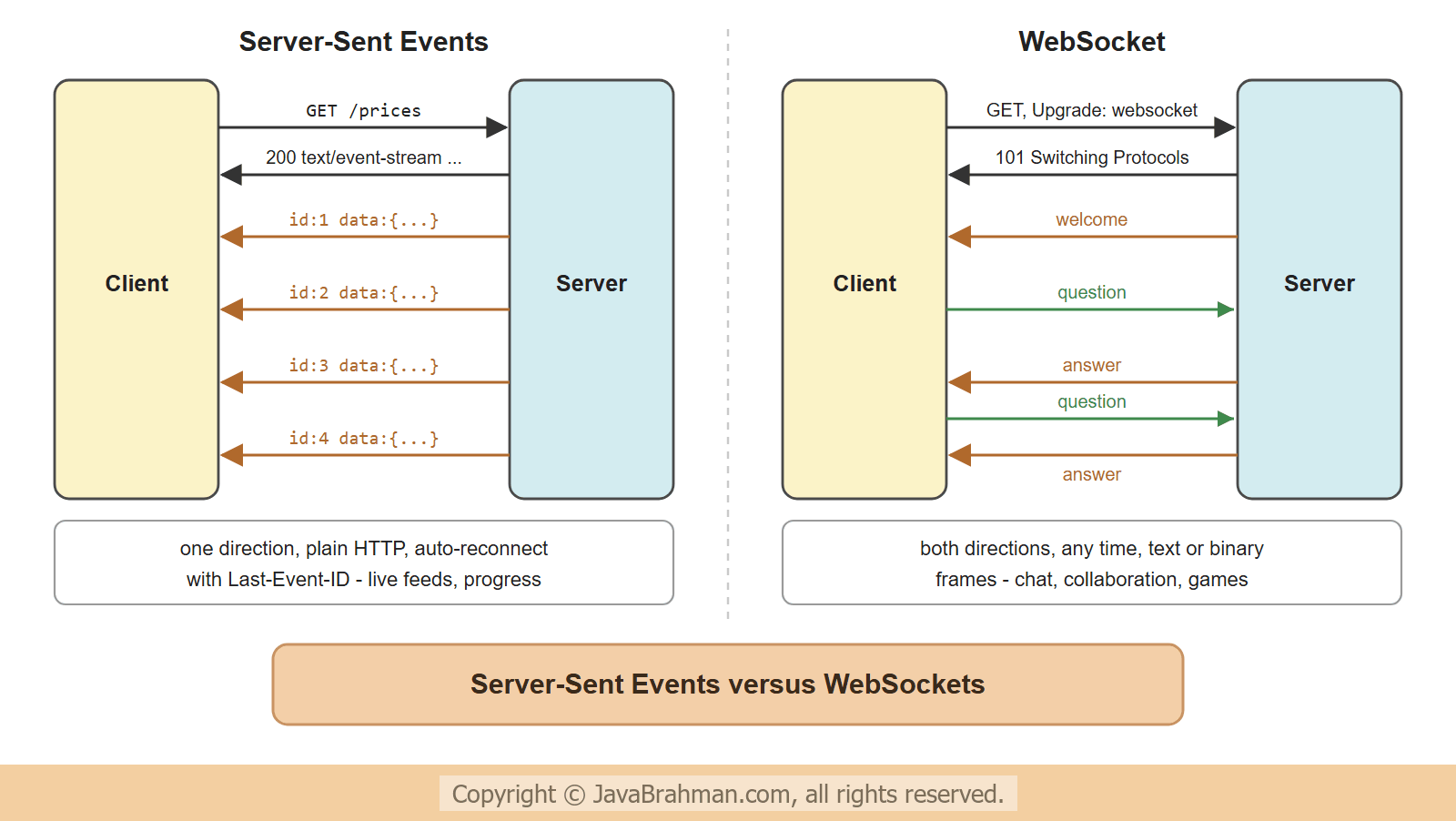
Both keep a connection open so that the server can send data whenever it has some, instead of the client asking again and again -- Server-Sent Events: a normal HTTP GET whose response, of type
text/event-stream, never really ends; the server writes events into it as text. One direction only - server to client - but it works through proxies and load balancers like any HTTP response, browsers reconnect automatically with theEventSourceAPI, and the last event id lets a reconnecting client continue where it stopped. Ideal for notifications, live prices, progress updates and dashboards. - WebSockets: the connection starts as HTTP and is then "upgraded" to a different protocol, in which both sides send messages at any time, as text or binary frames. Needed for chat, collaborative editing, games - whenever the client also sends a stream of messages.
Flux returned from a controller, and a WebSocket session is a Flux of incoming messages and a Flux of outgoing ones.
Server-Sent Events
A controller method that returns aFlux and produces text/event-stream sends each element as an event as soon as it is emitted. Plain elements become data: lines; ServerSentEvent adds an id, an event name, a retry interval or a comment -
src/main/java/.../realtime/Price.java
//Price.java
package com.javabrahman.reactive.realtime;

public record Price(String isbn, int amount) {
}
src/main/java/.../realtime/LiveController.java
//LiveController.java
package com.javabrahman.reactive.realtime;

import java.time.Duration;
import org.springframework.http.MediaType;
import org.springframework.http.codec.ServerSentEvent;
import org.springframework.web.bind.annotation.GetMapping;
import org.springframework.web.bind.annotation.PostMapping;
import org.springframework.web.bind.annotation.RequestBody;
import org.springframework.web.bind.annotation.RestController;
import reactor.core.publisher.Flux;
import reactor.core.publisher.Sinks;

@RestController
public class LiveController {
  // a hot source: news published once, delivered to everyone listening at that moment
  private final Sinks.Many<String> news = Sinks.many().multicast().directBestEffort();

  // plain values: each one becomes a "data:" line
  @GetMapping(value = "/ticks", produces = MediaType.TEXT_EVENT_STREAM_VALUE)
  public Flux<String> ticks() {
    return Flux.interval(Duration.ofMillis(200)).take(3).map(i -> "tick " + i);
  }

  // ServerSentEvent: id, event name and data (as JSON)
  @GetMapping(value = "/prices", produces = MediaType.TEXT_EVENT_STREAM_VALUE)
  public Flux<ServerSentEvent<Price>> prices() {
    return Flux.interval(Duration.ofMillis(300)).take(4)
        .map(i -> ServerSentEvent.builder(new Price("111", 450 - (int) (i * 5)))
            .id(String.valueOf(i + 1))
            .event("price-change")
            .build());
  }

  @GetMapping(value = "/news", produces = MediaType.TEXT_EVENT_STREAM_VALUE)
  public Flux<String> news() {
    return news.asFlux();
  }

  @PostMapping("/news")
  public void publish(@RequestBody String headline) {
    news.tryEmitNext(headline);
  }
}
src/main/java/.../realtime/RealtimeApp.java
//RealtimeApp.java
package com.javabrahman.reactive.realtime;

import org.springframework.boot.SpringApplication;
import org.springframework.boot.autoconfigure.SpringBootApplication;

@SpringBootApplication
public class RealtimeApp {

  public static void main(String[] args) {
    SpringApplication.run(RealtimeApp.class, args);
  }
}> curl -i http://localhost:8080/ticks
HTTP/1.1 200
Content-Type: text/event-stream; charset=UTF-8
data:tick 0
data:tick 1
data:tick 2
> curl -i http://localhost:8080/prices
HTTP/1.1 200
Content-Type: text/event-stream; charset=UTF-8
id:1
event:price-change
data:{"isbn":"111","amount":450}
id:2
event:price-change
data:{"isbn":"111","amount":445}
id:3
event:price-change
data:{"isbn":"111","amount":440}
id:4
event:price-change
data:{"isbn":"111","amount":435}
field:value lines ended by a blank line. data: carries the payload - the Price record as JSON - and id: and event: are what ServerSentEvent added. A browser reads it with a few lines of JavaScript; addEventListener("price-change", ...) picks events by name, and after a dropped connection the browser reconnects and sends the last id it saw in a Last-Event-ID header -
In the browser
const source = new EventSource("/prices");
source.addEventListener("price-change", event => {
  const price = JSON.parse(event.data);
  document.getElementById("price").textContent = price.amount;
});
Reading SSE with WebClient, and a hot news feed
WebClientClick to read tutorial: Calling HTTP APIs with Spring WebClient reads an event stream as aFlux of ServerSentEvents, typed by a ParameterizedTypeReference, each one as it arrives. The program below starts the server on a random port and reads the price stream. Then two listeners subscribe to /news, and three headlines are posted: one before the second listener has joined, two after -
src/main/java/.../realtime/SseClientDemo.java
//SseClientDemo.java
package com.javabrahman.reactive.realtime;

import java.time.Duration;
import org.springframework.boot.SpringApplication;
import org.springframework.boot.web.server.reactive.context.ReactiveWebServerApplicationContext;
import org.springframework.core.ParameterizedTypeReference;
import org.springframework.http.codec.ServerSentEvent;
import org.springframework.web.reactive.function.client.WebClient;
import reactor.core.Disposable;

public class SseClientDemo {

  public static void main(String[] args) throws InterruptedException {
    try (var server = (ReactiveWebServerApplicationContext) SpringApplication.run(RealtimeApp.class, "--server.port=0")) {
      WebClient web = WebClient.create("http://localhost:" + server.getWebServer().getPort());
      long start = System.nanoTime();

      System.out.println("price events as they arrive:");
      web.get().uri("/prices").retrieve()
          .bodyToFlux(new ParameterizedTypeReference<ServerSentEvent<Price>>() { })
          .doOnNext(e -> System.out.printf("   %.1f s  id=%s event=%s data=%s%n",
              Math.round((System.nanoTime() - start) / 100_000_000.0) / 10.0, e.id(), e.event(), e.data()))
          .blockLast();

      System.out.println("news to two listeners:");
      Disposable ann = listen(web, "ann");
      Thread.sleep(300);
      post(web, "Spring Boot 4.1 released");
      Thread.sleep(200);
      Disposable raj = listen(web, "raj");
      Thread.sleep(300);
      post(web, "Java 25 is the new LTS");
      post(web, "Reactor 3.8 is out");
      Thread.sleep(300);
      ann.dispose();
      raj.dispose();
    }
  }

  static Disposable listen(WebClient web, String name) {
    System.out.println("   " + name + " subscribes");
    return web.get().uri("/news").retrieve().bodyToFlux(String.class)
        .subscribe(headline -> System.out.println("   " + name + " got: " + headline));
  }

  static void post(WebClient web, String headline) {
    web.post().uri("/news").bodyValue(headline).retrieve().toBodilessEntity().block(Duration.ofSeconds(2));
  }
}price events as they arrive: 1.0 s id=1 event=price-change data=Price[isbn=111, amount=450] 1.1 s id=2 event=price-change data=Price[isbn=111, amount=445] 1.4 s id=3 event=price-change data=Price[isbn=111, amount=440] 1.7 s id=4 event=price-change data=Price[isbn=111, amount=435] news to two listeners: ann subscribes ann got: Spring Boot 4.1 released raj subscribes ann got: Java 25 is the new LTS raj got: Java 25 is the new LTS ann got: Reactor 3.8 is out raj got: Reactor 3.8 is out
- The price events arrived one by one, 0.3 s apart (the first a little later, on a fresh server), each with its id and event name, and the JSON data already converted to a
Price. - The first headline reached only Ann: Raj had not subscribed yet. The next two reached both.
/pricesis a cold stream - every client gets its own sequence from the start - while/newsis hot: aSinks.many().multicast()delivers each element to whoever is subscribed at that moment, which is what a live feed needs. directBestEffort()drops an element for a subscriber that cannot keep up, instead of slowing everyone down;onBackpressureBuffer()variants buffer instead, andreplay()sinks keep recent elements for late subscribers.- A real feed with several application instances needs a shared source behind the sink - a message broker - since each instance only knows its own subscribers.
WebSockets
A WebSocket endpoint in WebFlux is aWebSocketHandler, mapped to a path by a HandlerMapping bean. Its single method receives the session and returns a Mono<Void> that completes when the session should end. The session offers the incoming messages as a Flux - receive() - and sends whatever Flux is given to send(). This handler answers each message of a book shop's support chat -
src/main/java/.../realtime/SupportChatHandler.java
//SupportChatHandler.java
package com.javabrahman.reactive.realtime;

import org.springframework.stereotype.Component;
import org.springframework.web.reactive.socket.WebSocketHandler;
import org.springframework.web.reactive.socket.WebSocketMessage;
import org.springframework.web.reactive.socket.WebSocketSession;
import reactor.core.publisher.Flux;
import reactor.core.publisher.Mono;

@Component
public class SupportChatHandler implements WebSocketHandler {

  @Override
  public Mono<Void> handle(WebSocketSession session) {
    Flux<WebSocketMessage> replies = session.receive()
        .map(WebSocketMessage::getPayloadAsText)
        .map(this::answer)
        .startWith("Welcome to the book shop support. Ask about an order.")
        .map(session::textMessage);
    return session.send(replies);   // runs until the client closes the session
  }

  private String answer(String question) {
    if (question.toLowerCase().contains("order")) {
      return "Order 1042 was shipped yesterday.";
    }
    return "You asked: \"" + question + "\". An agent will reply soon.";
  }
}
src/main/java/.../realtime/WebSocketConfig.java
//WebSocketConfig.java
package com.javabrahman.reactive.realtime;

import java.util.Map;
import org.springframework.context.annotation.Bean;
import org.springframework.context.annotation.Configuration;
import org.springframework.web.reactive.HandlerMapping;
import org.springframework.web.reactive.handler.SimpleUrlHandlerMapping;

@Configuration
public class WebSocketConfig {

  @Bean
  HandlerMapping webSocketMapping(SupportChatHandler chat) {
    return new SimpleUrlHandlerMapping(Map.of("/ws/support", chat), -1);   // -1: before the controllers
  }
}ReactorNettyWebSocketClient.execute() opens the session and runs a handler for the client side. This one sends two questions, prints whatever comes back, and closes the session after three messages from the server -
src/main/java/.../realtime/WebSocketClientDemo.java
//WebSocketClientDemo.java
package com.javabrahman.reactive.realtime;

import java.net.URI;
import java.time.Duration;
import org.springframework.boot.SpringApplication;
import org.springframework.boot.web.server.reactive.context.ReactiveWebServerApplicationContext;
import org.springframework.web.reactive.socket.WebSocketMessage;
import org.springframework.web.reactive.socket.client.ReactorNettyWebSocketClient;
import reactor.core.publisher.Flux;
import reactor.core.publisher.Mono;

public class WebSocketClientDemo {

  public static void main(String[] args) {
    try (var server = (ReactiveWebServerApplicationContext) SpringApplication.run(RealtimeApp.class, "--server.port=0")) {
      URI uri = URI.create("ws://localhost:" + server.getWebServer().getPort() + "/ws/support");
      new ReactorNettyWebSocketClient().execute(uri, session -> {
        Mono<Void> send = session.send(Flux.just("Where is my order?", "Do you have Effective Java?")
            .delayElements(Duration.ofMillis(200))
            .doOnNext(q -> System.out.println("client sends:    " + q))
            .map(session::textMessage));
        Mono<Void> receive = session.receive()
            .map(WebSocketMessage::getPayloadAsText)
            .doOnNext(m -> System.out.println("client receives: " + m))
            .take(3)
            .then();
        return Mono.when(send, receive).then(session.close());
      }).block(Duration.ofSeconds(5));
    }
  }
}client receives: Welcome to the book shop support. Ask about an order. client sends: Where is my order? client receives: Order 1042 was shipped yesterday. client sends: Do you have Effective Java? client receives: You asked: "Do you have Effective Java?". An agent will reply soon.
Mono.when() waited for both, and the client then closed the session, which completed the server handler's send().
Practical points
- Timeouts in between: proxies and load balancers close connections that are idle for too long. Send a heartbeat - an SSE comment (
ServerSentEvent.builder().comment("ping")) or a WebSocket ping - every 15 to 30 seconds on quiet streams. - One connection per client, for a long time: thousands of open connections are cheap for WebFlux, which needs no thread per connection; for a thread-per-request server, each open stream would hold a thread.
- Messaging protocols: plain WebSockets carry raw messages; for topics, subscriptions and user destinations, Spring MVC offers STOMP over WebSocket. In the reactive stack, RSocket fills that role.
- Security: SSE requests carry cookies and headers like any request; a WebSocket handshake is an HTTP request too, so authenticate it there, and check the
Originheader against cross-site connections. - Scaling out: with several instances, a client is connected to only one of them. Events must reach every instance - through a broker such as Redis pub/sub, Kafka or RabbitMQ - to reach every client.
Summary
In this tutorial a WebFlux server pushed data to clients. AFlux produced as text/event-stream became Server-Sent Events, plain values as data: lines and ServerSentEvents with ids and event names; WebClient read them as typed events, 0.3 s apart. A Sinks.many().multicast() turned a news feed into a hot stream, which a late listener joined in the middle. A WebSocketHandler, mapped with a SimpleUrlHandlerMapping, greeted a client first and answered its questions over one two-way connection, opened by ReactorNettyWebSocketClient. The next tutorial asks whether all this is still needed now that Java has virtual threads: Virtual Threads vs WebFluxClick to read tutorial: Virtual Threads vs WebFlux: Which to Choose in 2026.Reactive Spring Tutorials
Reactive Database Access with Spring Data R2DBCClick to read tutorial: Reactive Database Access with Spring Data R2DBC Virtual Threads vs WebFlux: Which to Choose in 2026Click to read tutorial: Virtual Threads vs WebFlux: Which to Choose in 2026 Reactive Programming with Project Reactor: Mono and FluxClick to read tutorial: Reactive Programming with Project Reactor: Mono and Flux Building REST APIs with Spring WebFluxClick to read tutorial: Building REST APIs with Spring WebFlux Calling HTTP APIs with Spring WebClientClick to read tutorial: Calling HTTP APIs with Spring WebClient Testing Reactive Code with StepVerifierClick to read tutorial: Testing Reactive Code with StepVerifier
Reactive Database Access with Spring Data R2DBCClick to read tutorial: Reactive Database Access with Spring Data R2DBC Virtual Threads vs WebFlux: Which to Choose in 2026Click to read tutorial: Virtual Threads vs WebFlux: Which to Choose in 2026 Reactive Programming with Project Reactor: Mono and FluxClick to read tutorial: Reactive Programming with Project Reactor: Mono and Flux Building REST APIs with Spring WebFluxClick to read tutorial: Building REST APIs with Spring WebFlux Calling HTTP APIs with Spring WebClientClick to read tutorial: Calling HTTP APIs with Spring WebClient Testing Reactive Code with StepVerifierClick to read tutorial: Testing Reactive Code with StepVerifier