
Centralized Configuration with Spring Cloud Config
Introduction
Every Spring Boot application reads its settings fromapplication.properties inside its jar. With one application that is fine. With twenty services in three environments it means sixty files spread over twenty repositories, and a changed database address means twenty rebuilds. Spring Cloud Config moves the configuration out of the services: a Config Server serves the properties of every service and every profile from one place - usually a Git repository - and each service fetches its own at startup. This tutorial builds a Config Server over a Git repository, looks at what it serves, connects a client service to it, changes a value at runtime without a restart, and encrypts a secret. The code runs on Spring Boot 4.1.2 with Spring Cloud 2025.1.4 (Spring Cloud Config 5.0.6).How it fits together
There are three parts. A configuration repository holds plain properties or YAML files, named after the services. The Config Server is a small Spring Boot application that reads the repository and offers its content over HTTP. Each client service names the Config Server in its own configuration and asks it, at startup, for the properties that belong to its application name and its active profiles.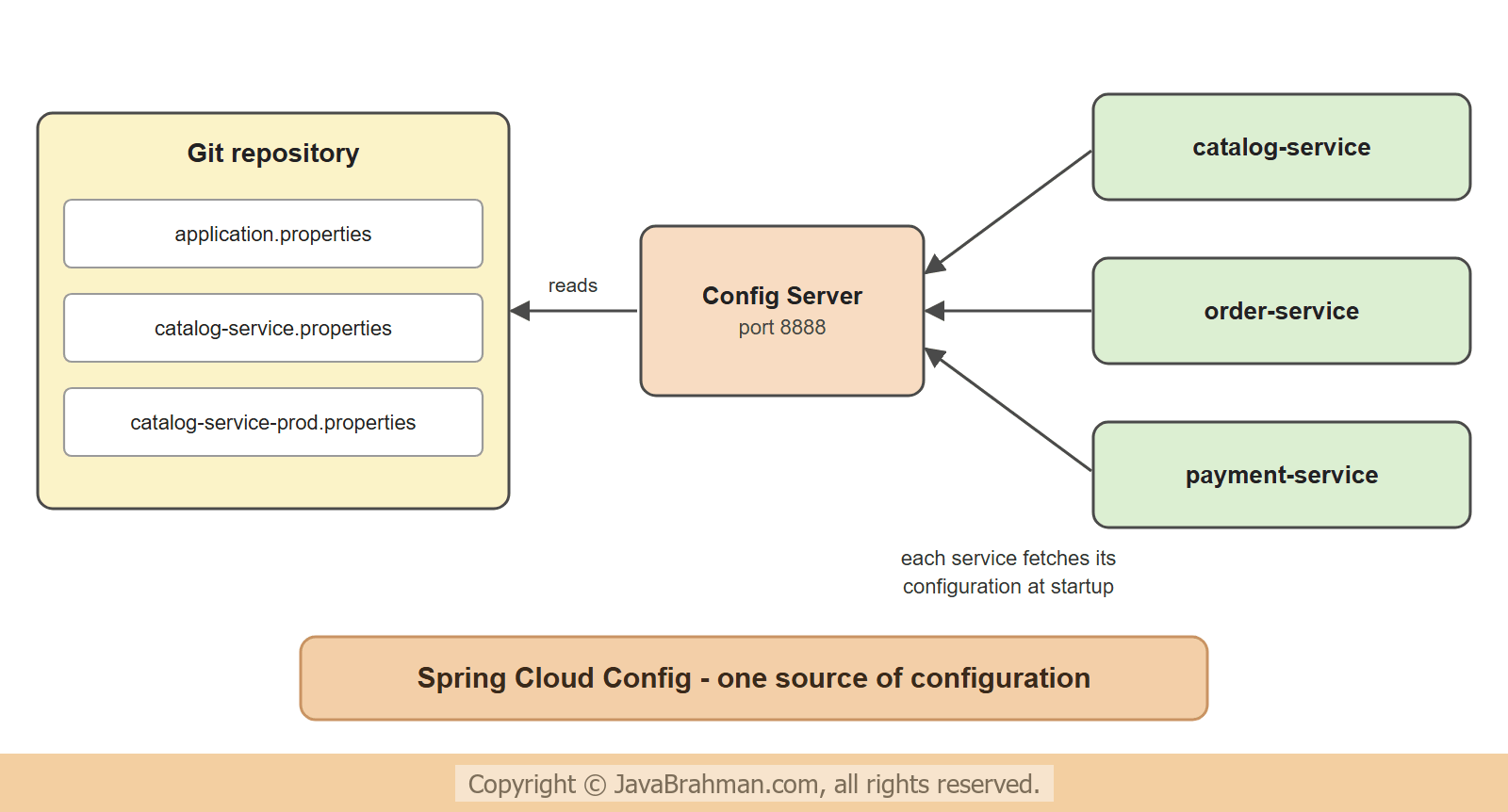 Keeping the files in Git gives the configuration what code already has: a history of who changed what and when, reviews, and a way back to yesterday's version.
The configuration repository
The repository of this tutorial has three files. The file name decides who gets the content:application.properties is for every service, catalog-service.properties for the service with that spring.application.name, and catalog-service-prod.properties for the same service when its profile prod is active -
config-repo/application.properties - shared by all services
shop.currency=INR
shop.page-size=20
config-repo/catalog-service.properties
shop.greeting=Welcome to the bookshopconfig-repo/catalog-service-prod.properties
shop.page-size=50
shop.payment-key={cipher}d6c9d015aeb356d7351839bd51c72979752af27353fc19b853d2963f0c405fe1git add and git commit. The value that starts with {cipher} is an encrypted secret, explained further down.
The Config Server
The server needs one dependency and one annotation. The Spring Cloud versions come from the release train's BOM -config-server: pom.xml (extract)
<dependencyManagement>
  <dependencies>
    <dependency>
      <groupId>org.springframework.cloud</groupId>
      <artifactId>spring-cloud-dependencies</artifactId>
      <version>2025.1.4</version>
      <type>pom</type>
      <scope>import</scope>
    </dependency>
  </dependencies>
</dependencyManagement>

<dependencies>
  <dependency>
    <groupId>org.springframework.cloud</groupId>
    <artifactId>spring-cloud-config-server</artifactId>
  </dependency>
</dependencies>
config-server: src/main/java/.../configserver/ConfigServerApp.java
//ConfigServerApp.java
package com.javabrahman.cloud.config.configserver;

import org.springframework.boot.SpringApplication;
import org.springframework.boot.autoconfigure.SpringBootApplication;
import org.springframework.cloud.config.server.EnableConfigServer;

@SpringBootApplication
@EnableConfigServer
public class ConfigServerApp {

  public static void main(String[] args) {
    SpringApplication.run(ConfigServerApp.class, args);
  }
}
config-server: src/main/resources/application.properties
server.port=8888
# the Git repository with the configuration files; in production an https:// or ssh:// address
spring.cloud.config.server.git.uri=file:./config-repo
spring.cloud.config.server.git.default-label=main
# the key for {cipher} values - in production from an environment variable, never from a file in Git
encrypt.key=${ENCRYPT_KEY:tutorial-demo-key}file: address, as here, is read in place.The server answers at
/{application}/{profile}, with an optional /{label} - a Git branch, tag or commit - at the end. These requests ask for the configuration of the catalog service, first with the default profile and then with prod -
OUTPUT of asking the Config Server> curl -i http://localhost:8888/catalog-service/default
HTTP/1.1 200
Content-Length: 364
Content-Type: application/json
{"name":"catalog-service","profiles":["default"],"label":null,"version":"4edf107f4db1c182122b58a66ec0a2a19bbc0573","state":"","propertySources":[{"name":"file:./config-repo/catalog-service.properties","source":{"shop.greeting":"Welcome to the bookshop"}},{"name":"file:./config-repo/application.properties","source":{"shop.currency":"INR","shop.page-size":"20"}}]}
> curl -i http://localhost:8888/catalog-service/prod
HTTP/1.1 200
Content-Length: 491
Content-Type: application/json
{"name":"catalog-service","profiles":["prod"],"label":null,"version":"4edf107f4db1c182122b58a66ec0a2a19bbc0573","state":"","propertySources":[{"name":"file:./config-repo/catalog-service-prod.properties","source":{"shop.page-size":"50","shop.payment-key":"pk_test_12345"}},{"name":"file:./config-repo/catalog-service.properties","source":{"shop.greeting":"Welcome to the bookshop"}},{"name":"file:./config-repo/application.properties","source":{"shop.currency":"INR","shop.page-size":"20"}}]}
> curl -i http://localhost:8888/catalog-service-prod.properties
HTTP/1.1 200
Content-Length: 108
Content-Type: text/plain
shop.currency: INR
shop.page-size: 50
shop.greeting: Welcome to the bookshop
shop.payment-key: pk_test_12345
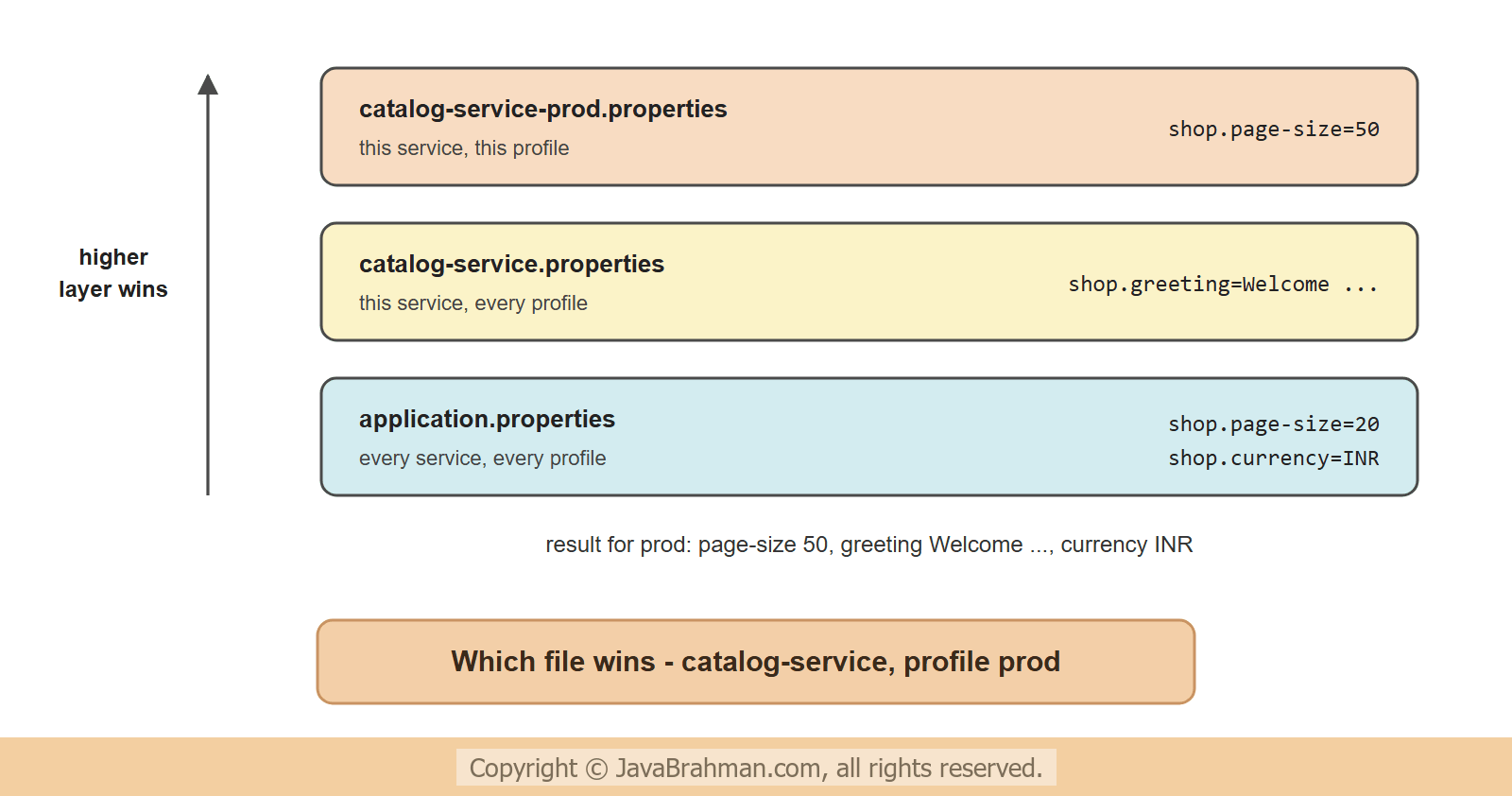
- The answer is a list of property sources, most specific first. For the default profile these are
catalog-service.propertiesand then the sharedapplication.properties. - For
prod, the filecatalog-service-prod.propertiescomes first. The client applies the sources in this order, soshop.page-sizeis 50 in production and 20 elsewhere. versionis the Git commit the files came from. Every answer can be traced to a commit.- The encrypted value arrives decrypted: the server holds the key, and the clients never see the cipher text.
- The third request,
/catalog-service-prod.properties, returns the merged result as one properties file - handy for checking what a service will really get..ymland.jsonwork too.
A client service
A service becomes a client with the starterspring-cloud-starter-config and one property, spring.config.import, that names the server. The Actuator starter is added too, for the refresh endpoint used later -
catalog-service: pom.xml (extract)
<dependency>
  <groupId>org.springframework.cloud</groupId>
  <artifactId>spring-cloud-starter-config</artifactId>
</dependency>
<dependency>
  <groupId>org.springframework.boot</groupId>
  <artifactId>spring-boot-starter-actuator</artifactId>
</dependency>
catalog-service: src/main/resources/application.properties
spring.application.name=catalog-service
server.port=8081
spring.config.import=configserver:http://localhost:8888
management.endpoints.web.exposure.include=refresh@Value, and a bean with @Value and @RefreshScope -
catalog-service: src/main/java/.../catalog/ShopProperties.java
//ShopProperties.java
package com.javabrahman.cloud.config.catalog;

import org.springframework.boot.context.properties.ConfigurationProperties;

@ConfigurationProperties("shop")
public class ShopProperties {

  private String greeting;
  private String currency;
  private int pageSize;

  public String getGreeting() { return greeting; }
  public void setGreeting(String greeting) { this.greeting = greeting; }
  public String getCurrency() { return currency; }
  public void setCurrency(String currency) { this.currency = currency; }
  public int getPageSize() { return pageSize; }
  public void setPageSize(int pageSize) { this.pageSize = pageSize; }
}
catalog-service: src/main/java/.../catalog/Greeters.java
//Greeters.java
package com.javabrahman.cloud.config.catalog;

import org.springframework.beans.factory.annotation.Value;
import org.springframework.cloud.context.config.annotation.RefreshScope;
import org.springframework.stereotype.Component;

public class Greeters {

  @Component
  public static class PlainGreeter {
    @Value("${shop.greeting}")
    private String greeting;

    public String greeting() { return greeting; }
  }

  @Component
  @RefreshScope
  public static class RefreshableGreeter {
    @Value("${shop.greeting}")
    private String greeting;

    public String greeting() { return greeting; }
  }
}
catalog-service: src/main/java/.../catalog/CatalogApp.java
//CatalogApp.java
package com.javabrahman.cloud.config.catalog;

import java.util.LinkedHashMap;
import java.util.Map;
import org.springframework.boot.SpringApplication;
import org.springframework.boot.autoconfigure.SpringBootApplication;
import org.springframework.boot.context.properties.EnableConfigurationProperties;
import org.springframework.web.bind.annotation.GetMapping;
import org.springframework.web.bind.annotation.RestController;

@SpringBootApplication
@EnableConfigurationProperties(ShopProperties.class)
@RestController
public class CatalogApp {

  private final ShopProperties shop;
  private final Greeters.PlainGreeter plain;
  private final Greeters.RefreshableGreeter refreshable;

  CatalogApp(ShopProperties shop, Greeters.PlainGreeter plain, Greeters.RefreshableGreeter refreshable) {
    this.shop = shop;
    this.plain = plain;
    this.refreshable = refreshable;
  }

  @GetMapping("/settings")
  Map<String, Object> settings() {
    Map<String, Object> settings = new LinkedHashMap<>();
    settings.put("currency", shop.getCurrency());
    settings.put("pageSize", shop.getPageSize());
    settings.put("greeting (@ConfigurationProperties)", shop.getGreeting());
    settings.put("greeting (@Value)", plain.greeting());
    settings.put("greeting (@Value + @RefreshScope)", refreshable.greeting());
    return settings;
  }

  public static void main(String[] args) {
    SpringApplication.run(CatalogApp.class, args);
  }
}--spring.profiles.active=prod -
OUTPUT with the default profile> curl -i http://localhost:8081/settings
HTTP/1.1 200
Content-Length: 204
Content-Type: application/json
{"currency":"INR","pageSize":20,"greeting (@ConfigurationProperties)":"Welcome to the bookshop","greeting (@Value)":"Welcome to the bookshop","greeting (@Value + @RefreshScope)":"Welcome to the bookshop"}
> curl -i http://localhost:8081/settings
HTTP/1.1 200
Content-Length: 204
Content-Type: application/json
{"currency":"INR","pageSize":50,"greeting (@ConfigurationProperties)":"Welcome to the bookshop","greeting (@Value)":"Welcome to the bookshop","greeting (@Value + @RefreshScope)":"Welcome to the bookshop"}
If the Config Server cannot be reached, the client refuses to start - a service running with missing configuration would be worse. Writing
optional:configserver:http://localhost:8888 lets it start anyway with its local properties, which suits development on a laptop. Remote properties take precedence over the local application.properties inside the jar, so a local value works as a default.
Changing configuration at runtime
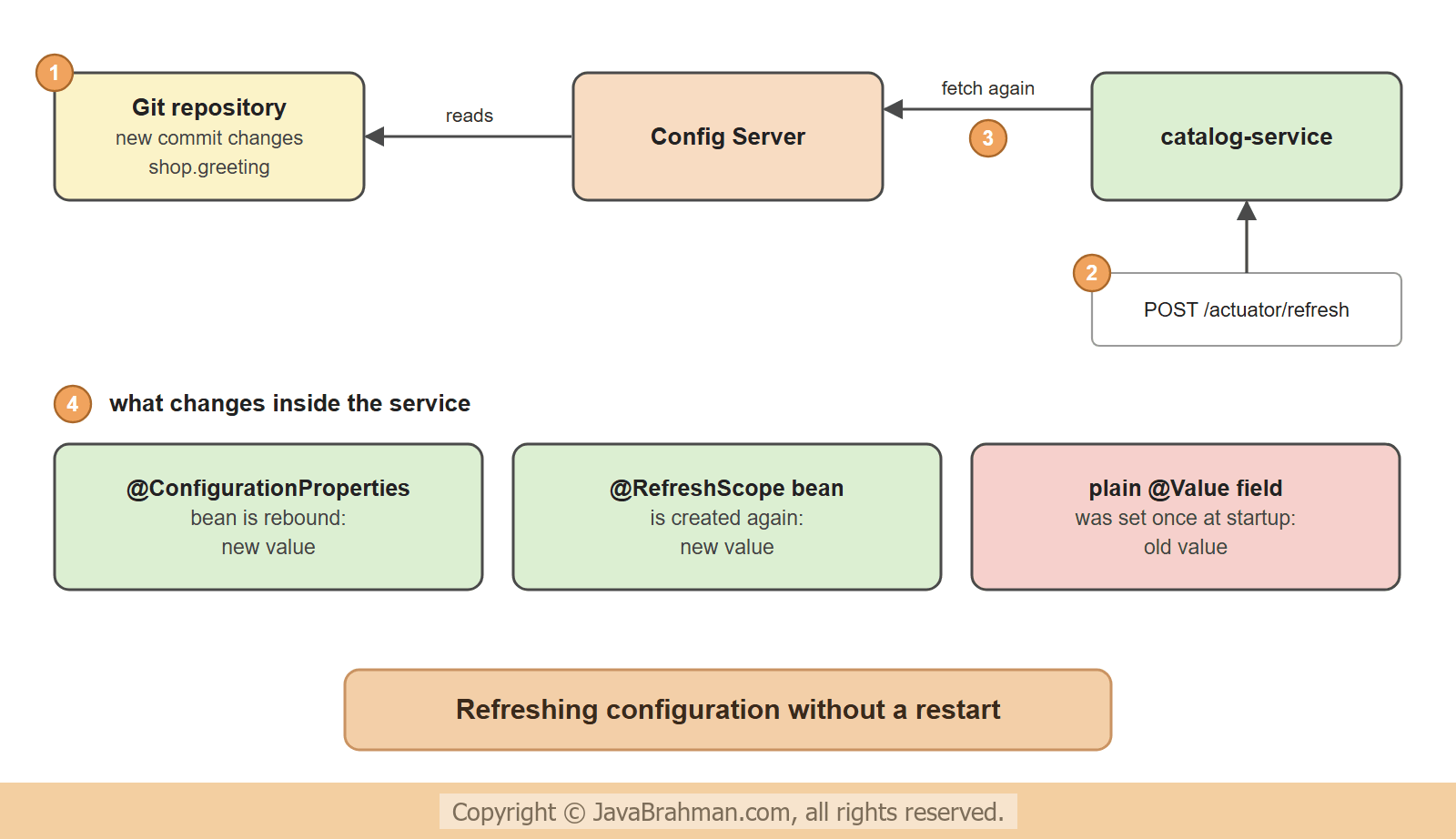
A client reads its configuration once, at startup. A commit to the repository does not reach running services by itself. Calling the Actuator endpointPOST /actuator/refresh on a service makes it fetch its configuration again and apply what changed. In this run the greeting is changed in the repository and committed, while both applications keep running -
OUTPUT of changing the greeting while the service runs> echo shop.greeting=Welcome to the book sale> config-repo\catalog-service.properties
> git -C config-repo -c user.name=dev -c user.email=dev@example.com commit -q -a -m "Sale greeting"
> curl -i http://localhost:8081/settings
HTTP/1.1 200
Content-Length: 204
Content-Type: application/json

{"currency":"INR","pageSize":20,"greeting (@ConfigurationProperties)":"Welcome to the bookshop","greeting (@Value)":"Welcome to the bookshop","greeting (@Value + @RefreshScope)":"Welcome to the bookshop"}
> curl -i -X POST http://localhost:8081/actuator/refresh
HTTP/1.1 200
Content-Length: 41
Content-Type: application/vnd.spring-boot.actuator.v3+json
["config.client.version","shop.greeting"]
> curl -i http://localhost:8081/settings
HTTP/1.1 200
Content-Length: 206
Content-Type: application/json
{"currency":"INR","pageSize":20,"greeting (@ConfigurationProperties)":"Welcome to the book sale","greeting (@Value)":"Welcome to the bookshop","greeting (@Value + @RefreshScope)":"Welcome to the book sale"}
- After the commit, the service still showed the old greeting everywhere: nothing had told it to look again.
POST /actuator/refreshanswered with the names of the properties that changed -shop.greeting, andconfig.client.version, the new commit.- The @ConfigurationProperties bean has the new value. Spring Cloud rebinds such beans on every refresh; no extra annotation is needed. This works for classes with setters, as here; a class bound through its constructor, such as a record, is not rebound unless it is also in the refresh scope.
- The plain @Value bean still has the old value. Its field was injected once when the bean was created, and a refresh does not touch it.
- The @RefreshScope bean has the new value. A bean in this scope is thrown away on refresh and created again, with fresh values, the next time it is used.
 The refresh endpoint acts on one instance. With many instances, calling each by hand does not scale; Spring Cloud Bus sends one refresh event to all of them through a message broker, and a Git webhook can trigger it on every push. Not every property can change at runtime, though: a refreshed value only matters to code that reads it again. The server port or a connection pool that was built at startup stays as it was until a restart.
Encrypting secrets
Passwords and API keys should not sit in a Git repository as plain text. The Config Server can encrypt them: withencrypt.key set, it offers the endpoints /encrypt and /decrypt, and decrypts every value that starts with {cipher} before serving it -
OUTPUT of encrypting a value> curl -i -X POST http://localhost:8888/encrypt -H "Content-Type: text/plain" -d 'pk_test_12345' HTTP/1.1 200 Content-Length: 64 Content-Type: text/plain; charset=UTF-8 faedbe70c196e2f2af032f7e543a93b2f3470a0e4214c1808250aabc32e6ce7a > curl -i -X POST http://localhost:8888/decrypt -H "Content-Type: text/plain" -d 'd6c9d015aeb356d7351839bd51c72979752af27353fc19b853d2963f0c405fe1' HTTP/1.1 200 Content-Length: 13 Content-Type: text/plain; charset=UTF-8 pk_test_12345
{cipher}. The cipher text differs each time, because a random salt is part of it; every one of them decrypts to the same value, as the second request shows with the cipher text stored in catalog-service-prod.properties above. The /catalog-service/prod answer earlier already contained that value decrypted.Points to take care of -
- The key must not be in the repository it protects. Pass it to the server as an environment variable or from a secret store; an RSA key pair from a keystore can replace the shared key.
- The Config Server hands out every secret to whoever asks. Protect it with Spring SecurityClick to read tutorial: Configuring SecurityFilterChain in Spring Security, keep it off the public network, and do not expose
/encryptand/decryptoutside. - For many secrets, a dedicated store is the better tool. The Config Server can also serve values from HashiCorp Vault and from cloud secret managers.
Other backends, and Kubernetes
Git is the default backend. The server can also read a plain folder or the classpath (profilenative), a database through JDBC, Vault, AWS S3 and others, and several backends combined.On Kubernetes, many teams do without a Config Server: configuration lives in ConfigMaps and Secrets, which Kubernetes hands to each pod as environment variables or files, and Spring Boot reads those with
spring.config.import=configtree: or through Spring Cloud Kubernetes. A Config Server earns its place when services run in several places, when configuration needs Git's history and reviews in one repository, or when values must change at runtime across many instances.
Summary
In this tutorial we moved the configuration of a service into a Git repository served by a Spring Cloud Config Server. The server, one class with@EnableConfigServer, answered at /{application}/{profile} with property sources ordered from the profile-specific file to the shared application.properties, each tied to a Git commit. A client needed only the config starter and spring.config.import=configserver:. After a commit, POST /actuator/refresh updated a @ConfigurationProperties bean and a @RefreshScope bean, while a plain @Value field kept its old value. Secrets were stored as {cipher} values that only the server can decrypt. With configuration in one place, the next question is how services find each other: service discovery with Eureka and KubernetesClick to read tutorial: Service Discovery: Eureka vs Kubernetes.Spring Cloud and Microservices Tutorials
Microservices with Spring: When and WhyClick to read tutorial: Microservices with Spring: When and Why Service Discovery: Eureka vs KubernetesClick to read tutorial: Service Discovery: Eureka vs Kubernetes API Gateway with Spring Cloud GatewayClick to read tutorial: API Gateway with Spring Cloud Gateway Circuit Breakers and Retries with Resilience4jClick to read tutorial: Circuit Breakers and Retries with Resilience4j Distributed Tracing with Micrometer and OpenTelemetryClick to read tutorial: Distributed Tracing with Micrometer and OpenTelemetry Inter-Service Communication: REST vs Messaging vs gRPCClick to read tutorial: Inter-Service Communication: REST vs Messaging vs gRPC Saga Pattern for Distributed TransactionsClick to read tutorial: Saga Pattern for Distributed Transactions
Microservices with Spring: When and WhyClick to read tutorial: Microservices with Spring: When and Why Service Discovery: Eureka vs KubernetesClick to read tutorial: Service Discovery: Eureka vs Kubernetes API Gateway with Spring Cloud GatewayClick to read tutorial: API Gateway with Spring Cloud Gateway Circuit Breakers and Retries with Resilience4jClick to read tutorial: Circuit Breakers and Retries with Resilience4j Distributed Tracing with Micrometer and OpenTelemetryClick to read tutorial: Distributed Tracing with Micrometer and OpenTelemetry Inter-Service Communication: REST vs Messaging vs gRPCClick to read tutorial: Inter-Service Communication: REST vs Messaging vs gRPC Saga Pattern for Distributed TransactionsClick to read tutorial: Saga Pattern for Distributed Transactions