
Service Discovery: Eureka vs Kubernetes
Introduction
In the first tutorial of this moduleClick to read tutorial: Microservices with Spring: When and Why the order service found the catalog service through a fixed address in its properties:catalog.url=http://localhost:8081. That works for one instance on one machine. In production a service runs as several instances, on addresses nobody chose, and instances come and go as the system scales, deploys and fails. Service discovery replaces the fixed address with a name: a service asks "where is catalog-service right now?" and gets the instances that are alive. This tutorial builds discovery with Netflix Eureka and Spring Cloud LoadBalancer - a registry, two instances of a service, and a client that spreads its calls over them - watches what happens when an instance dies, and then compares this with the discovery that Kubernetes has built in. The code runs on Spring Boot 4.1.2 with Spring Cloud 2025.1.4.How a service registry works
A service registry is a directory of running instances. Four things happen around it -- Register - an instance, when it starts, tells the registry its service name, host and port.
- Renew - the instance sends a heartbeat every few seconds. An instance whose heartbeats stop is removed after a while.
- Fetch - a client downloads the list of instances and keeps a local copy, refreshed regularly.
- Call - for each request, the client picks one instance from its local copy and calls it directly.
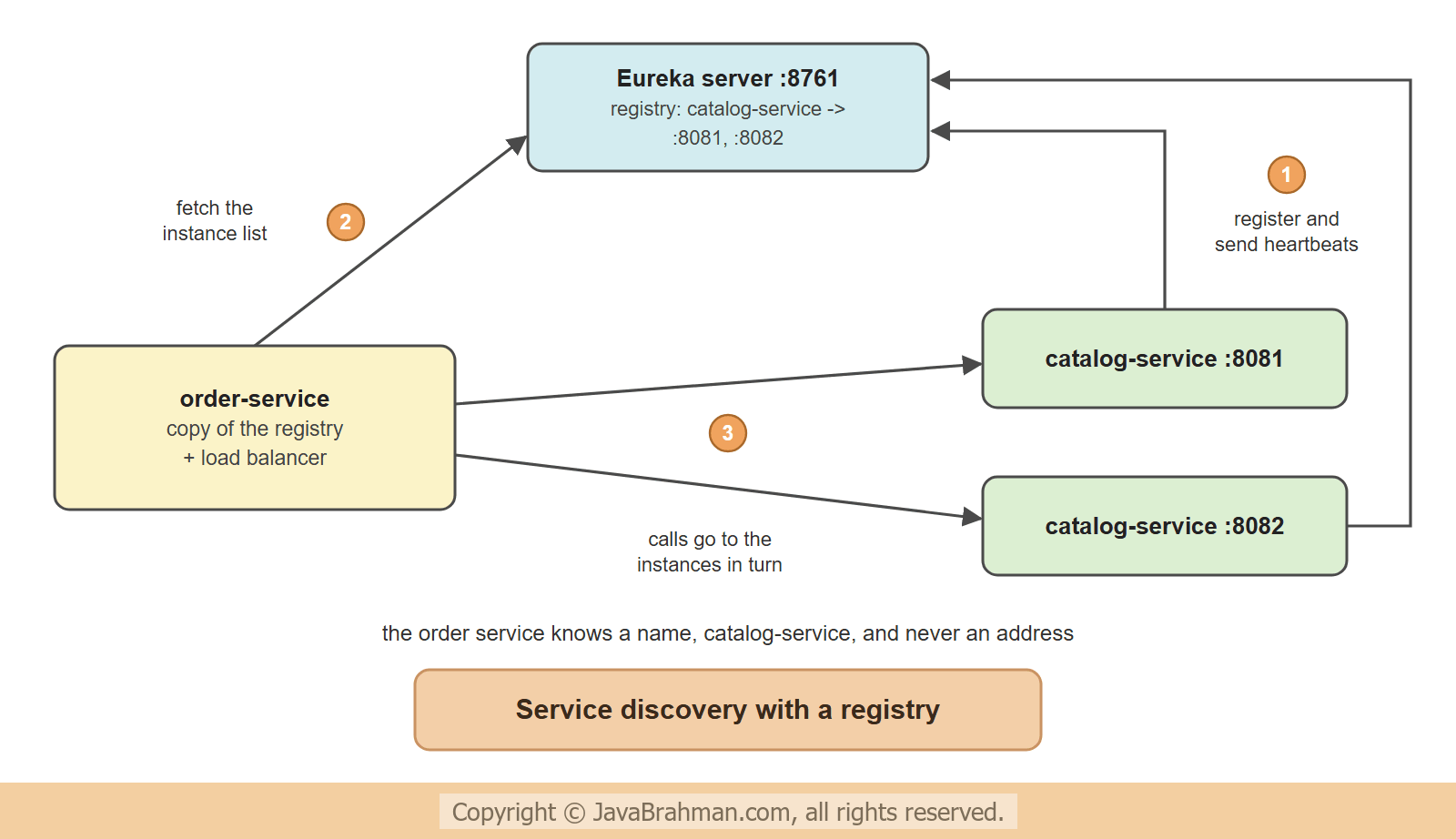 Because the client holds a copy of the list, the registry is not in the path of the calls. If the registry is down for a minute, the services go on calling each other with what they know.
The Eureka server
The registry is a Spring Boot application with the starterspring-cloud-starter-netflix-eureka-server and one annotation -
registry: src/main/java/.../registry/RegistryApp.java
//RegistryApp.java
package com.javabrahman.cloud.discovery.registry;

import org.springframework.boot.SpringApplication;
import org.springframework.boot.autoconfigure.SpringBootApplication;
import org.springframework.cloud.netflix.eureka.server.EnableEurekaServer;

@SpringBootApplication
@EnableEurekaServer
public class RegistryApp {

  public static void main(String[] args) {
    SpringApplication.run(RegistryApp.class, args);
  }
}
registry: src/main/resources/application.properties
spring.application.name=registry
server.port=8761
# a single registry: it does not register with, or fetch from, another one
eureka.client.register-with-eureka=false
eureka.client.fetch-registry=false

# for this demonstration only - react within seconds instead of minutes
eureka.server.enable-self-preservation=false
eureka.server.eviction-interval-timer-in-ms=1000
eureka.server.response-cache-update-interval-ms=1000A service that registers itself
The catalog service needs the starterspring-cloud-starter-netflix-eureka-client, a name, and the address of the registry. There is no annotation to add: with the starter on the classpath the application registers at startup -
catalog-service: src/main/java/.../catalog/CatalogApp.java
//CatalogApp.java
package com.javabrahman.cloud.discovery.catalog;

import org.springframework.beans.factory.annotation.Value;
import org.springframework.boot.SpringApplication;
import org.springframework.boot.autoconfigure.SpringBootApplication;
import org.springframework.web.bind.annotation.GetMapping;
import org.springframework.web.bind.annotation.PathVariable;
import org.springframework.web.bind.annotation.RestController;

@SpringBootApplication
@RestController
public class CatalogApp {

  record Book(String isbn, String title, int price, String servedBy) {}

  @Value("${server.port}")
  private int port;

  @GetMapping("/books/{isbn}")
  Book book(@PathVariable String isbn) {
    return new Book(isbn, "Effective Java", 450, "catalog-service on port " + port);
  }

  public static void main(String[] args) {
    SpringApplication.run(CatalogApp.class, args);
  }
}
catalog-service: src/main/resources/application.properties
spring.application.name=catalog-service
eureka.client.service-url.defaultZone=http://localhost:8761/eureka/
eureka.instance.hostname=localhost

# for this demonstration only - heartbeat every second, expire after 3 seconds (defaults: 30 and 90)
eureka.instance.lease-renewal-interval-in-seconds=1
eureka.instance.lease-expiration-duration-in-seconds=3
spring.application.name is the name other services will use. The response carries the port of the instance that answered, so the output below shows who served each call. Two instances of this application are started, with --server.port=8081 and --server.port=8082.
A client that calls by name
The order service has the Eureka client starter too, andspring-cloud-starter-loadbalancer. The one new thing in its code is the annotation @LoadBalanced on the RestClient.Builder bean -
order-service: src/main/java/.../order/OrderApp.java
//OrderApp.java
package com.javabrahman.cloud.discovery.order;

import org.springframework.boot.SpringApplication;
import org.springframework.boot.autoconfigure.SpringBootApplication;
import org.springframework.cloud.client.loadbalancer.LoadBalanced;
import org.springframework.context.annotation.Bean;
import org.springframework.web.client.RestClient;

@SpringBootApplication
public class OrderApp {

  @Bean(defaultCandidate = false)
  @LoadBalanced
  RestClient.Builder loadBalancedBuilder() {
    return RestClient.builder();
  }

  public static void main(String[] args) {
    SpringApplication.run(OrderApp.class, args);
  }
}
order-service: src/main/java/.../order/OrderController.java
//OrderController.java
package com.javabrahman.cloud.discovery.order;

import java.util.LinkedHashMap;
import java.util.List;
import java.util.Map;
import org.springframework.cloud.client.discovery.DiscoveryClient;
import org.springframework.cloud.client.loadbalancer.LoadBalanced;
import org.springframework.web.bind.annotation.GetMapping;
import org.springframework.web.bind.annotation.PostMapping;
import org.springframework.web.bind.annotation.RequestBody;
import org.springframework.web.bind.annotation.RestController;
import org.springframework.web.client.RestClient;

@RestController
public class OrderController {

  record OrderRequest(String isbn, int quantity) {}
  record Book(String isbn, String title, int price, String servedBy) {}
  record Order(String title, int quantity, int total, String priceFrom) {}

  private final RestClient catalog;
  private final DiscoveryClient discovery;

  OrderController(@LoadBalanced RestClient.Builder builder, DiscoveryClient discovery) {
    this.catalog = builder.baseUrl("http://catalog-service").build();
    this.discovery = discovery;
  }

  @PostMapping("/orders")
  Order place(@RequestBody OrderRequest request) {
    Book book = catalog.get().uri("/books/{isbn}", request.isbn()).retrieve().body(Book.class);
    return new Order(book.title(), request.quantity(), book.price() * request.quantity(), book.servedBy());
  }

  // what this service currently knows about the catalog service
  @GetMapping("/instances")
  Map<String, Object> instances() {
    List<String> uris = discovery.getInstances("catalog-service").stream()
        .map(instance -> instance.getUri().toString()).sorted().toList();
    Map<String, Object> result = new LinkedHashMap<>();
    result.put("count", uris.size());
    result.put("instances", uris);
    return result;
  }
}
order-service: src/main/resources/application.properties
spring.application.name=order-service
server.port=8080
eureka.client.service-url.defaultZone=http://localhost:8761/eureka/
eureka.instance.hostname=localhost

# for this demonstration only - refresh the local copy of the registry every second (defaults: 30 and 35 seconds)
eureka.client.registry-fetch-interval-seconds=1
spring.cloud.loadbalancer.cache.ttl=1s- The base URL is
http://catalog-service. There is no such host; the "host" is a service name. @LoadBalancedadds an interceptor to the builder. For every request it takes the host part of the URL as a service name, asks Spring Cloud LoadBalancer for an instance, and replaces the name with that instance's host and port.- The bean is declared with
defaultCandidate = false, so it is injected only where@LoadBalancedis asked for, as in the controller's constructor. This matters: the Eureka client makes its own HTTP calls to the registry, and it would otherwise pick up this builder and try to look up the registry's host name as a service. - The load balancer chooses round robin by default: each call goes to the next instance in the list.
DiscoveryClientis Spring Cloud's interface over any registry. The/instancesendpoint uses it to show the local copy of the list; the interface works the same with Eureka, Consul or Kubernetes behind it.- A plain
RestClient.Builderwithout the annotation still calls real host names. The RestClient tutorialClick to read tutorial: Calling REST Services with RestClient and HTTP Interfaces covers the client itself.
Running it: two instances, then one dies
Four applications are started: the registry, the catalog service on ports 8081 and 8082, and the order service. Four orders are placed. Then the instance on port 8082 is killed - the process is ended without any shutdown, as in a crash - and more orders are placed - OUTPUT of calling the catalog service by name> curl -i http://localhost:8080/instances
HTTP/1.1 200
Content-Length: 73
Content-Type: application/json
{"count":2,"instances":["http://localhost:8081","http://localhost:8082"]}
> curl -i -X POST http://localhost:8080/orders -H "Content-Type: application/json" -d '{"isbn":"978-1","quantity":1}'
HTTP/1.1 200
Content-Length: 94
Content-Type: application/json
{"title":"Effective Java","quantity":1,"total":450,"priceFrom":"catalog-service on port 8081"}
> curl -i -X POST http://localhost:8080/orders -H "Content-Type: application/json" -d '{"isbn":"978-1","quantity":2}'
HTTP/1.1 200
Content-Length: 94
Content-Type: application/json
{"title":"Effective Java","quantity":2,"total":900,"priceFrom":"catalog-service on port 8082"}
> curl -i -X POST http://localhost:8080/orders -H "Content-Type: application/json" -d '{"isbn":"978-1","quantity":3}'
HTTP/1.1 200
Content-Length: 95
Content-Type: application/json
{"title":"Effective Java","quantity":3,"total":1350,"priceFrom":"catalog-service on port 8081"}
> curl -i -X POST http://localhost:8080/orders -H "Content-Type: application/json" -d '{"isbn":"978-1","quantity":4}'
HTTP/1.1 200
Content-Length: 95
Content-Type: application/json
{"title":"Effective Java","quantity":4,"total":1800,"priceFrom":"catalog-service on port 8082"}
# --- the catalog-service instance on port 8082 is killed ---
> curl -i -X POST http://localhost:8080/orders -H "Content-Type: application/json" -d '{"isbn":"978-1","quantity":5}'
HTTP/1.1 500
Content-Type: application/json
{"timestamp":"2026-11-10T05:21:58.673Z","status":500,"error":"Internal Server Error","path":"/orders"}
> curl -i -X POST http://localhost:8080/orders -H "Content-Type: application/json" -d '{"isbn":"978-1","quantity":6}'
HTTP/1.1 200
Content-Length: 95
Content-Type: application/json
{"title":"Effective Java","quantity":6,"total":2700,"priceFrom":"catalog-service on port 8081"}
# --- a few seconds later, the registry has removed the dead instance ---
> curl -i http://localhost:8080/instances
HTTP/1.1 200
Content-Length: 49
Content-Type: application/json
{"count":1,"instances":["http://localhost:8081"]}
> curl -i -X POST http://localhost:8080/orders -H "Content-Type: application/json" -d '{"isbn":"978-1","quantity":7}'
HTTP/1.1 200
Content-Length: 95
Content-Type: application/json
{"title":"Effective Java","quantity":7,"total":3150,"priceFrom":"catalog-service on port 8081"}
> curl -i -X POST http://localhost:8080/orders -H "Content-Type: application/json" -d '{"isbn":"978-1","quantity":8}'
HTTP/1.1 200
Content-Length: 95
Content-Type: application/json
{"title":"Effective Java","quantity":8,"total":3600,"priceFrom":"catalog-service on port 8081"}
- The order service knew two instances of the catalog service, without either address appearing in its configuration.
- The four orders were answered by ports 8081 and 8082 in turn - round robin.
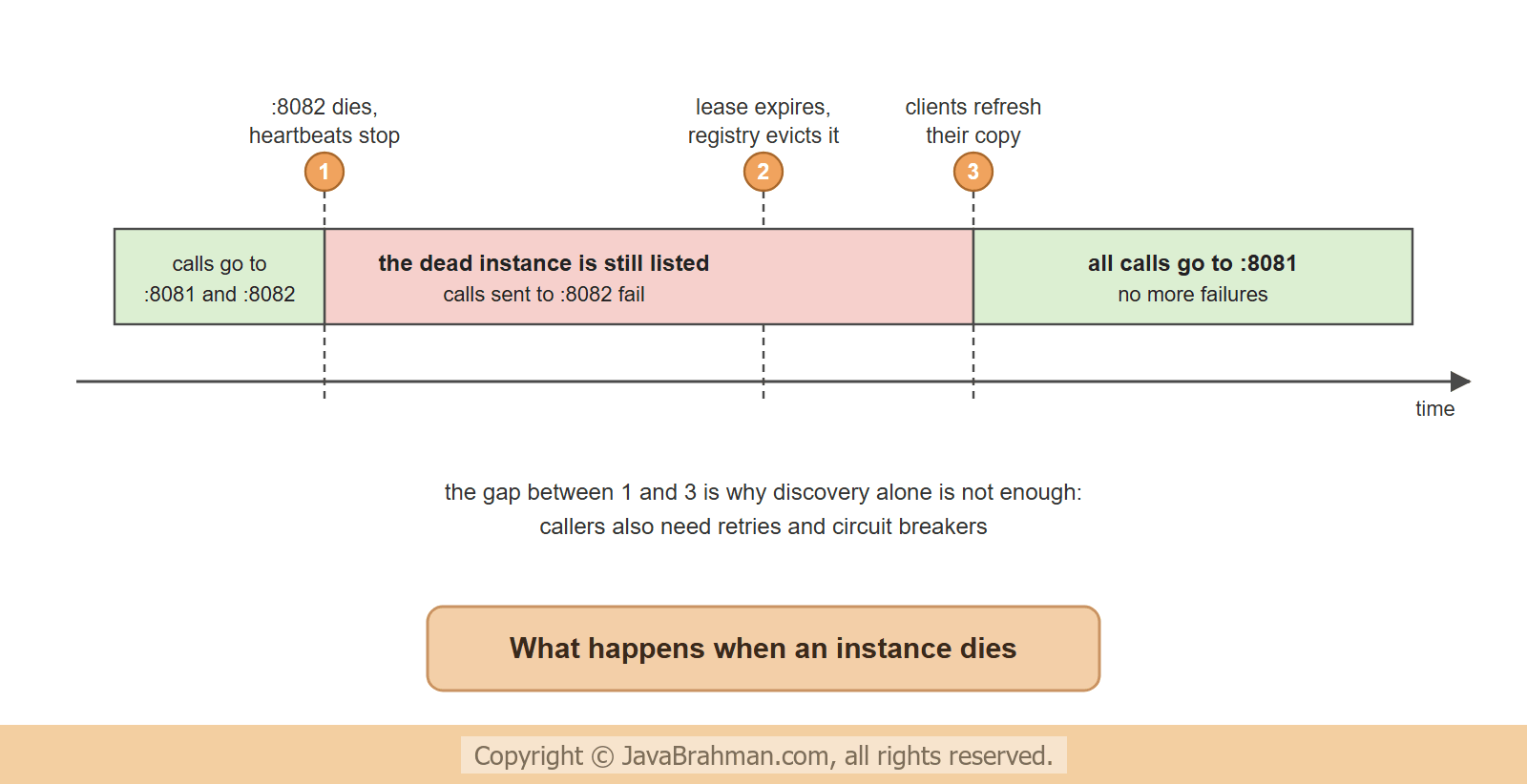
- Right after the instance on 8082 was killed, the two orders went one to each instance as before. The one sent to the live instance succeeded; the one sent to the dead instance failed with status 500. A killed process cannot say goodbye, so the registry, and the order service's copy of the list, still contained it.
- The heartbeats from 8082 had stopped. When its lease ran out, the registry removed the instance; the order service picked that up at its next fetch, and the list was down to one.
- From then on every order was served by port 8081.
Living with a stale list
The window in which a dead instance is still listed cannot be closed completely; it can be made short and harmless -- An instance that shuts down normally deregisters itself, so planned restarts and deployments leave no dead entry. Only crashes wait for the lease to expire.
- With the default settings the wait is long: 90 seconds of lease, an eviction run every 60 seconds, and 30-second caches on the server and in every client. The values in this tutorial are for a demonstration; in production the usual answer is not to tune these down but to handle the failed call.
- A retry on another instance hides the failure from the caller, and a circuit breaker stops calls to an instance that keeps failing. Both are the subject of Circuit Breakers and Retries with Resilience4jClick to read tutorial: Circuit Breakers and Retries with Resilience4j.
- Eureka's self-preservation mode, switched off above, protects against the opposite mistake: when many heartbeats stop at once, the cause is more likely a network problem than many crashes, and the server then stops removing instances. Leave it on in production.
- In production the registry itself runs as two or three Eureka servers that replicate to each other, so it is not a single point of failure.
Discovery on Kubernetes
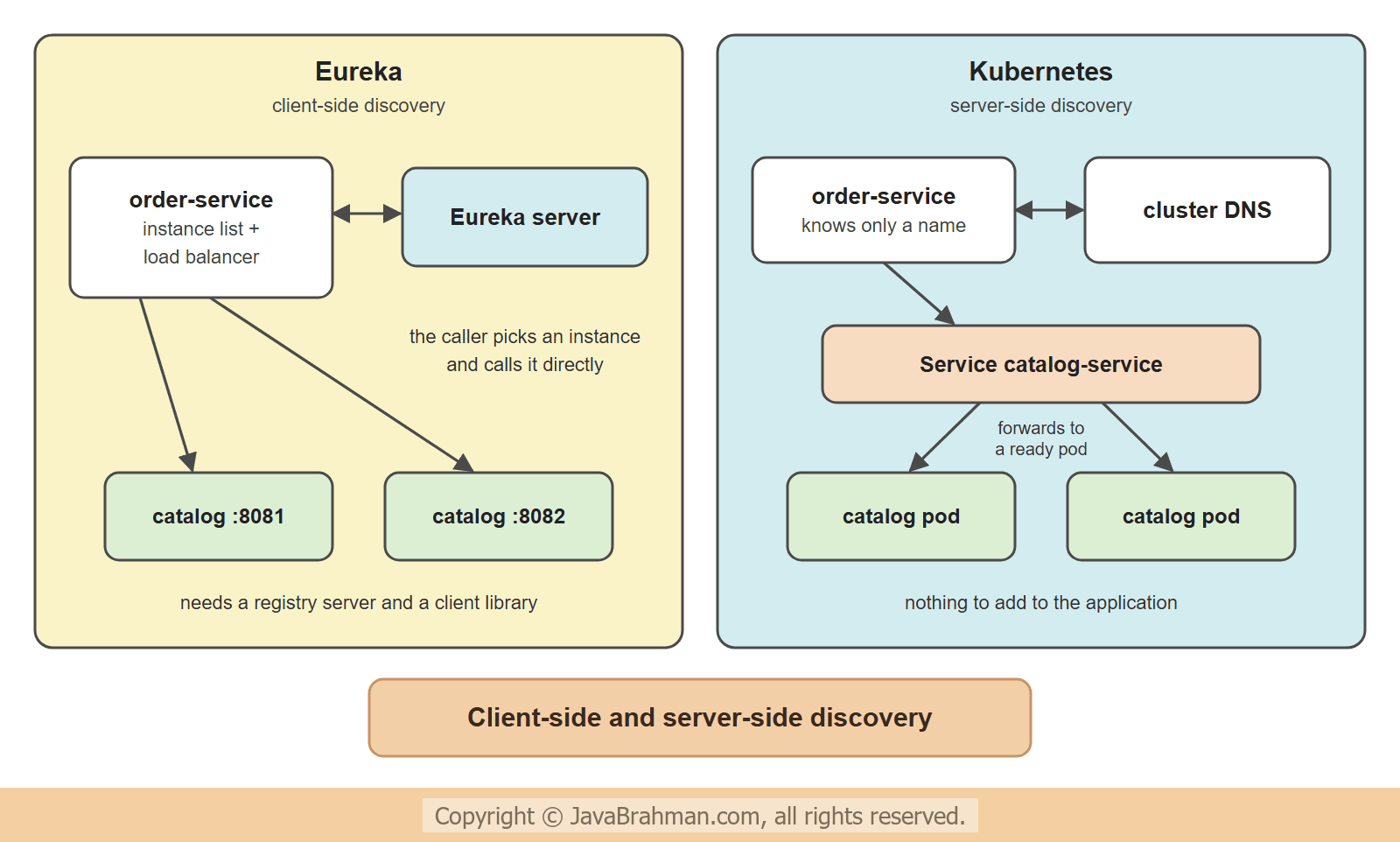
Kubernetes has service discovery built into the platform, and it works differently. The instances (pods) do not register themselves and the callers hold no list. A Kubernetes Service gives a set of pods one stable name and one virtual IP address; the cluster's DNS resolves the name, and the platform forwards each connection to one of the healthy pods. These manifests are shown to explain the idea; they were not run for this tutorial -catalog-service.yaml - a Deployment with two pods and a Service in front of them (not run here)
apiVersion: apps/v1
kind: Deployment
metadata:
  name: catalog-service
spec:
  replicas: 2
  selector:
    matchLabels:
      app: catalog-service
  template:
    metadata:
      labels:
        app: catalog-service
    spec:
      containers:
        - name: catalog-service
          image: example/catalog-service:1.0
          ports:
            - containerPort: 8080
          readinessProbe:
            httpGet:
              path: /actuator/health/readiness
              port: 8080
---
apiVersion: v1
kind: Service
metadata:
  name: catalog-service
spec:
  selector:
    app: catalog-service
  ports:
    - port: 80
targetPort: 8080http://catalog-service with an ordinary RestClient - no Eureka client, no @LoadBalanced, no registry to run. Kubernetes knows which pods exist because it started them, and the readiness probe tells it which ones can take traffic; a pod that fails the probe is taken out of the Service. Spring Boot's Actuator provides the probe endpoint.
Eureka or Kubernetes
The two differ in where the knowledge sits -- Who picks the instance - with Eureka the calling service does (client-side discovery); on Kubernetes the platform does (server-side discovery).
- What the application needs - Eureka needs a client library and configuration in every service, and a registry to operate. Kubernetes needs nothing in the application; a service in any language is discovered the same way.
- How liveness is known - Eureka trusts heartbeats sent by the instance. Kubernetes checks each pod itself with probes.
- Load balancing - a client-side load balancer sees every instance and can choose with its own rules: by zone, by response time, by a hint in the request. A Kubernetes Service balances per connection, which spreads long-lived HTTP/2 or gRPC connections poorly unless a service mesh or client-side balancing is added.
- Where it runs - Eureka works anywhere a JVM runs: virtual machines, bare metal, several data centres. Kubernetes discovery exists only inside a cluster.
DiscoveryClient and @LoadBalanced can move between them: Spring Cloud Kubernetes offers a DiscoveryClient backed by the Kubernetes API for the cases where an application wants the instance list itself.
Summary
In this tutorial we replaced a fixed service address with a name. A Eureka server kept the registry; two instances of the catalog service registered themselves with nothing but a starter and two properties; and the order service, with@LoadBalanced on its RestClient.Builder, called http://catalog-service and had its calls spread over both instances. When one instance was killed, the list stayed stale until the lease expired, and calls to the dead instance failed in that window - the reason discovery is always paired with retries and circuit breakers. Kubernetes solves the same problem in the platform, with Services, DNS and readiness probes, and is the natural choice when the services already run there. Next, one entry point in front of all the services: the API gateway with Spring Cloud GatewayClick to read tutorial: API Gateway with Spring Cloud Gateway.Spring Cloud and Microservices Tutorials
Centralized Configuration with Spring Cloud ConfigClick to read tutorial: Centralized Configuration with Spring Cloud Config API Gateway with Spring Cloud GatewayClick to read tutorial: API Gateway with Spring Cloud Gateway Microservices with Spring: When and WhyClick to read tutorial: Microservices with Spring: When and Why Circuit Breakers and Retries with Resilience4jClick to read tutorial: Circuit Breakers and Retries with Resilience4j Distributed Tracing with Micrometer and OpenTelemetryClick to read tutorial: Distributed Tracing with Micrometer and OpenTelemetry Inter-Service Communication: REST vs Messaging vs gRPCClick to read tutorial: Inter-Service Communication: REST vs Messaging vs gRPC Saga Pattern for Distributed TransactionsClick to read tutorial: Saga Pattern for Distributed Transactions
Centralized Configuration with Spring Cloud ConfigClick to read tutorial: Centralized Configuration with Spring Cloud Config API Gateway with Spring Cloud GatewayClick to read tutorial: API Gateway with Spring Cloud Gateway Microservices with Spring: When and WhyClick to read tutorial: Microservices with Spring: When and Why Circuit Breakers and Retries with Resilience4jClick to read tutorial: Circuit Breakers and Retries with Resilience4j Distributed Tracing with Micrometer and OpenTelemetryClick to read tutorial: Distributed Tracing with Micrometer and OpenTelemetry Inter-Service Communication: REST vs Messaging vs gRPCClick to read tutorial: Inter-Service Communication: REST vs Messaging vs gRPC Saga Pattern for Distributed TransactionsClick to read tutorial: Saga Pattern for Distributed Transactions