
Transactional Outbox Pattern with Spring
Introduction
A service that saves something and then tells other services about it performs two writes: one to its database and one to a message broker. "Save the order, then publish anOrderPlaced event" looks like one step, but no transaction covers both, and a failure between the two leaves them disagreeing - an order nobody was told about, or an event for an order that does not exist. This is the dual-write problem, and the transactional outbox pattern is its standard solution: the event is written to a table of the same database, in the same transaction as the order, and a separate relay publishes it from there. This tutorial first reproduces the problem, then builds an outbox with a polling relay and an idempotent consumer, and runs it through a broker outage and a duplicate delivery. The code runs on Spring Boot 4.1.2.The dual-write problem
A database transaction and a send to a broker cannot be committed together. Whichever is done first, the other can still fail -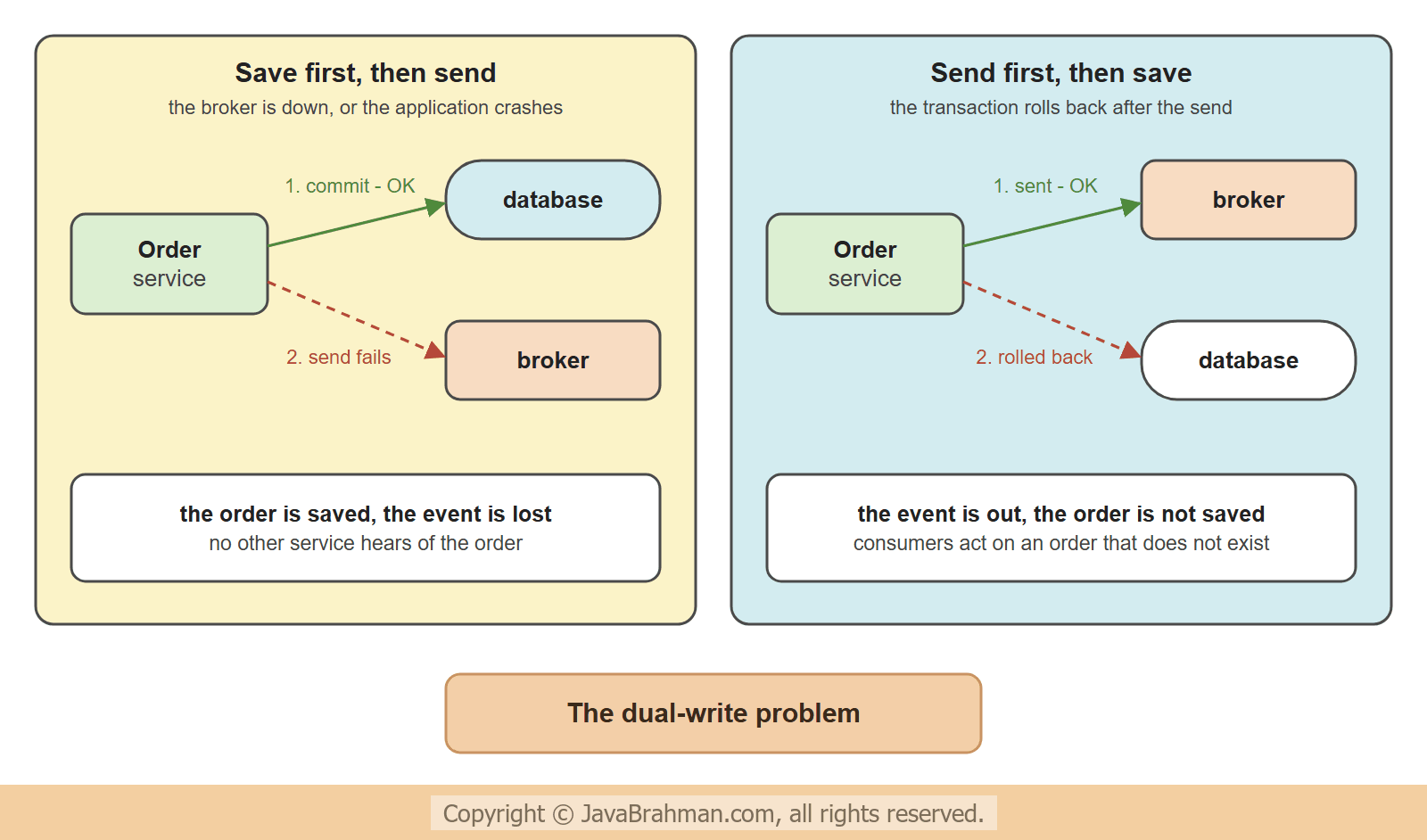
- Save first, then send - the order is committed, and then the broker is down, the network times out, or the application crashes before the send. The order exists, the event is lost, and no other service ever hears of the order.
- Send first, then save (or send inside the transaction) - the event is out, and then the transaction rolls back. Other services now act on an order that does not exist.
The example application
An order service saves orders and publishes anOrderPlaced event for each; an inventory consumer receives the events and reduces the stock. So that the tutorial runs as one small program without installing anything, the broker is a small class inside the application that hands each message to its subscribers. It can be switched to "down" and to "acknowledgement lost", which is what the examples need. In a real system it would be Kafka or RabbitMQ, and the consumer would be another service; the outbox code would be the same except for the one line that sends.
src/main/resources/schema.sql
create table orders (id bigint primary key, isbn varchar(20), quantity int);

create table outbox (
  id uuid primary key,
  seq bigint auto_increment,
  topic varchar(50) not null,
  message_key varchar(50) not null,
  payload varchar(1000) not null,
  created_at timestamp not null,
  sent_at timestamp
);

-- the consumer's tables
create table stock (isbn varchar(20) primary key, available int);
create table processed_events (event_id uuid primary key);
insert into stock values ('978-1', 100);
src/main/resources/application.properties
spring.main.banner-mode=off
logging.level.root=WARN
Message.java
//Message.java
package com.javabrahman.spring.outbox;

import java.util.UUID;

public record Message(UUID id, String topic, String messageKey, String payload) {
}
OrderPlaced.java
//OrderPlaced.java
package com.javabrahman.spring.outbox;

public record OrderPlaced(long orderId, String isbn, int quantity) {
}
BrokerException.java
//BrokerException.java
package com.javabrahman.spring.outbox;

public class BrokerException extends RuntimeException {

  private static final long serialVersionUID = 1L;

  public BrokerException(String message) {
    super(message);
  }
}
Broker.java - a stand-in for Kafka or RabbitMQ
//Broker.java
package com.javabrahman.spring.outbox;

import java.util.List;
import java.util.concurrent.CopyOnWriteArrayList;
import java.util.function.Consumer;
import org.springframework.stereotype.Component;

@Component
public class Broker {

  public enum Mode { UP, DOWN, ACK_LOST }

  private final List<Consumer<Message>> subscribers = new CopyOnWriteArrayList<>();
  private volatile Mode mode = Mode.UP;

  public void subscribe(Consumer<Message> subscriber) {
    subscribers.add(subscriber);
  }

  public void setMode(Mode mode) {
    this.mode = mode;
  }

  public void send(Message message) {
    if (mode == Mode.DOWN) {
      throw new BrokerException("broker unreachable");
    }
    subscribers.forEach(subscriber -> subscriber.accept(message));
    if (mode == Mode.ACK_LOST) {
      mode = Mode.UP;
      throw new BrokerException("timed out waiting for the acknowledgement");
    }
  }
}- The
outboxtable has one row per message that must be published: a uniqueid, the topic, a key, the payload as JSON, andsent_at, which staysnulluntil the message has been published.seqkeeps the order in which the rows were written. Broker.send()delivers a message to the subscribers. In modeDOWNit throws without delivering. In modeACK_LOSTit delivers and then throws, once: the message arrived, but the sender is not told. Real brokers produce exactly this situation when a network connection breaks at the wrong moment.
Reproducing the problem
The first version of the order service writes to the database and to the broker directly, in the two possible orders.NaiveOrderService.java
//NaiveOrderService.java
package com.javabrahman.spring.outbox;

import java.util.UUID;
import org.springframework.jdbc.core.simple.JdbcClient;
import org.springframework.stereotype.Service;
import org.springframework.transaction.annotation.Transactional;
import tools.jackson.databind.json.JsonMapper;

@Service
public class NaiveOrderService {

  private final JdbcClient jdbc;
  private final Broker broker;
  private final JsonMapper json;

  NaiveOrderService(JdbcClient jdbc, Broker broker, JsonMapper json) {
    this.jdbc = jdbc;
    this.broker = broker;
    this.json = json;
  }

  // save first, then send
  public void saveThenSend(long id, String isbn, int quantity) {
    jdbc.sql("insert into orders values (?, ?, ?)").params(id, isbn, quantity).update();
    broker.send(message(id, isbn, quantity));
  }

  // send first, then save, in one transaction
  @Transactional
  public void sendThenSave(long id, String isbn, int quantity) {
    broker.send(message(id, isbn, quantity));
    jdbc.sql("insert into orders values (?, ?, ?)").params(id, isbn, quantity).update();
  }

  private Message message(long id, String isbn, int quantity) {
    String payload = json.writeValueAsString(new OrderPlaced(id, isbn, quantity));
    return new Message(UUID.randomUUID(), "orders", String.valueOf(id), payload);
  }
}
InventoryConsumer.java
//InventoryConsumer.java
package com.javabrahman.spring.outbox;

import org.springframework.dao.DuplicateKeyException;
import org.springframework.jdbc.core.simple.JdbcClient;
import org.springframework.stereotype.Component;
import org.springframework.transaction.PlatformTransactionManager;
import org.springframework.transaction.TransactionDefinition;
import org.springframework.transaction.support.TransactionTemplate;
import tools.jackson.databind.json.JsonMapper;

@Component
public class InventoryConsumer {

  private final JdbcClient jdbc;
  private final JsonMapper json;
  private final TransactionTemplate transaction;

  InventoryConsumer(JdbcClient jdbc, JsonMapper json, PlatformTransactionManager manager, Broker broker) {
    this.jdbc = jdbc;
    this.json = json;
    // another service: always a transaction of its own, never the sender's
    this.transaction = new TransactionTemplate(manager);
    this.transaction.setPropagationBehavior(TransactionDefinition.PROPAGATION_REQUIRES_NEW);
    broker.subscribe(this::onMessage);
  }

  void onMessage(Message message) {
    OrderPlaced event = json.readValue(message.payload(), OrderPlaced.class);
    transaction.executeWithoutResult(status -> {
      try {
        jdbc.sql("insert into processed_events values (?)").param(message.id()).update();
      } catch (DuplicateKeyException e) {
        System.out.println("  consumer: order " + event.orderId() + " received again - duplicate, ignored");
        return;
      }
      jdbc.sql("update stock set available = available - ? where isbn = ?")
          .params(event.quantity(), event.isbn()).update();
      System.out.println("  consumer: order " + event.orderId() + " received, stock reduced by " + event.quantity());
    });
  }
}PROPAGATION_REQUIRES_NEW), because in a real system it is another service with another database. It is already written the way the outbox will need it; its processed_events table is explained further down. The application class enables scheduling, which the relay will use, and a runner plays the scenarios. With the argument dual it runs the two naive methods.
OutboxApp.java
//OutboxApp.java
package com.javabrahman.spring.outbox;

import org.springframework.boot.SpringApplication;
import org.springframework.boot.autoconfigure.SpringBootApplication;
import org.springframework.scheduling.annotation.EnableScheduling;

@SpringBootApplication
@EnableScheduling
public class OutboxApp {

  public static void main(String[] args) {
    System.exit(SpringApplication.exit(SpringApplication.run(OutboxApp.class, args)));
  }
}
Scenarios.java
//Scenarios.java
package com.javabrahman.spring.outbox;

import org.springframework.boot.CommandLineRunner;
import org.springframework.jdbc.core.simple.JdbcClient;
import org.springframework.stereotype.Component;

@Component
public class Scenarios implements CommandLineRunner {

  private final NaiveOrderService naive;
  private final OrderService orders;
  private final Broker broker;
  private final JdbcClient jdbc;

  Scenarios(NaiveOrderService naive, OrderService orders, Broker broker, JdbcClient jdbc) {
    this.naive = naive;
    this.orders = orders;
    this.broker = broker;
    this.jdbc = jdbc;
  }

  @Override
  public void run(String... args) throws Exception {
    if (args.length > 0 && args[0].equals("dual")) {
      dualWrite();
    } else {
      outbox();
    }
  }

  private void dualWrite() {
    System.out.println("1. Save, then send - while the broker is down");
    broker.setMode(Broker.Mode.DOWN);
    attempt(() -> naive.saveThenSend(1, "978-1", 2));
    state();

    System.out.println("2. Send, then save - and the save fails (order 1 exists already)");
    broker.setMode(Broker.Mode.UP);
    attempt(() -> naive.sendThenSave(1, "978-1", 5));
    state();
  }

  private void outbox() throws InterruptedException {
    System.out.println("1. Broker up");
    orders.placeOrder(1, "978-1", 2);
    Thread.sleep(1500);
    state();

    System.out.println("2. Broker down");
    broker.setMode(Broker.Mode.DOWN);
    orders.placeOrder(2, "978-1", 3);
    Thread.sleep(2000);
    state();
    System.out.println("   Broker up again");
    broker.setMode(Broker.Mode.UP);
    Thread.sleep(1500);
    state();

    System.out.println("3. The order cannot be saved (order 2 exists already)");
    attempt(() -> orders.placeOrder(2, "978-1", 50));
    Thread.sleep(1500);
    state();

    System.out.println("4. The broker delivers, but its acknowledgement is lost");
    broker.setMode(Broker.Mode.ACK_LOST);
    orders.placeOrder(3, "978-1", 4);
    Thread.sleep(2500);
    state();
  }

  private void attempt(Runnable action) {
    try {
      action.run();
    } catch (RuntimeException e) {
      System.out.println("  placing the order failed: " + e.getClass().getSimpleName());
    }
  }

  private void state() {
    var orderIds = jdbc.sql("select id from orders order by id").query(Long.class).list();
    int pending = jdbc.sql("select count(*) from outbox where sent_at is null").query(Integer.class).single();
    int sent = jdbc.sql("select count(*) from outbox where sent_at is not null").query(Integer.class).single();
    int stock = jdbc.sql("select available from stock where isbn = '978-1'").query(Integer.class).single();
    System.out.println("  => orders " + orderIds + ", outbox: " + pending + " pending / " + sent + " sent, stock " + stock);
  }
}1. Save, then send - while the broker is down placing the order failed: BrokerException => orders [1], outbox: 0 pending / 0 sent, stock 100 2. Send, then save - and the save fails (order 1 exists already) consumer: order 1 received, stock reduced by 5 placing the order failed: DuplicateKeyException => orders [1], outbox: 0 pending / 0 sent, stock 95
- Scenario 1 - the order is inserted and committed, and the send then throws a
BrokerException. The state line shows the result: order 1 is in the table, and the stock is still 100. The inventory was never told. Nothing in the system knows that an event is missing. - Scenario 2 - the event is sent first, and the consumer reduces the stock by 5. Then the insert fails with a
DuplicateKeyExceptionand the order's transaction rolls back. The consumer is another service with a transaction of its own, so its change stays: the stock is 95, for an order that was never saved. - Neither order of the two writes is safe. Scenario 1 loses an event; scenario 2 publishes one that should not exist.
The transactional outbox
The pattern removes the second write from the business transaction. The service does not send anything. It inserts the message as a row into an outbox table, in the same database and the same transaction as the order. One transaction, one database: either the order and its message are both committed, or neither is. Publishing becomes the job of a separate component, the relay, which reads the unsent rows, sends them to the broker, and marks them as sent.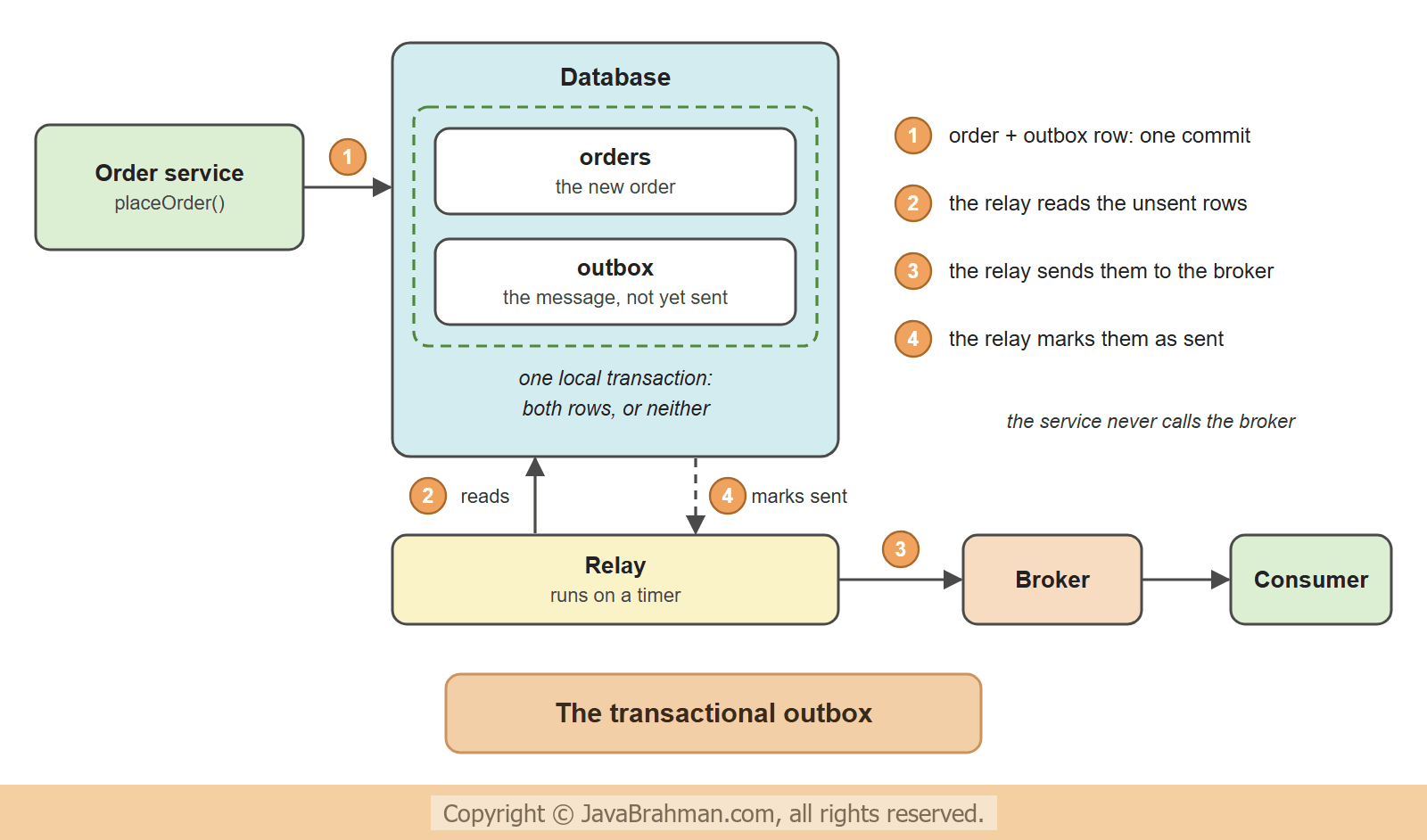
OrderService.java
//OrderService.java
package com.javabrahman.spring.outbox;

import java.time.LocalDateTime;
import java.util.UUID;
import org.springframework.jdbc.core.simple.JdbcClient;
import org.springframework.stereotype.Service;
import org.springframework.transaction.annotation.Transactional;
import tools.jackson.databind.json.JsonMapper;

@Service
public class OrderService {

  private final JdbcClient jdbc;
  private final JsonMapper json;

  OrderService(JdbcClient jdbc, JsonMapper json) {
    this.jdbc = jdbc;
    this.json = json;
  }

  @Transactional
  public void placeOrder(long id, String isbn, int quantity) {
    String payload = json.writeValueAsString(new OrderPlaced(id, isbn, quantity));
    jdbc.sql("insert into outbox (id, topic, message_key, payload, created_at) values (?, 'orders', ?, ?, ?)")
        .params(UUID.randomUUID(), String.valueOf(id), payload, LocalDateTime.now()).update();
    jdbc.sql("insert into orders values (?, ?, ?)").params(id, isbn, quantity).update();
    System.out.println("  order service: order " + id + " and its outbox row committed together");
  }
}
OutboxRelay.java
//OutboxRelay.java
package com.javabrahman.spring.outbox;

import java.time.LocalDateTime;
import java.util.List;
import org.springframework.jdbc.core.simple.JdbcClient;
import org.springframework.scheduling.annotation.Scheduled;
import org.springframework.stereotype.Component;
import org.springframework.transaction.annotation.Transactional;

@Component
public class OutboxRelay {

  private final JdbcClient jdbc;
  private final Broker broker;

  OutboxRelay(JdbcClient jdbc, Broker broker) {
    this.jdbc = jdbc;
    this.broker = broker;
  }

  @Scheduled(fixedDelay = 1000, initialDelay = 1000)
  @Transactional
  public void publishPending() {
    List<Message> pending = jdbc.sql("""
        select id, topic, message_key, payload from outbox
        where sent_at is null order by seq limit 10
        for update skip locked""").query(Message.class).list();
    for (Message message : pending) {
      try {
        broker.send(message);
      } catch (BrokerException e) {
        System.out.println("  relay: order " + message.messageKey() + " not sent (" + e.getMessage() + ") - will retry");
        return;
      }
      jdbc.sql("update outbox set sent_at = ? where id = ?").params(LocalDateTime.now(), message.id()).update();
      System.out.println("  relay: order " + message.messageKey() + " sent and marked");
    }
  }
}OrderService.placeOrder()is @TransactionalClick to read tutorial: Spring @Transactional: Propagation and Isolation and does two inserts, the outbox row and the order. It has no reference to the broker at all. If either insert fails, both are rolled back.OutboxRelay.publishPending()runs every second through @ScheduledClick to read tutorial: Scheduling Tasks in Spring with @Scheduled. It selects up to ten unsent rows in the order ofseq, sends each one, and setssent_atafter the send has succeeded.- When a send fails, the relay stops and returns. The row keeps
sent_at = null, so the next run finds it again. Stopping instead of continuing with the next row keeps the messages in order. for update skip lockedlocks the selected rows and makes a second relay skip rows that are locked. With it, several instances of the service can each run a relay without sending the same row at the same moment.
1. Broker up
  order service: order 1 and its outbox row committed together
  consumer: order 1 received, stock reduced by 2
  relay: order 1 sent and marked
  => orders [1], outbox: 0 pending / 1 sent, stock 98
2. Broker down
  order service: order 2 and its outbox row committed together
  relay: order 2 not sent (broker unreachable) - will retry
  relay: order 2 not sent (broker unreachable) - will retry
  => orders [1, 2], outbox: 1 pending / 1 sent, stock 98
   Broker up again
  consumer: order 2 received, stock reduced by 3
  relay: order 2 sent and marked
  => orders [1, 2], outbox: 0 pending / 2 sent, stock 95
3. The order cannot be saved (order 2 exists already)
  placing the order failed: DuplicateKeyException
  => orders [1, 2], outbox: 0 pending / 2 sent, stock 95
4. The broker delivers, but its acknowledgement is lost
  order service: order 3 and its outbox row committed together
  consumer: order 3 received, stock reduced by 4
  relay: order 3 not sent (timed out waiting for the acknowledgement) - will retry
  consumer: order 3 received again - duplicate, ignored
  relay: order 3 sent and marked
  => orders [1, 2, 3], outbox: 0 pending / 3 sent, stock 91
- Scenario 1 -
placeOrder()commits the order and its outbox row. Within a second the relay finds the row, sends it, and marks it; the consumer reduces the stock to 98. The outbox has 0 pending rows and 1 sent. - Scenario 2 - with the broker down, placing the order still succeeds, because it does not involve the broker. The relay tries on each run and fails, and the row stays pending. The order service keeps working through the outage. When the broker is back, the next run of the relay delivers the message and the stock drops to 95. Nothing was lost and nobody had to intervene.
- Scenario 3 - the insert of the order fails, the transaction rolls back, and the outbox row that was inserted just before it is rolled back too: the counts are unchanged, and no event is published for an order that does not exist.
- Scenario 4 - the broker delivers the message and the consumer reduces the stock by 4, but the relay gets a timeout instead of an acknowledgement. It cannot know that the message arrived, so it leaves the row pending and sends it again a second later. The consumer recognizes the message and ignores it: the stock is 91, reduced once.
At-least-once delivery and the idempotent consumer
The fourth scenario shows what the outbox guarantees and what it does not. The relay sends, and only then marks the row. If the mark does not happen - the acknowledgement is lost, or the relay crashes between the two - the row is still unsent, and it is sent again. The relay has replaced one dual write (order and message) by another (message and mark), but with an important difference: this one can only fail in the harmless direction. A message is never lost; it can be delivered more than once. This is at-least-once delivery.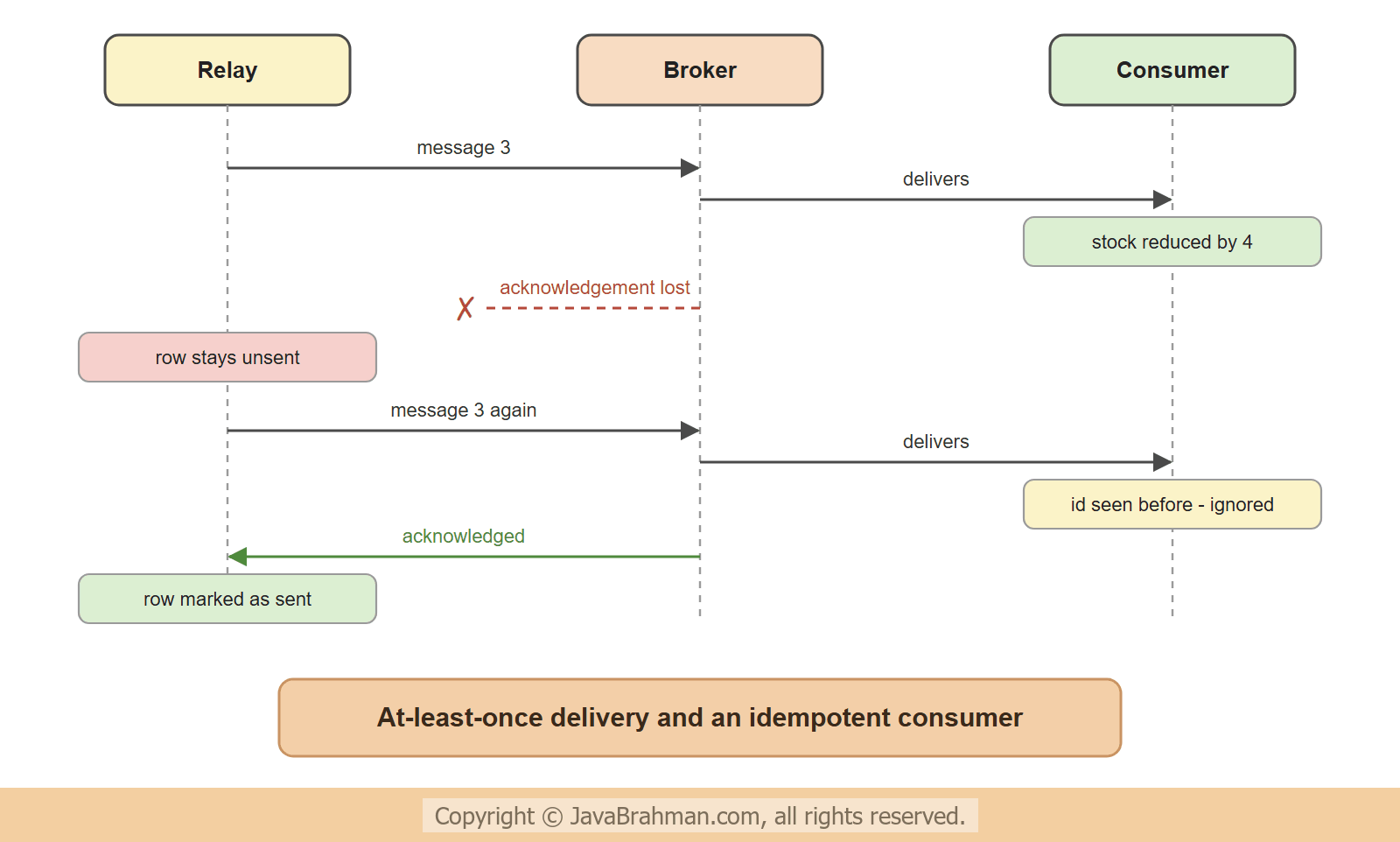 The consumer therefore has to be idempotent: receiving a message twice must have the same effect as receiving it once.
InventoryConsumer does it with a table -
- Every message carries a unique id, the
idof its outbox row. It is the same on every delivery of that message. - The consumer inserts the id into
processed_events, whose primary key is that id, and reduces the stock in the same transaction. - On a second delivery the insert fails with a
DuplicateKeyException, and the consumer skips the message. Because the id and the stock change are committed together, the consumer cannot end up with one and not the other.
Polling or reading the transaction log
The relay above polls: it asks the table every second. It is simple, needs nothing but the database, and is enough for most applications. Its costs are a delay of up to one polling interval and a query that runs even when there is nothing to send. The alternative is change data capture (CDC): a tool such as Debezium reads the database's transaction log, sees every insert into the outbox table as it is committed, and publishes it to Kafka. No polling query, almost no delay, and the order of the log is the order of the messages - at the price of one more piece of infrastructure to run.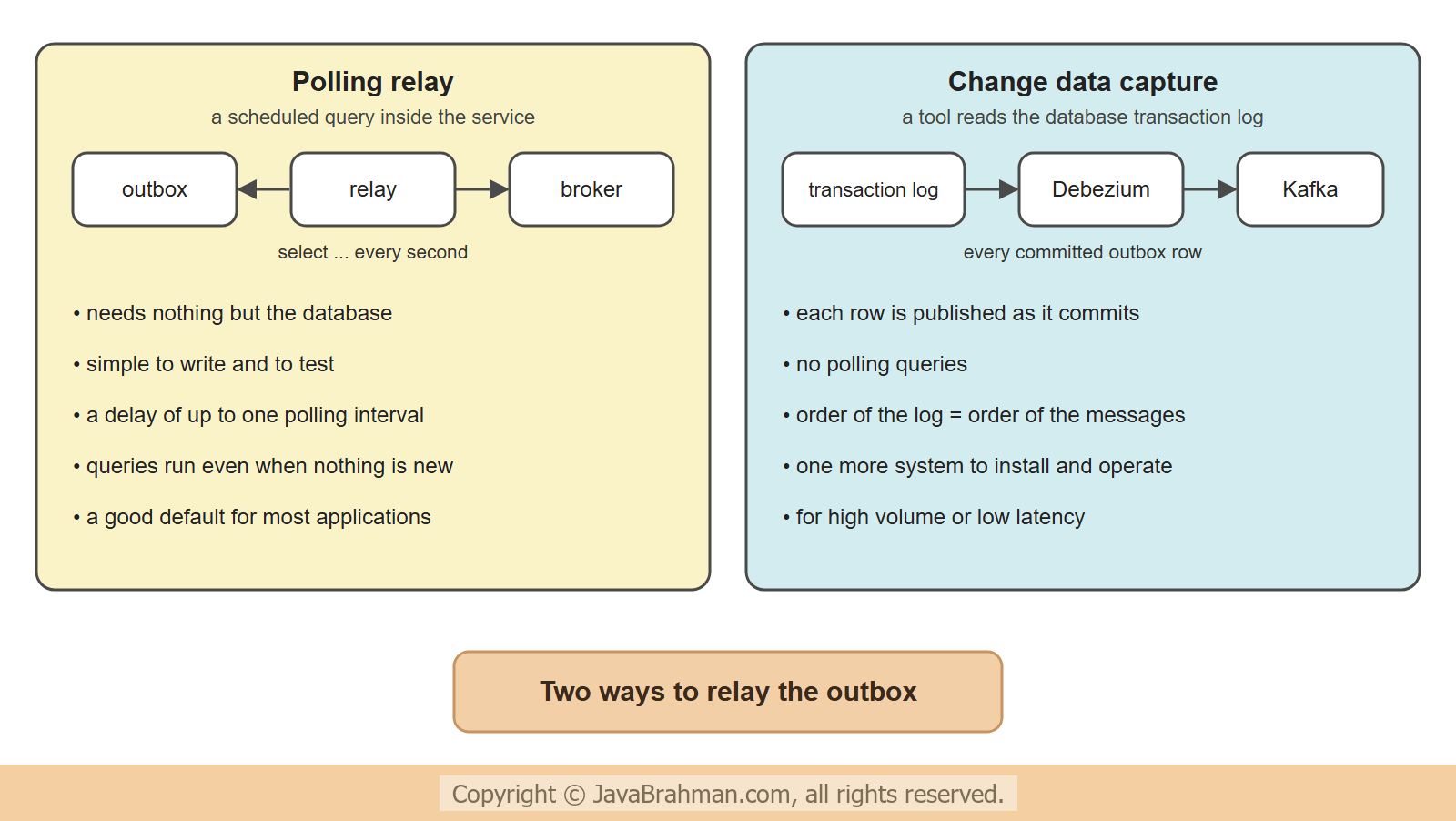
What a production outbox needs
- Cleaning up - sent rows accumulate. A scheduled job deletes rows whose
sent_atis older than a few days, or the relay deletes a row instead of marking it. - An index on the unsent rows, so that the polling query stays fast when the table is large.
- Ordering - messages about the same order should arrive in the order they were written. Using the order id as the message key sends them to the same Kafka partition, and one relay at a time per key keeps them in sequence.
- Poison messages - a row that can never be sent would block all rows behind it. Count the attempts in a column, and after a limit move the row aside and alert somebody.
- Monitoring - the number of unsent rows and the age of the oldest one show at once whether the relay is keeping up.
- The same in reverse - a consumer that updates its database and then acknowledges the message has the mirror-image problem. The
processed_eventstable is its solution, and is sometimes called an inbox.
Summary
In this tutorial we saw that saving to a database and publishing to a broker are two writes that no transaction joins: saving first lost an event when the broker was down, and sending first published an event for an order that was rolled back. The transactional outbox removed the problem by writing the event as a row in the same transaction as the order, so that both are committed or neither. A relay, run by@Scheduled, published the unsent rows and marked them, kept trying through a broker outage, and after a lost acknowledgement sent a message twice. That is at-least-once delivery, and the consumer handled it by recording each message id in the same transaction as its own change. We also compared polling with change data capture and listed what an outbox needs in production.