
Scheduling Tasks in Spring with @Scheduled
Introduction
This tutorial explains how to run methods on a schedule in Spring with@Scheduled: every few seconds, a fixed time after the previous run ended, or at times given by a cron expression such as "every weekday at 9:15". We will measure the difference between fixedRate and fixedDelay, see that Spring Boot runs all scheduled tasks on one thread by default and what that does to a fast task when a slow one runs, give the scheduler more threads or virtual threads, read cron expressions field by field and let Spring compute their next fire times, and see what happens when a scheduled task throws. Every output below comes from running the code with Spring Boot 4.1.2.Enabling scheduling
Scheduling is part of Spring Framework itself; no extra dependency is needed.@EnableScheduling on a configuration class makes Spring look for @Scheduled methods in all beans, and Spring Boot then creates the TaskScheduler that runs them. A scheduled method must take no arguments; its return value, if any, is ignored -
A scheduled method
@Component
public class Cleanup {

  @Scheduled(fixedRate = 5, timeUnit = TimeUnit.MINUTES)
  public void removeExpiredSessions() {
    // runs every 5 minutes, from startup on
  }
}fixedRate: the time between the starts of two runs.fixedDelay: the time between the end of one run and the start of the next.initialDelay: the time before the first run, with either of the two above.cron: calendar-based times, with an optionalzone.timeUnit: the unit of the numbers, milliseconds by default. The...Stringvariants (fixedRateString = "${cleanup.rate}") take a placeholder and a duration such as"30s"or"PT30S", so the schedule can live inapplication.properties.
fixedRate versus fixedDelay
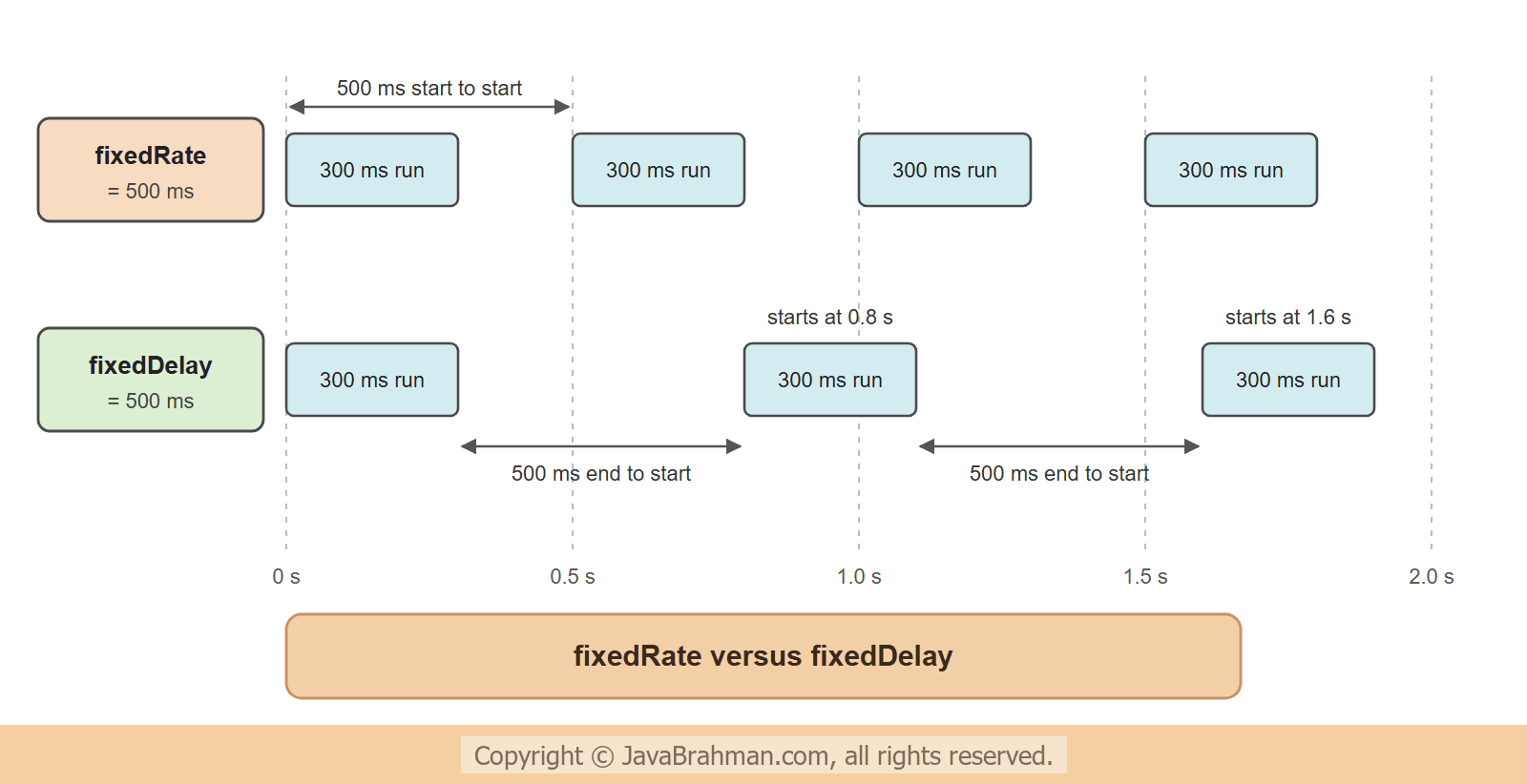
The two look alike, but differ as soon as the task takes time. The two tasks below each take 300 ms, and are scheduled every 500 ms, one withfixedRate and one with fixedDelay. Each is active in its own profile, so that one run shows one of them. A small Since bean gives times relative to startup, rounded to 0.1 s so that the outputs are stable -
src/main/java/.../scheduling/Since.java - seconds since the first scheduled run
//Since.java
package com.javabrahman.scheduling;

import java.util.concurrent.atomic.AtomicLong;
import org.springframework.stereotype.Component;

@Component
public class Since {
  private final AtomicLong start = new AtomicLong();

  public String now() {
    long time = System.nanoTime();
    start.compareAndSet(0, time);   // the first call sets time zero
    long tenths = Math.round((time - start.get()) / 100_000_000.0);
    return String.format("%4.1f s", tenths / 10.0);
  }
}
src/main/java/.../scheduling/RateAndDelayTasks.java
//RateAndDelayTasks.java
package com.javabrahman.scheduling;

import org.springframework.context.annotation.Profile;
import org.springframework.scheduling.annotation.Scheduled;
import org.springframework.stereotype.Component;

public class RateAndDelayTasks {

  @Component
  @Profile("rate")
  public static class RateTask {
    private final Since since;

    public RateTask(Since since) {
      this.since = since;
    }

    @Scheduled(fixedRate = 500)
    public void run() throws InterruptedException {
      System.out.println(since.now() + "  fixedRate task starts");
      Thread.sleep(300);
    }
  }

  @Component
  @Profile("delay")
  public static class DelayTask {
    private final Since since;

    public DelayTask(Since since) {
      this.since = since;
    }

    @Scheduled(fixedDelay = 500)
    public void run() throws InterruptedException {
      System.out.println(since.now() + "  fixedDelay task starts");
      Thread.sleep(300);
    }
  }
}
src/main/java/.../scheduling/SchedulingApp.java
//SchedulingApp.java
package com.javabrahman.scheduling;

import org.springframework.boot.SpringApplication;
import org.springframework.boot.autoconfigure.SpringBootApplication;
import org.springframework.context.ConfigurableApplicationContext;
import org.springframework.scheduling.annotation.EnableScheduling;

@SpringBootApplication
@EnableScheduling
public class SchedulingApp {

  // runs the application for the given number of milliseconds (default 1800), then closes it
  public static void main(String[] args) throws InterruptedException {
    long runFor = Long.getLong("runFor", 1800);
    try (ConfigurableApplicationContext context = SpringApplication.run(SchedulingApp.class, args)) {
      Thread.sleep(runFor);
    }
  }
}0.0 s fixedRate task starts 0.5 s fixedRate task starts 1.0 s fixedRate task starts 1.5 s fixedRate task starts
 0.0 s  fixedDelay task starts
 0.8 s  fixedDelay task starts
 1.6 s  fixedDelay task starts
fixedRate, a run started every 0.5 s, whatever the task's duration. With fixedDelay, the 300 ms of work added to each interval: 0.8 s between starts. Use fixedRate for things that should happen at regular times, such as sampling a value; use fixedDelay when each run should get a guaranteed pause after the last one, such as polling a queue or an inbox.
One thread for all tasks
Spring Boot's defaultTaskScheduler has a pool of one thread, named scheduling-1. Every scheduled task of the application runs on it, one after the other. That is fine for a few short tasks, but a slow task holds up all the others. Here a heartbeat runs every 250 ms, and a report that takes 1 second starts after 300 ms -
src/main/java/.../scheduling/BusyTasks.java
//BusyTasks.java
package com.javabrahman.scheduling;

import org.springframework.context.annotation.Profile;
import org.springframework.scheduling.annotation.Scheduled;
import org.springframework.stereotype.Component;

@Component
@Profile("busy")
public class BusyTasks {
  private final Since since;

  public BusyTasks(Since since) {
    this.since = since;
  }

  @Scheduled(fixedRate = 250)
  public void heartbeat() {
    Thread thread = Thread.currentThread();
    System.out.println(since.now() + "  heartbeat on " + thread.getName() + (thread.isVirtual() ? " (virtual)" : ""));
  }

  @Scheduled(initialDelay = 300, fixedDelay = 60_000)
  public void report() throws InterruptedException {
    System.out.println(since.now() + "  report starts on " + Thread.currentThread().getName());
    Thread.sleep(1000);
    System.out.println(since.now() + "  report ends");
  }
}0.0 s heartbeat on scheduling-1 0.2 s heartbeat on scheduling-1 0.3 s report starts on scheduling-1 1.3 s report ends 1.3 s heartbeat on scheduling-1 1.3 s heartbeat on scheduling-1 1.3 s heartbeat on scheduling-1 1.3 s heartbeat on scheduling-1 1.5 s heartbeat on scheduling-1
 0.0 s  heartbeat on scheduling-2
 0.2 s  heartbeat on scheduling-2
 0.3 s  report starts on scheduling-1
 0.5 s  heartbeat on scheduling-2
 0.7 s  heartbeat on scheduling-2
 1.0 s  heartbeat on scheduling-2
 1.2 s  heartbeat on scheduling-2
 1.3 s  report ends
 1.5 s  heartbeat on scheduling-2
fixedRate task whose run takes longer than its rate simply starts late.
Scheduling on virtual threads
Withspring.threads.virtual.enabled=true (on Java 21 and later), Spring Boot replaces the thread pool with a SimpleAsyncTaskScheduler: one scheduler thread triggers the tasks, and each run gets a new virtual thread -
OUTPUT with spring.threads.virtual.enabled=true0.0 s heartbeat on scheduling-3 (virtual) 0.2 s heartbeat on scheduling-4 (virtual) 0.3 s report starts on scheduling-2 0.5 s heartbeat on scheduling-5 (virtual) 0.7 s heartbeat on scheduling-6 (virtual) 1.0 s heartbeat on scheduling-7 (virtual) 1.2 s heartbeat on scheduling-8 (virtual) 1.3 s report ends 1.5 s heartbeat on scheduling-9 (virtual)
@Async, continue in the next tutorialClick to read tutorial: Async Processing in Spring with @Async and Virtual Threads.
Cron expressions
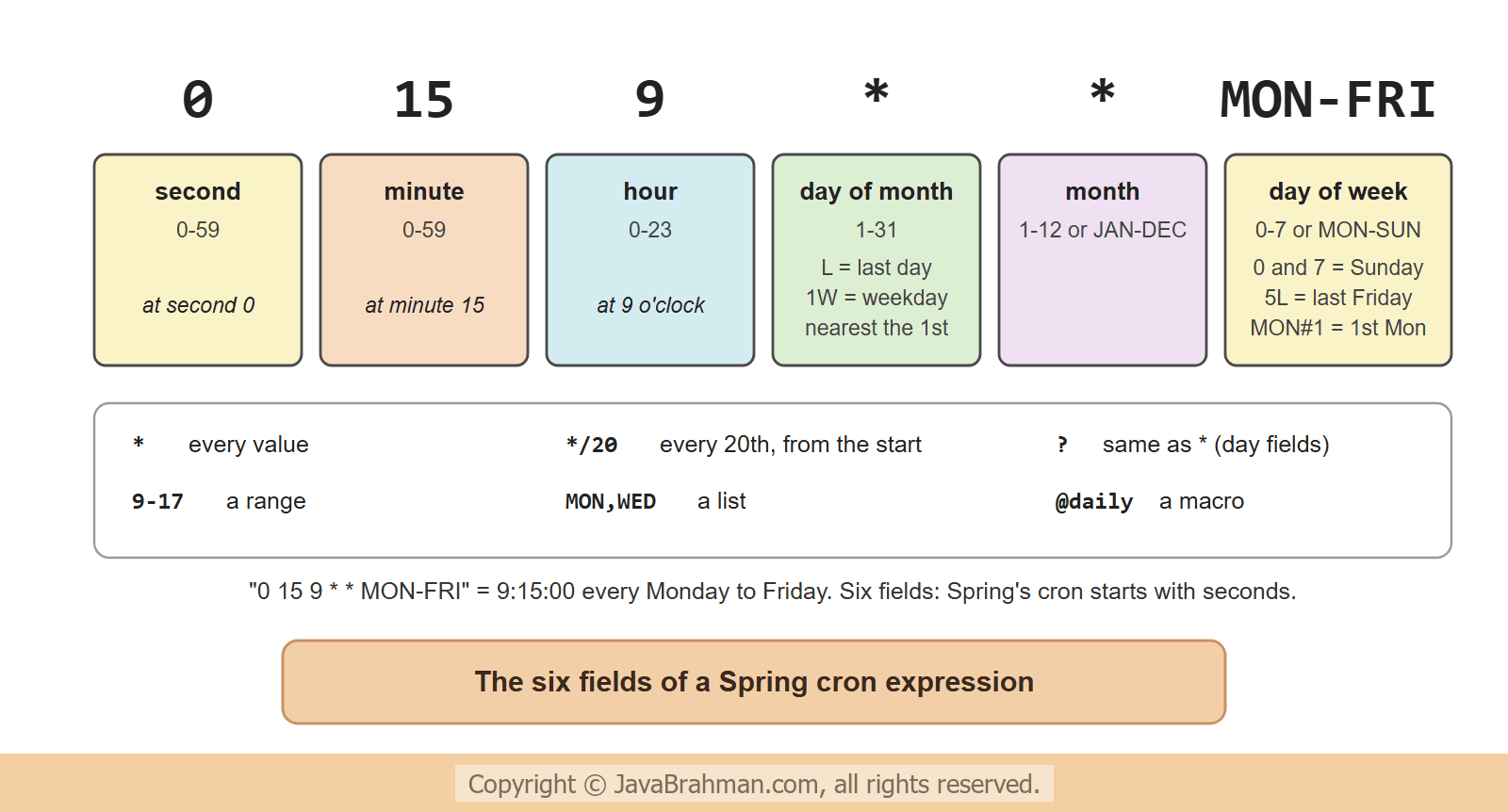
For calendar times - every night at 2:00, every weekday at 9:15, the last day of each month -fixedRate does not help. cron takes an expression of six fields. Spring's cron format starts with seconds, one field more than the classic Unix crontab -
CronExpression, the class that @Scheduled uses internally, also works on its own. Its next() method computes the next fire time after a given time, which is a good way to check an expression before deploying it. The program below asks for the next three times of several expressions, after Saturday, 7 November 2026, 22:40 -
src/main/java/.../scheduling/CronCheck.java
//CronCheck.java
package com.javabrahman.scheduling;

import java.time.LocalDateTime;
import java.time.format.DateTimeFormatter;
import org.springframework.scheduling.support.CronExpression;

public class CronCheck {
  static final DateTimeFormatter FORMAT = DateTimeFormatter.ofPattern("EEE dd MMM yyyy HH:mm:ss");

  public static void main(String[] args) {
    LocalDateTime from = LocalDateTime.of(2026, 11, 7, 22, 40);
    show(from, "0 15 9 * * MON-FRI", "9:15 on weekdays");
    show(from, "0 */20 * * * *", "every 20 minutes");
    show(from, "0 0 2 * * *", "every night at 2:00");
    show(from, "0 0 18 L * *", "18:00 on the last day of the month");
    show(from, "0 0 10 * * MON#1", "10:00 on the first Monday of the month");
    show(from, "0 0 9 1W * *", "9:00 on the weekday nearest to the 1st");
    show(from, "@daily", "macro: midnight every day");
    try {
      CronExpression.parse("0 15 9 * MON-FRI");   // five fields, crontab style
    } catch (IllegalArgumentException e) {
      System.out.println("\"0 15 9 * MON-FRI\": " + e.getMessage());
    }
  }

  static void show(LocalDateTime from, String expression, String meaning) {
    CronExpression cron = CronExpression.parse(expression);
    System.out.printf("%-20s %s%n", expression, meaning);
    LocalDateTime next = from;
    for (int i = 0; i < 3; i++) {
      next = cron.next(next);
      System.out.println("                     " + FORMAT.format(next));
    }
  }
}0 15 9 * * MON-FRI 9:15 on weekdays
Mon 09 Nov 2026 09:15:00
Tue 10 Nov 2026 09:15:00
Wed 11 Nov 2026 09:15:00
0 */20 * * * * every 20 minutes
Sat 07 Nov 2026 23:00:00
Sat 07 Nov 2026 23:20:00
Sat 07 Nov 2026 23:40:00
0 0 2 * * * every night at 2:00
Sun 08 Nov 2026 02:00:00
Mon 09 Nov 2026 02:00:00
Tue 10 Nov 2026 02:00:00
0 0 18 L * * 18:00 on the last day of the month
Mon 30 Nov 2026 18:00:00
Thu 31 Dec 2026 18:00:00
Sun 31 Jan 2027 18:00:00
0 0 10 * * MON#1 10:00 on the first Monday of the month
Mon 07 Dec 2026 10:00:00
Mon 04 Jan 2027 10:00:00
Mon 01 Feb 2027 10:00:00
0 0 9 1W * * 9:00 on the weekday nearest to the 1st
Tue 01 Dec 2026 09:00:00
Fri 01 Jan 2027 09:00:00
Mon 01 Feb 2027 09:00:00
@daily macro: midnight every day
Sun 08 Nov 2026 00:00:00
Mon 09 Nov 2026 00:00:00
Tue 10 Nov 2026 00:00:00
"0 15 9 * MON-FRI": Cron expression must consist of 6 fields (found 5 in "0 15 9 * MON-FRI")
*means every value,*/20every 20th from the start of the range,9-17a range andMON,WEDa list. Months and days of the week can be written as numbers or as three-letter names.Lis the last day of the month (or, in the day-of-week field,5Lthe last Friday),Wthe nearest weekday, andMON#1the first Monday. The 1st of December, January and February falls on a weekday each time, so1Wstayed on the 1st; for a 1st on a Saturday, it moves to Monday the 3rd, asWnever leaves the month.- Macros such as
@yearly,@monthly,@weekly,@dailyand@hourlyreplace a whole expression. - A five-field crontab line is rejected at parse time - and, in
@Scheduled, at startup, which is the better moment to find out.
zone fixes it, and the special value "-" switches a task off, which is useful with a placeholder -
Cron with a zone, from a property
@Scheduled(cron = "${reports.daily-cron:0 0 7 * * *}", zone = "Asia/Kolkata")
public void sendDailyReport() {
  // 7:00 India time by default; reports.daily-cron=- in a profile switches it off
}
When a scheduled task throws
An exception thrown by a scheduled method does not reach any caller - there is none. The scheduler logs it, and the task stays scheduled. Here a task fails on its second run -src/main/java/.../scheduling/FailingTask.java
//FailingTask.java
package com.javabrahman.scheduling;

import org.springframework.context.annotation.Profile;
import org.springframework.scheduling.annotation.Scheduled;
import org.springframework.stereotype.Component;

@Component
@Profile("failing")
public class FailingTask {
  private final Since since;
  private int runs;

  public FailingTask(Since since) {
    this.since = since;
  }

  @Scheduled(fixedRate = 400)
  public void importFeed() {
    runs++;
    System.out.println(since.now() + "  import run " + runs);
    if (runs == 2) {
      throw new IllegalStateException("feed server not reachable");
    }
  }
}src/main/resources/application-failing.properties
logging.pattern.console=%m%n%ex{1}0.0 s import run 1 0.4 s import run 2 Unexpected error occurred in scheduled task java.lang.IllegalStateException: feed server not reachable at com.javabrahman.scheduling.FailingTask.importFeed(FailingTask.java:23) 0.8 s import run 3
Scheduling in production
- Several instances run every task:
@Scheduledknows nothing about other copies of the application. With three instances, the nightly job runs three times. A shared lock in the database, for example with the ShedLock library, lets only one instance run it; job schedulers such as Quartz (which Spring Boot supports) or JobRunr add persistent jobs and retries. - Shutdown: by default, closing the application interrupts running tasks.
spring.task.scheduling.shutdown.await-termination=trueandawait-termination-periodlet them finish first. - Keep tasks short, or give them a thread of their own; long work started by a schedule can also be handed to an
@Asyncmethod. - Test the logic, not the timer: put the work in a normal method of a bean and test that directly, and keep the
@Scheduledmethod a one-line trigger. A test that waits for a schedule is slow and flaky; if it must, Awaitility waits only as long as needed.
Summary
In this tutorial we scheduled methods with@Scheduled and @EnableScheduling. fixedRate started runs every 0.5 s, while fixedDelay waited 0.5 s after each 0.3 s run. On Spring Boot's single scheduler thread, a slow report stopped a heartbeat for a second, after which the missed heartbeats ran in a burst; a pool of two threads, or virtual threads, kept it on time. Cron expressions have six fields starting with seconds, CronExpression.next() showed their next fire times, and a five-field expression was rejected. A failing task was logged and kept its schedule. The next tutorial moves work off the caller's thread: @Async and virtual threadsClick to read tutorial: Async Processing in Spring with @Async and Virtual Threads.Spring AOP, Caching, Scheduling and Events Tutorials
Caching in Spring Boot with @Cacheable and CaffeineClick to read tutorial: Caching in Spring Boot with @Cacheable and Caffeine Async Processing in Spring with @Async and Virtual ThreadsClick to read tutorial: Async Processing in Spring with @Async and Virtual Threads Spring AOP Explained: Aspects, Advice and PointcutsClick to read tutorial: Spring AOP Explained: Aspects, Advice and Pointcuts How Spring Proxies Work and the Self-Invocation TrapClick to read tutorial: How Spring Proxies Work and the Self-Invocation Trap Application Events in Spring with @EventListenerClick to read tutorial: Application Events in Spring with @EventListener Resilience in Spring 7: @Retryable and @ConcurrencyLimitClick to read tutorial: Resilience in Spring 7: @Retryable and @ConcurrencyLimit
Caching in Spring Boot with @Cacheable and CaffeineClick to read tutorial: Caching in Spring Boot with @Cacheable and Caffeine Async Processing in Spring with @Async and Virtual ThreadsClick to read tutorial: Async Processing in Spring with @Async and Virtual Threads Spring AOP Explained: Aspects, Advice and PointcutsClick to read tutorial: Spring AOP Explained: Aspects, Advice and Pointcuts How Spring Proxies Work and the Self-Invocation TrapClick to read tutorial: How Spring Proxies Work and the Self-Invocation Trap Application Events in Spring with @EventListenerClick to read tutorial: Application Events in Spring with @EventListener Resilience in Spring 7: @Retryable and @ConcurrencyLimitClick to read tutorial: Resilience in Spring 7: @Retryable and @ConcurrencyLimit