
Spring Batch Fundamentals: Jobs, Steps and Chunks
Introduction
Not all work in an application answers a request. Importing a file of a million rows, computing the month's invoices, moving data from one system to another - such work runs without a user waiting, over a large amount of data, and usually for a long time. This is batch processing, and it has needs of its own: the data must be handled in portions so that memory and transactions stay small, a bad record must not stop the other 999,999, and a job that fails after two hours should continue where it stopped, not start again. Spring Batch is the Spring project that provides all of this. In this tutorial we build a job that imports a CSV file of books into a database, and use it to explain jobs, steps, chunks, readers, processors and writers, the job repository, skipping bad records, and restarting a failed job. The code runs on Spring Boot 4.1.2 with Spring Batch 6.The building blocks
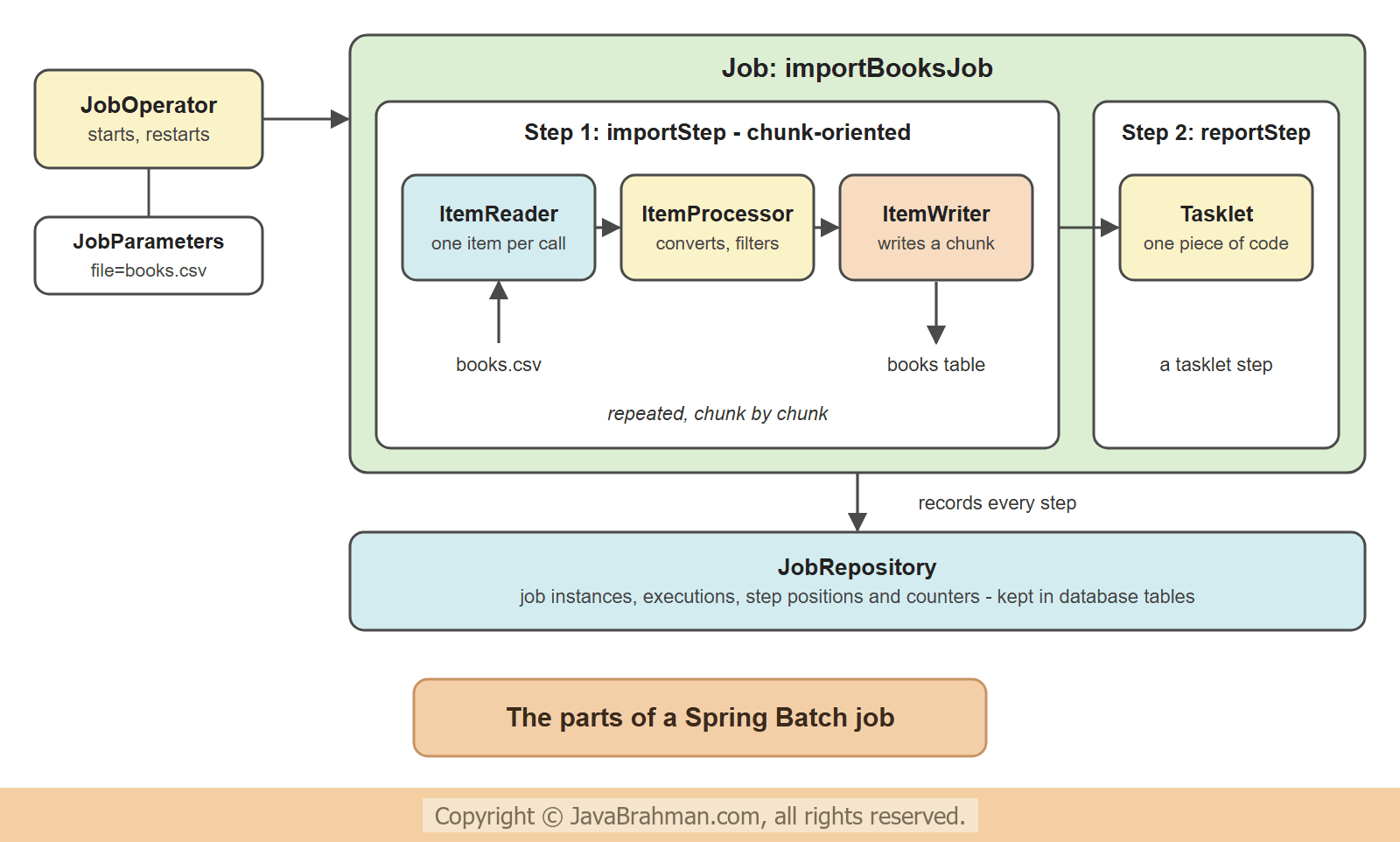
- A Job is the whole piece of work, for example "import the books file". It is a sequence of steps.
- A Step is one phase of the job. There are two kinds. A chunk-oriented step reads items, processes them and writes them, and is what most steps are. A tasklet step runs one piece of code - delete a temporary file, call a stored procedure, print a report.
- An ItemReader returns one item per call - a line of a file, a row of a query, a message. An ItemProcessor turns an input item into an output item, and may reject it. An ItemWriter receives a list of items and writes them. Spring Batch ships with readers and writers for flat files, JSON, XML, JDBC, JPA, Kafka and more, so usually only the processor is written by hand.
- JobParameters are the arguments of a run: which file, which date.
- The JobRepository stores what happened: which job ran with which parameters, how far each step got, how many items were read, written and skipped. Restarting a failed job depends on it.
- The JobOperator starts, stops and restarts jobs.
Chunk-oriented processing
A step does not read the whole file, process all of it and then write. It works in chunks. With a chunk size of 4, the step reads and processes items one at a time until it has four, hands the four to the writer in one call, and commits. Then it does the next four.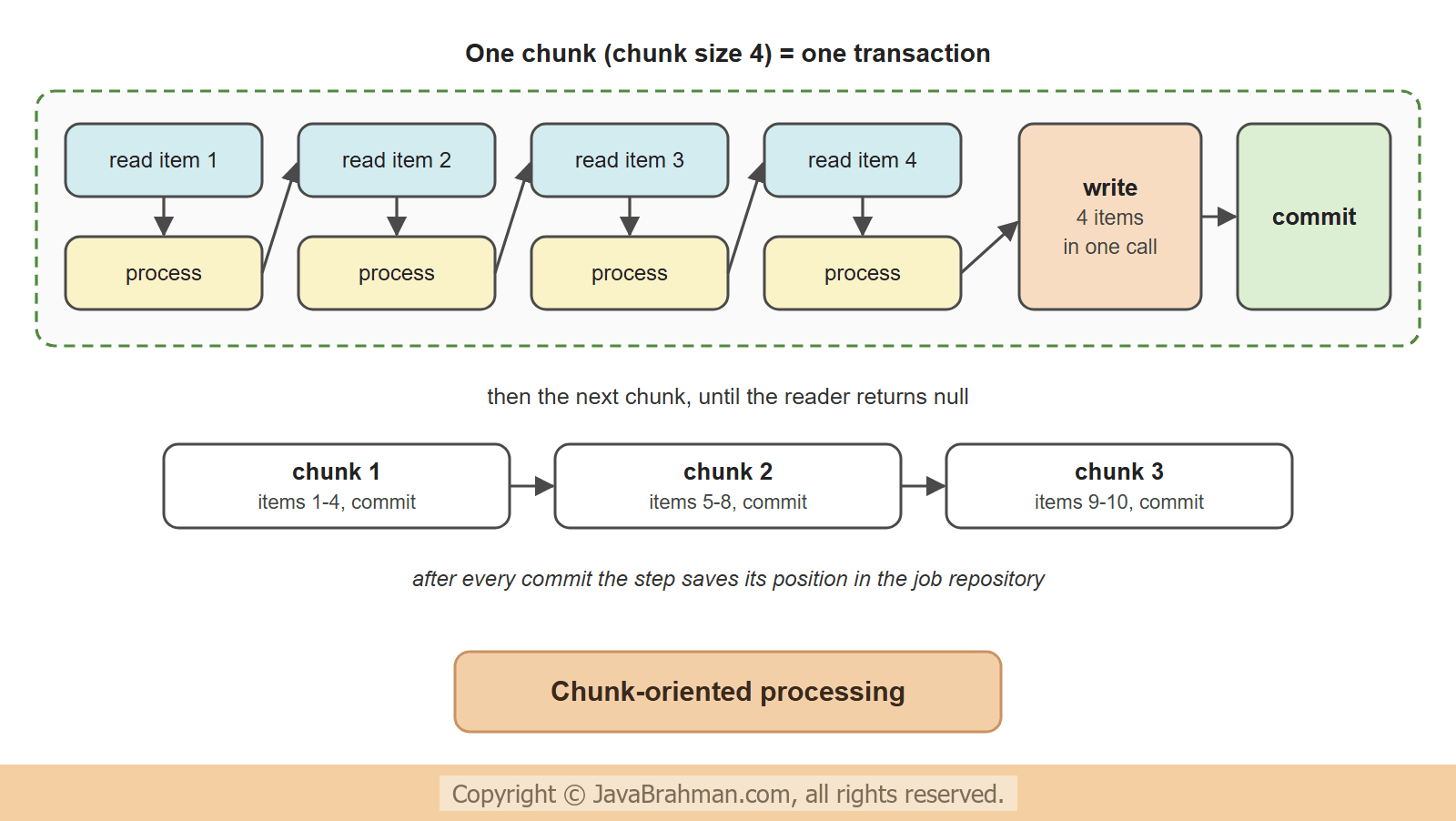
- Each chunk is one transaction. If writing a chunk fails, only that chunk is rolled back; the chunks before it stay committed.
- Memory use depends on the chunk size, not on the size of the file. A file of ten million lines needs no more memory than one of ten.
- The writer gets a list, so it can use a JDBC batch insert, which is far faster than one insert per item.
- After each commit the step saves its position in the job repository. That saved position is what a restart continues from.
The example: importing a CSV file
The input is a file of books. Three of its ten rows are special, and the job must deal with each: a price that is not a number, a negative price, and a book that is out of print and should not be imported.books.csv
isbn,title,price,status
978-01,Effective Java,45.00,ACTIVE
978-02,Clean Code,38.50,ACTIVE
978-03,Refactoring,abc,ACTIVE
978-04,Java Concurrency in Practice,52.25,ACTIVE
978-05,Head First Java,35.00,ACTIVE
978-06,The Pragmatic Programmer,-41.00,ACTIVE
978-07,Design Patterns,54.99,ACTIVE
978-08,Thinking in Java,30.00,OUT_OF_PRINT
978-09,Spring in Action,49.00,ACTIVE
978-10,Domain-Driven Design,60.00,ACTIVE
src/main/resources/schema.sql
create table books (isbn varchar(20) primary key, title varchar(100), price_cents int);src/main/resources/application.properties
spring.main.banner-mode=off
logging.level.root=WARN
logging.level.org.springframework.batch=OFFspring-boot-starter-batch-jdbc and the H2 database. In Spring Boot 4, spring-boot-starter-batch alone gives a job repository that keeps nothing, which is enough for jobs that never need a restart. The -jdbc starter stores the job repository in the application's database and, for an embedded database such as H2, creates its tables on startup.
BookRow.java - a line of the file
//BookRow.java
package com.javabrahman.spring.batch;

import java.math.BigDecimal;

public record BookRow(String isbn, String title, BigDecimal price, String status) {
}
Book.java - a row of the table
//Book.java
package com.javabrahman.spring.batch;

public record Book(String isbn, String title, int priceCents) {
}
InvalidBookException.java
//InvalidBookException.java
package com.javabrahman.spring.batch;

public class InvalidBookException extends RuntimeException {

  private static final long serialVersionUID = 1L;

  public InvalidBookException(String message) {
    super(message);
  }
}
ImportJobConfig.java
//ImportJobConfig.java
package com.javabrahman.spring.batch;

import javax.sql.DataSource;
import org.springframework.batch.core.configuration.annotation.StepScope;
import org.springframework.batch.core.job.Job;
import org.springframework.batch.core.job.builder.JobBuilder;
import org.springframework.batch.core.repository.JobRepository;
import org.springframework.batch.core.step.Step;
import org.springframework.batch.core.step.builder.StepBuilder;
import org.springframework.batch.infrastructure.item.ItemProcessor;
import org.springframework.batch.infrastructure.item.database.JdbcBatchItemWriter;
import org.springframework.batch.infrastructure.item.database.builder.JdbcBatchItemWriterBuilder;
import org.springframework.batch.infrastructure.item.file.FlatFileItemReader;
import org.springframework.batch.infrastructure.item.file.FlatFileParseException;
import org.springframework.batch.infrastructure.item.file.builder.FlatFileItemReaderBuilder;
import org.springframework.batch.infrastructure.repeat.RepeatStatus;
import org.springframework.beans.factory.annotation.Value;
import org.springframework.context.annotation.Bean;
import org.springframework.context.annotation.Configuration;
import org.springframework.core.io.FileSystemResource;
import org.springframework.jdbc.core.simple.JdbcClient;
import org.springframework.transaction.PlatformTransactionManager;

@Configuration
public class ImportJobConfig {

  @Bean
  @StepScope
  FlatFileItemReader<BookRow> bookReader(@Value("#{jobParameters['file']}") String file) {
    return new FlatFileItemReaderBuilder<BookRow>()
        .name("bookReader")
        .resource(new FileSystemResource(file))
        .linesToSkip(1)
        .delimited().names("isbn", "title", "price", "status")
        .targetType(BookRow.class)
        .build();
  }

  @Bean
  ItemProcessor<BookRow, Book> bookProcessor() {
    return row -> {
      if (row.status().equals("OUT_OF_PRINT")) {
        return null;
      }
      if (row.price().signum() <= 0) {
        throw new InvalidBookException(row.isbn() + " has price " + row.price());
      }
      return new Book(row.isbn(), row.title(), row.price().movePointRight(2).intValueExact());
    };
  }

  @Bean
  JdbcBatchItemWriter<Book> bookWriter(DataSource dataSource) {
    return new JdbcBatchItemWriterBuilder<Book>()
        .dataSource(dataSource)
        .sql("insert into books (isbn, title, price_cents) values (?, ?, ?)")
        .itemPreparedStatementSetter((book, statement) -> {
          statement.setString(1, book.isbn());
          statement.setString(2, book.title());
          statement.setInt(3, book.priceCents());
        })
        .build();
  }

  @Bean
  Step importStep(JobRepository jobRepository, PlatformTransactionManager transactionManager,
      FlatFileItemReader<BookRow> bookReader, ItemProcessor<BookRow, Book> bookProcessor,
      JdbcBatchItemWriter<Book> bookWriter, ProgressListener progress) {
    return new StepBuilder("importStep", jobRepository)
        .<BookRow, Book>chunk(4)
        .transactionManager(transactionManager)
        .reader(bookReader)
        .processor(bookProcessor)
        .writer(bookWriter)
        .faultTolerant()
        .skip(FlatFileParseException.class, InvalidBookException.class)
        .skipLimit(2)
        .skipListener(progress)
        .listener(progress)
        .build();
  }

  @Bean
  Step reportStep(JobRepository jobRepository, PlatformTransactionManager transactionManager, JdbcClient jdbc) {
    return new StepBuilder("reportStep", jobRepository)
        .tasklet((contribution, chunkContext) -> {
          int count = jdbc.sql("select count(*) from books").query(Integer.class).single();
          System.out.println("  report: the books table now has " + count + " rows");
          return RepeatStatus.FINISHED;
        }, transactionManager)
        .build();
  }

  @Bean
  Job importBooksJob(JobRepository jobRepository, Step importStep, Step reportStep, JobSummary summary) {
    return new JobBuilder("importBooksJob", jobRepository)
        .start(importStep)
        .next(reportStep)
        .listener(summary)
        .build();
  }
}
ProgressListener.java
//ProgressListener.java
package com.javabrahman.spring.batch;

import java.util.stream.Collectors;
import org.springframework.batch.core.listener.ItemWriteListener;
import org.springframework.batch.core.listener.SkipListener;
import org.springframework.batch.infrastructure.item.Chunk;
import org.springframework.batch.infrastructure.item.file.FlatFileParseException;
import org.springframework.stereotype.Component;

@Component
public class ProgressListener implements ItemWriteListener<Book>, SkipListener<BookRow, Book> {

  @Override
  public void afterWrite(Chunk<? extends Book> chunk) {
    String isbns = chunk.getItems().stream().map(Book::isbn).collect(Collectors.joining(", "));
    System.out.println("  chunk written and committed: " + isbns);
  }

  @Override
  public void onSkipInRead(Throwable t) {
    String what = t instanceof FlatFileParseException e ? "line " + e.getLineNumber() + ": " + e.getInput() : t.toString();
    System.out.println("  skipped while reading - " + what);
  }

  @Override
  public void onSkipInProcess(BookRow row, Throwable t) {
    System.out.println("  skipped while processing - " + t.getMessage());
  }
}
JobSummary.java
//JobSummary.java
package com.javabrahman.spring.batch;

import org.springframework.batch.core.job.JobExecution;
import org.springframework.batch.core.listener.JobExecutionListener;
import org.springframework.batch.core.step.StepExecution;
import org.springframework.stereotype.Component;

@Component
public class JobSummary implements JobExecutionListener {

  @Override
  public void beforeJob(JobExecution execution) {
    System.out.println("Job " + execution.getJobInstance().getJobName() + " " + execution.getJobParameters().getString("file")
        + " - instance " + execution.getJobInstanceId() + ", execution " + execution.getId());
  }

  @Override
  public void afterJob(JobExecution execution) {
    for (StepExecution step : execution.getStepExecutions()) {
      System.out.println("  " + step.getStepName() + " " + step.getStatus() + ": read " + step.getReadCount()
          + ", filtered " + step.getFilterCount() + ", skipped " + step.getSkipCount()
          + ", written " + step.getWriteCount() + ", commits " + step.getCommitCount());
    }
    execution.getAllFailureExceptions().forEach(e -> System.out.println("  failure: " + e.getClass().getSimpleName() + " - " + e.getMessage()));
    System.out.println("  job status: " + execution.getStatus());
  }
}
BatchApp.java
//BatchApp.java
package com.javabrahman.spring.batch;

import org.springframework.boot.SpringApplication;
import org.springframework.boot.autoconfigure.SpringBootApplication;

@SpringBootApplication
public class BatchApp {

  public static void main(String[] args) {
    System.exit(SpringApplication.exit(SpringApplication.run(BatchApp.class, args)));
  }
}- The reader is a
FlatFileItemReader, built with its builder: skip the header line, split each line at the commas, name the four fields, and map them to aBookRowrecord. Convertingpriceto aBigDecimalis part of the mapping, so a price ofabcfails here, with aFlatFileParseException. - The reader is
@StepScope: the bean is created when the step starts, not when the application starts. Only then is the job parameterfileknown, and#{jobParameters['file']}injects it. - The processor is a lambda from
BookRowtoBook. It has three outcomes. Returningnullfilters the item: it is dropped silently and is not an error. Throwing an exception marks the item as bad. Otherwise it returns the converted item, here with the price in cents. - The writer is a
JdbcBatchItemWriter. It sends a whole chunk to the database as one JDBC batch of inserts. importStepputs them together.chunk(4)sets the chunk size, deliberately small so that ten rows make several chunks; real jobs use sizes from 100 to a few thousand.transactionManager()gives the step the application's transaction manager, so that a chunk and the step's saved position are committed together.faultTolerant()switches on skipping.skip()names the two exceptions that mean "bad record, carry on", andskipLimit(2)allows two such records. Any other exception, or a third bad record, fails the step.reportStepis a tasklet step: one lambda, which returnsRepeatStatus.FINISHEDto say that it is done.importBooksJobrunsimportStepand thenreportStep. The second step only runs if the first completes.ProgressListenerandJobSummaryare listeners, called by Spring Batch at certain points: after a chunk is written, when an item is skipped, before and after the job. They only print, so that the run can be followed. Spring Batch's own logging is switched off inapplication.propertiesfor the same reason: it would print a long stack trace for the failure shown later.
name=value into job parameters.
java -jar book-import.jar file=books.csv
Job importBooksJob books.csv - instance 1, execution 1
  skipped while reading - line 4: 978-03,Refactoring,abc,ACTIVE
  chunk written and committed: 978-01, 978-02, 978-04
  skipped while processing - 978-06 has price -41.00
  chunk written and committed: 978-05, 978-07
  chunk written and committed: 978-09, 978-10
  report: the books table now has 7 rows
  importStep COMPLETED: read 9, filtered 1, skipped 2, written 7, commits 3
  reportStep COMPLETED: read 0, filtered 0, skipped 0, written 0, commits 1
  job status: COMPLETED
- The first line comes from
JobSummary.beforeJob(): this is job instance 1, and its first execution. Both terms are explained in the next section. - Chunk 1 - the step reads four lines. Line 4, the price
abc, cannot be parsed and is skipped while reading. The other three are processed and written in one transaction. - Chunk 2 - the next four lines.
978-06has a negative price; the processor throwsInvalidBookExceptionand the item is skipped.978-08is out of print; the processor returnsnulland the item is filtered. Two books are left to write. - Chunk 3 - the last two lines are written, the reader returns
null, and the step ends. - The summary line shows the counters that Spring Batch keeps for every step: 9 items read (the unparseable line is not counted as read), 1 filtered, 2 skipped, 7 written, in 3 commits.
reportStepthen confirms the 7 rows. In a real job these numbers are the first thing to look at after a run: 2 skipped rows out of 10 may be acceptable, 2,000 out of 10,000 is not.
Job instances, executions and restart
The job repository distinguishes three things -- A Job is the definition:
importBooksJob. - A JobInstance is the job together with one set of parameters: "import
incoming.csv". It is one logical piece of work that should be completed exactly once. - A JobExecution is one attempt to run a job instance. A job instance that fails and is started again has two executions.
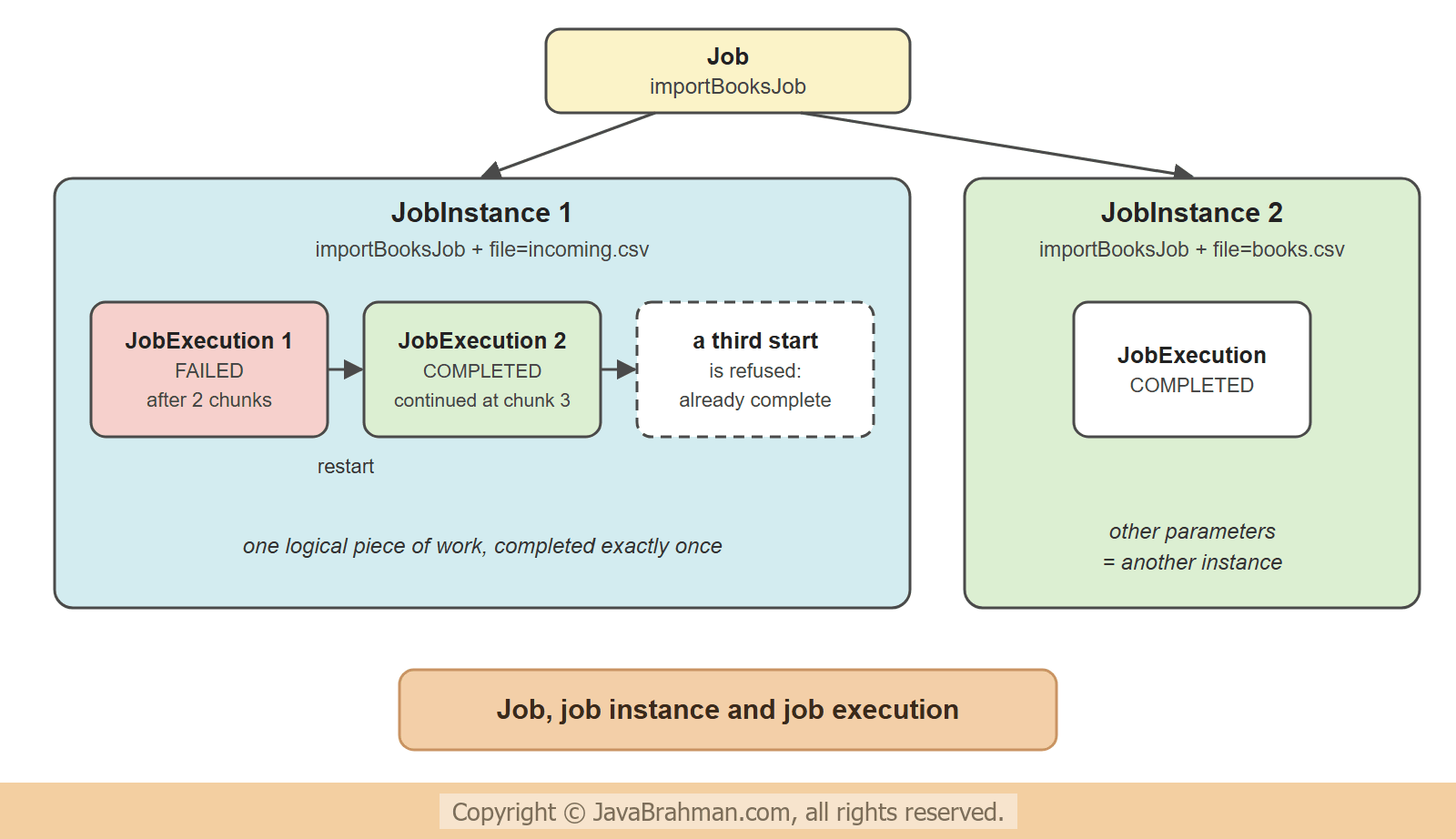 This is what makes a restart possible. Starting a job with the parameters of a failed instance does not begin again: Spring Batch finds the failed execution in the job repository and continues after the last committed chunk. Starting it with the parameters of a completed instance is refused. To see both, the following runner starts the job itself with the
JobOperator, so the automatic start is switched off in a profile. It imports a copy of the file in which a third row is bad - one more than the skip limit allows.
src/main/resources/application-restart.properties
spring.batch.job.enabled=falseRestartDemo.java
//RestartDemo.java
package com.javabrahman.spring.batch;

import java.nio.file.Files;
import java.nio.file.Path;
import org.springframework.batch.core.job.Job;
import org.springframework.batch.core.job.parameters.JobParameters;
import org.springframework.batch.core.job.parameters.JobParametersBuilder;
import org.springframework.batch.core.launch.JobInstanceAlreadyCompleteException;
import org.springframework.batch.core.launch.JobOperator;
import org.springframework.boot.CommandLineRunner;
import org.springframework.context.annotation.Profile;
import org.springframework.jdbc.core.simple.JdbcClient;
import org.springframework.stereotype.Component;

@Component
@Profile("restart")
public class RestartDemo implements CommandLineRunner {

  private final JobOperator jobOperator;
  private final Job importBooksJob;
  private final JdbcClient jdbc;

  RestartDemo(JobOperator jobOperator, Job importBooksJob, JdbcClient jdbc) {
    this.jobOperator = jobOperator;
    this.importBooksJob = importBooksJob;
    this.jdbc = jdbc;
  }

  @Override
  public void run(String... args) throws Exception {
    // the same file with a third bad row: the price in the last line is not a number
    Path file = Path.of("incoming.csv");
    String content = Files.readString(Path.of("books.csv"));
    Files.writeString(file, content.replace("978-10,Domain-Driven Design,60.00", "978-10,Domain-Driven Design,n/a"));
    JobParameters parameters = new JobParametersBuilder().addString("file", "incoming.csv").toJobParameters();

    System.out.println("--- first run");
    jobOperator.start(importBooksJob, parameters);
    printBooks();

    System.out.println("--- the file is corrected, and the job is started again with the same parameters");
    Files.writeString(file, content);
    jobOperator.start(importBooksJob, parameters);
    printBooks();

    System.out.println("--- and once more");
    try {
      jobOperator.start(importBooksJob, parameters);
    } catch (JobInstanceAlreadyCompleteException e) {
      System.out.println("  " + e.getClass().getSimpleName() + ": " + e.getMessage());
    }

    System.out.println("--- the job repository");
    jdbc.sql("""
        select e.job_instance_id, e.job_execution_id, s.step_name, s.status, s.read_count, s.write_count, s.commit_count
        from batch_job_execution e join batch_step_execution s on s.job_execution_id = e.job_execution_id
        order by s.step_execution_id""").query().listOfRows().forEach(row -> System.out.println("  " + row));
  }

  private void printBooks() {
    System.out.println("  books in the table: " + jdbc.sql("select isbn from books order by isbn").query(String.class).list());
  }
}--- first run
Job importBooksJob incoming.csv - instance 1, execution 1
skipped while reading - line 4: 978-03,Refactoring,abc,ACTIVE
chunk written and committed: 978-01, 978-02, 978-04
skipped while processing - 978-06 has price -41.00
chunk written and committed: 978-05, 978-07
importStep FAILED: read 8, filtered 1, skipped 2, written 5, commits 2
failure: FatalStepExecutionException - Unable to process chunk
job status: FAILED
books in the table: [978-01, 978-02, 978-04, 978-05, 978-07]
--- the file is corrected, and the job is started again with the same parameters
Job importBooksJob incoming.csv - instance 1, execution 2
chunk written and committed: 978-09, 978-10
report: the books table now has 7 rows
importStep COMPLETED: read 2, filtered 0, skipped 0, written 2, commits 1
reportStep COMPLETED: read 0, filtered 0, skipped 0, written 0, commits 1
job status: COMPLETED
books in the table: [978-01, 978-02, 978-04, 978-05, 978-07, 978-09, 978-10]
--- and once more
JobInstanceAlreadyCompleteException: A job instance already exists and is complete for identifying parameters={JobParameter{name='file', value=incoming.csv, type=class java.lang.String, identifying=true}}. If you want to run this job again, change the parameters.
--- the job repository
{JOB_INSTANCE_ID=1, JOB_EXECUTION_ID=1, STEP_NAME=importStep, STATUS=FAILED, READ_COUNT=8, WRITE_COUNT=5, COMMIT_COUNT=2}
{JOB_INSTANCE_ID=1, JOB_EXECUTION_ID=2, STEP_NAME=importStep, STATUS=COMPLETED, READ_COUNT=2, WRITE_COUNT=2, COMMIT_COUNT=1}
{JOB_INSTANCE_ID=1, JOB_EXECUTION_ID=2, STEP_NAME=reportStep, STATUS=COMPLETED, READ_COUNT=0, WRITE_COUNT=0, COMMIT_COUNT=1}
- First run - chunks 1 and 2 are written and committed as before, using up both allowed skips. In chunk 3,
978-09is read, and then the last line fails to parse. A third skip is not allowed, so the chunk is rolled back and the step fails.reportStepnever runs, and the job's status isFAILED. The table has the five books of the two committed chunks.978-09was read - the read counter says 8 - but not written. - Second run - the same job instance 1, but execution 2. The step does not start at the top of the file. It reads only two items,
978-09and978-10, and writes them. The five books already imported are not read again, so there are no duplicates and no wasted work.reportStepruns now, and the job isCOMPLETED. - Third start - the instance is complete, and Spring Batch refuses to run it again with a
JobInstanceAlreadyCompleteException. This protects against importing the same file twice by accident. To run a job again on purpose, a parameter must differ - a date or a run number is the usual choice. - The job repository - the last three lines are read from the tables
BATCH_JOB_EXECUTIONandBATCH_STEP_EXECUTION, where Spring Batch recorded all of this: the failed step execution with 2 commits, and the two step executions of the restart.
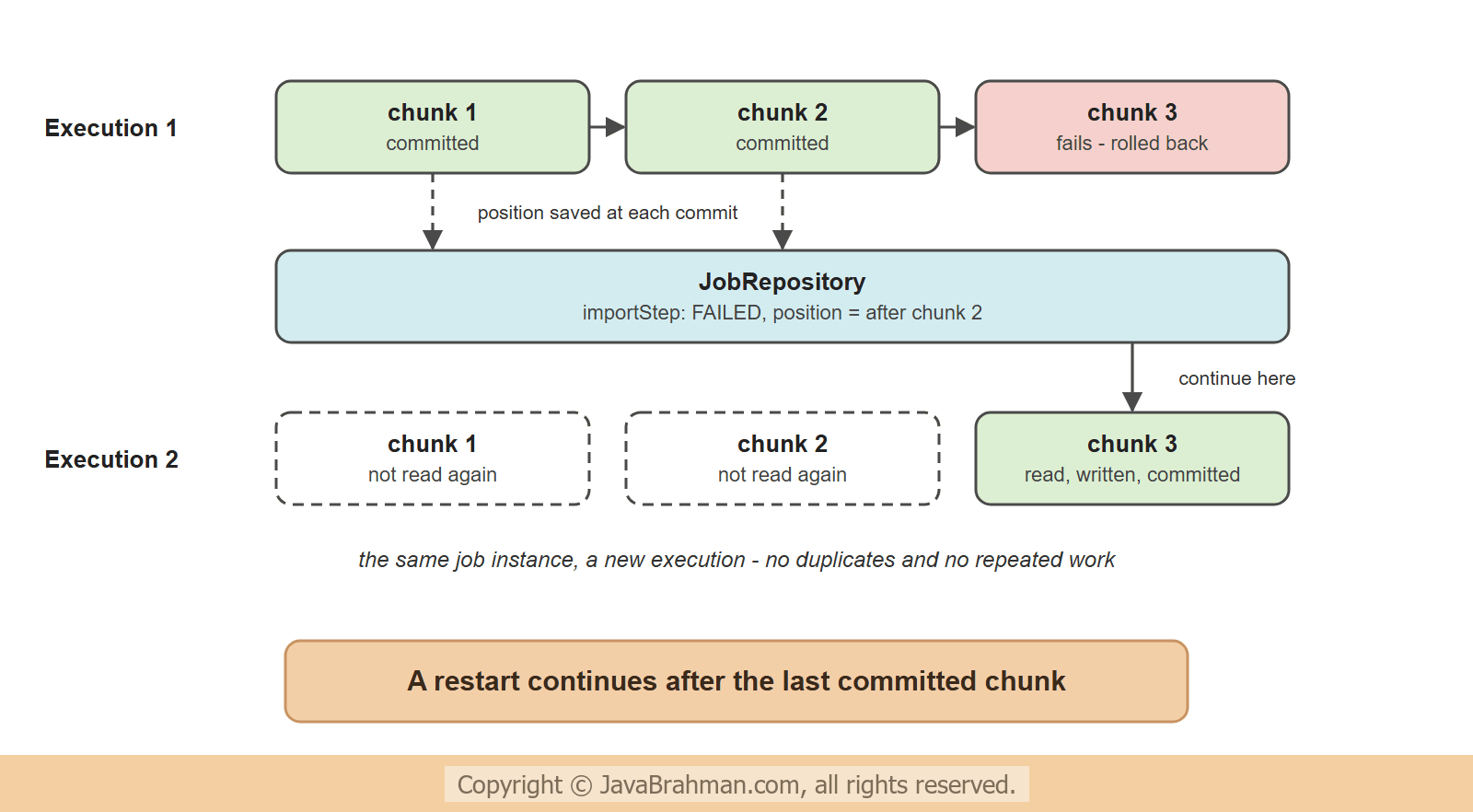 A restart is only correct if the reader can return to its position and the writer's work is in the chunk's transaction. The file and database readers and writers of Spring Batch are built for this. A reader or writer of your own that should be restartable implements
ItemStream and saves its position in the step's ExecutionContext.
Skip, retry and fail
A chunk-oriented step has three answers to an exception -- Fail - the default. The chunk is rolled back, the step and the job fail, and the job can be restarted once the cause is removed. It is the right answer for anything unexpected.
- Skip - for bad data: a record that will be wrong however often it is tried. The exceptions are named with
skip(), andskipLimit()stops the job when there are too many. ASkipListenershould store every skipped record, in a file or a table, so that somebody can correct it; the example only prints it. - Retry - for temporary faults: a deadlock, a timeout of a remote service.
retry(SomeException.class)andretryLimit(3)on the same builder try the item again before giving up.
Starting jobs
- At startup - the default in Spring Boot, used in the first run: the application starts, runs the job with the command-line arguments as parameters, and exits. This suits jobs started by cron, a Kubernetes CronJob or an enterprise scheduler, which is how most batch jobs are run. If the application defines several jobs,
spring.batch.job.nameselects the one to run. - From code - with
spring.batch.job.enabled=falseand theJobOperator, as in the second run. The call can come from a @ScheduledClick to read tutorial: Scheduling Tasks in Spring with @Scheduled method, a REST controller, or a message listener.
taskExecutor(), or be partitioned, where the data is split into ranges and each range is handled by its own copy of the step. Both are for later; a single-threaded job with a sensible chunk size and batch inserts handles millions of rows.
Summary
In this tutorial we built a Spring Batch job that imports a CSV file into a database. A job is a sequence of steps, and a chunk-oriented step reads and processes items one at a time and writes them a chunk at a time, one transaction per chunk. The reader, the writer and the step came from builders; only the processor was our own code, and it filtered one item by returningnull. With faultTolerant() the step skipped two bad records and reported them, and the step counters showed what was read, filtered, skipped and written. A third bad record failed the job after two committed chunks, and starting the same job instance again continued with the third chunk, because the job repository had recorded the position. A further start of the completed instance was refused.