
Java Program to Reverse an Array
Introduction
This tutorial shows multiple approaches in which an array can be reversed in Java, viz. reversing the array in place by swapping elements at both ends, by building a new reversed array and by using the in-built methodCollections.reverse().Approach 1 - in-place reversal by swapping elements at opposite ends
In-place(or inside the same array's memory space) reversal works by swapping the first element with the last, the second with the second to last, and so on towards the middle. Generalizing - the element at indexi swaps with the element at index length - 1 - i. The loop only has to go to the middle, length / 2 swaps in all.For example - for an array of 5 elements, that is two swaps: index 0 with index 4, and index 1 with index 3. The element in the middle, at index 2, is its own partner and stays where it is.
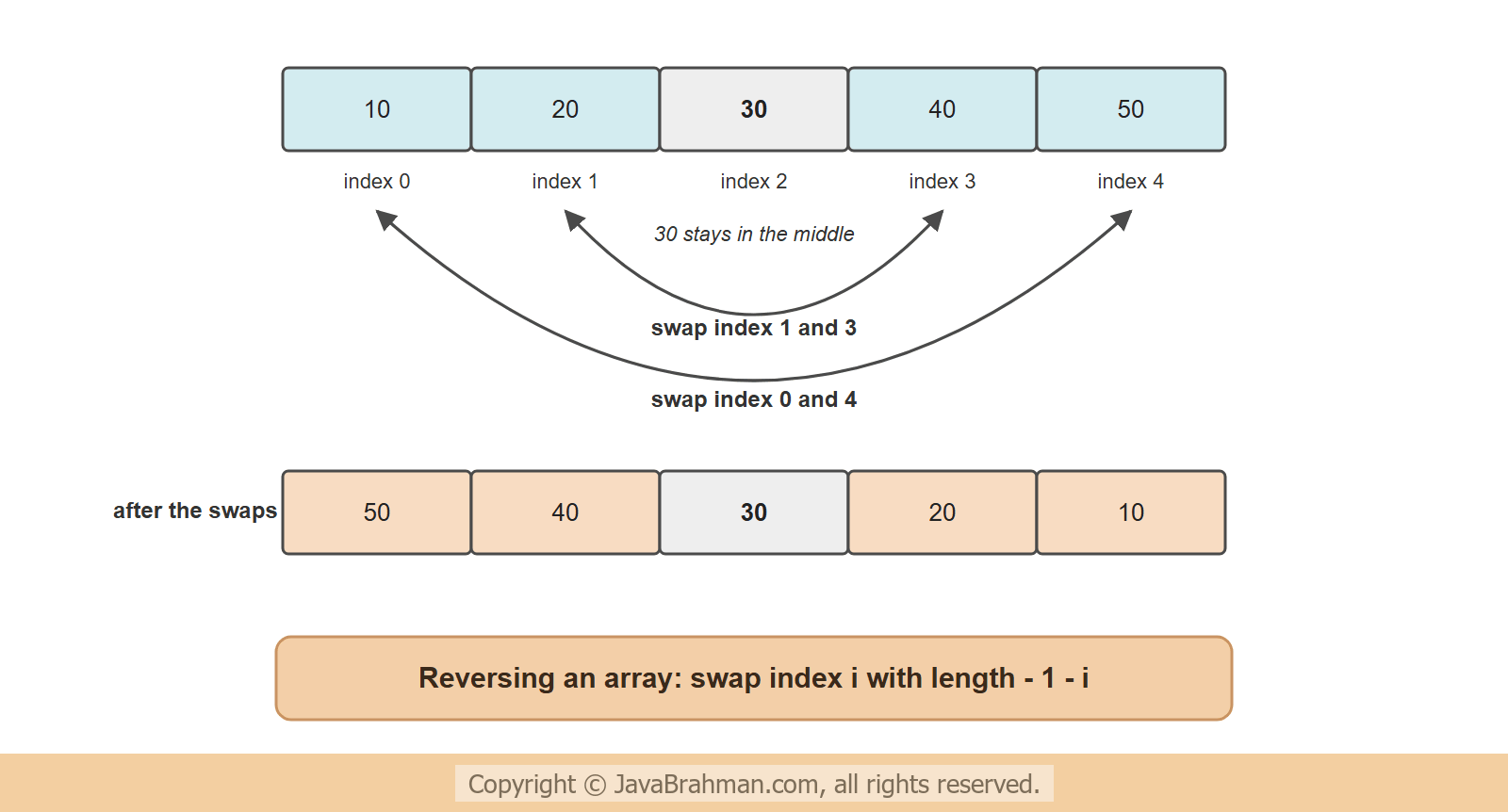
Java program to reverse an array
Java program to reverse an array in place
//ReverseArray.java
package com.javabrahman.generaljava;

import java.util.Arrays;
import java.util.Scanner;

public class ReverseArray {

  public static void main(String[] args) {
    Scanner scanner = new Scanner(System.in);
    System.out.print("Enter the number of elements: ");
    int count = scanner.nextInt();

    int[] numbers = new int[count];
    System.out.print("Enter the elements: ");
    for (int i = 0; i < count; i++) {
      numbers[i] = scanner.nextInt();
    }
    System.out.println("Original array: " + Arrays.toString(numbers));

    for (int i = 0; i < numbers.length / 2; i++) {
      int other = numbers.length - 1 - i;      // the partner at the same distance from the other end
      int temp = numbers[i];
      numbers[i] = numbers[other];
      numbers[other] = temp;
    }
    System.out.println("Reversed array: " + Arrays.toString(numbers));
  }
}Enter the number of elements: 5 Enter the elements: 10 20 30 40 50 Original array: [10, 20, 30, 40, 50] Reversed array: [50, 40, 30, 20, 10] Enter the number of elements: 4 Enter the elements: 1 2 3 4 Original array: [1, 2, 3, 4] Reversed array: [4, 3, 2, 1] Enter the number of elements: 1 Enter the elements: 7 Original array: [7] Reversed array: [7]
- The program reads the elements into an
int[]and prints it withArrays.toString(), which writes the elements in square brackets. - The loop runs
numbers.length / 2times. In every pass, the element at indexiand the element at indexother = length - 1 - iexchange their values with the usual temporary variable:tempkeeps one value while the other is copied over it. - An array of 5 elements gets 2 swaps - integer division makes 5 / 2 equal to 2 - and the middle element stays. An array of 4 elements gets 2 swaps and has no middle element. An array of 1 element gets none.
- If you are new to Java, the for loop is explained in the for loop tutorialClick to read: for loop tutorial, and printing arrays in how to print an array in JavaClick to read: how to print an array in Java.
Approach 2 - Adding the reversed array elements into a new array
When the original array must stay as it is, the reversed elements go into a second array of the same length with the logic that elementi of the new array is element length - 1 - i of the old one.
Reverse an array into a new array
//ReverseArrayCopy.java
package com.javabrahman.generaljava;

import java.util.Arrays;
import java.util.Scanner;

public class ReverseArrayCopy {

  public static void main(String[] args) {
    Scanner scanner = new Scanner(System.in);
    System.out.print("Enter the number of elements: ");
    int count = scanner.nextInt();

    int[] numbers = new int[count];
    System.out.print("Enter the elements: ");
    for (int i = 0; i < count; i++) {
      numbers[i] = scanner.nextInt();
    }

    int[] reversed = new int[numbers.length];
    for (int i = 0; i < numbers.length; i++) {
      reversed[i] = numbers[numbers.length - 1 - i];
    }
    System.out.println("Original array: " + Arrays.toString(numbers));
    System.out.println("Reversed array: " + Arrays.toString(reversed));
  }
}Enter the number of elements: 5 Enter the elements: 10 20 30 40 50 Original array: [10, 20, 30, 40, 50] Reversed array: [50, 40, 30, 20, 10]
- The elements are read into the array
numberswith aScanner, in the same way as in the first program. - A second array,
reversed, is created with the same length asnumbers. - The loop runs over all the indexes of
reversed, from 0 tolength - 1. For each indexi, it copies the element from the other end ofnumbers, at indexlength - 1 - i. Soreversed[0]gets the last element,reversed[1]the second to last, and so on. - No swapping is needed, and
numbersis never changed - the output prints the original array and the reversed one side by side. This is the approach to use when the original order is still needed; the price is a second array of the same size.
Approach 3 - using Collections.reverse()
TheCollections class has a reverse() method for lists. Arrays.asList() wraps an object array as a list that shares its elements, so reversing the list reverses the array too:
Reverse an array with Collections.reverse()
//ReverseWithCollections.java
package com.javabrahman.generaljava;

import java.util.Arrays;
import java.util.Collections;

public class ReverseWithCollections {

  public static void main(String[] args) {
    Integer[] boxed = {10, 20, 30, 40, 50};
    Collections.reverse(Arrays.asList(boxed));
    System.out.println("Integer[] reversed: " + Arrays.toString(boxed));

    int[] primitives = {10, 20, 30, 40, 50};
    Collections.reverse(Arrays.asList(primitives));
    System.out.println("int[] after the same call: " + Arrays.toString(primitives));
  }
}Integer[] reversed: [50, 40, 30, 20, 10] int[] after the same call: [10, 20, 30, 40, 50]
- The program reverses two arrays with the same values:
boxed, anInteger[]that holds objects, andprimitives, anint[]that holds primitive values. Arrays.asList(boxed)wraps theInteger[]as aListthat shares its elements with the array.Collections.reverse()reverses that list, and because the list and the array are the same elements,boxedis reversed too - as the first line of the output shows.- The same call on
primitivescompiles and runs without an error, but the array stays as it was.Arrays.asList()works with objects, so for anint[]it does not make a list of the five numbers - it makes a list with one element, the whole array. Reversing a list of one element changes nothing. - So
Collections.reverse()is the shortest way for arrays of objects such asInteger[]orString[]; for anint[], use the loop of Approach 1 or 2.
Summary
In this tutorial we looked at three approaches to reverse an array in Java - swapping the elements at both ends in place, building a new reversed array, and usingCollections.reverse() - each with its program, output and a detailed explanation of the code.General Java Programs on JavaBrahman
Fahrenheit to CelsiusClick to Read Fahrenheit to Celsius Tutorial FactorialClick to Read Factorial Tutorial FibonacciClick to Read Fibonacci Tutorial PalindromeClick to Read Palindrome Tutorial Armstrong NumberClick to Read Armstrong Number Tutorial Automorphic NumberClick to Read Automorphic Number Tutorial Harshad NumberClick to Read Harshad Number Tutorial Matrix AdditionClick to Read Matrix Addition Tutorial Matrix MultiplicationClick to Read Matrix Multiplication Tutorial
Fahrenheit to CelsiusClick to Read Fahrenheit to Celsius Tutorial FactorialClick to Read Factorial Tutorial FibonacciClick to Read Fibonacci Tutorial PalindromeClick to Read Palindrome Tutorial Armstrong NumberClick to Read Armstrong Number Tutorial Automorphic NumberClick to Read Automorphic Number Tutorial Harshad NumberClick to Read Harshad Number Tutorial Matrix AdditionClick to Read Matrix Addition Tutorial Matrix MultiplicationClick to Read Matrix Multiplication Tutorial