
Async Processing in Spring with @Async and Virtual Threads
Introduction
This tutorial explains how to run methods in the background in Spring with@Async. We will see what changes when a method runs on another thread, send an email without making the caller wait, run three slow lookups in parallel and combine their results with CompletableFuture, and look at the thread pool that Spring Boot provides - and at how many tasks it really runs at once. Then we will switch the whole application to Java's virtual threads with one property, see where exceptions of background methods end up, and pass a request id from the caller's thread to the background thread with a TaskDecorator. Every output below comes from running the code with Spring Boot 4.1.2 on Java 25.What @Async does
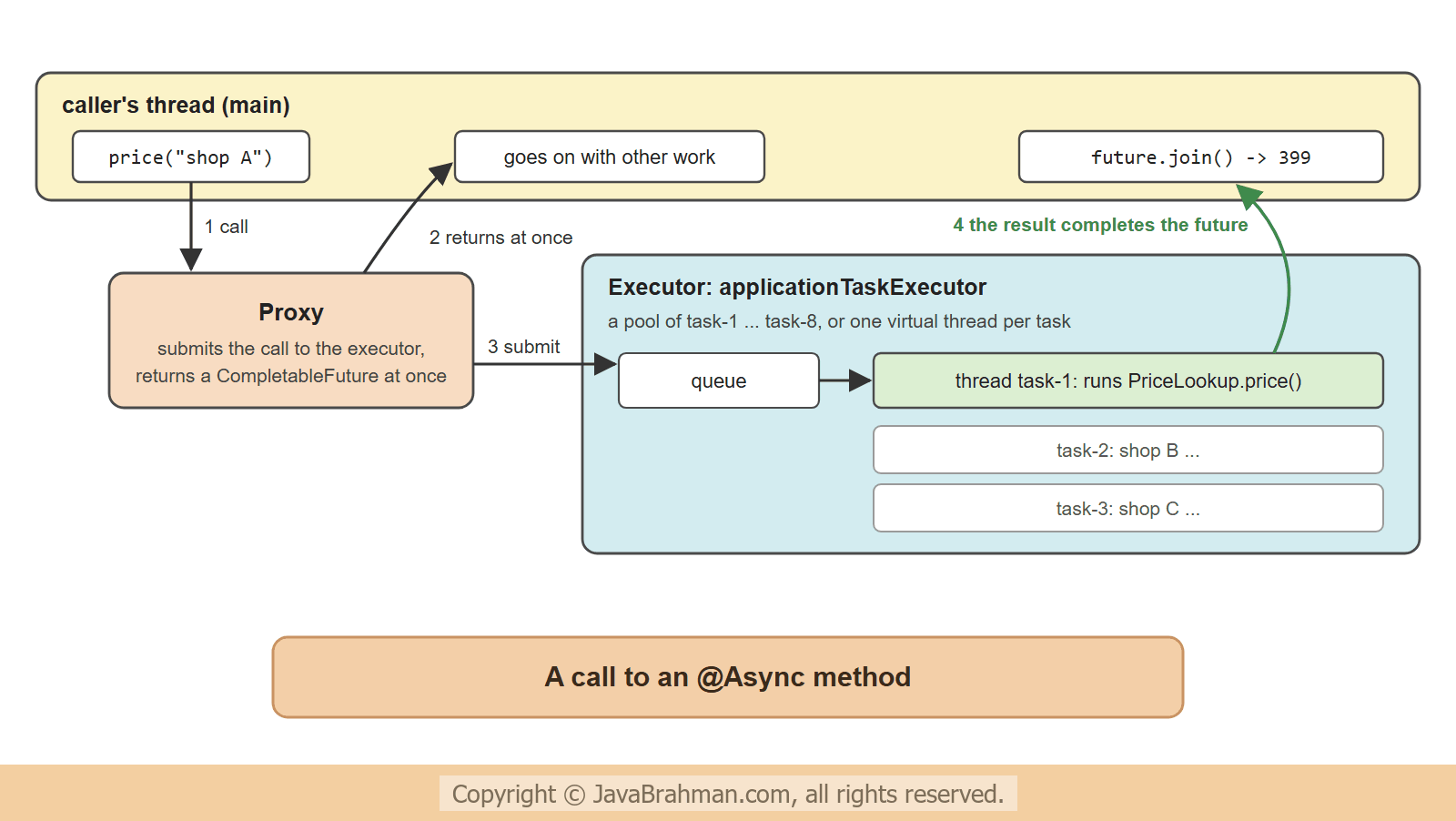
A normal method call runs on the caller's thread, and the caller waits until it returns. A method annotated with@Async is another job for a proxy, like the aspects of Spring AOP ExplainedClick to read tutorial: Spring AOP Explained: Aspects, Advice and Pointcuts: the proxy does not run the method, but hands it to an executor - a pool of threads - and returns at once. The method then runs on one of the executor's threads -
- A
void@Asyncmethod is fire and forget: the caller gets no result and does not learn whether it worked. - A method returning
CompletableFuture<T>gives the caller a handle to the result, which the caller can wait for, combine with other futures, or attach further steps to. (Futureworks too, but offers much less.) @EnableAsyncon a configuration class switches the support on.
Fire and forget: a welcome email
Registering a user should not wait for the email server. The email sender's method is@Async; it takes half a second -
src/main/java/.../async/EmailSender.java
//EmailSender.java
package com.javabrahman.async;

import org.springframework.scheduling.annotation.Async;
import org.springframework.stereotype.Service;

@Service
public class EmailSender {

  @Async
  public void sendWelcome(String user) throws InterruptedException {
    Thread.sleep(500);   // stands for a slow mail server
    System.out.println("   welcome email to " + user + " sent, on " + Threads.name());
  }
}
src/main/java/.../async/SignupService.java
//SignupService.java
package com.javabrahman.async;

import org.springframework.stereotype.Service;

@Service
public class SignupService {
  private final EmailSender emails;

  public SignupService(EmailSender emails) {
    this.emails = emails;
  }

  public void register(String user) throws InterruptedException {
    System.out.println("   registering " + user + " on " + Threads.name());
    emails.sendWelcome(user);   // returns at once
    System.out.println("   register() returns");
  }
}
src/main/java/.../async/Threads.java - a helper for the outputs
//Threads.java
package com.javabrahman.async;

public final class Threads {

  private Threads() {
  }

  // the thread's name, and whether it is a virtual thread
  public static String name() {
    Thread thread = Thread.currentThread();
    return thread.getName() + (thread.isVirtual() ? " (virtual)" : "");
  }

  // seconds since a start time, rounded to 0.1 s so that outputs are stable
  public static String since(long startNanos) {
    return String.format("%.1f s", Math.round((System.nanoTime() - startNanos) / 100_000_000.0) / 10.0);
  }
}demo; the parts are shown section by section below -
src/main/java/.../async/AsyncApp.java
//AsyncApp.java
package com.javabrahman.async;

import java.util.List;
import java.util.concurrent.CompletableFuture;
import java.util.concurrent.CompletionException;
import java.util.stream.IntStream;
import org.springframework.boot.SpringApplication;
import org.springframework.boot.autoconfigure.SpringBootApplication;
import org.springframework.context.ConfigurableApplicationContext;
import org.springframework.scheduling.annotation.EnableAsync;

@SpringBootApplication
@EnableAsync
public class AsyncApp {

  public static void main(String[] args) throws Exception {
    try (ConfigurableApplicationContext context = SpringApplication.run(AsyncApp.class, args)) {
      switch (System.getProperty("demo")) {
        case "email" -> {
          context.getBean(SignupService.class).register("ann");
          Thread.sleep(800);   // keep the application running until the email is sent
        }
        case "prices" -> prices(context.getBean(PriceLookup.class));
        case "pool" -> pool(context.getBean(StockCheck.class));
        case "errors" -> errors(context.getBean(FailingJobs.class));
        case "context" -> requestId(context.getBean(AuditLog.class));
        default -> throw new IllegalArgumentException("unknown demo");
      }
    }
  }

  static void prices(PriceLookup lookup) {
    long start = System.nanoTime();
    CompletableFuture<Integer> a = lookup.price("shop A");
    CompletableFuture<Integer> b = lookup.price("shop B");
    CompletableFuture<Integer> c = lookup.price("shop C");
    System.out.println("three lookups started after " + Threads.since(start));
    int best = CompletableFuture.allOf(a, b, c)
        .thenApply(done -> Math.min(a.join(), Math.min(b.join(), c.join())))
        .join();
    System.out.println("best price " + best + " after " + Threads.since(start));
  }

  static void pool(StockCheck stock) {
    long start = System.nanoTime();
    List<CompletableFuture<String>> checks = IntStream.rangeClosed(1, 10).mapToObj(stock::check).toList();
    List<String> threads = checks.stream().map(CompletableFuture::join).toList();
    System.out.println("10 checks of 0.3 s each took " + Threads.since(start));
    System.out.println("threads used: " + threads.stream().distinct().sorted().toList());
  }

  static void errors(FailingJobs jobs) throws InterruptedException {
    System.out.println("calling the void method:");
    jobs.cleanUp();
    Thread.sleep(300);
    System.out.println("calling the CompletableFuture method:");
    try {
      jobs.export().join();
    } catch (CompletionException e) {
      System.out.println("   caller sees " + e.getCause());
    }
  }

  static void requestId(AuditLog audit) {
    RequestId.set("req-7f3a");
    System.out.println("caller on " + Threads.name() + ", request id " + RequestId.get());
    audit.record("price changed").join();
    RequestId.clear();
  }
}registering ann on main register() returns welcome email to ann sent, on task-1
register() returned before the email was sent, and the email was sent on another thread, task-1, from the executor that Spring Boot configures. Had the mail server failed, register() would never know - which, for a welcome email, is acceptable.
Results with CompletableFuture
When the caller needs the results, the method returns aCompletableFuture. Inside the method, the code is ordinary blocking code; CompletableFuture.completedFuture() wraps the result, and the proxy returns a future that completes when the method has finished on its thread -
src/main/java/.../async/PriceLookup.java
//PriceLookup.java
package com.javabrahman.async;

import java.util.Map;
import java.util.concurrent.CompletableFuture;
import org.springframework.scheduling.annotation.Async;
import org.springframework.stereotype.Service;

@Service
public class PriceLookup {
  private final Map<String, Integer> prices = Map.of("shop A", 450, "shop B", 399, "shop C", 420);

  @Async
  public CompletableFuture<Integer> price(String shop) {
    try {
      Thread.sleep(300);   // stands for a call to the shop's API
    } catch (InterruptedException e) {
      return CompletableFuture.failedFuture(e);
    }
    System.out.println("   " + shop + " answered, on " + Threads.name());
    return CompletableFuture.completedFuture(prices.get(shop));
  }
}three lookups started after 0.0 s shop C answered, on task-3 shop A answered, on task-1 shop B answered, on task-2 best price 399 after 0.3 s
allOf() waited for all three; thenCombine(), anyOf() and orTimeout() are the other common tools (the CompletableFuture combining tutorialClick to read: CompletableFuture combining tutorial covers them). The caller's join() blocks its own thread; a web controller can instead return the CompletableFuture itself, and Spring MVC completes the response when the future completes.
The executor behind @Async
Spring Boot configures one executor for@Async, the bean applicationTaskExecutor: a ThreadPoolTaskExecutor with threads named task-1, task-2 and so on. Its defaults are a core size of 8 threads and an unbounded queue. A pool only grows beyond its core size when its queue is full, and an unbounded queue is never full, so at most 8 tasks run at once; the rest wait in the queue. Ten stock checks of 0.3 s show it -
src/main/java/.../async/StockCheck.java
//StockCheck.java
package com.javabrahman.async;

import java.util.concurrent.CompletableFuture;
import org.springframework.scheduling.annotation.Async;
import org.springframework.stereotype.Service;

@Service
public class StockCheck {

  @Async
  public CompletableFuture<String> check(int item) {
    try {
      Thread.sleep(300);   // stands for a call to a warehouse system
    } catch (InterruptedException e) {
      return CompletableFuture.failedFuture(e);
    }
    return CompletableFuture.completedFuture(Threads.name());
  }
}10 checks of 0.3 s each took 0.6 s threads used: [task-1, task-2, task-3, task-4, task-5, task-6, task-7, task-8]
spring.task.execution.pool.core-size, max-size, queue-capacity (a bounded queue lets the pool grow to max-size), keep-alive and spring.task.execution.thread-name-prefix.
Virtual threads
Platform threads are expensive - each has a large stack and is an operating-system thread - which is why they are pooled. A virtual thread, final in Java 21, is cheap enough to create one per task: while it waits for I/O or sleeps, it does not hold an operating-system thread. Withspring.threads.virtual.enabled=true, Spring Boot replaces the pool behind @Async with a SimpleAsyncTaskExecutor that starts a new virtual thread for each task. The same property switches Tomcat's request threads, the scheduler of the scheduling tutorialClick to read tutorial: Scheduling Tasks in Spring with @Scheduled and other executors to virtual threads -
OUTPUT with spring.threads.virtual.enabled=true10 checks of 0.3 s each took 0.3 s threads used: [task-1 (virtual), task-10 (virtual), task-2 (virtual), task-3 (virtual), task-4 (virtual), task-5 (virtual), task-6 (virtual), task-7 (virtual), task-8 (virtual), task-9 (virtual)]
spring.task.execution.simple.concurrency-limit caps the executor, and Spring Framework 7's @ConcurrencyLimit caps one method, as the resilience tutorialClick to read tutorial: Resilience in Spring 7: @Retryable and @ConcurrencyLimit shows.
Exceptions in @Async methods
An exception thrown on the executor's thread cannot travel back up the caller's stack: the caller has moved on. Where it ends up depends on the return type -src/main/java/.../async/FailingJobs.java
//FailingJobs.java
package com.javabrahman.async;

import java.util.concurrent.CompletableFuture;
import org.springframework.scheduling.annotation.Async;
import org.springframework.stereotype.Service;

@Service
public class FailingJobs {

  @Async
  public void cleanUp() {
    throw new IllegalStateException("cleanup failed: disk full");
  }

  @Async
  public CompletableFuture<String> export() {
    throw new IllegalStateException("export failed: no permission");
  }
}AsyncUncaughtExceptionHandler, which by default logs it at ERROR level. The run shortens the log lines to the message and the exception -
src/main/resources/application-errors.properties
logging.pattern.console=%m%n%ex{0}calling the void method: Unexpected exception occurred invoking async method: public void com.javabrahman.async.FailingJobs.cleanUp() java.lang.IllegalStateException: cleanup failed: disk full calling the CompletableFuture method: caller sees java.lang.IllegalStateException: export failed: no permission
- The void method's exception reached only the log. To do more - count it, alert - implement
AsyncConfigurerin a configuration class and return your own handler fromgetAsyncUncaughtExceptionHandler(). - The CompletableFuture method threw too, but the proxy turned the exception into a failed future, and the caller saw it from
join(), wrapped in aCompletionException. Callers that never look at the future never see the error, so attachexceptionally()orwhenComplete()where nobody waits.
Thread-local context does not travel
Much of an application's context lives inThreadLocal variables bound to the current thread: the security context, the logging MDC with a request id, the current transaction. The executor's thread has none of it. An audit log that records the request id of the current request shows the problem -
src/main/java/.../async/RequestId.java
//RequestId.java
package com.javabrahman.async;

public final class RequestId {
  private static final ThreadLocal<String> CURRENT = new ThreadLocal<>();

  private RequestId() {
  }

  public static void set(String id) {
    CURRENT.set(id);
  }

  public static String get() {
    return CURRENT.get();
  }

  public static void clear() {
    CURRENT.remove();
  }
}
src/main/java/.../async/AuditLog.java
//AuditLog.java
package com.javabrahman.async;

import java.util.concurrent.CompletableFuture;
import org.springframework.scheduling.annotation.Async;
import org.springframework.stereotype.Service;

@Service
public class AuditLog {

  @Async
  public CompletableFuture<Void> record(String event) {
    System.out.println("audit on " + Threads.name() + ": " + event + ", request id " + RequestId.get());
    return CompletableFuture.completedFuture(null);
  }
}TaskDecorator fixes this. It wraps every task when it is submitted - still on the caller's thread, where it can read the context - and the wrapper restores the context on the executor's thread before the task runs, and clears it after. Spring Boot applies a TaskDecorator bean to its executors automatically. The bean below only exists in the profile decorator, so that the two runs can compare -
src/main/java/.../async/ContextCopyConfig.java
//ContextCopyConfig.java
package com.javabrahman.async;

import org.springframework.context.annotation.Bean;
import org.springframework.context.annotation.Configuration;
import org.springframework.context.annotation.Profile;
import org.springframework.core.task.TaskDecorator;

@Configuration
@Profile("decorator")
public class ContextCopyConfig {

  @Bean
  TaskDecorator copyRequestId() {
    return task -> {
      String id = RequestId.get();   // runs on the caller's thread, at submission
      return () -> {                 // runs on the executor's thread
        RequestId.set(id);
        try {
          task.run();
        } finally {
          RequestId.clear();         // pooled threads are reused: never leave context behind
        }
      };
    };
  }
}caller on main, request id req-7f3a audit on task-1: price changed, request id null
caller on main, request id req-7f3a
audit on task-1: price changed, request id req-7f3a
DelegatingSecurityContextAsyncTaskExecutor, and in Spring Boot 4 the property spring.task.execution.propagate-context (off by default) - but they all work this way. A @Transactional context never travels: an @Async method runs outside the caller's transaction, and needs its own.
Rules for @Async
- Proxy rules apply: the method must be public, and called from another bean. A call through
thisruns synchronously on the caller's thread, as the proxy tutorialClick to read tutorial: How Spring Proxies Work and the Self-Invocation Trap explains. - Return
voidorCompletableFuture. Any other return type is lost: the caller receivesnull. - Several executors:
@Async("reportExecutor")picks an executor bean by name, so that slow reports cannot take all the threads that emails need. - Bound the work: an unbounded queue hides overload until memory runs out, and unlimited virtual threads move the overload to the next system. Decide how much may run, and wait, at once.
- Shutdown:
spring.task.execution.shutdown.await-termination=truelets running tasks finish when the application stops; otherwise they are interrupted. - Not a job queue: tasks live in memory. If the application stops, queued tasks are gone. Work that must not be lost belongs in a message broker or a persistent job scheduler.
Summary
In this tutorial we moved work to background threads with@Async and @EnableAsync. A welcome email was sent on a task- thread after register() had returned; three price lookups returning CompletableFuture ran in parallel and were combined with allOf(). Spring Boot's default pool ran at most 8 of 10 tasks at once, while with spring.threads.virtual.enabled=true each task got a virtual thread of its own. A void method's exception went to the log, a future's exception to the caller's join(), and a TaskDecorator carried a request id to the background thread. The next tutorial decouples beans in another way: application eventsClick to read tutorial: Application Events in Spring with @EventListener.Spring AOP, Caching, Scheduling and Events Tutorials
Scheduling Tasks in Spring with @ScheduledClick to read tutorial: Scheduling Tasks in Spring with @Scheduled Application Events in Spring with @EventListenerClick to read tutorial: Application Events in Spring with @EventListener Spring AOP Explained: Aspects, Advice and PointcutsClick to read tutorial: Spring AOP Explained: Aspects, Advice and Pointcuts How Spring Proxies Work and the Self-Invocation TrapClick to read tutorial: How Spring Proxies Work and the Self-Invocation Trap Caching in Spring Boot with @Cacheable and CaffeineClick to read tutorial: Caching in Spring Boot with @Cacheable and Caffeine Resilience in Spring 7: @Retryable and @ConcurrencyLimitClick to read tutorial: Resilience in Spring 7: @Retryable and @ConcurrencyLimit
Scheduling Tasks in Spring with @ScheduledClick to read tutorial: Scheduling Tasks in Spring with @Scheduled Application Events in Spring with @EventListenerClick to read tutorial: Application Events in Spring with @EventListener Spring AOP Explained: Aspects, Advice and PointcutsClick to read tutorial: Spring AOP Explained: Aspects, Advice and Pointcuts How Spring Proxies Work and the Self-Invocation TrapClick to read tutorial: How Spring Proxies Work and the Self-Invocation Trap Caching in Spring Boot with @Cacheable and CaffeineClick to read tutorial: Caching in Spring Boot with @Cacheable and Caffeine Resilience in Spring 7: @Retryable and @ConcurrencyLimitClick to read tutorial: Resilience in Spring 7: @Retryable and @ConcurrencyLimit