
Java 8 Parallel Streams Tutorial with Examples
Introduction
This tutorial explains parallel streams in Java 8: how to create them, how they split work across threads, and - just as important - when they make code faster and when they make it slower or wrong. We will start with what a parallel stream is and how it uses the fork/join framework behind the scenes. We will then run an example showing results that are the same in both modes, the encounter order, the classic shared-mutable-state bug, and areduce() identity mistake that only shows up in parallel. Next, we will cover Java 8's parallel array methods, and lastly a checklist for deciding whether to use parallel() at all.(This tutorial assumes you know the basics of the Java 8 Streams APIClick to read: Java 8 Streams API.)
What is a parallel stream
A normal - sequential - stream processes its elements one after another on the calling thread. A parallel stream runs the same pipeline on several threads at once: the source is split into chunks, each chunk is processed by a different thread, and the partial results are combined into the final result. The code of the pipeline does not change; only the way it is executed does.There are two ways to get a parallel stream, and two methods to check or change the mode -
collection.parallelStream(): a parallel stream straight from anyCollection.stream.parallel(): turns any stream, such asIntStream.range()orArrays.stream(), into a parallel one.stream.sequential(): switches back. The last call wins for the whole pipeline - a stream cannot be partly parallel.stream.isParallel(): reports the current mode.
How it works - split, process, combine
Three pieces of the JDK work together. The source'sSpliterator (a "splittable iterator", new in Java 8) divides the elements into chunks, splitting them again and again while there is enough work. The chunks run as tasks in ForkJoinPool.commonPool(), a pool shared by the whole JVM with one thread less than the number of CPU cores - the calling thread joins in as well. Finally, the terminal operation combines the partial results: adding partial sums, merging partial lists, and so on.
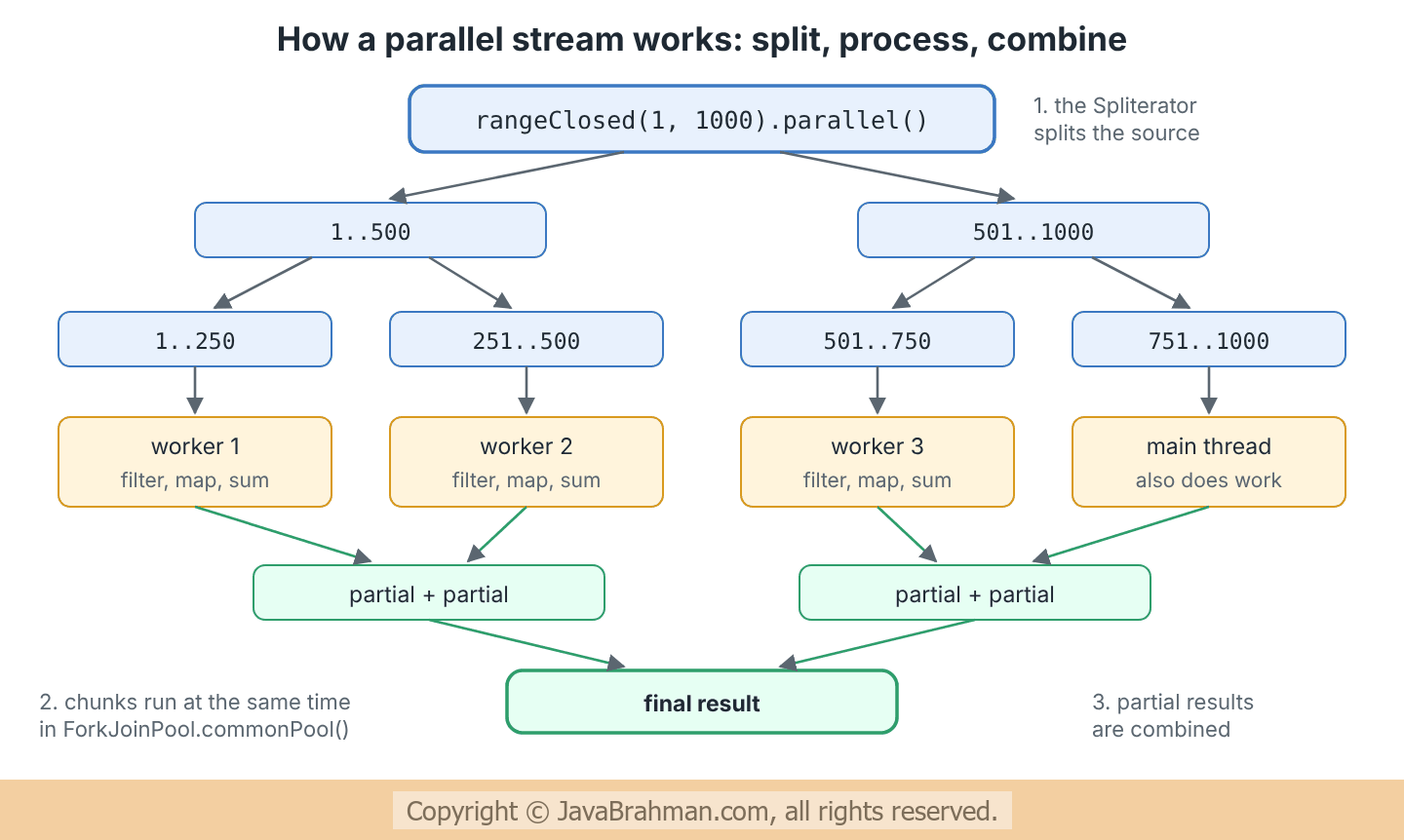
reduce() and collectors must be able to combine correctly.
Java 8 code example of parallel streams
The program below runs six small experiments. Some of their output is the same on every run; part 3 deliberately shows a bug whose output changes from run to run.Java 8 code showing parallel streams, encounter order, shared state, reduce identity and parallel array methods
//ParallelStreams.java
import java.util.ArrayList;
import java.util.Arrays;
import java.util.List;
import java.util.stream.Collectors;
import java.util.stream.IntStream;
import java.util.stream.LongStream;

public class ParallelStreams {

  public static void main(String[] args) {
    // 1. A stateless pipeline gives the same answer sequentially and in parallel
    long sequential = LongStream.rangeClosed(1, 1_000_000)
        .filter(n -> n % 3 == 0).map(n -> n * 2).sum();
    long parallel = LongStream.rangeClosed(1, 1_000_000).parallel()
        .filter(n -> n % 3 == 0).map(n -> n * 2).sum();
    System.out.println("1. sequential sum = " + sequential + ", parallel sum = " + parallel);

    // 2. Encounter order is kept by collect() and forEachOrdered()
    List<Integer> ids = Arrays.asList(1, 2, 3, 4, 5, 6, 7, 8);
    List<Integer> collected = ids.parallelStream()
        .map(n -> n * 10)
        .collect(Collectors.toList());
    StringBuilder ordered = new StringBuilder();
    ids.parallelStream().map(n -> n * 10).forEachOrdered(n -> ordered.append(n).append(' '));
    System.out.println("2. collect: " + collected);
    System.out.println("   forEachOrdered: " + ordered.toString().trim());

    // 3. Shared mutable state: adding to an ArrayList from many threads
    List<Integer> unsafe = new ArrayList<>();
    String outcome;
    try {
      IntStream.range(0, 100_000).parallel().forEach(unsafe::add);
      outcome = unsafe.size() + " elements";
    } catch (RuntimeException e) {
      outcome = e.getClass().getSimpleName();
    }
    System.out.println("3. unsafe forEach + add: " + outcome + " (expected 100000 elements)");
    List<Integer> safe = IntStream.range(0, 100_000).parallel().boxed()
        .collect(Collectors.toList());
    System.out.println("   collect instead:      " + safe.size() + " elements");

    // 4. reduce() needs a true identity value
    int wrongSequential = ids.stream().reduce(10, Integer::sum);
    int wrongParallel = ids.parallelStream().reduce(10, Integer::sum);
    int right = ids.parallelStream().reduce(0, Integer::sum) + 10;
    System.out.println("4. reduce(10, sum): sequential " + wrongSequential
        + ", parallel " + wrongParallel + "; reduce(0, sum) + 10: " + right);

    // 5. Java 8's parallel array methods
    int[] salaries = {5200, 4100, 6300, 5800, 4700};
    Arrays.parallelSort(salaries);
    long[] squares = new long[6];
    Arrays.setAll(squares, i -> (long) i * i);
    int[] runningTotal = {100, 200, 300, 400};
    Arrays.parallelPrefix(runningTotal, Integer::sum);
    System.out.println("5. parallelSort   " + Arrays.toString(salaries));
    System.out.println("   setAll         " + Arrays.toString(squares));
    System.out.println("   parallelPrefix " + Arrays.toString(runningTotal));

    // 6. Checking and switching mode
    System.out.println("6. isParallel: " + ids.parallelStream().isParallel()
        + ", after sequential(): " + ids.parallelStream().sequential().isParallel());
  }
}1. sequential sum = 333333666666, parallel sum = 333333666666 2. collect: [10, 20, 30, 40, 50, 60, 70, 80] forEachOrdered: 10 20 30 40 50 60 70 80 3. unsafe forEach + add: 17034 elements (expected 100000 elements) collect instead: 100000 elements 4. reduce(10, sum): sequential 46, parallel 116; reduce(0, sum) + 10: 46 5. parallelSort [4100, 4700, 5200, 5800, 6300] setAll [0, 1, 4, 9, 16, 25] parallelPrefix [100, 300, 600, 1000] 6. isParallel: true, after sequential(): false
Explanation of the code
- Part 1:
filter(),map()andsum()are stateless and associative, so the parallel pipeline gives exactly the sequential answer. This is the kind of pipeline parallel streams are made for. - Part 2: a list has an encounter order, and
collect()keeps it even in parallel - the chunks are merged in the right order.forEachOrdered()also respects it. PlainforEach()does not: in parallel it runs the action in whatever order the threads happen to reach the elements, which is why the program does not print it. - Part 3: several threads call
add()on oneArrayList, which is not thread-safe. Additions are lost, or the list throws an exception when two threads resize it at once. The output changes from run to run - a typical race condition. Letting the stream build the list withcollect()always gives all 100,000 elements, because each thread fills its own partial list and the lists are merged at the end. - Part 4:
reduce(identity, op)uses the identity as the starting value of every chunk, not just once. 10 is not an identity for addition, so the parallel result adds 10 once per chunk and is larger than the sequential one, which adds it only once. The fix is a true identity (0 for addition, 1 for multiplication), with any extra value added afterwards. See the reduce() tutorialClick to read: reduce() tutorial for the rules. - Part 5: Java 8 also added parallel helpers to
java.util.Arrays.parallelSort()sorts using the fork/join pool (falling back to a normal sort for small arrays),setAll()fills each element from its index (parallelSetAll()is the parallel version), andparallelPrefix()replaces each element with the running result of an operation - here a running total. - Part 6:
sequential()afterparallelStream()turns the whole pipeline back into a sequential one.
When does parallel() make code faster
Parallel streams are not a free speed-up. Splitting the source, scheduling tasks and combining results all cost time, and the work must be large enough to pay for them. The checklist below sums up the main factors.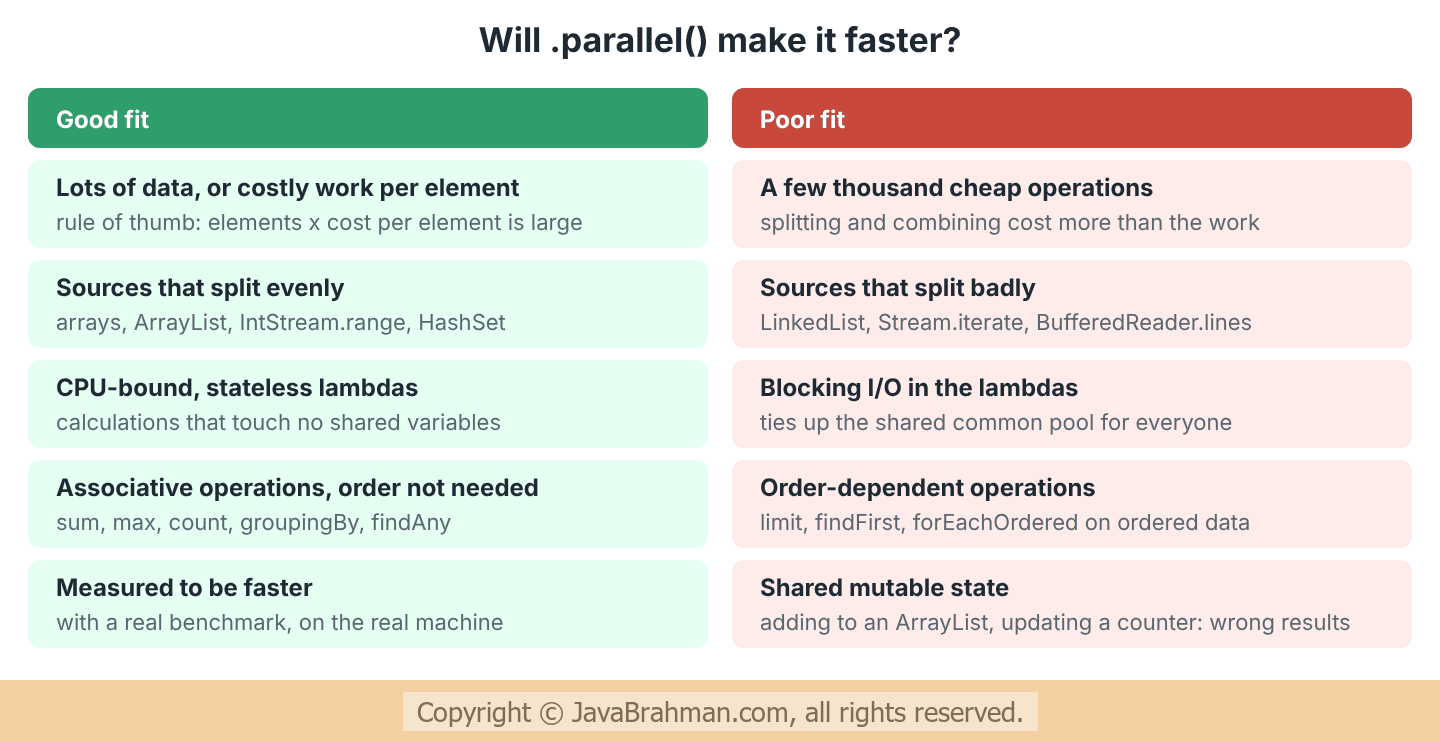
- Size times cost: a common rule of thumb is that the number of elements multiplied by the cost per element must be large - tens of thousands of cheap operations, or a few hundred expensive ones.
- The source matters: arrays,
ArrayListandIntStream.range()split instantly into equal halves. ALinkedListhas to be walked to split, andStream.iterate()or lines read from a file cannot be split well at all. - Keep I/O out: a blocking call inside a parallel stream holds a thread of the common pool, which every parallel stream and many CompletableFutures in the JVM share. For I/O, use a CompletableFutureClick to read tutorial: Java 8 CompletableFuture Tutorial with Examples with your own executor instead.
- Order costs:
limit(),findFirst()andforEachOrdered()must respect the encounter order, which limits parallelism. If order does not matter,findAny()andunordered()remove that cost. - Measure: the only reliable answer comes from a benchmark of the real workload on the real hardware. A quick timing loop is easily misled by JIT warm-up; a harness such as JMH is the safe choice.
Rules for correct parallel streams
- No shared mutable state: lambdas must not modify variables, collections or objects outside the stream. Use
collect(),reduce()orsum()to build results - and keep the lambdas pureClick to read: pure. - Associative operations: the order in which partial results are combined must not matter. Addition and
max()are fine; subtraction is not. - A true identity for
reduce(), as part 4 showed. - Thread-safe collectors: the built-in collectors are safe in parallel. A custom collectorClick to read tutorial: Java 8 Custom Collector with Collector.of() Tutorial must provide a correct combiner.
Summary
In this tutorial we first saw that a parallel stream runs the same pipeline on several threads, and how to create one withparallelStream() or parallel(). Next we saw how the Spliterator splits the source, the common fork/join pool processes the chunks, and the partial results are combined. We then ran an example that gave the same sum in both modes, kept the encounter order with collect(), lost elements when threads shared an ArrayList, and gave a wrong total with a false reduce() identity, and we used Java 8's parallel array methods. Lastly, we listed when parallel streams pay off, and the rules for keeping them correct.Java 8 Tutorials
Java 8 CompletableFuture: Combining and Error HandlingClick to read tutorial: Java 8 CompletableFuture: Combining and Error Handling Java 8 Collectors.toMap Tutorial with ExamplesClick to read tutorial: Java 8 Collectors.toMap Tutorial with Examples Java 8 CompletableFuture Tutorial with ExamplesClick to read tutorial: Java 8 CompletableFuture Tutorial with Examples Java 8 Custom Collector with Collector.of() TutorialClick to read tutorial: Java 8 Custom Collector with Collector.of() Tutorial Java 8 Map merge, putIfAbsent and forEach with ExamplesClick to read tutorial: Java 8 Map merge, putIfAbsent and forEach with Examples Java 8 - How to Sort a Map by Key or ValueClick to read tutorial: Java 8 - How to Sort a Map by Key or Value Java 8 BiFunction, BiConsumer and BiPredicate TutorialClick to read tutorial: Java 8 BiFunction, BiConsumer and BiPredicate Tutorial
Java 8 CompletableFuture: Combining and Error HandlingClick to read tutorial: Java 8 CompletableFuture: Combining and Error Handling Java 8 Collectors.toMap Tutorial with ExamplesClick to read tutorial: Java 8 Collectors.toMap Tutorial with Examples Java 8 CompletableFuture Tutorial with ExamplesClick to read tutorial: Java 8 CompletableFuture Tutorial with Examples Java 8 Custom Collector with Collector.of() TutorialClick to read tutorial: Java 8 Custom Collector with Collector.of() Tutorial Java 8 Map merge, putIfAbsent and forEach with ExamplesClick to read tutorial: Java 8 Map merge, putIfAbsent and forEach with Examples Java 8 - How to Sort a Map by Key or ValueClick to read tutorial: Java 8 - How to Sort a Map by Key or Value Java 8 BiFunction, BiConsumer and BiPredicate TutorialClick to read tutorial: Java 8 BiFunction, BiConsumer and BiPredicate Tutorial