
Java 8 - How to Sort a Map by Key or Value
Introduction
This quick tutorial shows how to sort a Map by key or by value in Java 8. AMap has no sort() method, and a HashMap has no order at all, so "sorting a map" really means producing a new, ordered view of its entries. We will start with the three steps every solution follows. We will then run an example that sorts by key with a TreeMap and with a stream, sorts by value ascending and descending, breaks ties, picks the top three, and shows the common mistake that loses the order again. Lastly, we will summarise which approach to use when.
The three steps
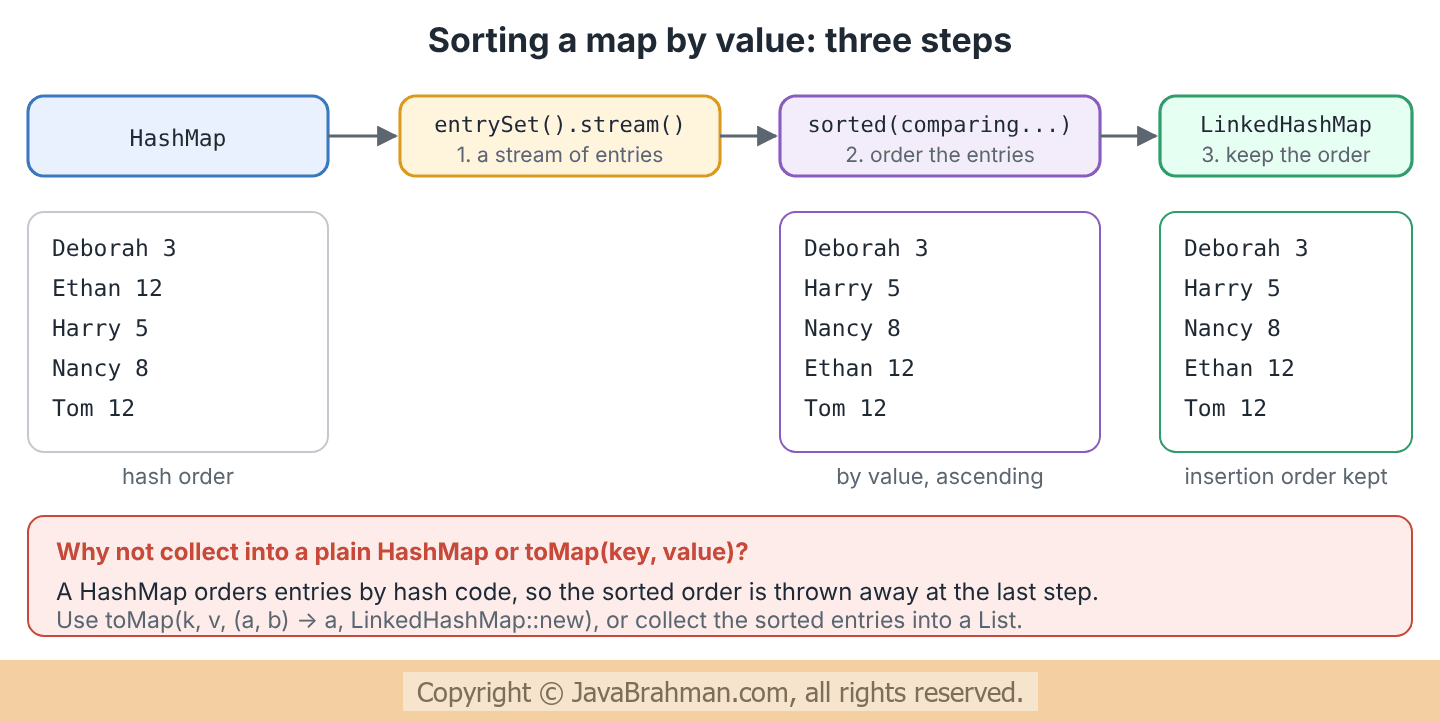
Sorting a map by value always comes down to the same three steps: turn the entries into a stream, sort the stream with a comparator on entries, and collect the result into something that keeps order - aLinkedHashMap or a List.
Comparators for map entries
Java 8 added four static methods toMap.Entry that return ready-made ComparatorsClick to read: Comparators -
Map.Entry.comparingByKey()andMap.Entry.comparingByValue(): compare entries by the natural order of their keys or values (which must beComparable).Map.Entry.comparingByKey(Comparator)andMap.Entry.comparingByValue(Comparator): compare using the given comparator - for exampleComparator.reverseOrder()for descending order.
reversed() and thenComparing().
Java 8 code example of sorting a map
The map holds the number of leave days each employee has taken this year. It is aHashMap, so it starts in hash order.
Java 8 code showing how to sort a Map by key and by value
//SortMapExamples.java
import java.util.ArrayList;
import java.util.Collections;
import java.util.Comparator;
import java.util.HashMap;
import java.util.LinkedHashMap;
import java.util.List;
import java.util.Map;
import java.util.TreeMap;
import java.util.stream.Collectors;

public class SortMapExamples {

  public static void main(String[] args) {
    Map<String, Integer> leaveTaken = new HashMap<>();
    leaveTaken.put("Tom Jones", 12);
    leaveTaken.put("Harry Major", 5);
    leaveTaken.put("Ethan Hardy", 12);
    leaveTaken.put("Nancy Smith", 8);
    leaveTaken.put("Deborah Sprightly", 3);

    // 1. By key: copy into a TreeMap
    Map<String, Integer> byName = new TreeMap<>(leaveTaken);
    System.out.println("1. by key (TreeMap):        " + byName);

    // 2. By key with a stream, into a LinkedHashMap that keeps the order
    Map<String, Integer> byNameDesc = leaveTaken.entrySet().stream()
        .sorted(Map.Entry.comparingByKey(Comparator.reverseOrder()))
        .collect(Collectors.toMap(Map.Entry::getKey, Map.Entry::getValue,
            (a, b) -> a, LinkedHashMap::new));
    System.out.println("2. by key, descending:      " + byNameDesc);

    // 3. By value, ascending
    Map<String, Integer> byDays = leaveTaken.entrySet().stream()
        .sorted(Map.Entry.comparingByValue())
        .collect(Collectors.toMap(Map.Entry::getKey, Map.Entry::getValue,
            (a, b) -> a, LinkedHashMap::new));
    System.out.println("3. by value:                " + byDays);

    // 4. By value descending, ties broken by key
    Comparator<Map.Entry<String, Integer>> mostLeaveFirst =
        Map.Entry.<String, Integer>comparingByValue().reversed()
            .thenComparing(Map.Entry.comparingByKey());
    Map<String, Integer> ranked = leaveTaken.entrySet().stream()
        .sorted(mostLeaveFirst)
        .collect(Collectors.toMap(Map.Entry::getKey, Map.Entry::getValue,
            (a, b) -> a, LinkedHashMap::new));
    System.out.println("4. by value desc, then key: " + ranked);

    // 5. The top 3 names only
    List<String> topThree = leaveTaken.entrySet().stream()
        .sorted(mostLeaveFirst)
        .limit(3)
        .map(Map.Entry::getKey)
        .collect(Collectors.toList());
    System.out.println("5. top 3: " + topThree);

    // 6. Collecting sorted entries into a HashMap loses the order again
    Map<String, Integer> lost = leaveTaken.entrySet().stream()
        .sorted(Map.Entry.comparingByValue())
        .collect(Collectors.toMap(Map.Entry::getKey, Map.Entry::getValue));
    System.out.println("6. sorted, then into HashMap: " + lost);

    // 7. Without streams: sort a list of entries
    List<Map.Entry<String, Integer>> entries = new ArrayList<>(leaveTaken.entrySet());
    entries.sort(Collections.reverseOrder(Map.Entry.comparingByValue()));
    System.out.println("7. list of entries sorted: " + entries);
  }
}1. by key (TreeMap): {Deborah Sprightly=3, Ethan Hardy=12, Harry Major=5, Nancy Smith=8, Tom Jones=12}
2. by key, descending: {Tom Jones=12, Nancy Smith=8, Harry Major=5, Ethan Hardy=12, Deborah Sprightly=3}
3. by value: {Deborah Sprightly=3, Harry Major=5, Nancy Smith=8, Ethan Hardy=12, Tom Jones=12}
4. by value desc, then key: {Ethan Hardy=12, Tom Jones=12, Nancy Smith=8, Harry Major=5, Deborah Sprightly=3}
5. top 3: [Ethan Hardy, Tom Jones, Nancy Smith]
6. sorted, then into HashMap: {Deborah Sprightly=3, Ethan Hardy=12, Harry Major=5, Nancy Smith=8, Tom Jones=12}
7. list of entries sorted: [Ethan Hardy=12, Tom Jones=12, Nancy Smith=8, Harry Major=5, Deborah Sprightly=3]
Explanation of the code
- Part 1: copying the map into a
TreeMapis the simplest way to sort by key. TheTreeMapstays sorted as entries are added later. - Part 2: to sort by key in a custom order, stream the entries, sort them with
comparingByKey(Comparator.reverseOrder()), and collect with the four-argument toMap()Click to read tutorial: Java 8 Collectors.toMap Tutorial with Examples into aLinkedHashMap, which remembers insertion order. - Part 3: the same pipeline with
comparingByValue()sorts by value. Ethan and Tom both have 12 days; the sort is stable, so they keep the order in which the stream met them. - Part 4:
comparingByValue().reversed()puts the most leave first, andthenComparing(comparingByKey())orders ties by name. The type witnessMap.Entry.<String, Integer>comparingByValue()is needed because Java cannot infer the types whenreversed()is called on the result straight away. - Part 5: when only the top entries are needed,
limit(3)andmap(Map.Entry::getKey)give a plain list of names. - Part 6: the two-argument
toMap()collects into aHashMap, which orders entries by hash code, not by the order they arrive in. The sorting in the pipeline is wasted. (For these names, hash order happens to look alphabetical - it is still not the value order of part 3.) - Part 7: without streams, copy
entrySet()into a list and call List.sort()Click to read: List.sort() with the same comparators.Collections.reverseOrder(comparator)reverses any comparator.
Which approach to use
- Sorted by key, and kept sorted: use a
TreeMap, optionally with a comparator:new TreeMap<>(Comparator.reverseOrder()). - Sorted by value: there is no map that keeps itself sorted by value, because values can change and repeat. Sort the entries when you need the order, as in parts 3 and 4.
- Need a map afterwards: collect into a
LinkedHashMap. Need a ranking or top N: collect into aList. - Ties: always add a
thenComparing()on the key if the order of equal values matters, so the result does not depend on the hash order of the original map.
Summary
In this tutorial we first saw that sorting a map means streaming its entries, sorting them, and collecting into something that keeps order. Next we covered the comparators Java 8 added toMap.Entry. We then ran an example that sorted by key with a TreeMap and with a stream, sorted by value ascending and descending with ties broken by key, took the top three, lost the order by collecting into a HashMap, and sorted a list of entries without streams. Lastly, we summarised which approach fits which need.Java 8 Tutorials
Java 8 Map merge, putIfAbsent and forEach with ExamplesClick to read tutorial: Java 8 Map merge, putIfAbsent and forEach with Examples Java 8 BiFunction, BiConsumer and BiPredicate TutorialClick to read tutorial: Java 8 BiFunction, BiConsumer and BiPredicate Tutorial Java 8 CompletableFuture Tutorial with ExamplesClick to read tutorial: Java 8 CompletableFuture Tutorial with Examples Java 8 CompletableFuture: Combining and Error HandlingClick to read tutorial: Java 8 CompletableFuture: Combining and Error Handling Java 8 Parallel Streams Tutorial with ExamplesClick to read tutorial: Java 8 Parallel Streams Tutorial with Examples Java 8 Collectors.toMap Tutorial with ExamplesClick to read tutorial: Java 8 Collectors.toMap Tutorial with Examples Java 8 Custom Collector with Collector.of() TutorialClick to read tutorial: Java 8 Custom Collector with Collector.of() Tutorial
Java 8 Map merge, putIfAbsent and forEach with ExamplesClick to read tutorial: Java 8 Map merge, putIfAbsent and forEach with Examples Java 8 BiFunction, BiConsumer and BiPredicate TutorialClick to read tutorial: Java 8 BiFunction, BiConsumer and BiPredicate Tutorial Java 8 CompletableFuture Tutorial with ExamplesClick to read tutorial: Java 8 CompletableFuture Tutorial with Examples Java 8 CompletableFuture: Combining and Error HandlingClick to read tutorial: Java 8 CompletableFuture: Combining and Error Handling Java 8 Parallel Streams Tutorial with ExamplesClick to read tutorial: Java 8 Parallel Streams Tutorial with Examples Java 8 Collectors.toMap Tutorial with ExamplesClick to read tutorial: Java 8 Collectors.toMap Tutorial with Examples Java 8 Custom Collector with Collector.of() TutorialClick to read tutorial: Java 8 Custom Collector with Collector.of() Tutorial