
Java 8 Base64 Encoding and StringJoiner Tutorial
Introduction
This quick tutorial covers two small Java 8 additions to the standard library that replace a lot of hand-written code: java.util.Base64, for encoding binary data as text, and java.util.StringJoiner, for building delimited strings such as[Tom, Harry, Nancy]. We will start with how Base64 encoding works and the three encoders Java 8 provides - basic, URL-safe and MIME. We will then look at StringJoiner's delimiter, prefix, suffix and empty value, and its relationship with String.join() and Collectors.joining(). Lastly, we will run one example covering both.
How Base64 encoding works
Base64 represents arbitrary bytes using only 64 safe, printable characters -A-Z, a-z, 0-9, + and / - so that binary data such as images, keys or credentials can travel through channels built for text: JSON, XML, HTTP headers, email. Every 3 bytes (24 bits) are split into four 6-bit groups, and each group picks one character of the alphabet. When the input length is not a multiple of 3, the output is padded with =.
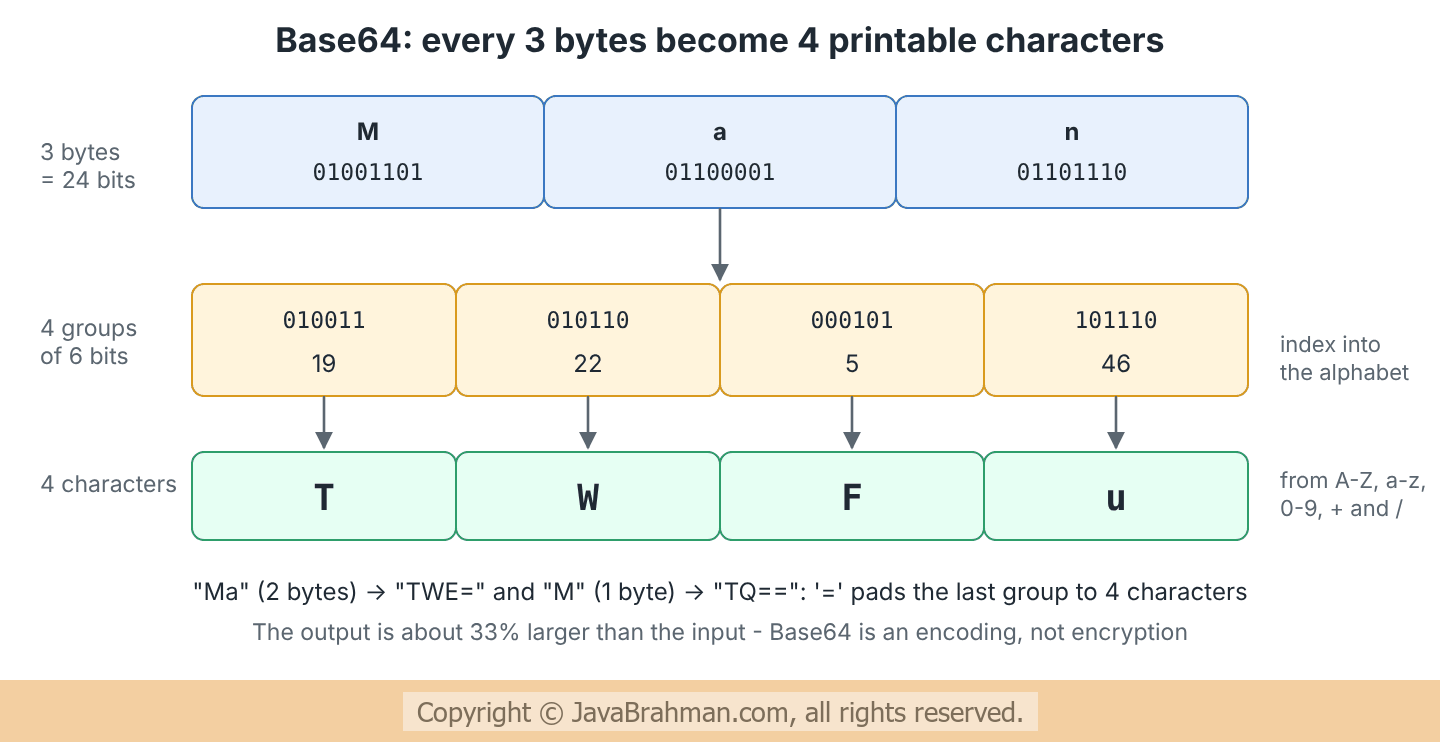
sun.misc.BASE64Encoder - which was removed in Java 9 - or a library. java.util.Base64 replaces both.
The Base64 encoders and decoders
Base64.getEncoder()/getDecoder(): the basic alphabet from RFC 4648, no line breaks. The decoder rejects any character outside the alphabet with anIllegalArgumentException.Base64.getUrlEncoder()/getUrlDecoder(): the URL- and file-name-safe variant, which uses-and_instead of+and/. Used in JSON Web Tokens and URL parameters.Base64.getMimeEncoder()/getMimeDecoder(): for email, breaks the output into lines of at most 76 characters separated by\r\n; the MIME decoder ignores characters outside the alphabet, such as those line breaks.encoder.withoutPadding(): an encoder that leaves out the trailing=characters.- Methods:
encodeToString(byte[])andencode(byte[])on encoders,decode(String)anddecode(byte[])on decoders, pluswrap()for encoding and decoding streams.
StringJoiner
StringJoiner builds a string from parts separated by a delimiter, optionally surrounded by a prefix and a suffix. It solves the classic problem of the loop that adds ", " after every element and then has to remove the last one.
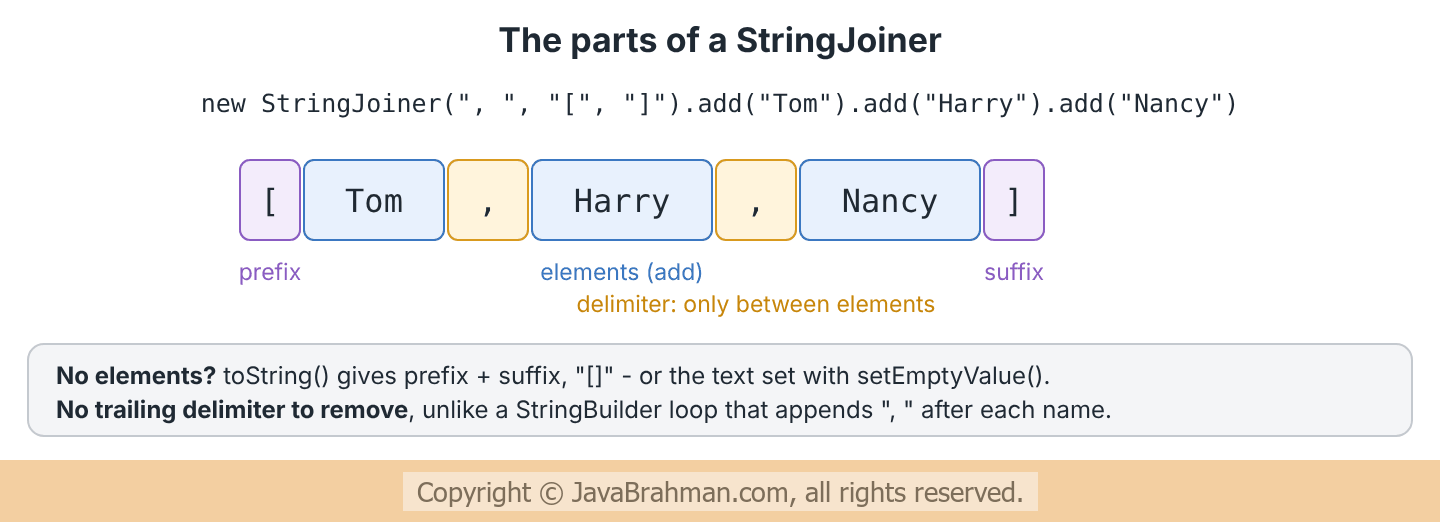
new StringJoiner(delimiter)andnew StringJoiner(delimiter, prefix, suffix).add(CharSequence): adds an element and returns the joiner, so calls can be chained.setEmptyValue(CharSequence): the text to return fromtoString()when no element has been added. By default it is prefix + suffix.merge(StringJoiner other): adds the other joiner's content as one element, using this joiner's delimiter between the two, but the other joiner's delimiter inside its content and without its prefix and suffix.length(): the length of whattoString()would return.
String.join(delimiter, elements...) (see Essential Java String methodsClick to read: Essential Java String methods) and Collectors.joining()Click to read: Collectors.joining() are both built on StringJoiner. Use them for one-line joins, and StringJoiner itself when elements are added in a loop or need an empty value.
Java 8 code example of Base64 and StringJoiner
Java 8 code showing Base64 encoders and decoders and StringJoiner
//Base64AndStringJoiner.java
import java.nio.charset.StandardCharsets;
import java.util.Arrays;
import java.util.Base64;
import java.util.StringJoiner;
import java.util.stream.Collectors;

public class Base64AndStringJoiner {

  public static void main(String[] args) {
    // 1. Basic Base64: encode bytes to text, and back
    byte[] original = "Tom:secret".getBytes(StandardCharsets.UTF_8);
    String encoded = Base64.getEncoder().encodeToString(original);
    String decoded = new String(Base64.getDecoder().decode(encoded), StandardCharsets.UTF_8);
    System.out.println("1. encoded: " + encoded + "  decoded: " + decoded);

    // 2. Padding: 3 bytes -> 4 characters; shorter input is padded with '='
    for (String s : Arrays.asList("Man", "Ma", "M")) {
      System.out.print((s.equals("Man") ? "2. " : "   ") + s + " -> " + encode(s) + "  ");
    }
    System.out.println();
    byte[] ma = "Ma".getBytes(StandardCharsets.UTF_8);
    System.out.println("   without padding: "
        + Base64.getEncoder().withoutPadding().encodeToString(ma));

    // 3. URL-safe Base64 uses - and _ instead of + and /
    byte[] bytes = {(byte) 0xfb, (byte) 0xff, (byte) 0xbf};
    System.out.println("3. basic: " + Base64.getEncoder().encodeToString(bytes)
        + "  URL-safe: " + Base64.getUrlEncoder().encodeToString(bytes));

    // 4. MIME Base64 breaks long output into lines of at most 76 characters
    byte[] longInput = new byte[60];
    Arrays.fill(longInput, (byte) 'x');
    String mime = Base64.getMimeEncoder().encodeToString(longInput);
    System.out.println("4. MIME output lines: " + mime.split("\r\n").length
        + ", first line length: " + mime.split("\r\n")[0].length());

    // 5. Invalid input is rejected when decoding
    try {
      Base64.getDecoder().decode("not*base64");
    } catch (IllegalArgumentException e) {
      System.out.println("5. decode failed: IllegalArgumentException");
    }

    // 6. StringJoiner: a delimiter, plus an optional prefix and suffix
    StringJoiner team = new StringJoiner(", ", "[", "]");
    team.add("Tom Jones").add("Harry Major").add("Nancy Smith");
    System.out.println("6. " + team + " (length " + team.length() + ")");

    // 7. setEmptyValue: what to print when nothing was added
    StringJoiner absent = new StringJoiner(", ", "Absent today: ", ".");
    absent.setEmptyValue("Everyone is in.");
    System.out.println("7. " + absent);
    absent.add("Ethan Hardy");
    System.out.println("   " + absent);

    // 8. merge: add another joiner's content (without its prefix and suffix)
    StringJoiner finance = new StringJoiner(", ", "{", "}").add("Tom").add("Harry");
    StringJoiner sales = new StringJoiner(" | ", "<", ">").add("Ethan").add("Nancy");
    System.out.println("8. merged: " + finance.merge(sales));

    // 9. String.join and Collectors.joining use StringJoiner internally
    System.out.println("9. " + String.join(" / ", "Finance", "Sales", "IT") + "   "
        + Arrays.asList("a", "b", "c").stream().collect(Collectors.joining(",", "(", ")")));
  }

  static String encode(String s) {
    return Base64.getEncoder().encodeToString(s.getBytes(StandardCharsets.UTF_8));
  }
}1. encoded: VG9tOnNlY3JldA== decoded: Tom:secret
2. Man -> TWFu Ma -> TWE= M -> TQ==
without padding: TWE
3. basic: +/+/ URL-safe: -_-_
4. MIME output lines: 2, first line length: 76
5. decode failed: IllegalArgumentException
6. [Tom Jones, Harry Major, Nancy Smith] (length 37)
7. Everyone is in.
Absent today: Ethan Hardy.
8. merged: {Tom, Harry, Ethan | Nancy}
9. Finance / Sales / IT (a,b,c)
Explanation of the code
- Part 1: Base64 works on bytes, so text is converted with an explicit charset -
StandardCharsets.UTF_8- both when encoding and when decoding. Relying on the platform's default charset can give different bytes on different machines. - Part 2: "Man" (3 bytes) becomes exactly 4 characters, as in the diagram. "Ma" and "M" are padded with one and two
=signs;withoutPadding()drops them. - Part 3: these three bytes map to the characters at positions 62 and 63 of the alphabet, which are
+and/in basic Base64 - both special in URLs - and-and_in URL-safe Base64. - Part 4: 60 bytes encode to 80 characters, which the MIME encoder splits into a 76-character line and a short second line.
- Part 5:
*is not in the alphabet, so the basic decoder throwsIllegalArgumentException. - Part 6: the joiner adds the delimiter only between names, and the brackets once around the whole.
- Part 7: with nobody absent,
setEmptyValue()supplies a whole sentence; as soon as a name is added, the prefix, the name and the suffix are used instead. - Part 8:
merge()adds Sales' content "Ethan | Nancy" as one element of Finance's joiner - with Sales' own delimiter inside it and without its angle brackets. - Part 9:
String.join()andCollectors.joining()give the same results in one line.
Summary
In this tutorial we first saw how Base64 turns every 3 bytes into 4 printable characters, with= padding, and that it is an encoding rather than encryption. Next we covered Java 8's basic, URL-safe and MIME encoders and decoders, and withoutPadding(). We then looked at StringJoiner's delimiter, prefix, suffix, empty value and merge(), and its relationship with String.join() and Collectors.joining(). Lastly, we ran an example covering both classes.Java 8 Tutorials
Java 8 Creating, Combining and Sorting StreamsClick to read tutorial: Java 8 Creating, Combining and Sorting Streams Java 8 CompletableFuture Tutorial with ExamplesClick to read tutorial: Java 8 CompletableFuture Tutorial with Examples Java 8 CompletableFuture: Combining and Error HandlingClick to read tutorial: Java 8 CompletableFuture: Combining and Error Handling Java 8 Parallel Streams Tutorial with ExamplesClick to read tutorial: Java 8 Parallel Streams Tutorial with Examples Java 8 Collectors.toMap Tutorial with ExamplesClick to read tutorial: Java 8 Collectors.toMap Tutorial with Examples Java 8 Custom Collector with Collector.of() TutorialClick to read tutorial: Java 8 Custom Collector with Collector.of() Tutorial Java 8 Map merge, putIfAbsent and forEach with ExamplesClick to read tutorial: Java 8 Map merge, putIfAbsent and forEach with Examples
Java 8 Creating, Combining and Sorting StreamsClick to read tutorial: Java 8 Creating, Combining and Sorting Streams Java 8 CompletableFuture Tutorial with ExamplesClick to read tutorial: Java 8 CompletableFuture Tutorial with Examples Java 8 CompletableFuture: Combining and Error HandlingClick to read tutorial: Java 8 CompletableFuture: Combining and Error Handling Java 8 Parallel Streams Tutorial with ExamplesClick to read tutorial: Java 8 Parallel Streams Tutorial with Examples Java 8 Collectors.toMap Tutorial with ExamplesClick to read tutorial: Java 8 Collectors.toMap Tutorial with Examples Java 8 Custom Collector with Collector.of() TutorialClick to read tutorial: Java 8 Custom Collector with Collector.of() Tutorial Java 8 Map merge, putIfAbsent and forEach with ExamplesClick to read tutorial: Java 8 Map merge, putIfAbsent and forEach with Examples