
Java Collections Framework: Overview and Hierarchy
Introduction
Almost every Java program has to keep a group of objects: the items of an order, the users who are logged in, the words of a text and how often each occurs. This tutorial gives an overview of the Java Collections Framework, the part of the JDK that is used for this. It covers, in this order, what the framework consists of, its interface hierarchy - including the sequenced collections added in Java 21 - and the maps, which form a hierarchy of their own. It then lists the main implementations and what sets them apart, shows the operations common to all collections in a program run against four different implementations, explains why variables are declared with an interface type, and ends with a guide to choosing the right collection. The examples run on JDK 25.(Note - Collections are generic types such as
List<String>. If generics are new to you, read Introduction to Java GenericsClick to read tutorial: Introduction to Java Generics: Why and How first.)
What the Collections Framework is
An array holds a fixed number of elements of one type, and it can do little more than store and return them by index. The Java Collections Framework, in the packagejava.util, provides the data structures that programs need beyond that. It has three parts -
- Interfaces -
List,Set,Queue,Deque,Mapand others. Each describes a kind of collection and what can be done with it, independent of how it is stored. - Implementations - classes such as
ArrayList,HashSetandHashMap, which store the elements in a particular way: in an array, a hash table, a linked list or a tree. - Algorithms - ready-made operations such as sorting, searching, shuffling and finding the largest element, in the
Collectionsclass and as methods of the interfaces.
int are stored as their wrapper objectsClick to read: wrapper objects (Integer), and Java converts between the two automatically.
The Collection interface hierarchy
All collections except maps belong to one family of interfaces, withCollection at its centre.
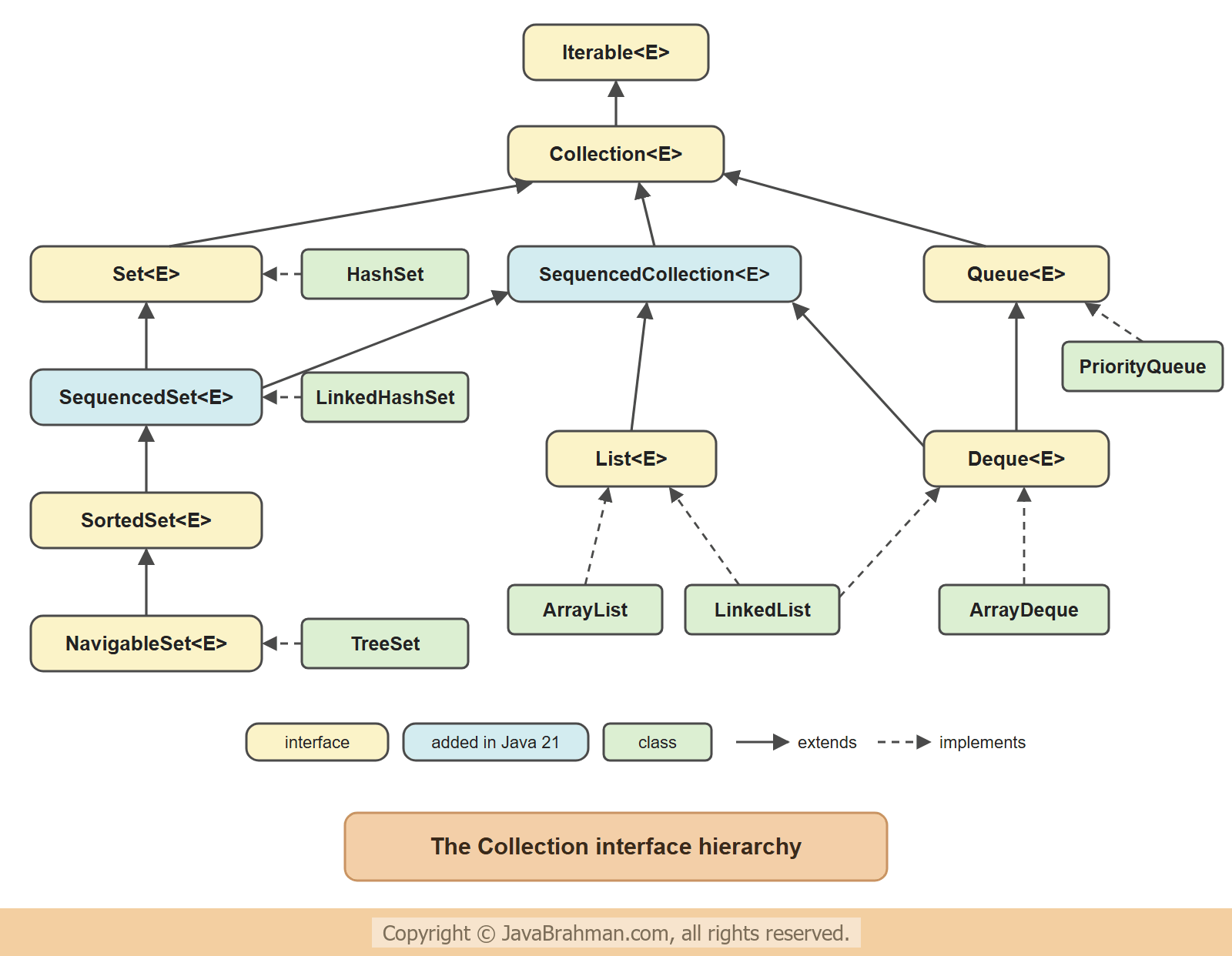
Iterableis the root. AnythingIterablecan be used in a for-each loop, which is why every collection can be looped over in the same way. How to make your own classes iterable is shown in Implementing the Iterable interfaceClick to read: Implementing the Iterable interface.Collectiondeclares the operations every collection has:add,remove,contains,size,isEmpty,clear, the bulk operationsaddAll,removeAllandretainAll, andstream().List- an ordered sequence that allows duplicates, with access by index:get(i),set(i, e),add(i, e).Set- a collection without duplicates. Whether two elements are duplicates is decided by theirequals()andhashCode()methods, see the equals and hashCode contractClick to read: the equals and hashCode contract.SortedSetandNavigableSetkeep the elements sorted and add range operations such asfirst(),headSet()andceiling().Queue- elements waiting to be processed, normally first in, first out, withoffer,pollandpeek.Deque(double-ended queue) can add and remove at both ends, so it serves as a queue and as a stack.SequencedCollection, added in Java 21, is the common type of the collections that have a defined order - lists, deques and ordered sets. It gives them uniform methods for both ends:getFirst(),getLast(),addFirst(),addLast(),removeFirst(),removeLast()andreversed(). Java 21 Sequenced Collections ExplainedClick to read: Java 21 Sequenced Collections Explained covers them in detail.
The Map interface hierarchy
A map stores key-value pairs: each key appears once and is associated with one value, so a value is found by its key - a word and its count, a user id and the user. Because a map holds pairs rather than single elements,Map does not extend Collection; it is the root of a hierarchy of its own. It is still part of the framework, and it offers its contents as collections through three views: keySet(), values() and entrySet().
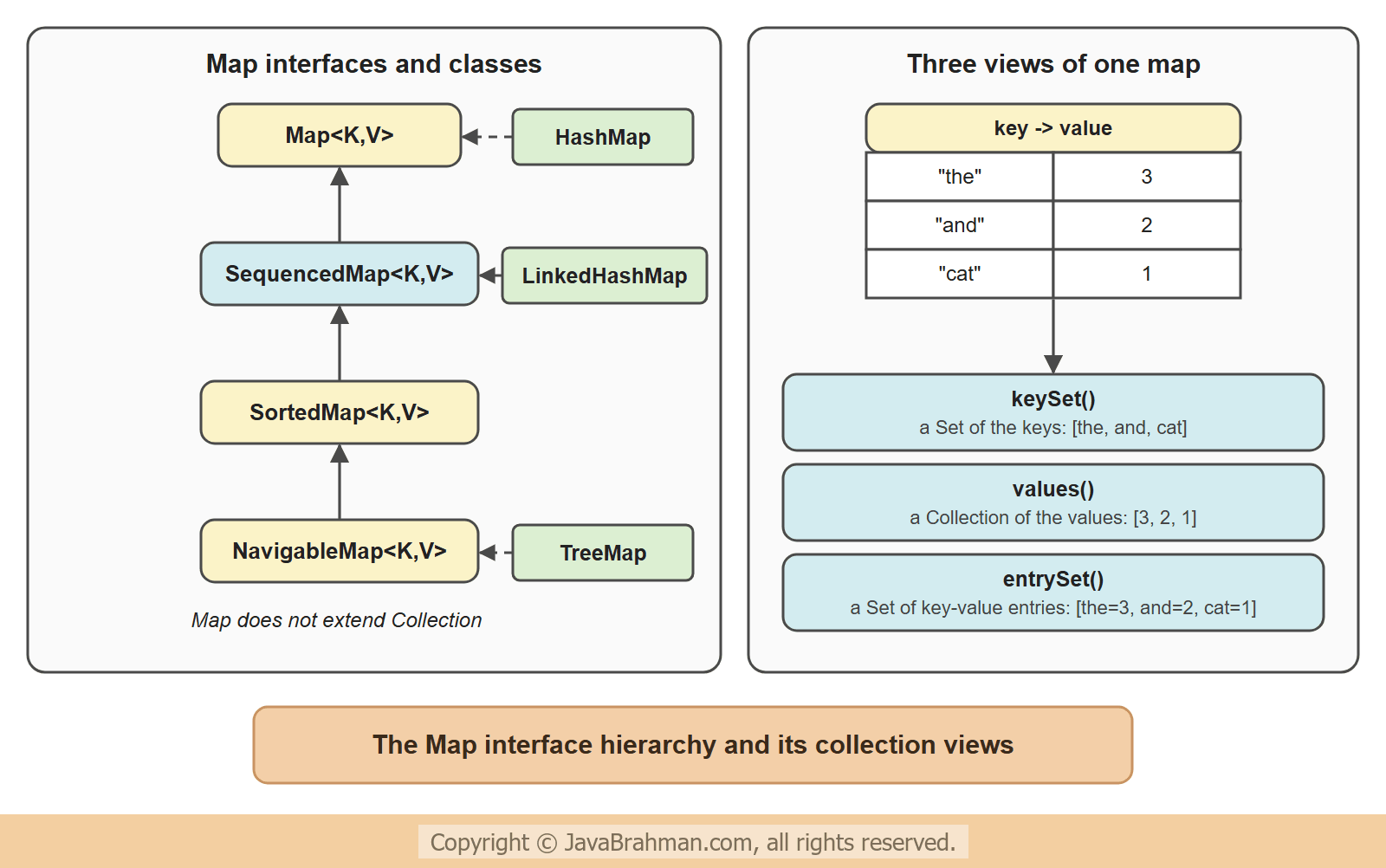
Mapdeclaresput,get,getOrDefault,containsKey,remove,sizeand the three views.SequencedMap(Java 21) is the type of maps with a defined order of their entries, withfirstEntry(),lastEntry(),pollFirstEntry()andreversed().SortedMapandNavigableMapkeep the keys sorted and add range operations such asheadMap(),floorKey()andceilingKey().
The main implementations
Each interface has several implementations. They behave the same as far as the interface goes, and differ in order, duplicates, nulls and speed, because they store the elements differently. These ten cover almost all everyday needs -| Class | Interface | Stored in | Order of iteration | Duplicates | null |
|---|---|---|---|---|---|
ArrayList | List | a resizable array | insertion (index) order | yes | yes |
LinkedList | List, Deque | a doubly linked list | insertion (index) order | yes | yes |
HashSet | Set | a hash table | no defined order | no | one |
LinkedHashSet | SequencedSet | a hash table + a linked list | insertion order | no | one |
TreeSet | NavigableSet | a red-black tree | sorted | no | no |
ArrayDeque | Deque | a resizable circular array | front to back | yes | no |
PriorityQueue | Queue | a binary heap | poll() returns the smallest first | yes | no |
HashMap | Map | a hash table | no defined order | keys no | one key |
LinkedHashMap | SequencedMap | a hash table + a linked list | insertion order | keys no | one key |
TreeMap | NavigableMap | a red-black tree | sorted by key | keys no | no keys |
java.util.concurrent, such as ConcurrentHashMap - see Java 8 ConcurrentHashMap, LongAdder and StampedLockClick to read: Java 8 ConcurrentHashMap, LongAdder and StampedLock.
The common Collection operations
Because all collections share theCollection interface, one method can work with any of them. The following program fills four different collections through the same method, with the same six words - one of them twice - and then uses only Collection methods on them.
CommonOperations.java
//CommonOperations.java
import java.util.ArrayDeque;
import java.util.ArrayList;
import java.util.Collection;
import java.util.HashSet;
import java.util.List;
import java.util.TreeSet;

public class CommonOperations {

  static void fill(Collection<String> words) {
    for (String w : List.of("pear", "apple", "fig", "apple", "kiwi", "banana")) {
      words.add(w);
    }
  }

  static void describe(String name, Collection<String> words) {
    System.out.printf("%-10s size %d  contains fig: %-5s  %s%n", name, words.size(), words.contains("fig"), words);
  }

  public static void main(String[] args) {
    Collection<String> list = new ArrayList<>();
    Collection<String> hashSet = new HashSet<>();
    Collection<String> treeSet = new TreeSet<>();
    Collection<String> deque = new ArrayDeque<>();
    fill(list);
    fill(hashSet);
    fill(treeSet);
    fill(deque);
    describe("ArrayList", list);
    describe("HashSet", hashSet);
    describe("TreeSet", treeSet);
    describe("ArrayDeque", deque);

    System.out.println();
    list.remove("apple");
    System.out.println("ArrayList after remove(\"apple\") : " + list);
    list.removeIf(w -> w.length() < 5);
    System.out.println("after removeIf(length < 5)      : " + list);
    treeSet.retainAll(List.of("apple", "kiwi", "plum"));
    System.out.println("TreeSet after retainAll         : " + treeSet);
    for (String w : hashSet) {
      System.out.print(w.toUpperCase() + " ");
    }
    System.out.println("<- for-each over the HashSet");
  }
}ArrayList size 6 contains fig: true [pear, apple, fig, apple, kiwi, banana]
HashSet size 5 contains fig: true [banana, apple, pear, kiwi, fig]
TreeSet size 5 contains fig: true [apple, banana, fig, kiwi, pear]
ArrayDeque size 6 contains fig: true [pear, apple, fig, apple, kiwi, banana]
ArrayList after remove("apple") : [pear, fig, apple, kiwi, banana]
after removeIf(length < 5) : [apple, banana]
TreeSet after retainAll : [apple, kiwi]
BANANA APPLE PEAR KIWI FIG <- for-each over the HashSet
fill()anddescribe()accept anyCollection<String>, so the same code worked with a list, two sets and a deque.- The list and the deque kept both "apple"s and the insertion order. The two sets dropped the duplicate, so their size is 5:
add()on a set returnsfalsewhen the element is already there. - The
TreeSetprinted its words in alphabetical order. TheHashSetprinted them in an order that comes from the words' hash codes; it is not insertion order, and a program must not depend on it. remove("apple")removed only the first of the two,removeIf()removed every word shorter than five letters (see Collection.removeIfClick to read: Collection.removeIf), andretainAll()kept only the words that are also in the given list.- The for-each loop works on every collection, because every collection is
Iterable.
Maps and their views
A map is used through its keys. The next program counts how often each word occurs - the most common use of a map - and then looks at the result through the three views.WordCount.java
//WordCount.java
import java.util.HashMap;
import java.util.Map;
import java.util.TreeMap;

public class WordCount {
  public static void main(String[] args) {
    String text = "the cat and the dog and the bird";
    Map<String, Integer> counts = new HashMap<>();
    for (String word : text.split(" ")) {
      counts.put(word, counts.getOrDefault(word, 0) + 1);
    }
    System.out.println("counts           : " + counts);
    System.out.println("count of the     : " + counts.get("the"));
    System.out.println("count of fish    : " + counts.get("fish") + " / getOrDefault: " + counts.getOrDefault("fish", 0));

    Map<String, Integer> sorted = new TreeMap<>(counts);
    System.out.println("keySet (sorted)  : " + sorted.keySet());
    System.out.println("values           : " + sorted.values());
    for (Map.Entry<String, Integer> e : sorted.entrySet()) {
      System.out.print(e.getKey() + "=" + e.getValue() + "  ");
    }
    System.out.println("<- entrySet");
  }
}counts : {the=3, and=2, cat=1, bird=1, dog=1}
count of the : 3
count of fish : null / getOrDefault: 0
keySet (sorted) : [and, bird, cat, dog, the]
values : [2, 1, 1, 1, 3]
and=2 bird=1 cat=1 dog=1 the=3 <- entrySet
put()with a key that is already there replaces its value, which is how each count went up:getOrDefault(word, 0)returns the current count, or 0 for a new word.get()returnsnullfor a key that is not in the map, which is easy to miss;getOrDefault()avoids it.- Copying the
HashMapinto aTreeMapsorted the entries by key. The views then showed the keys, the values in key order, and the entries as key-value pairs.
Programming to the interface
In the examples, the variables are declared with an interface type -List<String> words = new ArrayList<>(), not ArrayList<String> words = .... This is the usual style, for two reasons -
- The rest of the code depends only on what a list can do, not on how this one is stored. Changing the implementation is then a change of one line - from
ArrayListtoLinkedList, or fromHashSettoTreeSetwhen the elements should come out sorted. - Methods that take and return interface types, such as
fill(Collection<String>)above, can be used with any implementation.
Sequenced collections in Java 21
Before Java 21, getting the last element meantlist.get(list.size() - 1) for a list, deque.getLast() for a deque, and a loop for a LinkedHashSet. The sequenced interfaces give all ordered collections the same methods.
SequencedDemo.java
//SequencedDemo.java
import java.util.ArrayList;
import java.util.LinkedHashMap;
import java.util.LinkedHashSet;
import java.util.List;
import java.util.SequencedMap;
import java.util.SequencedSet;

public class SequencedDemo {
  public static void main(String[] args) {
    List<String> steps = new ArrayList<>(List.of("plan", "build", "test"));
    steps.addFirst("idea");
    steps.addLast("ship");
    System.out.println("list     : " + steps + "  first " + steps.getFirst() + ", last " + steps.getLast());
    System.out.println("reversed : " + steps.reversed());

    SequencedSet<String> visited = new LinkedHashSet<>(List.of("home", "search", "product"));
    System.out.println("set      : " + visited + "  last visited " + visited.getLast());

    SequencedMap<String, Integer> scores = new LinkedHashMap<>();
    scores.put("Tom", 72);
    scores.put("Ann", 95);
    scores.put("Raj", 88);
    System.out.println("map      : " + scores + "  first entry " + scores.firstEntry() + ", reversed " + scores.reversed());
  }
}list : [idea, plan, build, test, ship] first idea, last ship
reversed : [ship, test, build, plan, idea]
set : [home, search, product] last visited product
map : {Tom=72, Ann=95, Raj=88} first entry Tom=72, reversed {Raj=88, Ann=95, Tom=72}
reversed() returns a reversed view, not a copy: it reflects the original, and changes made through it change the original.
Choosing a collection
Two questions lead to the right interface, and a third to the implementation -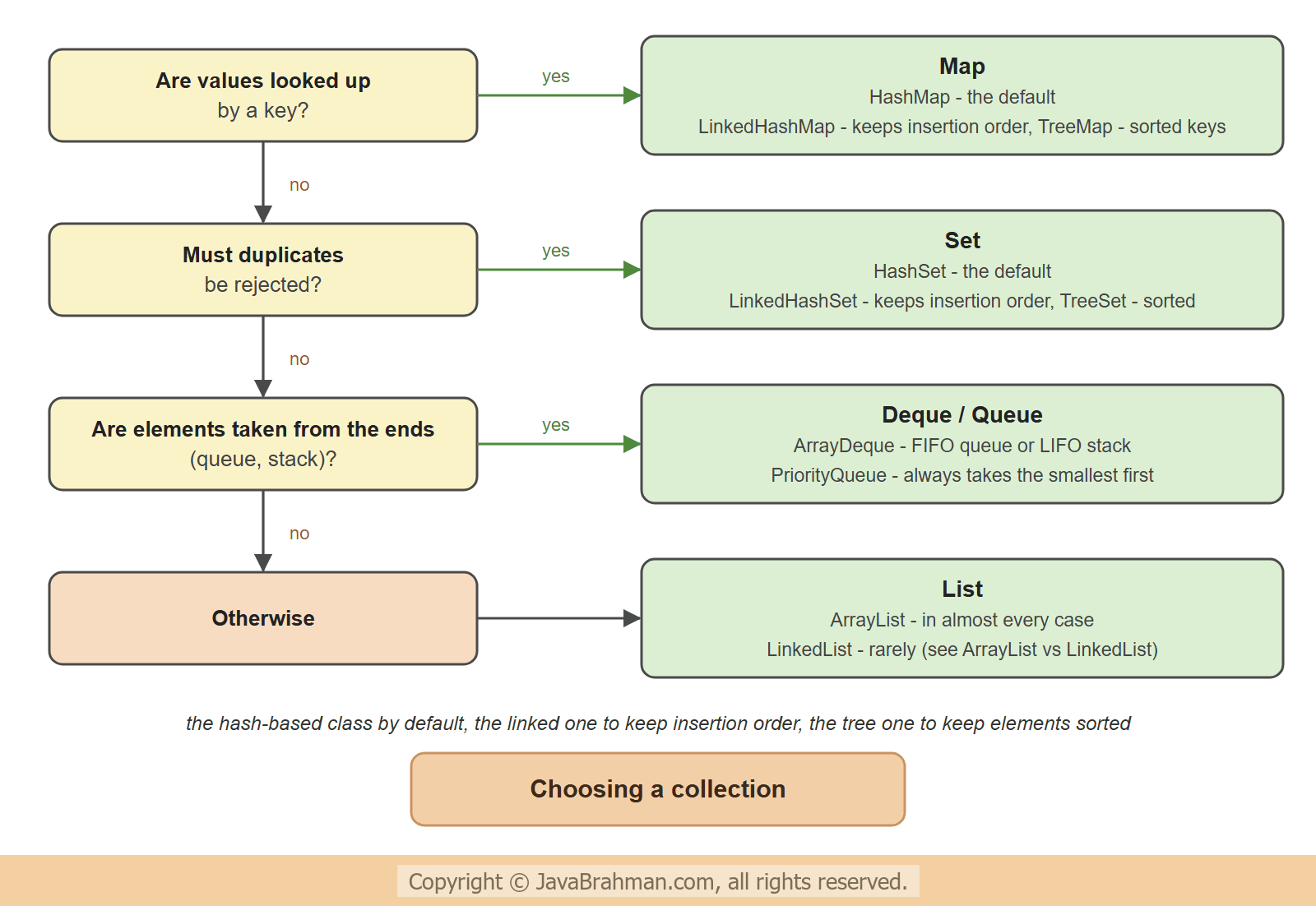
- Looked up by a key? - a
Map. - Must duplicates be rejected? - a
Set. - Taken from the front or the back, as in a queue or a stack? - a
Deque, or aPriorityQueuewhen the smallest (or highest-priority) element must come out first. - Otherwise - a
List. - Then the order: the hash-based class by default, the linked one to keep insertion order, the tree-based one to keep the elements sorted.
ArrayList is almost always the right choice; why, and when LinkedList is not, is the subject of ArrayList vs LinkedListClick to read tutorial: Java ArrayList vs LinkedList: Performance and When to Use. For collections that never change, Java 9's List.of(), Set.of() and Map.of() create compact unmodifiable ones - see Java 9 immutable collectionsClick to read: Java 9 immutable collections.
Summary
In this tutorial we saw that the Java Collections Framework consists of interfaces, implementations and algorithms. The interfaces form two hierarchies:Iterable and Collection with List, Set, Queue and Deque, joined in Java 21 by SequencedCollection; and Map, which stores key-value pairs and offers them through its views. The main implementations differ in how they store elements, and so in order, duplicates and nulls. A program ran the same Collection operations against a list, two sets and a deque and showed those differences, and a word count showed a map and its views. We declared variables with interface types, used the sequenced methods of Java 21, and finished with three questions for choosing a collection. The next tutorial compares the two lists: ArrayList vs LinkedListClick to read tutorial: Java ArrayList vs LinkedList: Performance and When to Use.Java Collections Tutorials
Java ArrayList vs LinkedList: Performance and When to UseClick to read tutorial: Java ArrayList vs LinkedList: Performance and When to Use Introduction to Java Generics: Why and HowClick to read tutorial: Introduction to Java Generics: Why and How Java 21 Sequenced Collections ExplainedClick to read tutorial: Java 21 Sequenced Collections Explained Understanding equals and hashCode contract when using collectionsClick to read tutorial: Understanding equals and hashCode contract when using collections Java 9 Immutable Collections: List.of, Set.of, Map.ofClick to read tutorial: Java 9 Immutable Collections: List.of, Set.of, Map.of Java Wrapper Classes Tutorial with ExamplesClick to read tutorial: Java Wrapper Classes Tutorial with Examples Java 8 Streams API Tutorial with ExamplesClick to read tutorial: Java 8 Streams API Tutorial with Examples
Java ArrayList vs LinkedList: Performance and When to UseClick to read tutorial: Java ArrayList vs LinkedList: Performance and When to Use Introduction to Java Generics: Why and HowClick to read tutorial: Introduction to Java Generics: Why and How Java 21 Sequenced Collections ExplainedClick to read tutorial: Java 21 Sequenced Collections Explained Understanding equals and hashCode contract when using collectionsClick to read tutorial: Understanding equals and hashCode contract when using collections Java 9 Immutable Collections: List.of, Set.of, Map.ofClick to read tutorial: Java 9 Immutable Collections: List.of, Set.of, Map.of Java Wrapper Classes Tutorial with ExamplesClick to read tutorial: Java Wrapper Classes Tutorial with Examples Java 8 Streams API Tutorial with ExamplesClick to read tutorial: Java 8 Streams API Tutorial with Examples