
Java Multithreading Basics | Creating and running threads in Java with examples
This tutorial covers the basic concepts of multithreading in Java. It begins with explaining what is multithreading, and then shows how to create your first threads in Java using two basic approaches - extending
Conceptual basics of multithreading (Note - You can skip the theory part in this section if you already understand basic concepts of multithreading; but I would recommend that you still give it a quick look!)
Usually when we talk of multi-programming we refer to multiple programs running on a processor. A program is a set of instructions which when executed provides a specific functionality. An example of a commonly used program is a word processor such as MS Word. From the operating system point-of-view executing instances of programs are individual processes with each process having its own memory address space allocated to it.
As a process runs, it might need to take care of multiple internal tasks in parallel in order to deliver the complete set of functionalities which it offers. For example, as a person types in the word processor, there are multiple tasks running in the background. One task is responsible for saving changes in the document in a recovery file. Another task checks for spelling and grammatical errors as the user types. Yet another task does the basic task of displaying what a user types in the editor and so on.
All the above mentioned tasks are internal to the word processor program, i.e. they share the same memory address space which has been allocated to the word processor by the operating system. At the same time these internal tasks need to execute together or in parallel to ensure the program's functionalities are available to its users at the same time. Each of these parallel tasks are the smallest units of independent work carried out by program, and are instances of individual threads working to make the whole program work together.
To summarize the relation between programs, processes and threads. A program in execution is a process, and an executing process can have multiple threads running in parallel within it to accomplish multiple tasks that the process needs to carry out. The diagram below depicts the relationship between processes and threads.
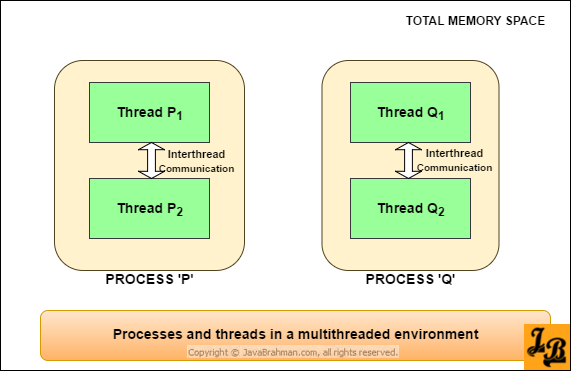 A thread in Java is the smallest unit of dispatchable code which can be executed. As the bigger program executes in a process space of its own, its multiple internal threads carry out their individual tasks and communicate with each other to make the program work as a whole. These internal threads of work use a portion of the memory address space allocated to their parent program/process. As we will see in detail in forthcoming tutorials on concurrency management, this sharing of memory space has both advantages(inter-thread communication) and disadvantages(synchronization issues).
Thread management classes in Java are all designed around management of parallel internal threads of work over their entire lifecycle - from creation to destruction. As we study basic and advanced features for multithreading in Java in this and upcoming tutorials in Java Concurrency series, we will cover all aspects related to defining, managing and optimizing threads.
To run a piece of functionality in parallel, you will need to first encapsulate it as a separate thread and then execute that thread. Let us now learn how to define and run individual thread instances as per our needs.
Creating and running a thread defined by extending Thread class The first way of defining your own thread functionality involves sub-classing the
Creation of a new parallel thread using
OUTPUT of the above code
Explanation of the code
Creating and running a thread defined by implementing Runnable interface
The second way to create a parallel thread is by implementing
OUTPUT of the above code
Explanation of the code
Conclusion
In this tutorial we understood the conceptual basics of multithreading, and then learnt how to create and run threads using
Thread class and implementing Runnable interface. Both approaches are explained with Java code examples showing thread creation and execution. Lastly, the tutorial explains the reasons why ‘implementing Runnable’ approach for creating threads is preferred over ‘extending Thread’ approach.Conceptual basics of multithreading (Note - You can skip the theory part in this section if you already understand basic concepts of multithreading; but I would recommend that you still give it a quick look!)
Usually when we talk of multi-programming we refer to multiple programs running on a processor. A program is a set of instructions which when executed provides a specific functionality. An example of a commonly used program is a word processor such as MS Word. From the operating system point-of-view executing instances of programs are individual processes with each process having its own memory address space allocated to it.
As a process runs, it might need to take care of multiple internal tasks in parallel in order to deliver the complete set of functionalities which it offers. For example, as a person types in the word processor, there are multiple tasks running in the background. One task is responsible for saving changes in the document in a recovery file. Another task checks for spelling and grammatical errors as the user types. Yet another task does the basic task of displaying what a user types in the editor and so on.
To summarize the relation between programs, processes and threads. A program in execution is a process, and an executing process can have multiple threads running in parallel within it to accomplish multiple tasks that the process needs to carry out. The diagram below depicts the relationship between processes and threads.
Thread management classes in Java are all designed around management of parallel internal threads of work over their entire lifecycle - from creation to destruction. As we study basic and advanced features for multithreading in Java in this and upcoming tutorials in Java Concurrency series, we will cover all aspects related to defining, managing and optimizing threads.
To run a piece of functionality in parallel, you will need to first encapsulate it as a separate thread and then execute that thread. Let us now learn how to define and run individual thread instances as per our needs.
Creating and running a thread defined by extending Thread class The first way of defining your own thread functionality involves sub-classing the
java.lang.Thread class. An instance of Thread class holds a single thread of execution of a running program.Creation of a new parallel thread using
Thread class involves the following 3 steps -
- Define a class which extends
Threadclass. - Override the
run()method ofThreadclass, and write your custom thread logic in it. - Invoke the
start()method on your customThreadsubclass to start the thread execution.
Thread class, which is followed by detailed explanation of the code - Java example showing thread creation by extending java.lang.Thread
//FirstThread.java
package com.javabrahman.corejava;
public class FirstThread extends Thread{

  @Override
  public void run(){
    System.out.println("First thread ran");
  }

}
//RunningThreads.java
package com.javabrahman.corejava;
public class RunningThreads {

  public static void main(String args[]){
    Thread firstThread = new FirstThread();
    firstThread.start();
  }

}First thread ran
- Class
FirstThreadis extendsThread. It overrides the methodrun(), and provides a simple implementation which prints a single line string. - In the
main()method ofRunningThreadsclass an instance ofFirstThread, namedfirstThread, is created using its default constructor. -
firstThread.start()method is then invoked which starts the execution of the code insiderun()method offirstThreadin a parallel new thread. - The newly created thread then executes and prints the line
"First thread ran"as output.
java.lang.Runnable interface. There are 4 steps involved in creating and running a separate thread using Runnable -
- Define a class which implements
Runnableinterface. - Override the
run()method ofRunnableinterface, and write your custom thread logic in it. - Wrap the
Runnableinstance inside a newThreadinstance. This is accomplished by using one of the multiple constructors provided byThreadclass which accept theRunnableinterface as parameter. - Invoke the
start()method on the newly createdThreadinstance to start the thread execution.
Runnable interface - Java example showing thread creation by implementing java.lang.Runnable
//SecondThread.java
package com.javabrahman.corejava;

public class SecondThread implements Runnable{
  @Override
  public void run() {
    System.out.println("Second thread ran");
  }
}
//RunningThreads.java
package com.javabrahman.corejava;
public class RunningThreads {

  public static void main(String args[]){
    Thread secondThread = new Thread(new SecondThread());
    secondThread.start();
  }

}Second thread ran
- Class
SecondThreadimplementsRunnableinterface. It overrides the abstract methodrun()ofRunnable, and prints a single line string as part of its implementation. - Class
RunningThreadscreates an instance of aThreadby using its single parameter constructor which accepts aRunnableinstance. - A parallel thread of execution for the logic contained in
run()method ofSecondThreadis started by invoking thestart()method ofSecondThread. - The parallel thread started and printed the string -
"Second thread ran"as its output.
Runnable interface is preferred over extending Thread class due to the following reasons -
- Java allows extending only a single base class. But it allows implementing multiple interfaces. So, if you extend
Thread, you cannot subclass any other class. But when you implementRunnableyou can potentially extend another class when required. - When a thread is implemented by extending
Threadclass then each thread instance created has a unique object associated with it. On the other hand, when you implement a thread by implementingRunnable, and the same instance is used to create multipleThreadinstances, then the same object is passed to different threads. So, if you create 'n' threads by usingextends Thread, you end up with 'n'Threadobjects. But when you create 'n' threads by using a single instance of classimplementing Runnable, you end up with only '1'Runnableobject. - From a design perspective, if you want to enhance the behavior of any class by overriding multiple of its methods, then you should extend it. So, if you need to enhance
Threadclass' behavior by implementing methods other thanrun()then only you should subclassThread, else implementRunnable, and pass this instance ofRunnableto aThreadto start your parallel thread. - Implementing
Runnablegives you the option of executing your threads via theExecuterframework as it only acceptsRunnableinstances and notThreadsubclasses.
Thread class and Runnable interface with code examples. We also looked at the preferred way of creating threads and understood the reasons for the preference. In the next tutorial, i.e. 2nd partClick to Read Tutorial on Java Threads' Lifecycle of Java Concurrency Series, we will go through the lifecycle of a thread, and understand thread state transitions.